本文介绍了如何构建一个文本转 SQL 的 Agent 系统,包括 SQL Agent、错误推理 Agent 和错误修复 Agent。文章详细说明了每个 Agent 的作用,并提供了示例代码和提示,展示了如何使用 DSPy 框架构建该系统。
译自:Building a Reliable Text-to-SQL Pipeline: A Step-by-Step Guide pt.1
作者:Arslan Shahid
现在很多我们的客户都在寻求文本转 SQL 的解决方案,并且这已经成为我们在上个季度所做的几乎每个项目的关键部分。虽然让语言模型生成 SQL 查询很容易,但构建一个可靠的系统供企业使用则是另一回事。对于业务关键型应用程序,我们需要高水平的准确性——理想情况下,首次尝试的准确率要超过 95%。
在这篇博文中,我将向您展示如何从头开始构建一个强大的文本转 SQL 管道。如果您时间紧迫,我还将向您介绍一些开源工具,例如 Vanna.AI,可以帮助您加快速度。
这篇博客分为两个部分:
- 构建一个文本转 SQL 的 Agent 系统(内置重试和自我纠正)
- 提高文本转 SQL 的准确性和可靠性。
这是关于如何构建文本转 SQL 的 Agent 的第一部分,请关注并继续关注下一部分!
注意: 关于 Agent 究竟是什么,存在一些混淆。从我的开发人员的角度来看,Agent 是具有记忆和访问外部工具权限的 LLM 程序。本文中的 Agent 一词可以与“LLM 程序”互换。
构建文本到 SQL 代理
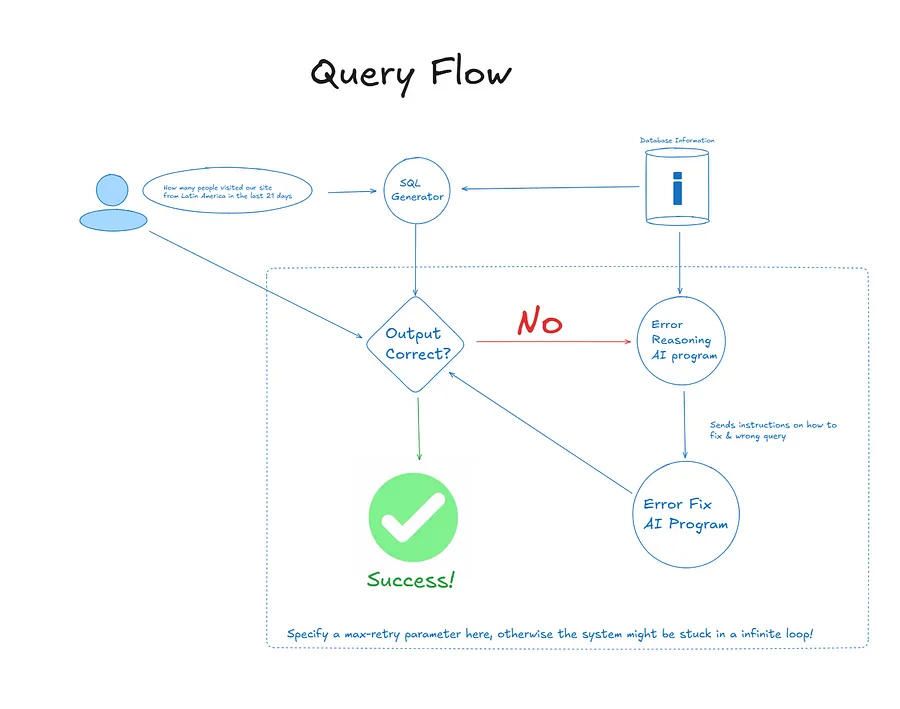
作者图片 — 系统的查询流程
文本转 SQL 系统有三个部分:
- SQL Agent:这是一个从数据库获取信息和用户问题,然后创建 SQL 查询的程序。
- 错误推理 Agent:这个程序查看用户的查询及其导致的错误,然后尝试解释为什么查询不起作用。
- 错误修复 Agent:这个程序使用错误推理 Agent 的解释和错误的查询来创建更正后的 SQL 查询版本。
构建这个系统有很多方法,根据具体的用例,您可能需要设计自己的流程。以下是选择此方法的原因:
- 简单性:过多的复杂性会增加在生成代码时犯错的机会。向系统添加更多部件可能会导致更多错误。
- 安全性:有些人可能会认为该系统只需两个部分即可工作——一个用于生成 SQL,另一个用于修复错误。虽然这可以工作,但更容易失败,特别是如果用户提出非 SQL 或不相关的问题(例如试图“欺骗”系统)。拥有一个推理 Agent 使其“安全”。
设计数据库信息
向 LLM 提供正确的信息是生成准确查询的关键。以下是您应该提供的内容:
- 表、列和值信息:包括表名、列详细信息以及数值范围、类别数量和前几个值等统计信息。
- 元数据:分享有关每个表包含的数据、每列的含义以及您可能遇到的常见错误的详细信息。
- 查询:提供示例查询及其 SQL 输出的集合,展示问题通常如何提出以及查询如何在您的组织中编写。
对于大型企业数据库,此信息会占用模型内存中的大量空间。因此,请专注于仅传递与用户问题直接相关的信息。您可以使用 RAG 管道来提取最相关的数据。
以下是如何向 LLM 提供数据集信息的示例。
db_info = """### Database Structure:

**Tables:**
1. **salesperson**
   - `salesperson_id` (INT)
   - `name` (TEXT)
   - `region` (TEXT)

   **Sample Data**:
   | salesperson_id | name        | region |
   |----------------|-------------|--------|
   | 1              | John Doe    | North  |
   | 2              | Jane Smith  | South  |

2. **timber_sales**
   - `sales_id` (INT)
   - `salesperson_id` (INT, FK to `salesperson`)
   - `volume` (REAL)
   - `sale_date` (DATE)

   **Sample Data**:
   | sales_id | salesperson_id | volume | sale_date  |
   |----------|----------------|--------|------------|
   | 1        | 1              | 120    | 2021-01-01 |
   | 2        | 1              | 150    | 2021-02-01 |
   | 3        | 2              | 180    | 2021-01-01 |

### Key Points:
- **Relationships**: One-to-many between `salesperson` and `timber_sales` via `salesperson_id`.
- **Indexes**: Likely primary keys on `salesperson_id` and `sales_id`.

### Example Query:
- **Total timber sold by each salesperson**:
   sql
   SELECT s.name, SUM(t.volume) AS total_sales_volume
   FROM salesperson s
   JOIN timber_sales t ON s.salesperson_id = t.salesperson_id
   GROUP BY s.salesperson_id;

   """
SQL 程序
对于这篇博客,我选择了 DSPy,但您可以使用任何其他框架或直接使用 API。
以下是用于 SQL 程序的提示。
class sql_program(dspy.Signature):
    """
You are a text-to-SQL agent designed to generate SQL queries based on user input. You have access to the following database information:

Table, Column, and Value Info
You know the table names, column details (e.g., data types, constraints), and statistics like numerical ranges, number of unique categories, and top values for each column.

Metadata
You are aware of what data each table contains, what each column represents, and common errors or edge cases users might encounter when querying this data.

Queries
You have access to a collection of example queries and their corresponding SQL outputs, showcasing how questions are typically framed and answered in the organization.

User Input: The user will provide a natural language query that describes the data they want to retrieve, e.g., “Show me the top 5 customers who spent the most in the last quarter.”

Your Task:

Analyze the user's query.
Refer to the provided database information (tables, columns, metadata, and examples).
Generate the most accurate SQL query to retrieve the requested data.
Make sure to follow these guidelines:

Ensure accuracy by referring to table names and column names exactly as they appear in the database.
ONLY ANSWER WITH SQL


    """
    user_query = dspy.InputField(desc="User input query describing what kind of SQL user needs")
    dataset_information = dspy.InputField(desc="The information around columns, relevent tables & metadata that helps answer the user query")
    generated_sql = dspy.OutputField(desc="The SQL query, remember to only include SQL")
错误推理程序
您可以使用类似于以下的提示
class error_reasoning_program(dspy.Signature):
    """

**Task:** Given a SQL error message, an incorrect SQL, user query, and database information, generate a series of concise instructions for another agent on how to resolve the issue.
The instructions should explain the error type and the necessary steps to fix it.


**Input:**
1. **SQL Error Message:** The error generated when the query is executed.
2. **Incorrect Query:** The SQL query that caused the error.
3. **Database Information:** Schema details (tables, columns, data types, etc.).

---

**Output:**
Provide a **series of concise instructions** that include:

1. **Error Diagnosis:** Briefly describe the issue (e.g., "Column not found in the table").
2. **Analysis:** Identify the root cause (e.g., "The column `age` does not exist in the `users` table").
3. **Solution:** Specify the necessary fix (e.g., "Correct the column name to `dob`").
4. **Verification:** Suggest how to test the fix (e.g., "Rerun the query with the corrected column name").

---

### **Common Error Types & Instruction Patterns:**

1. **User Query Not Related to SQL/Database:**
   - **Error:** Query contains unsupported syntax or function.
   - **Solution:**: Output a query like SELECT "NOT ASKING FOR SQL";.

2. **Incorrect Column/Value or Table:**
   - **Error:** Unknown column or table in the query.
   - **Solution:** Correct column/table name or suggest schema verification.

3. **Incorrect Datatype Conversion:**
   - **Error:** Mismatch in data types (e.g., string vs integer).
   - **Solution:** Ensure correct data types or use type conversion functions (e.g., `CAST()`).

Think about the error deeply and give a step by step solutions to try

    """
    error_message = dspy.InputField(desc="The SQL engine error message")
    incorrect_sql = dspy.InputField(desc="The failed SQL")
    information = dspy.InputField(desc="user query or question and database information ")
    error_fix_reasoning = dspy.OutputField(desc="The reasoning for why the error and instructions on how to fix it")
错误修复程序
示例提示:
class error_fix_agent(dspy.Signature):
    """

**Task:** Given a series of instructions from the Error Reasoning Agent, generate a corrected SQL query to resolve the issue described. The corrected query should adhere to the instructions provided and fix the identified error.

---

**Input:**
1. **Instructions from Error Reasoning Agent:** A series of steps outlining the error diagnosis, analysis, and suggested solution.
   - Example Instructions:
     - Error Diagnosis: "Column 'age' is missing in the 'users' table."
     - Solution: "Correct the column name to 'birthdate'."
     - Verification: "Rerun the query with the updated column name."

---

**Output:**
Generate the **corrected SQL query** based on the instructions.

---

### **Example Input:**
- **Instructions:**
  - **Error Diagnosis:** "The column 'age' is missing from the 'users' table."
  - **Analysis:** "Verify the schema for the correct column name."
  - **Solution:** "Correct the query to use an existing column (e.g., 'birthdate')."
  - **Verification:** "Rerun the query with the updated column name."

---

### **Example Output:**

**Corrected SQL Query:**
sql


---

### **Guidelines for Generating Corrected SQL:**
- **Understand the Error Reasoning:** Use the instructions to determine which part of the query needs to be corrected (e.g., column names, table names, datatypes).
- **Apply the Fix:** Modify the query to address the identified issue (e.g., replace an incorrect column name with the correct one).
- **Check Syntax:** Ensure the corrected SQL query adheres to proper syntax and structure for the given database system.

    """
    instruction = dspy.InputField(desc="The instructions from the agent on how to fix the SQL query")
    generated_sql = dspy.OutputField(desc="The correct and fixed query")
代理系统
现在,构建一个完成整个流程并构建文本转 SQL 系统的系统。
def clean_llm_response(text):

    splits = text.split('```')
    # print(splits)
    if len(splits)==1:
        return splits[0].replace('sql','').replace("\n",'')
    else:

        return splits[1].replace('sql','').replace("\n",'')

class agent_system(dspy.Module):
    def __init__(self, max_retry=2):
# initializes the all the values and agents
        self.max_retry = max_retry
        self.sql_agent = dspy.Predict(sql_agent)
        self.error_reasoning_agent = dspy.Predict(error_reasoning_agent)
        self.error_fix_agent = dspy.ChainOfThought(error_fix_agent)

# In a DSPy module, the forward function is called when you 'invoke' the program
    def forward(self,query,relevant_context, db_engine):

        df = pd.DataFrame()
# What to return in the end, you can customize
        return_dict = {'response':[], 'sql':[],'error_reason':[], 'df':[]}
        response = self.sql_agent(user_query = query, dataset_information = relevant_context)

        return_dict['response'].append(response)

        information = {'user_query':query, 'relevant_context':relevant_context}
        i = 0
# This loop iterates until, max_retry exhausted or query executes
        while i < self.max_retry:
            print("Try "+str(i))
            sql = clean_llm_response(response.generated_sql)
            print(sql)
            try:

                return_dict['sql'].append(sql)
# Replace this with whatever db SDK you're using
# This is only for duckDB
                df = db_engine.execute(sql).df()
                return_dict['df'].append(df)
                display(df.head())
                if df.empty:
                    raise Exception("Empty Dataframe")
                else:
                    i=self.max_retry+1

            except Exception as e:
                print("This is the exception"+str(e)[:100])


                error_reason = self.error_reasoning_agent(error_message= str(e)[:-200], incorrect_sql = sql, information = str(information))
# Checks if user asked a SQL based question
                if 'NOT ASKING FOR SQL' not in error_reason.error_fix_reasoning:

                    return_dict['error_reason'].append(error_reason.error_fix_reasoning)
                    response = self.error_fix_agent(instruction=error_reason.error_fix_reasoning)
                    return_dict['response'].append(response)
                else:
                    i=self.max_retry+1

            i+=1
        return return_dict
从系统生成响应
对于这篇博客,我使用了 gretelai 提供的开源文本转 SQL 数据集。但是,您可以将其替换为您数据库的相关信息,并像这样查询
# Create a system object
sql_system = agent_system()


# This is how you can call the system, this uses a DuckDB engine, change based on your db SDK
responses = sql_system(query='What is the total volume of timber sold by each of salesperson, sorted by name?',relevant_context=db_info,db_engine=conn)

作者图片 — 示例输出,它尝试了两次才回答了问题。错误由系统自动修复!