LangChain与PydanticAI构建AI Agent大PK!LangChain历史悠久但繁琐,PydanticAI简洁直观。二者均实现动态模型选择、人工输入、依赖工具调用、对话记忆和结构化输出。LangChain用AgentExecutor,PydanticAI用Agent类,动态配置Agent参数。PydanticAI更胜一筹,代码更易懂!
译自:LangChain vs PydanticAI for building an AI Agent
作者:Finn Andersen
LangChain 是一个著名的 Agential AI 框架,而 PydanticAI 则是一个新兴框架,但正迅速获得欢迎。在这里,我将比较如何使用它们来构建一个简单的对话式 AI Agent,其中涉及以下功能:
- 动态模型选择
- 人工参与的输入
- 具有依赖关系的工具调用
- 对话历史/记忆
- 动态系统提示
- 结构化输出
Agent 行为
目标是构建一个 AI Agent,它将扮演餐厅里一位古怪的服务员的角色,他会询问您的饮食要求并接受您的订单。一个示例对话可能如下所示:
AI 服务员:Ah, bonjour madame et monsieur! Welcome to Le Bistro, where the food is as delightful as the company! Before we embark on a culinary adventure, might you have any dietary restrictions or preferences? We wouldn’t want any rogue ingredients crashing the party!
您:I only eat yellow coloured food
AI 服务员:Magnifique! A connoisseur of the golden hue, I see! Let’s explore the menu with your sunshine-filled preference in mind. For appetizers, we have the Quinoa Stuffed Bell Peppers, which are a vibrant yellow. For the main course, the Chickpea and Sweet Potato Curry is a golden delight! And for dessert, the Fresh Fruit Sorbet might have some yellow options depending on the day! What do you think? 您:I’ll take the Bell Peppers and fruit sorbet thanks!
AI 服务员:Excellent choices! One order of the Quinoa Stuffed Bell Peppers and the Fresh Fruit Sorbet for the discerning palate at table number 1! Your order has been placed, and I shall return with your delectable delights shortly. Au revoir!
Order placed:[Order(menu_items=[‘Quinoa Stuffed Bell Peppers’, ‘Fresh Fruit Sorbet’], table_number=1)]
通过查看完整存储库亲自尝试一下!
框架概述
LangChain 是一个著名的框架,自 LLM 可用性的早期就已存在,因此虽然它提供了很多功能,但由于模型的快速发展,它也包含了很多遗留内容。 许多不同的方式来做同样的事情(特别是随着 LangGraph 的引入)以及难以推理的组件链接方法使得该框架的使用有些令人生畏。它也是一个非常全面的库,分布在多个包中,如果您想要多模型和图形支持,总共大约 300MB。
PydanticAI 是一个相对年轻的框架,来自大家最喜欢的数据验证库的创建者,“旨在减少使用生成式 AI 构建生产级应用程序的痛苦”。 它看起来非常平易近人和直观,所以我通过创建一个基本的 AI Agent 尝试了一下,该 Agent 允许使用自然语言查询任何数据库。 完整的软件包(包括 Logfire)只有大约 70MB。
我喜欢使用 PydanticAI,但很好奇 LangChain 的炒作是怎么回事,所以我整理了一个演示项目来了解它们的比较情况。
常用内容
这些是两个 Agent 实现都将使用的常用组件。
定义动态系统提示和结构化响应定义:
PROMPT_TEMPLATE = """
You are playing the role of an incredibly eccentric and entertaining waiter in a fine dining restaurant
called "{restaurant_name}" taking orders for table number {table_number}.
You must:
* Greet the customer, ask if they have any dietary restrictions
* Tell them about appropriate menu items using the *get_menu()* tool.
* Take their order, and confirm it with them.
* When confirmed, use the *create_order()* tool to create an order for the customer.
* Only set the *end_conversation* flag to True in your final response after you have finished the conversation,
meaning that your message DOES NOT contain a question.
"""
class LLMResponse(BaseModel):
    """
    Structured response format for the LLM to use so it can indicate when the conversation should end
    """
    message: str
    end_conversation: Annotated[
        bool,
        "True if the conversation should end after this response. DO NOT set if the message contains a question.",
    ]
代理将调用的工具使用的依赖项服务:
class MenuService:
    def get_menu(self) -> dict[str, list[str]]:
        # Returns an Appetizer, Main Course and Deserts menu
        ...
class OrderService:
    orders: list[Order]
    def create_order(self, table_number: int, menu_items: list[str]):
        self.orders.append(Order(table_number=table_number, menu_items=menu_items))
    def get_orders(self) -> list[Order]:
        return self.orders
AgentRunner 类接口,该接口需要使用每个框架实现,以及代理执行函数:
class AgentRunner(ABC):
    """
提供用于初始化代理并向代理发出请求的通用接口的基类。
@abstractmethod
def __init__(self, menu_service: MenuService, order_service: OrderService, args: argparse.Namespace): ...
@abstractmethod
def make_request(self, user_message: str) -> LLMResponse: ...

def run_agent(runner_class: type[AgentRunner], args: argparse.Namespace):
    """初始化服务并运行代理对话循环。"""
    menu_service = MenuService()
    order_service = OrderService()
    agent_runner = runner_class(menu_service, order_service, args)
    user_message = "*Greet the customer*"
    console = Console()
    while True:
        with Live(console=console) as live_console:
            live_console.update("AI Waiter: ...")
            response = agent_runner.make_request(user_message)
            live_console.update(f"AI Waiter: {response.message}")
            # Exit if LLM indicates conversation is over
            if response.end_conversation:
                break
            user_message = Prompt.ask("You")
        # Show orders
        if orders := order_service.get_orders():
            console.print(f"Order placed: {orders}")
还有一些额外的 CLI 处理代码,我不会在这里展示。虽然这两个框架都支持异步编程,但为了简单起见,我将坚持使用标准的同步方法。
PydanticAI 实现
我将从 PydanticAI 实现开始,因为它更直接一些。
依赖项
首先,我们需要定义工具或动态系统提示将使用的依赖项的结构:
@dataclass
class Dependencies:
    menu_service: MenuService
    order_service: OrderService
    restaurant_name: str
    table_number: int
工具
然后是工具本身,它们可以通过 RunContext 对象(将与任何参数一起传入)访问运行时依赖项。PydanticAI 使用工具函数的类型注释和文档字符串来自动生成它们的模式,以提供给 LLM。
def create_order(
    ctx: RunContext[Dependencies],
    table_number: int,
    order_items: Annotated[list[str], "List of food menu items to order"],
) -> str:
    """为餐桌创建订单"""
    ctx.deps.order_service.create_order(table_number, order_items)
    return "Order placed"

def get_menu(ctx: RunContext[Dependencies]) -> dict[str, list[str]]:
    """获取餐厅的完整菜单"""
    return ctx.deps.menu_service.get_menu()
代理
PydanticAI 框架的关键组件是 Agent 类,它管理与提供的模型的交互,处理工具调用并确保适当的最终结果格式:
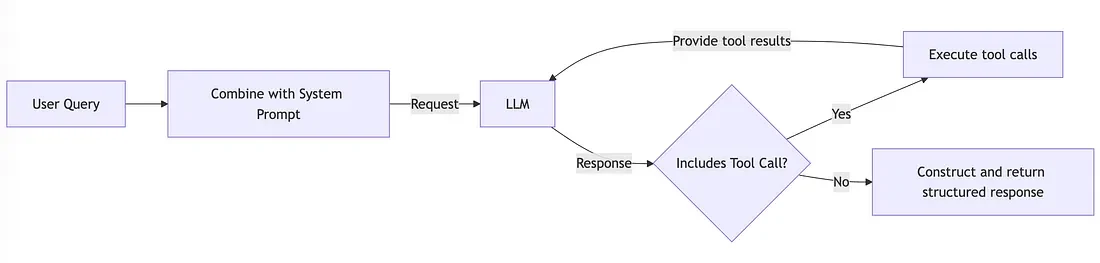
PydanticAI 代理的基本图形图
从技术上讲,此图表具有轻微的误导性,因为结构化输出是使用工具调用实现的,但从概念上讲,它可以工作。
文档中的所有示例都涉及在导入时将 Agent 初始化为模块级对象,然后使用其装饰器方法来注册工具和系统提示。但是,如果您想在运行时动态配置代理参数(如模型选择、工具配置、系统提示),则此方法效果不佳。因此,我创建了一个函数来创建代理:
def get_agent(model_name: KnownModelName, api_key: str | None = None) -> Agent[Dependencies, LLMResponse]:
    """
    构造一个具有 LLM 模型、工具和系统提示的代理
    """
    model = build_model_from_name_and_api_key(
        model_name=model_name,
        api_key=api_key,
    )
    # Tools can also be registered using @agent.tool decorator, but providing them like this is more appropriate when
    # constructing the agent dynamically
    agent = Agent(model=model, deps_type=Dependencies, tools=[get_menu, create_order], result_type=LLMResponse)
    # Define dynamic system prompt
    @agent.system_prompt
    def system_prompt(ctx: RunContext[Dependencies]) -> str:
        return PROMPT_TEMPLATE.format(restaurant_name=ctx.deps.restaurant_name, table_number=ctx.deps.table_number)
    return agent
build_model_from_name_and_api_key() 函数只是根据模型名称查找并初始化适当的模型类。不幸的是,@agent.system_prompt 装饰器是注册动态系统提示的唯一方法,这似乎有点局限性。
代理运行器
这是 AgentRunner 实现的样子:
class PydanticAIAgentRunner(AgentRunner):
    agent: Agent[Dependencies, LLMResponse]
    deps: Dependencies
    message_history: list[ModelMessage]

    def __init__(self, menu_service: MenuService, order_service: OrderService, args: argparse.Namespace):
        self.agent = get_agent(model_name=args.model, api_key=args.api_key)
        self.deps = Dependencies(
            menu_service=menu_service,
            order_service=order_service,
            restaurant_name=args.restaurant_name,
            table_number=args.table_number,
        )
        self.message_history = []

    def make_request(self, user_message: str) -> LLMResponse:
        ai_response = self.agent.run_sync(
            user_message,
            deps=self.deps,
            message_history=self.message_history,
        )
        self.message_history = ai_response.all_messages()
        return ai_response.data
Agent 实例实际上是无状态的,因此它本身不存储消息历史记录,而是每次都必须将其与依赖项和新的用户查询一起提供给 agent.run_sync()。
总的来说,我认为这个实现非常简单易懂!
LangChain 实现
对于 LangChain 的实现,我想使用 AgentExecutor 类,即使它实际上现在是遗留方法,因为已经引入了 LangGraph。LangGraph 以增加复杂性为代价增加了更多的灵活性,所以我认为 AgentExecutor 仍然可以胜任这个用例。我将在稍后探讨基于图的实现。
工具
LangChain 包括一个 @tool 装饰器,用于注册函数并检查它们的签名以自动生成工具模式,但是使用此方法实现运行时依赖注入的方式看起来相当复杂(而且我认为这个例子是坏的,user_id 甚至是从哪里来的?)。因此,我决定采用基于类的工具方法,以便可以使用它们所需的依赖项进行初始化:
class GetMenuTool(BaseTool):
    """
    Tool that can be used by the LLM to get the full menu for the restaurant.
    """

    name: str = "get_menu"
    description: str = "Get the full menu for the restaurant"
    menu_service: MenuService

    def _run(self) -> dict[str, list[str]]:
        return self.menu_service.get_menu()


class CreateOrderInputSchema(BaseModel):
    table_number: int
    order_items: Annotated[list[str], "List of food menu items to order"]


class CreateOrderTool(BaseTool):
    """
    Tool that can be used by the LLM to create an order for the table.
    """

    name: str = "create_order"
    description: str = "Create an order for the table"
    args_schema: type[BaseModel] = CreateOrderInputSchema
    order_service: OrderService

    def _run(self, table_number: int, order_items: list[str]) -> str:
        self.order_service.create_order(table_number, order_items)
        return "Order placed"
结构化输出
ChatModel.with_structured_output() 方法接受所需的输出模式(例如 Pydantic 模型或 TypedDict),并绑定 LLM 可以用来生成结构化输出的相应工具。但是,一旦完成此操作,就无法将更多工具绑定到模型。因此,我需要创建一个自定义的基于类的工具来实现结构化输出以及其他工具:
class StructuredResponseTool(BaseTool):
    """
    Tool that can be used by the LLM to provide a structured response to the user.
    Does not have any associated functionality, it is just a way to enable structured output from the LLM.
    """

    name: str = "respond_to_user"
    description: str = (
        "ALWAYS use this tool to provide a response to the user, INSTEAD OF responding directly. "
        "The `message` content should be what you would normally respond with in a conversation. "
        "The `end_conversation` flag should be set to True if the conversation should end after this response."
    )
    args_schema: type[BaseModel] = LLMResponse

    # The following content is only used by legacy AgentExecutor, not required for graph agent
    return_direct: bool = True  # Causes the tool result to be returned directly to the user

    def _run(self, message: str, end_conversation: bool) -> str:
        # Return a serialised str as a workaround to avoid a validation error in the RunnableWithMessageHistory
        return LLMResponse(message=message, end_conversation=end_conversation).model_dump_json()
代理
LangChain 包括一堆工厂函数,这些函数为不同的用例生成预构建的代理配置。在此上下文中,“代理”是指与各种提示输入和/或响应输出解析器/处理器链接的 ChatModel。它仍然是一个简单的线性输入输出链,不涉及多个 LLM 交互或工具调用——这就是 AgentExecutor 的用武之地。
有一个方便的 create_tool_calling_agent() 构造函数,它显然使旧的变体(如 create_react_agent() 和 create_openai_functions_agent())过时(并且它本身现在也被 LangGraph 等效项所取代)。这 几乎 适用于此用例,但它不强制使用工具,这是在使用基于工具的实现来实现结构化输出时所必需的。因此,我不得不基本上重新实现 create_tool_calling_agent() 的内容来强制使用工具。
ChatPromptTemplate 支持使用从提供给代理/链的输入对象进行参数替换的动态提示构建。
聊天历史记录/内存
似乎在调用 AgentExecutor 时,它只返回最终响应,但不会以明显的方式公开或跟踪与 LLM 交换的中间消息。它们隐藏并丢失在令人困惑的 AgentExecutor 的难以穿透的深处。
实现,并且只能通过 RunnableWithMessageHistory 包装器的 wicked dark magic 来检索。如果你珍惜你的理智,请不要试图弄清楚它是如何工作的。令人恼火的是,即使你不需要多会话聊天历史记录,它也要求你在调用 AgentExecutor 时提供一个 session_id 配置参数。
Agent Executor
以下是带有记忆功能的完整 agent executor 的构建方式:
def get_agent_executor(
    tools: Sequence[BaseTool], model_name: str, api_key: str | None = None
) -> RunnableWithMessageHistory:
    """
    Construct an agent with an LLM model, tools and system prompt
    """
    model = build_model_from_name_and_api_key(
        model_name=model_name,
        api_key=api_key,
    )
    prompt = ChatPromptTemplate.from_messages(
        [
            ("system", PROMPT_TEMPLATE),
            ("placeholder", "{chat_history}"),
            ("human", "{input}"),
            ("placeholder", "{agent_scratchpad}"),
        ]
    )
    # Effectively re-implement create_tool_calling_agent() here, but force tool use
    llm_with_tools = model.bind_tools(tools, tool_choice=True)
    agent = (
        RunnablePassthrough.assign(agent_scratchpad=lambda x: format_to_tool_messages(x["intermediate_steps"]))
        | prompt
        | llm_with_tools
        | ToolsAgentOutputParser()
    )
    agent_executor = AgentExecutor.from_agent_and_tools(agent=agent, tools=tools)
    # Enable chat history/memory (very convoluted)
    # Use a single message history (no need for multiple threads)
    message_history = ChatMessageHistory()
    agent_with_chat_history = RunnableWithMessageHistory(
        runnable=agent_executor,  # type: ignore[arg-type]
        get_session_history=lambda _: message_history,
        input_messages_key="input",
        history_messages_key="chat_history",
    )
    return agent_with_chat_history
Agent Runner
然后是 AgentRunner 的实现:
class LangchainAgentRunner(AgentRunner):
    def __init__(self, menu_service: MenuService, order_service: OrderService, args: argparse.Namespace):
        # Initialise tools with dependencies
        tools = [
            GetMenuTool(menu_service=menu_service),
            CreateOrderTool(order_service=order_service),
            StructuredResponseTool(),
        ]
        self.agent_executor = get_agent_executor(tools=tools, model_name=args.model, api_key=args.api_key)
        self.static_input_content = {"restaurant_name": args.restaurant_name, "table_number": args.table_number}
        self.config: RunnableConfig = {"configurable": {"session_id": "not-even-used"}}

    def make_request(self, user_message: str) -> LLMResponse:
        result = self.agent_executor.invoke(self.static_input_content | {"input": user_message}, self.config)
        # De-serialise structured response into an LLMResponse
        response = LLMResponse.model_validate_json(result["output"])
        return response
结论
这个演示表明,使用 PydanticAI 框架创建基本的对话式和工具调用 AI agent 比 LangChain 简单得多。LangChain 有太多的已弃用功能,并且迫切需要进行一些广泛的清理。
我还想启用流式响应,但是使用 LangChain 同时涉及工具调用和结构化输出时,这似乎很难实现。
我认为用于创建 agent 的较新的 LangGraph 方法解决了这里遇到的许多限制和挫折。PydanticAI 最近还添加了一个 graph library,因此下次我将探索两个框架的完整基于 graph 的实现是什么样的。
我希望这可以帮助任何想要在框架之间进行选择或学习如何使用它们来构建很酷的 AI 应用的人!
完整的项目存储库可以在这里找到。