

一、前言
如果每个组件的样式都需要单独设置,在开发过程中会出现大量代码在进行重复样式设置,虽然可以复制粘贴,但为了代码简洁性和后续方便维护,我们推出了可以提炼公共样式进行复用的装饰器@Styles。
@Styles装饰器 可以将多条样式设置提炼成一个方法,直接在组件声明的位置调用。通过@Styles装饰器可以快速定义并复用自定义样式。
说明 从API version 9开始,该装饰器支持在ArkTS卡片中使用。
从API version 11开始,该装饰器支持在元服务中使用。
二、装饰器使用说明
当前 @Styles 仅支持通用属性和通用事件。
@Styles可以定义在组件内或全局,在全局定义时需在方法名前面添加function关键字,组件内定义时则不需要添加function关键字。
说明 只能在当前文件内使用,不支持export。
如果想实现export功能,推荐使用AttributeModifier
// 全局
@Styles function functionName() { ... }

// 在组件内
@Component
struct FancyUse {
  @Styles fancy() {
    .height(100)
  }
}
如果要实现跨文件操作的功能,可以参考使用动态属性设置。
setAttribute.ets代码
export class MyButtonModifier implements AttributeModifier<ButtonAttribute> {
  isDark: boolean = false
  applyNormalAttribute(instance: ButtonAttribute): void {
    if (this.isDark) {
      instance.backgroundColor(Color.Black)
    } else {
      instance.backgroundColor(Color.Red)
    }
  }
}
TestStyles.ets代码
import { MyButtonModifier } from './setAttribute'

@Entry
@Component
struct TestStyles {
  @State modifier: MyButtonModifier = new MyButtonModifier()

  build() {
    Column() {
      Button('通过动态属性设置更改UI')
        .attributeModifier(this.modifier)
        .onClick((_evnet) => {
          this.modifier.isDark = !this.modifier.isDark
        })
    }
    .height('100%')
    .width('100%')
  }
}
效果图
- 定义在组件内的@Styles可以通过this访问组件的常量和状态变量,并可以在@Styles里通过事件来改变状态变量的值,示例如下:
@Component
struct FancyUse {
  @State heightValue: number = 100;
  @State txt: string =
    "定义在组件内的@Styles可以通过this访问组件的常量和状态变量,并可以在@Styles里通过事件来改变状态变量的值";

  @Styles
  fancy(){
    .height(this.heightValue)
    .backgroundColor(Color.Blue)
    .onClick(() => {
      this.heightValue = this.heightValue > 100 ? 100 : 200
    })
  }

  build() {
    Column() {
      Text(this.txt)
        .fancy()
        .fontColor($r('app.color.c_white'))
        .padding(10)
        .fontSize(16)
        .margin(16)
    }
  }
}
效果图
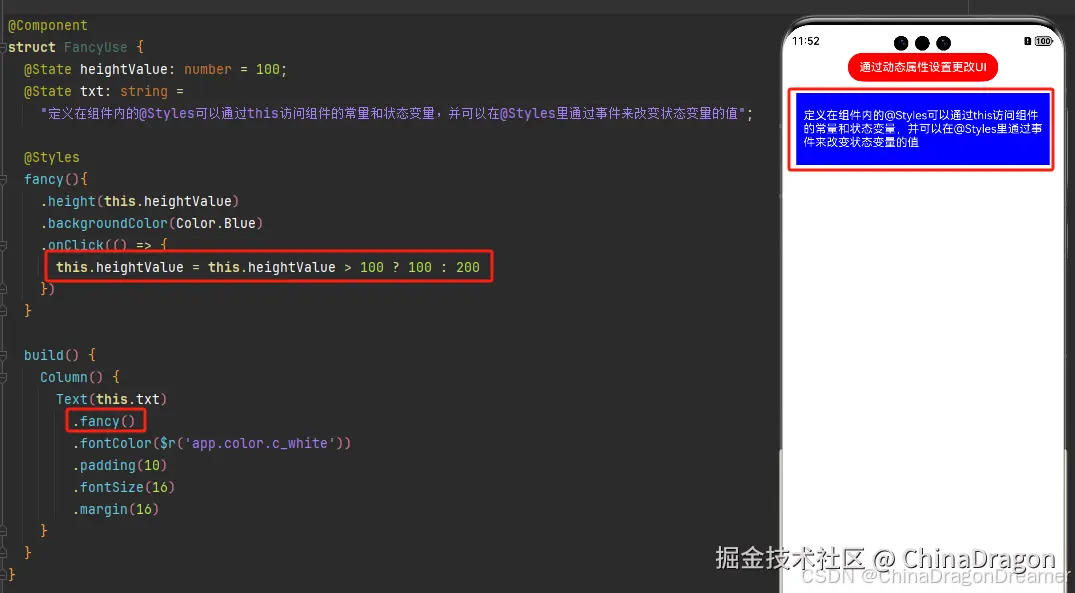
提醒
- 组件内@Styles的优先级高于全局@Styles。 框架优先找当前组件内的@Styles,如果找不到,则会全局查找。
三、限制条件
- 不支持在@Styles方法内使用逻辑组件,在逻辑组件内的属性不生效。
// 错误写法
@Styles function backgroundColorStyle() {
  if (true) {
    .backgroundColor(Color.Red)
  }
}

// 正确写法
@Styles function backgroundColorStyle() {
  .backgroundColor(Color.Red)
}
2. @Styles方法不能有参数,编译期会报错,提醒开发者@Styles方法不支持参数。
// 错误写法: @Styles不支持参数,编译期报错
@Styles function globalFancy (value: number) {
  .width(value)
}

// 正确写法
@Styles function globalFancy () {
  .width(value)
}
四、使用场景
以下示例中演示了组件内@Styles和全局@Styles的用法。
setAttribute.ets代码
export class MyButtonModifier implements AttributeModifier<ButtonAttribute> {
  isDark: boolean = false
  applyNormalAttribute(instance: ButtonAttribute): void {
    if (this.isDark) {
      instance.backgroundColor(Color.Black)
    } else {
      instance.backgroundColor(Color.Red)
    }
  }
}
TestStyles.ets代码
import { MyButtonModifier } from './setAttribute'

/*
定义在组件内的@Styles可以通过this访问组件的常量和状态变量,并可以在@Styles里通过事件来改变状态变量的值,示例如下:
 */

@Component
struct FancyUse {
  @State heightValue: number = 100;
  @State txt: string =
    "定义在组件内的@Styles可以通过this访问组件的常量和状态变量,并可以在@Styles里通过事件来改变状态变量的值";

  @Styles
  fancy(){
    .height(this.heightValue)
    .backgroundColor(Color.Blue)
    .onClick(() => {
      this.heightValue = this.heightValue > 100 ? 100 : 200
    })
  }

  build() {
    Column() {
      Text(this.txt)
        .fancy()
        .fontColor($r('app.color.c_white'))
        .padding(10)
        .fontSize(16)
        .margin(16)
    }
  }
}

// 定义在全局的@Styles封装的样式
@Styles
function globalFancy() {
  .width(300)
  .height(100)
  .backgroundColor(Color.Pink)
}


@Entry
@Component
struct TestStyles {
  @State modifier: MyButtonModifier = new MyButtonModifier()

  build() {
    Scroll() {
      Column() {
        Button('通过动态属性设置更改UI')
          .attributeModifier(this.modifier)
          .onClick((_evnet) => {
            this.modifier.isDark = !this.modifier.isDark
          })

        FancyUse()
        Text('使用定义在全局的@Styles封装的样式')
          .globalFancy()
          .fontSize(16)
          .padding(10)
          .margin(16)

      }
      .height('100%')
    }
    .height('100%')
    .width('100%')
  }
}
效果图

