

任务池(TaskPool)作用是为应用程序提供一个多线程的运行环境,降低整体资源的消耗、提高系统的整体性能,且您无需关心线程实例的生命周期。具体接口信息及使用方法详情请见TaskPool。
一、TaskPool运作机制
TaskPool运作机制示意图
TaskPool支持开发者在宿主线程封装任务抛给任务队列,系统选择合适的工作线程,进行任务的分发及执行,再将结果返回给宿主线程。接口直观易用,支持任务的执行、取消,以及指定优先级的能力,同时通过系统统一线程管理,结合动态调度及负载均衡算法,可以节约系统资源。系统默认会启动一个任务工作线程,当任务较多时会扩容,工作线程数量上限跟当前设备的物理核数相关,具体数量内部管理,保证最优的调度及执行效率,长时间没有任务分发时会缩容,减少工作线程数量。
二、TaskPool注意事项
- 实现任务的函数需要使用@Concurrent装饰器标注,且仅支持在.ets文件中使用。
- 从API version 11开始,跨并发实例传递带方法的实例对象时,该类必须使用装饰器@Sendable装饰器标注,且仅支持在.ets文件中使用。
- 任务函数在TaskPool工作线程的执行耗时不能超过3分钟(不包含Promise和async/await异步调用的耗时,例如网络下载、文件读写等I/O任务的耗时),否则会被强制退出。
- 实现任务的函数入参需满足序列化支持的类型,详情请参见线程间通信对象。
- ArrayBuffer参数在TaskPool中默认转移,需要设置转移列表的话可通过接口setTransferList()设置。
- 由于不同线程中上下文对象是不同的,因此TaskPool工作线程只能使用线程安全的库,例如UI相关的非线程安全库不能使用。
- 序列化传输的数据量大小限制为16MB。
- Priority的IDLE优先级是用来标记需要在后台运行的耗时任务(例如数据同步、备份),它的优先级别是最低的。这种优先级标记的任务只会在所有线程都空闲的情况下触发执行,并且只会占用一个线程来执行。
- Promise不支持跨线程传递,如果TaskPool返回pending或rejected状态的Promise,会返回失败;对于fulfilled状态的Promise,TaskPool会解析返回的结果,如果结果可以跨线程传递,则返回成功。
- 不支持在TaskPool工作线程中使用AppStorage。
三、@Concurrent装饰器
在使用TaskPool时,执行的并发函数需要使用该装饰器修饰,否则无法通过相关校验。
说明 从API version 9开始,支持使用@Concurrent装饰器声明并校验并发函数。
3.1 装饰器说明
| @Concurrent并发装饰器 | 说明 |
|---|---|
| 装饰器参数 | 无。 |
| 使用场景 | 仅支持在Stage模型的工程中使用。仅支持在.ets文件中使用。 |
| 装饰的函数类型 | 允许标注async函数或普通函数。禁止标注generator、箭头函数、类方法。不支持类成员函数或者匿名函数。 |
| 装饰的函数内的变量类型 | 允许使用local变量、入参和通过import引入的变量。禁止使用闭包变量。 |
| 装饰的函数内的返回值类型 | 支持的类型请查线程间通信对象。 |
说明 由于@Concurrent标记的函数不能访问闭包,因此@Concurrent标记的函数内部不能调用当前文件的其他函数,例如:
function bar() {
}

@Concurrent
function foo() {
bar(); // 违反闭包原则,报错
}
四、 装饰器使用示例
4.1 并发函数一般使用
并发函数为一个计算两数之和的普通函数,taskpool执行该函数并返回结果。
示例
import { taskpool } from '@kit.ArkTS'

@Concurrent
function add(numb1: number, numb2: number): number {
  return numb1 + numb2;
}

async function concurrentFunc(): Promise<void> {
  try {
    let task: taskpool.Task = new taskpool.Task(add, 1, 2)
    let result = await taskpool.execute(task)
    console.log(`taskpool res is: ${result}`)
  } catch (e) {
    console.log(`taskpool execute error is: ${e}`)
  }
}


@Entry
@Component
struct TestTaskPool {
  @State message: string = '并发函数为一个计算两数之和的普通函数';

  build() {
    Column() {
      Text(this.message)
        .fontColor(Color.Black)
        .fontSize(16)
        .fontWeight(FontWeight.Normal)
        .textAlign(TextAlign.Center)
        .margin({ top: 20 })

      Button('执行计算两数之和的普通函数')
        .fontColor($r('app.color.c_white'))
        .fontSize(16)
        .fontWeight(FontWeight.Normal)
        .padding({ left: 24, right: 24 })
        .backgroundColor($r('app.color.c_black'))
        .borderRadius(8)
        .margin({ top: 24 })
        .height(44)
        .onClick((_event) => {
          concurrentFunc()
        })
    }
    .height('100%')
    .width('100%')
  }
}
计算结果
4.2 并发函数返回Promise
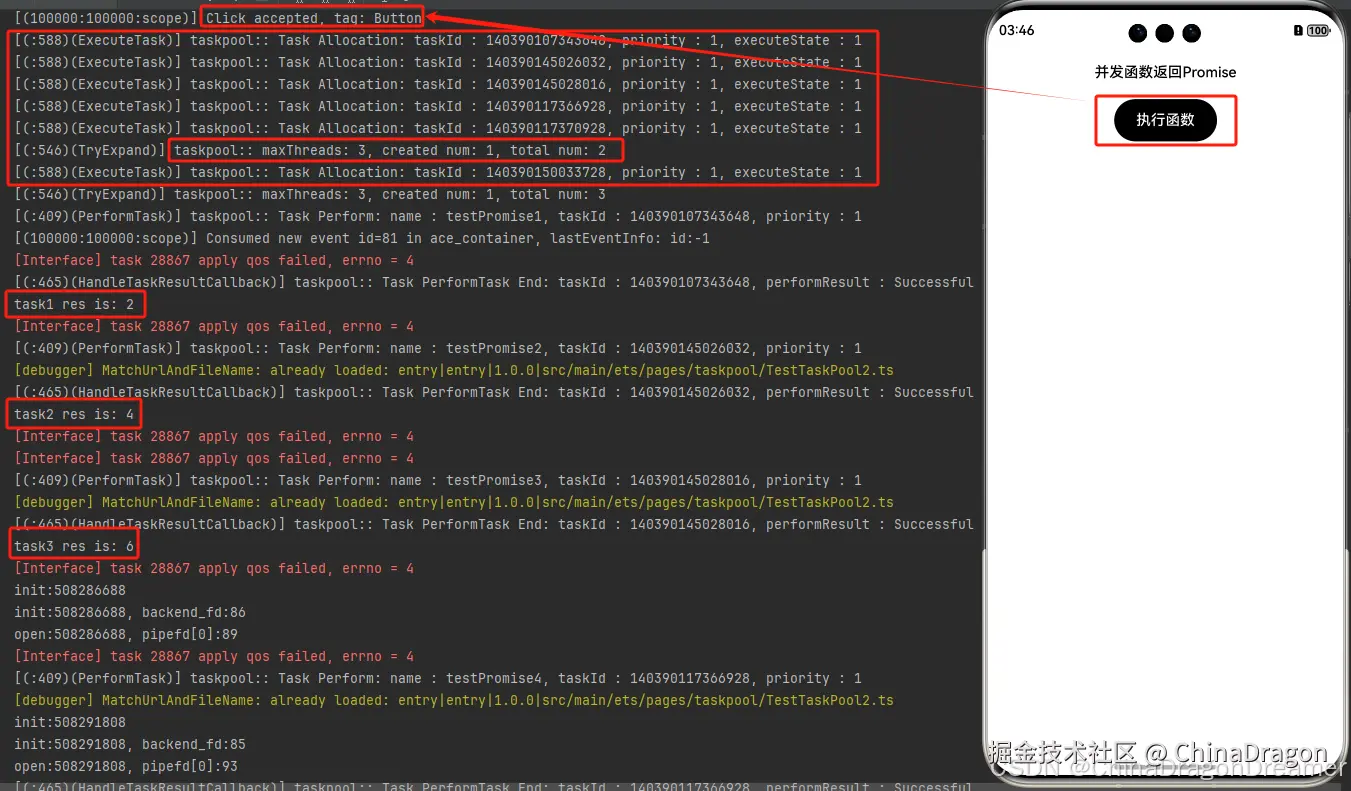
并发函数中返回Promise的表现需关注,其中并发同步函数会处理返回该Promise并返回结果,如下例所示。
示例:
import { taskpool } from '@kit.ArkTS'

@Concurrent
function testPromise1(numb1: number, numb2: number): Promise<number> {
  return new Promise<number>((testFunA, _testFunB) => {
    //_testFunB 表示未使用
    testFunA(numb1 + numb2)
  })
}

@Concurrent
function testPromise2(numb1: number, numb2: number): Promise<number> {
  return new Promise<number>((testFunA, _testFunB) => {
    testFunA(numb1 + numb2)
  })
}

@Concurrent
function testPromise3(numb1: number, numb2: number): Promise<number> {
  return new Promise<number>((testFunA, _testFunB) => {
    testFunA(numb1 + numb2)
  })
}

@Concurrent
function testPromise4() {
  return Promise.resolve(4)
}

@Concurrent
async function testPromise5(): Promise<number> {
  return 5
}

@Concurrent
async function testPromise6(): Promise<string> {
  return await new Promise((resolve) => {
    setTimeout(() => {
      resolve("testPromise6 setTimeout after resolve")
    }, 1000)
  })
}

async function testConcurrentFunc() {
  let task1: taskpool.Task = new taskpool.Task(testPromise1, 1, 1)
  let task2: taskpool.Task = new taskpool.Task(testPromise2, 2, 2)
  let task3: taskpool.Task = new taskpool.Task(testPromise3, 3, 3)
  let task4: taskpool.Task = new taskpool.Task(testPromise4)
  let task5: taskpool.Task = new taskpool.Task(testPromise5)
  let task6: taskpool.Task = new taskpool.Task(testPromise6)

  taskpool.execute(task1).then((data: object) => {
    console.info("task1 res is: " + data);
  }).catch((e: object) => {
    console.info("task1 catch e: " + e);
  })
  taskpool.execute(task2).then((data: object) => {
    console.info("task2 res is: " + data);
  }).catch((e: object) => {
    console.info("task2 catch e: " + e);
  })
  taskpool.execute(task3).then((data: object) => {
    console.info("task3 res is: " + data);
  }).catch((e: object) => {
    console.info("task3 catch e: " + e);
  })
  taskpool.execute(task4).then((data: object) => {
    console.info("task4 res is: " + data);
  }).catch((e: object) => {
    console.info("task4 catch e: " + e);
  })
  taskpool.execute(task5).then((data: object) => {
    console.info("task5 res is: " + data);
  }).catch((e: object) => {
    console.info("task5 catch e: " + e);
  })
  taskpool.execute(task6).then((data: object) => {
    console.info("task6 res is: " + data);
  }).catch((e: object) => {
    console.info("task6 catch e: " + e);
  })
}

@Entry
@Component
struct TestTaskPool2 {
  @State message: string = '并发函数返回Promise';

  build() {
    Column() {
      Text(this.message)
        .fontColor(Color.Black)
        .fontSize(16)
        .fontWeight(FontWeight.Medium)
        .textAlign(TextAlign.Center)
        .margin({ top: 20 })
      Button('执行函数')
        .fontColor($r('app.color.c_white'))
        .fontSize(16)
        .fontWeight(FontWeight.Medium)
        .padding({ left: 24, right: 24 })
        .margin({ left: 24, right: 24, top: 20 })
        .backgroundColor(Color.Black)
        .height(46)
        .onClick((_event) => {
          testConcurrentFunc()
        })
    }
    .height('100%')
    .width('100%')
  }
}
执行结果
4.3 并发函数中使用自定义类或函数
并发函数中使用自定义类或函数时需定义在不同文件,否则会被认为是闭包,如下例所示。
示例:
// Index.ets
import { taskpool } from '@kit.ArkTS';
import { BusinessError } from '@kit.BasicServicesKit';
import { testAdd, MyTestA, MyTestB } from './Test';

function add(arg: number) {
  return ++arg;
}

class TestA {
  constructor(name: string) {
    this.name = name;
  }
  name: string = 'ClassA';
}

class TestB {
  static nameStr: string = 'ClassB';
}

@Concurrent
function TestFunc() {
  // case1:在并发函数中直接调用同文件内定义的类或函数

  // 直接调用同文件定义的函数add(),add飘红报错:Only imported variables and local variables can be used in @Concurrent decorated functions. <ArkTSCheck>
  // add(1);
  // 直接使用同文件定义的TestA构造,TestA飘红报错:Only imported variables and local variables can be used in @Concurrent decorated functions. <ArkTSCheck>
  // let a = new TestA("aaa");
  // 直接访问同文件定义的TestB的成员nameStr,TestB飘红报错:Only imported variables and local variables can be used in @Concurrent decorated functions. <ArkTSCheck>
  // console.info("TestB name is: " + TestB.nameStr);

  // case2:在并发函数中调用定义在Test.ets文件并导入当前文件的类或函数

  // 输出结果:res1 is: 2
  console.info("res1 is: " + testAdd(1));
  let tmpStr = new MyTestA("TEST A");
  // 输出结果:res2 is: TEST A
  console.info("res2 is: " + tmpStr.name);
  // 输出结果:res3 is: MyTestB
  console.info("res3 is: " + MyTestB.nameStr);
}


@Entry
@Component
struct Index {
  @State message: string = 'Hello World';

  build() {
    RelativeContainer() {
      Text(this.message)
        .id('HelloWorld')
        .fontSize(50)
        .fontWeight(FontWeight.Bold)
        .alignRules({
          center: { anchor: '__container__', align: VerticalAlign.Center },
          middle: { anchor: '__container__', align: HorizontalAlign.Center }
        })
        .onClick(() => {
          let task = new taskpool.Task(TestFunc);
          taskpool.execute(task).then(() => {
            console.info("taskpool: execute task success!");
          }).catch((e:BusinessError) => {
            console.error(`taskpool: execute: Code: ${e.code}, message: ${e.message}`);
          })
        })
    }
    .height('100%')
    .width('100%')
  }
}
// Test.ets
export function testAdd(arg: number) {
  return ++arg;
}

@Sendable
export class MyTestA {
  constructor(name: string) {
    this.name = name;
  }
  name: string = 'MyTestA';
}

export class MyTestB {
  static nameStr:string = 'MyTestB';
}
执行结果
4.4 并发异步函数中使用Promise
并发异步函数中如果使用Promise,建议搭配await使用捕获Promise中可能发生的异常。推荐使用示例如下。
示例:
import { taskpool } from '@kit.ArkTS'

@Concurrent
async function testPromiseError() {
  await new Promise<number>((resolve, reject) => {
    resolve(1);
  }).then(()=>{
    throw new Error("testPromise Error");
  })
}

@Concurrent
async function testPromiseError1() {
  await new Promise<string>((resolve, reject) => {
    reject("testPromiseError1 Error msg");
  })
}

@Concurrent
function testPromiseError2() {
  return new Promise<string>((resolve, reject) => {
    reject("testPromiseError2 Error msg");
  })
}

async function testConcurrentFunc() {
  let task1: taskpool.Task = new taskpool.Task(testPromiseError);
  let task2: taskpool.Task = new taskpool.Task(testPromiseError1);
  let task3: taskpool.Task = new taskpool.Task(testPromiseError2);

  taskpool.execute(task1).then((d:object)=>{
    console.info("task1 res is: " + d);
  }).catch((e:object)=>{
    console.info("task1 catch e: " + e);
  })
  taskpool.execute(task2).then((d:object)=>{
    console.info("task2 res is: " + d);
  }).catch((e:object)=>{
    console.info("task2 catch e: " + e);
  })
  taskpool.execute(task3).then((d:object)=>{
    console.info("task3 res is: " + d);
  }).catch((e:object)=>{
    console.info("task3 catch e: " + e);
  })
}

@Entry
@Component
struct Index {
  @State message: string = 'Hello World';

  build() {
    Row() {
      Column() {
        Button(this.message)
          .fontSize(50)
          .fontWeight(FontWeight.Bold)
          .onClick(() => {
            testConcurrentFunc();
          })
      }
      .width('100%')
    }
    .height('100%')
  }
}
执行结果
五、按照任务的优先级执行
将创建好的任务放入taskpool内部任务队列,任务不会立即执行,而是等待分发到工作线程执行。 当前执行模式可以设置任务优先级和尝试调用cancel进行任务取消。 该任务不可以是任务组任务和串行队列任务。若该任务非长时任务,可以多次调用执行,长时任务仅支持执行一次。
taskpool.execute execute(task: Task, priority?: Priority): Promise<Object>
- task: 需要在任务池中执行的任务。
- priority: 等待执行的任务的优先级,该参数默认值为taskpool.Priority.MEDIUM。Priority源码如下图
示例 TestTaskPool5.ets代码
import { taskpool } from '@kit.ArkTS'

/*
  https://developer.huawei.com/consumer/cn/doc/harmonyos-references-V5/js-apis-taskpool-V5
  taskpool.execute
  execute(task: Task, priority?: Priority): Promise<Object>
  task: 需要在任务池中执行的任务。
  priority: 等待执行的任务的优先级,该参数默认值为taskpool.Priority.MEDIUM。


  将创建好的任务放入taskpool内部任务队列,任务不会立即执行,而是等待分发到工作线程执行。
  当前执行模式可以设置任务优先级和尝试调用cancel进行任务取消。
  该任务不可以是任务组任务和串行队列任务。若该任务非长时任务,可以多次调用执行,长时任务仅支持执行一次。


 */

@Concurrent
function printArgs(args: number): Promise<number> {
  console.info("printArgs: " + args);
  return new Promise<number>((testFunA, _testFunB) => {
    testFunA(args)
  });
}

async function testTaskPool() {//按照任务的优先级执行
  let task1: taskpool.Task = new taskpool.Task(printArgs, 100); // 100: test number
  let task2: taskpool.Task = new taskpool.Task(printArgs, 200); // 200: test number
  let task3: taskpool.Task = new taskpool.Task(printArgs, 300); // 300: test number
  taskpool.execute(task1, taskpool.Priority.LOW).then((value: Object) => {
    console.info("taskpool result1: " + value);
  });
  taskpool.execute(task2, taskpool.Priority.MEDIUM).then((value: Object) => {
    console.info("taskpool result2: " + value);
  });
  taskpool.execute(task3, taskpool.Priority.HIGH).then((value: Object) => {
    console.info("taskpool result3: " + value);
  });

}

@Entry
@Component
struct TestTaskPool5 {
  @State message: string = '按照任务的优先级执行';

  build() {
    RelativeContainer() {
      Text(this.message)
        .id('TestTaskPool5HelloWorld')
        .fontSize(20)
        .fontWeight(FontWeight.Bold)
        .alignRules({
          center: { anchor: '__container__', align: VerticalAlign.Center },
          middle: { anchor: '__container__', align: HorizontalAlign.Center }
        })
        .onClick((_event) => {
          testTaskPool()
        })
    }
    .height('100%')
    .width('100%')
  }
}
执行结果

