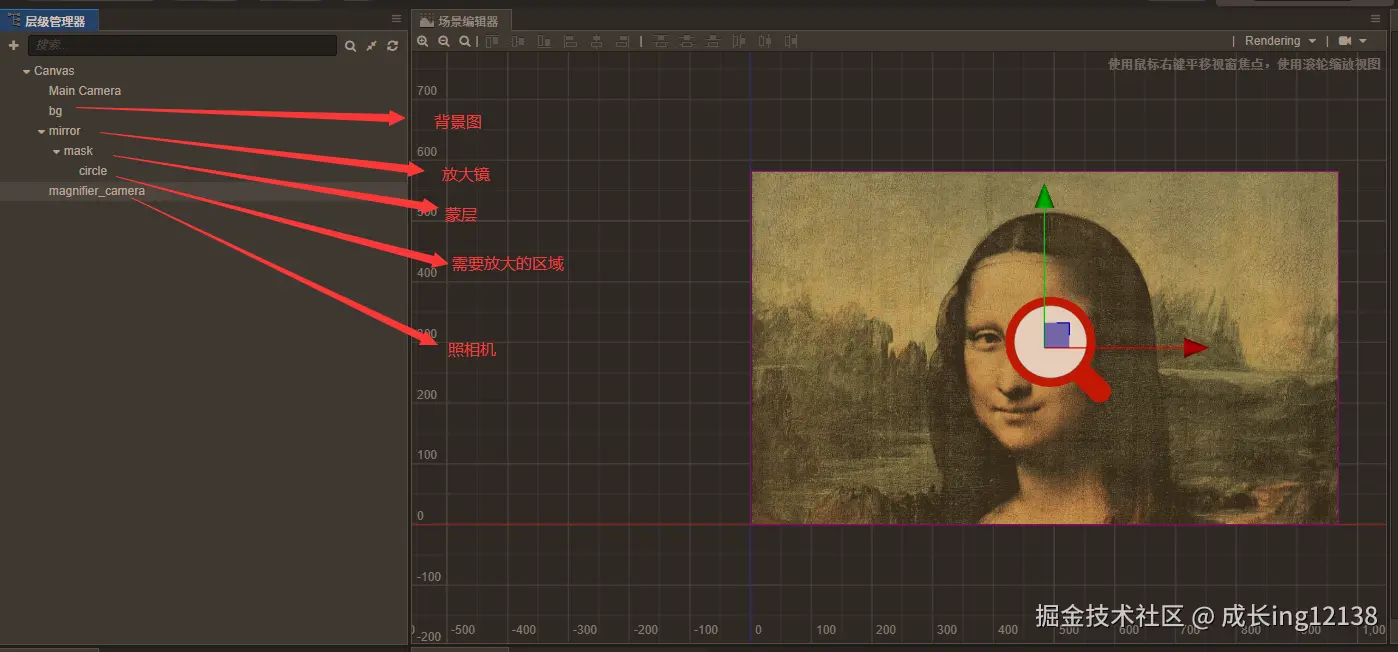
- 背景图,没啥好说的,就是简单一张图片
- 放大镜,就是可以放一张放大镜图片
- 蒙层的作用主要就是为了将里面的图片区域弄成圆形,蒙层节点添加mask,配置遮罩层,让里面的图片可以变成圆形
- 需要放大的区域就是我们展示放大的区域了
- 照相机就是新建一个camera节点了,同时给放大镜添加上一个新的分组,放大镜选择新的分组,然后照相机这里取消勾选新分组,这样屏幕上就不会展示照相机和其子节点了
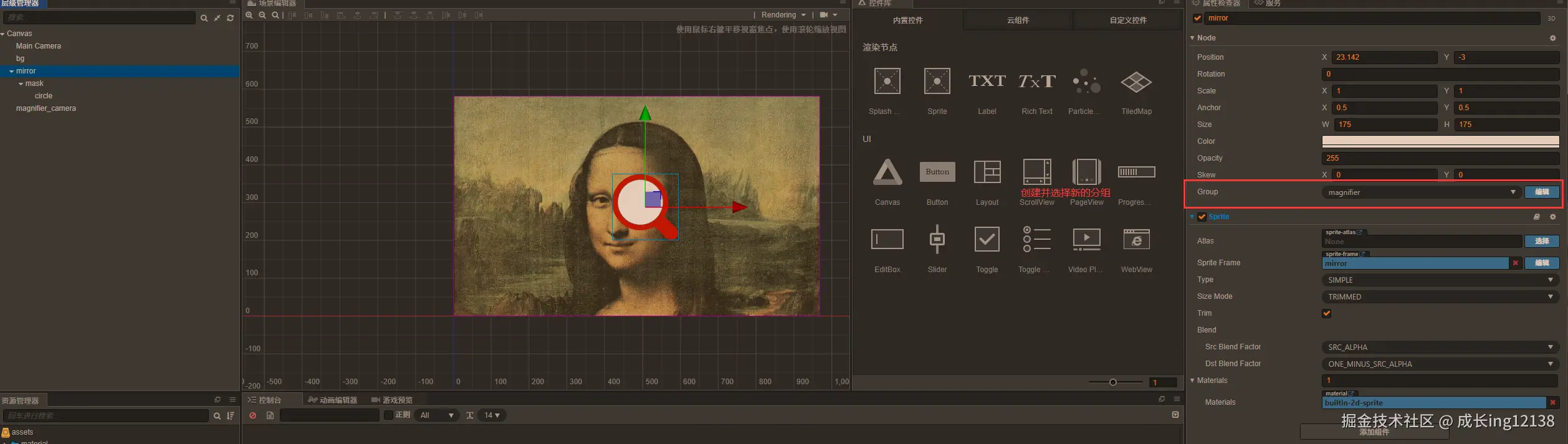
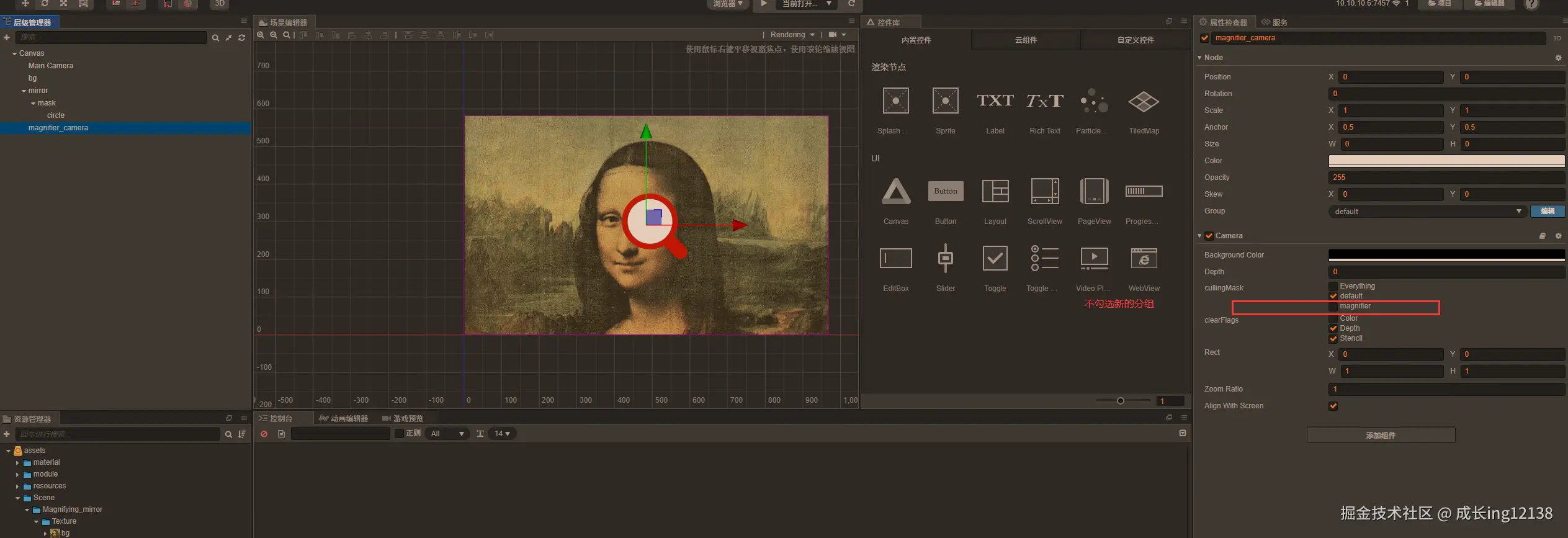
- 完成这一步后,预览界面就只会展示一张背景图了,不会展示放大镜
const {ccclass, property} = cc._decorator
@ccclass
export default class MagnifyingMirror extends cc.Component {
@property(cc.Node)
mirror: cc.Node = null
@property(cc.Node)
mirrorCameraNode: cc.Node = null
@property(cc.Node)
tempCameraSpriteNode: cc.Node = null
viewSize: cc.Size = null
onLoad () {
this.viewSize = cc.view.getVisibleSize()
this.initCamera()
// this.mirrorCameraNode.setPosition(this.mirror.getPosition())
this.node.on(cc.Node.EventType.TOUCH_START, this.touchStartEvent, this)
this.node.on(cc.Node.EventType.TOUCH_MOVE, this.touchMoveEvent, this)
}
touchStartPos: cc.Vec2 = null
mirrorOriginPos: cc.Vec2 = null
touchStartEvent(event) {
this.touchStartPos = event.getLocation()
this.mirrorOriginPos = this.mirror.getPosition()
}
touchMoveEvent(event) {
let touchPos: cc.Vec2 = event.getLocation()
let pos = this.mirrorOriginPos.add(touchPos.subtract(this.touchStartPos))
this.mirror.setPosition(pos)
this.mirrorCameraNode.setPosition(pos)
}
initCamera() {
let visibleRect = cc.view.getVisibleSize()
let texture = new cc.RenderTexture()
texture.initWithSize(visibleRect.width, visibleRect.height)
let spriteFrame = new cc.SpriteFrame()
spriteFrame.setTexture(texture)
this.mirrorCameraNode.getComponent(cc.Camera).targetTexture = texture
this.tempCameraSpriteNode.getComponent(cc.Sprite).spriteFrame = spriteFrame
this.tempCameraSpriteNode.scaleY = -4
this.tempCameraSpriteNode.scaleX = 4
}
}
- 根结点添加上脚本,对应mirror,mirrorCameraNode,tempCameraSpriteNode,这些选取对应的节点,
        this.node.on(cc.Node.EventType.TOUCH_START, this.touchStartEvent, this);
        this.node.on(cc.Node.EventType.TOUCH_MOVE, this.touchMoveEvent, this);
- touchStartEvent方法就是用来移动放大镜
- touchMoveEvent方法就是移动放大镜里面的内容
initCamera() {
let visibleRect = cc.view.getVisibleSize()
let texture = new cc.RenderTexture()
texture.initWithSize(visibleRect.width, visibleRect.height)
let spriteFrame = new cc.SpriteFrame()
spriteFrame.setTexture(texture)
this.mirrorCameraNode.getComponent(cc.Camera).targetTexture = texture
this.tempCameraSpriteNode.getComponent(cc.Sprite).spriteFrame = spriteFrame
this.tempCameraSpriteNode.scaleY = -4
this.tempCameraSpriteNode.scaleX = 4
}
- initCamera方法就是配置新的camera节点,添加上texture,并给需要放大的区域,弄上对应的图像