前言
上一片《为什么Vue的样式可以使用v-bind,和css变量有何区别》介绍了Vue如何将一个component的script部分编译为目标代码以及style中v-bind的原理。在结尾部分遗留了一个问题:component文件中style代码块如何编译为原生CSS?本篇内容将通过深度剖析VuecompileStyle函数来讲解style编译过程。
以Vue源码中的一段单元测试为例,先思考以下代码最终输出的css是什么样?等compileStyle分析完,再回过头来验证自己的分析是否靠谱。
const { code } = compileStyle({
  source: `.foo {
    color: v-bind(color);
    font-size: v-bind('font.size');

    font-weight: v-bind(_φ);
    font-size: v-bind(1-字号);
    font-family: v-bind(フォント);
  }`,
  filename: 'test.css',
  id: 'data-v-test',
})
Style编译相关文章:
Vue提供的CSS功能
-
作用域CSS(scoped)
css会为scoped标签的style代码块添加作用域限制。
<style scoped> .example { color: red; } </style>编译结果:
<style> .example[data-v-f3f3eg9] { color: red; } </style> -
深度选择器
在style中使用
deep标识,实现深度选择器。<style scoped> .a :deep(.b) { /* ... */ } </style>转换为:
.a[data-v-f3f3eg9] .b { /* ... */ } -
全局选择器
要添加全局的样式,除了不使用
scoped标识外,还可以使用:global表示全局样式。<style scoped> :global(.red) { color: red; } </style> -
CSS Modules
一个 <style module> 标签会被编译为 CSS Modules 并且将生成的 CSS class 作为 $style 对象暴露给组件:
<template>
  <p :class="$style.red">This should be red</p>
</template>

<style module>
.red {
  color: red;
}
</style>
也可以为module指定名称,然后在template或script中直接通过模块名称返回class。
<template>
  <p :class="classes.red">red</p>
</template>

<style module="classes">
.red {
  color: red;
}
</style>
- CSS中的
v-bind()
单文件组件的 <style> 标签支持使用 v-bindCSS函数将CSS的值链接到动态的组件状态。
<script setup>
import { ref } from 'vue'
const theme = ref({
    color: 'red',
})
</script>

<template>
  <p>hello</p>
</template>

<style scoped>
p {
  color: v-bind('theme.color');
}
</style>
CSS编译函数 compileStyle
compileStyle函数签名如下,入参options为SFCStyleCompileOptions类型,返回结果为SFCStyleCompileResults类型。
export function compileStyle(
  options: SFCStyleCompileOptions,
): SFCStyleCompileResults
入参SFCStyleCompileOptions说明:
- source: 源代码字符串;
- filename: 用于生成sourcemap等文件;
- id: 组件标识,如data-v-7ba5bd90;
- scoped: 是否启用 CSS 作用域,对应
<style scoped>; - isProd: 是否为生产环境,打包区分;
- preprocessLang?: 预处理器语言,如 'scss', 'less'等;
- preprocessOptions?: 预处理配置项;
- postcssOptions?: postcss配置项;
- postcssPlugins: postcss插件;
输出SFCStyleCompileResults说明:
- code: 编译后的css代码;
- map: 类型为
RawSourceMap,生成source map数据 - rawResult: postcss原始处理结果;
- modules?: 类型为
Record<string, string>,CSS Modules的处理结果,例如:{ 'btn': '_btn_1x2k3_1' }。 - dependencies:样式依赖的文件集合,主要用于预处理器@import,也用于文件监听和热更新;
compileStyle没有其他额外逻辑,仅仅调用了doCompileStyle函数,并把入参直接丢给它,因此接着重点分析doCompileStyle函数。
return doCompileStyle({
    ...options,
    isAsync: true,
}) as Promise<SFCStyleCompileResults>
分析了半天,compileStyle只是套了个壳子,内部直接调用了doCompileStyle函数,为什么会这样?这是因为Vue对外暴露了同步、异步编译两种模式:
- 同步编译: compileStyle;
- 异步编译:compileStyleAsync;
这两个函数唯一区别是调用doCompileStyle产传入的isAsync参数不同而已。至于为什么有同步、异步区分,我们在doCompileStyle函数分析中揭晓答案。
doCompileStyle
doCompileStyle函数首先将传入的参数进行解构,和上文compileStyle传入的SFCStyleCompileOptions一致。
  const {
    // 文件名,用于 source map 和错误提示
    filename,
    id,
    scoped = false,
    // 是否清理多余的空白字符
    trim = true,
    isProd = false,
    modules = false,
    // CSS Modules 的配置选项
    modulesOptions = {},
    preprocessLang,
    postcssOptions,
    // PostCSS 插件列表
    postcssPlugins,
  } = options
css processors
Vue支持多种css语言,例如less、scss、stylus等,当我们在编写lang属性时,IDE也会智能提示支持的语言。
由于Vue支持多种css语言,因此首先得确认css的预处理器。而参数中的preprocessLang正好对应了style代码块中的lang属性。
export type PreprocessLang = 'less' | 'sass' | 'scss' | 'styl' | 'stylus'

const preprocessor = preprocessLang && processors[preprocessLang]
const preProcessedSource = preprocessor && preprocess(options, preprocessor)
假如style中设置的lang为scss, 我们就以scss对应的处理器StylePreprocessor管中窥豹,从一个点来了解css processors的处理流程。
// .scss/.sass processor
const scss: StylePreprocessor = (source, map, options, load = require) => {
  const nodeSass = load('sass')
  const finalOptions = {
    ...options,
    data: source,
    file: options.filename,
    outFile: options.filename,
    sourceMap: !!map,
  }
  const result = nodeSass.renderSync(finalOptions)
  const dependencies = result.stats.includedFiles

  return { code: result.css.toString(), errors: [], dependencies }
}
Vue直接通过require('sass')引入外部库来解析scss语言, less、stylus类型。 输出的参数指定了css源代码或输入文件、输出文件、是否输出sourceMap等。而执行转换则使用sass库提供的renderSync函数,如果sass代码本身有引入其他的css文件,则这些依赖文件会包含在result.stats.includedFiles中。
如下scss代码:
$primary-color: #333;
$light-color: #FF0;
a {
  color: $primary-color;
  &:hover{
    color: $light-color;
  }
}
通过renderSync函数最转换为:
a {
  color: #333;
}
a:hover {
  color: #FF0;
}
postcss plugin准备
什么是postcss?
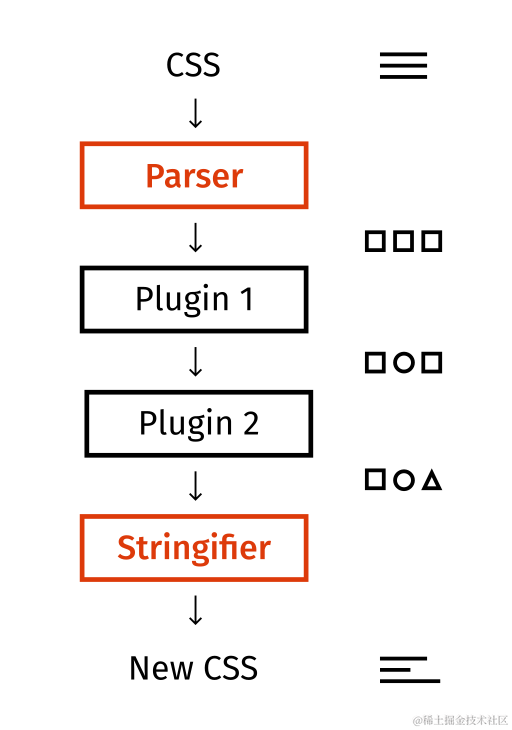
PostCSS是业界通用的样式转换工具链,支持将CSS资源转换为CSS AST,并通过插件来分析或修改CSS。常用的PostCSS插件有Autoprefixer、 Stylelint等等。
Vue使用PostCSS作为其默认的CSS转换器。 compileStyle函数允许通过参数postcssPlugins传入自定义的postcss plugin,并且比Vue内置的plugin先执行。
const plugins = (postcssPlugins || []).slice()
在上一篇《Vue3的样式竟然可以使用v-bind,和css变量有何区别(上)?》 注册介绍了Vue如何编译Script并注入useCssVars代码。同理,Vue通过提供cssVarsPlugin插件来转换源CSS文件中的v-bind部分代码。通过正则匹配的方式将例如v-bind(image)转换为var(data-v-7ba5bd90-image)。
plugins.unshift(cssVarsPlugin({ id: shortId, isProd }))
如果trim为true,则添加换行符\n。
if (trim) {
plugins.push(trimPlugin())
}
如果style代码块标示了scoped标签,则注册scopedPlugin插件,其目的是为各个css选择器注入属性选择。例如将.container {}修改为.container['data-v-7ba5bd90']
if (scoped) {
plugins.push(scopedPlugin(longId))
}
<style module>定义:
一个
<style module>标签会被编译为 CSS Modules 并且将生成的 CSS class 作为$style对象暴露给组件。
如果style代码块标示了module标签,则注册postcssModules插件,将css转换为{key:value}形式并暴露给组件。
  let cssModules: Record<string, string> | undefined
  if (modules) {
    plugins.push(
      postcssModules({
        ...modulesOptions,
        getJSON: (_cssFileName: string, json: Record<string, string>) => {
          cssModules = json
        },
      }),
    )
  }
<style module> demo如下,在template中可通过$style.red方式访问style中的class模块。
<template>
  <p :class="$style.red">This should be red</p>
</template>
<style module>
  .red { color: red; }
</style>
postcss参数准备
上一步为postcss预置了各种插件,在postcss执行转换前还得准备入参:
- from: 源文件路径,建议始终设置。source map生成、错误生成时将被使用;
- to: css输出路径;
- sourceMap: CSS sourceMap生成配置;
- parser:CSS AST转换器;
  const postCSSOptions: ProcessOptions = {
    ...postcssOptions,
    to: filename,
    from: filename,
  }
  if (map) {
    postCSSOptions.map = {
      inline: false,
      annotation: false,
      prev: map,
    }
  }
收集dependencies和errors
stylus依赖处理:stylus输出的css可能包含重复依赖项,因此需要使用Set去重。
const dependencies = new Set(
    preProcessedSource ? preProcessedSource.dependencies : [],
)
sass依赖处理:sass类型css输出的依赖项包含文件自身,因此需要从dependencies中移出。
dependencies.delete(filename)
收集预处理错误:
  const errors: Error[] = []
  if (preProcessedSource && preProcessedSource.errors.length) {
    errors.push(...preProcessedSource.errors)
  }
定义postcss依赖项收集函数:当后续执行完postcss转换处理,会在messages中输出依赖项,统一附加到dependencies。收集dependencies的目的是提供给DEV的HMR或者PROD的bundle使用。
  const recordPlainCssDependencies = (messages: Message[]) => {
    messages.forEach(msg => {
      if (msg.type === 'dependency') {
        // postcss output path is absolute position path
        dependencies.add(msg.file)
      }
    })
    return dependencies
  }
使用postcss执行css编译
postcss函数签名如下,入参接收插件列表,例如postcss([cssVarsPlugin, trimPlugin, modulesPlugin])。返回结果为实例化的postcss processor。
declare function postcss(plugins?: readonly postcss.AcceptedPlugin[]): Processor
postcss实例化包含process(source, options)函数,其执行流程为parse -> execute plugin 1 -> ... -> execute plugin n -> stringfier。
result = postcss(plugins).process(source, postCSSOptions)
recordPlainCssDependencies(result.messages)
假如需要编译的css文件头部包含@import 'other.css'; ,则process函数生成的结果messages中,有包含type为dependency的项,因此需要调用前面定义的recordPlainCssDependencies函数将css文件中import的文件依赖添加到dependecies中。
通过完整的compileStyle流程,单元测试生成的最终结果为:
.foo {
  color: var(--test-color);
  font-size: var(--test-font\.size);
  font-weight: var(--test-_φ);
  font-size: var(--test-1-字号);
  font-family: var(--test-フォント);
}
总结
文章开头了解到Vue为style代码快提供了scoped、deep、module、 global等标识,能够很便捷的实现模块化CSS。
在CSS编译函数compileStyle中,Vue为postcss提供了像cssVarsPlugin、scopedPlugin、postcssModules专门来处理style代码块中的v-bind、scoped、module标签。
Vue借助postcss对外提供了插件扩展机制,也为CSS编写提供天马行空的想象。例如为style提供一个ease标签<style ease>,并实现easePlugin插件为第一个class添加进入、退出动画效果。
我是
前端下饭菜,原创不易,各位看官动动手,帮忙关注、点赞、收藏、评论!