当你看到网络内容和 AT interaction 的具体细节时,事情就复杂了。这一章让你对各种平台可访问性 API 之间发生的事情有一个大概的了解,并看看动态 DOM 更新和正确应用语义来描述定制控件。
正如我提到的,我至少花了两到三年的时间来掌握屏幕阅读器的实际工作方式,从研究用户交互模型和熟悉 JAWS 击键到理解幕后发生的事情。这只是从屏幕阅读器的角度来看——不要管数据是如何在各种 API 之间转换的!所以,如果你在海上感到有点失落,也不用担心。这一章是我试图用一种我希望几年前有人为我做的方式向你解释事情。
什么是 API?
一个 API 就是一个应用编程接口。这是一个框架或一组规则,提供用任何给定语言编程所需的代码、函数或词汇。API 可以被认为是一个代码库,你用它来告诉软件,比如浏览器或辅助技术,去做一些事情。
例如,浏览器将以 HTML5 编写的 web 内容转换为文档对象模型(DOM)。网页的这个 DOM 与浏览器使用的布局引擎相关联。然后,浏览器从布局引擎和 DOM 获取信息,以支持操作系统(OS)平台可访问性 API。该 API 允许辅助技术监控和查询浏览器向其公开的任何可访问性信息。
在我们更详细地研究 API 本身之前,我们需要后退一点,讨论第一个易访问性模型:离屏模型,或 OSM。它的开发是为了让早期的屏幕阅读器和盲文输出设备能够访问可视桌面和第一个图形用户界面(GUI)。对屏幕外模型的了解将有助于您更广泛地理解这些相关技术是如何交互和表现的。
早期的基于 DOS 的系统,或者命令行界面系统,因为是基于文本的,所以很容易使用。用户输入到系统中的信息,以及系统返回的信息,可以很容易地在内存缓冲区中捕获并合成为语音。这种语音输出是通过使用我在第二章“理解残疾和辅助技术”中谈到的共振峰合成来实现的。文本字符串和数据等字符存储在缓冲区(或内存存储区)中,屏幕阅读器可以轻松地直接访问这些缓冲区,然后以语音形式输出给最终用户。
注关于一段非常有趣的屏幕阅读器历史,我推荐 Richard Schwerdtfeger 的论文《让 GUI 说话》,他是 IBM 辅助功能软件组的 CTO,也是著名的辅助功能专家。Rich 还与杰出的 Jim Thatcher 博士一起工作,他开发了第一个 DOS 屏幕阅读器和第一个基于 GUI 的 PC 屏幕阅读器。你可以在ftp://service.boulder.ibm.com/sns/sr-os2/sr2doc/guitalk.txt拿到这篇论文。
对于基于 GUI 的系统,离屏模型的工作方式是捕获关于要在屏幕上可视化呈现的控件的信息,然后创建一个单独的页面版本(离屏模型——因此得名)。然后,屏幕阅读器与这个 OSM 交互,并使用其内容作为输出最终用户可以理解的语音的基础。
您可以将离屏模型想象成任何给定时间的屏幕快照。正在发生的是一种被称为屏幕抓取或挂钩图形调用的技术。如今,对于桌面系统,操作系统提供了公开和检索这些信息的工具,但是是应用及其用户界面组件通过 API 公开这些信息。
现代编程语言允许使用对象和元素的描述,屏幕阅读器可以通过可访问性 API 锁定这些描述。然后,当用户通过键盘获得焦点时,屏幕阅读器将这些名称和属性作为语音输出给用户。正如我提到的,对于桌面应用来说,维护 OSM 的需求已经减少,但并没有完全消失,在开发人员忽略了标记控件的语义的情况下,它仍然是有用的。因此,OSM 可能仍然会发挥支持作用,为屏幕阅读器提供尽可能多的信息,从而促进更完整的用户体验。
如今,并不是所有的屏幕阅读器都主要使用 OSM 来与网络交互。OSM 被视为过时的技术。此外,维护一个 OSM 在技术上很困难,对开发人员来说也是一个挑战。例如,当您第一次尝试自己测试网页时,您可能会发现很难理解屏幕阅读器是怎么回事。你会失去你在页面上的位置,或者发现在某些时候很难知道屏幕阅读器的焦点在哪里。(会发生的。)这有助于理解你首先不是直接与浏览器互动,而是与这个第三位互动。
注意在与 Web 交互时,实际上“第三位置”是 DOM 和可访问性 API 输出的组合——以及一些屏幕阅读器的 OSM。当你第一次接触这些东西时,最初认为它们代表着同样的东西会有所帮助。它们并不相同,但实际上结合起来创造了“第三个位置”所以它作为一个抽象概念是有用的——这样你的脑袋就不会爆炸。
前面我们讨论了像 JAWS 这样的屏幕阅读器在与 Web 交互时使用的各种光标。电脑虚拟光标是 JAWS 用来浏览网页的主要工具。该虚拟光标实际上指向虚拟缓冲区中的内容数据库——实际上是 osm 和 API 调用组合的可用内容的缓存。屏幕上可视化内容的缓冲允许 at 用户浏览屏幕内容。因此,虚拟光标代表屏幕阅读器用户的浏览点,当视力正常的用户浏览网页时,它可能与焦点不匹配。
您可能还记得我之前谈到过屏幕阅读器使用的表单模式。像 JAWS 这样的屏幕阅读器使用虚拟光标,这样用户可以通过按 H 键、G 键(对于图形)或 B 键(对于按钮)来导航标题,或者在页面上调出链接对话框。这是可能的,因为虚拟光标已经捕获了击键,将它们用作导航控件。那么当你想在网页上输入一些数据的时候呢?显然,您不能同时使用屏幕阅读器的这些导航功能。
记住这就是为什么有像 JAWS 这样的屏幕阅读器的表单模式。在窗体模式下,屏幕阅读器从使用 PC 虚拟光标切换到直接与浏览器交互。这将禁用虚拟光标,并允许屏幕阅读器用户直接在表单中输入数据。
这种表单模式也给 web 开发人员带来了一定的挑战,因为当开发人员在表单模式下工作时,通过 PC 虚拟光标可以获得的重要数据可能不可用。这些丢失的数据可能是关于如何填写表单的说明等等。在表单模式下,应该注意表单验证和更新屏幕内容,这样屏幕阅读器用户就不会错过您需要给他们的指示或反馈,比如丢失输入数据等等。
注在现实中,用户代理,可能是浏览器或某种辅助技术,在构建 web 文档的图片或模型时有几种选择。它可以直接与 DOM 交互,或者使用离屏模型,或者它可以通过平台可访问性 API 获得关于这些不同节点及其状态和属性的信息。我之前提到过一些可访问性 API,比如 MSAA、iAccessible2、苹果可访问性 API 等等。
可访问性 API 是如何工作的?
可访问性 API 充当浏览器、DOM 和 AT 之间的网关或桥梁。为了让辅助技术能够理解 DOM 的内容,需要将这些内容映射到可访问性 API 中的相应角色。API 就像一个过滤器,帮助在任何给定的时间了解 DOM 中发生的事情。实际的 API 做的不止这些,因为它不是完全静态的。它可以促进用户界面组件和辅助技术之间的动态交互。
注意 AJAX 开发人员将熟悉XMLHttpRequest或XHR对象,它们可以通过减少对服务器的调用来促进更多的客户端功能,并有助于创建更加动态和响应更快的 web 应用。
虽然客户端更新很棒,是一个真正的进步,但 AJAX 或 Web 2.0 应用中的动态内容更新对更注重可访问性的开发人员提出了挑战。开发人员如何让 AT 知道部分页面内容已经更新?如何以一种不引人注目的方式做到这一点?在 WAI-ARIA 出现之前,这非常棘手,因为虚拟缓冲区的更新必须是强制的,用户才能看到 DOM 中的任何变化。现在这已经不是什么大问题了,因为虚拟缓冲区每隔几毫秒就会自动更新一次,所以 DOM 的变化可以更可靠、更快速地传递给用户。
注意对于一些关于这个问题的屏幕阅读器历史,如果你喜欢放松一点,我推荐以下 Gez Lemon 和 Steve Faulkner 在[www.Juicystudio.com](http://www.Juicystudio.com)发表的文章。Gez 和我也写了关于这个主题的文章,并在英国利兹的一次技术会议上提交了一篇论文,会议由大约五个人组成,我们是其中的两个人。所以这个主题确实有广泛的吸引力,哈哈!
在本章中,您学习了可访问性 API、DOM、屏幕阅读器如何通过可访问性 API 从 DOM 接收信息,以及旧的但仍在使用的离屏模型。在未来的章节中,我们将更多地使用易访问性 API 而不是 OSM。如前所述,屏幕阅读器不是 AT 现有的唯一部分,但它是最复杂的部分之一。在接下来的章节中,当我们继续更详细地研究 HTML5 时,我们在这一章中所涉及的领域肯定会对你更好地理解 at 是如何处理代码有很大的帮助。此外,我希望你能更好地理解为什么你有时可能需要提供一些额外的东西来支持旧的,例如,不使用更高级的 API。
在这一章中,你将开始更详细地了解 HTML5 规范,尤其是与可访问接口的开发最相关的方面。有许多新的 API 进行后台客户端/服务器处理和数据存储,可以用于丰富、响应迅速的应用,但您将看到的主要是 HTML5 影响用户可访问性的方面。
您还将看到新的 HTML5 元素和用于定义文档轮廓和新的结构形式的语义。
HTML5:有什么新消息?
HTML 的早期版本是相对简单的文档标记语言。它们允许文档被链接和引用,并为构建内容提供语义以支持小范围的浏览器和平台。这种多样的内容范围很广,从数据表到通过简单链接提供交互的内容(这实际上是 Web 的核心),再到表单控件,以及一些非常简单的媒体——实现了嵌入式图形。
但是真的是这样。这些项目构成了早期 HTML 标记语言能力的基础。聪明的人随后想出了压缩音频和视频的方法,比如使用 Flash、Silverlight、Maccies 的 QuickTime 或 PC heads 的 RealPlayer 等插件(以及这些插件的真正乐趣)。这些技术使得 Web 能够被用作像动画内容和视频这样的富媒体的平台。
从可访问性的角度来看,最终结果是浏览器或辅助技术(at)供应商支持或不支持的内容似乎有点武断。例如,CSS2 在浏览器中得到广泛支持绝对需要几年时间。当它最终被支持时,它通常只得到部分支持,这导致了错误和故障(例如“盒子模型渲染不一致”)。在 AT 的世界里也有同样的特性。例如,< table>元素的<scope>属性使得在 HTML4 中创作更易访问的数据表比使用更受支持的<headers>和for/id方法要快得多。然而,对它的支持是如此之少,不幸的是,这种更简单的创作方法不能被依赖。
新的 HTML5 语义
HTML 是一种很大程度上与意义相关联的语言。有些您已经熟悉的控件具有固有的行为(如通过键盘可点击或激活的链接等),但这些行为是由用户代理(如浏览器)处理的。底层代码提供了一个基本结构,允许核心内容(通常是文本)被广泛的设备消费。这一内容层为“一次创作,发布到多种设备”的模式提供了实用的基础,该模式为电子通信提供了巨大的优势,实现了互操作性,而无需在过多的设备之间进行大量定制。
注意html 5 规范对元素的使用非常严格。
当您想到语义对互操作性和可访问性的重要性时,前面的观察确实有意义。想想我们已经讨论过的关于结构化内容在支持可访问性架构和通过可访问性 API 向 at 传递可用信息方面的重要性。如果你的头还疼的话,我很抱歉,但这一切现在应该清楚一点了。
有些人自称了解可访问性,但实际上他们是规范狂热者,可能是验证吸血鬼。符合任何一种方法都不能保证可访问性、良好的可用性或积极的用户体验。所有这些开发工具真正能做的是表明开发人员在编写符合正式发布的语法的代码时知道她在做什么,但它们不一定在用户代理支持方面考虑用户体验,也不一定在浏览器或 at 上工作。唯一有助于开发人员理解实际情况的是用户测试或熟练使用屏幕阅读器的体验。在这一点上,开发人员自己的测试可能有助于发现什么时候工作或者不工作。这种知识非常重要,因为它基于用户体验的主观现实。
"下表定义了适用于 HTML 元素的强本机语义和相应的默认隐式 ARIA 语义。第一列中的每个 HTML 语言特性(元素或属性)暗示了同一行第二列的单元格中给出的 ARIA 语义(角色、状态和/或属性)。当多个行应用于一个元素时,必须应用定义角色的最后一行中的角色,并且必须组合所有行中的状态和属性。以下是这一工作方式的详细列表。”1
<html> <canvas id=”Groovy_anim_with_fallback” width=”300” height=”150”> <p> Some fallback instruction for the user..or links to other more accessible resources</p> </canvas> </html>
<html> <canvas id="Groovy_anim_with_fallback" width="300" height="150"> <h1>Oops..your browser won’t show our groovy Canvas Animation</h1> <img scr="myserver/usful_andgroovy_image.png" alt="Visit the ‘overview’ section of the website which has a more accessible content"> </canvas> </html>
<html> <canvas id="Groovy_anim_with_fallback" width="300" height="150"role='presentational'> <h1>Oops..your browser won’t show our groovy Canvas Animation</h1> <img scr="myserver/usful_andgroovy_image.png" alt="Visit the ‘overview’ section of the website which has a more accessible content"> </canvas> </html>
<section> <h1>Example of paragraphs using <pre>ins</pre> and <pre>del</pre></h1> <p>This is a chunk of content that was <del>deleted</del> <ins>and then updated</ins>.</p> <p>This is another paragraph where nothing was inserted or deleted.</p> </section>
这是一个用来定义所谓的文档库 URL 的元素。你为什么想这么做?我听到你问,“URL 不是相对于 HTML 文档根或 index.html 文件定义的吗?”好问题,的确如此。如果您有一个包含相关文档集合的网站子部分,为了更好的 SEO,您可能希望为当前文档提供更多的上下文。它是一个 void 元素,所以它不接受任何类型的内容,它位于文档的头部。此外,在 HTML5 中,你现在可以添加一个目标属性到基本 URL,这在 HTML 的早期版本中是做不到的。清单 5-3 详细说明了<base>元素的使用。
清单 5-3。使用<底座>元素
<!DOCTYPE HTML> <html> <head> <title><Base> element sample</title> <base href=www.mysiteandsubsite.com/repository/… /> </head> <body> <p>Visit the <a href="collectionoflinks.html">Here is a collection of interesting documents</a>.</p> <p>Visit the <a href="collectionofworddocuments.html">Here is a collection of interesting Word documents</a>.</p> <p>Visit the <a href="collectionofimages.html">Here is a collection of interesting images</a>.</p> </body> </html> 3
元素
<link>元素是有用的头部元数据,它帮助您定义保存脚本和 CSS 的位置。它还用于指示 HTML 文档头中的其他资源。一个< link>元素必须有一个rel属性,如下面的代码片段所示:
<!DOCTYPE HTML> <html> <head> <meta charset="UTF-8" /> <meta name="description" content="This site outlines how the smartest guys in the room are amoral strawmen who would sell their grandmothers into slavery to enhance their profit and prestige. They may also gain tenure at Columbia for doing so." /> <meta name="keywords" content="Money, Gold, Economics, Greed, Folly, House of Cards, Pyramid Scam, Ponzi Scheme" /> <title>A website about Economics</title> </head> <body> […]
<body> <article> <h1>Really interesting news article that you’ll soon find in other online Papers</h1> <p>Here is some really interesting news that just has to go around the world</p> </article>
<h1>Really interesting document that contains nicely styled news articles that you'll find in other online Papers</h1> <p>Here is some really interesting news that just has to go around the world</p> </article>
<article> <h2>Second really interesting article that just has to go around the world, that you'll also find in other online Papers</h2> <p>Here is some really interesting news that just has to go around the world</p> </article>
<article> <h2>Third really interesting article that just has to go around the world, that you'll also find in other online Papers</h2> <p>Here is some really interesting news that just has to go around the world</p> </article>
<article> <hgroup> <h1>The Guitar Gallery</h1> <h2>Lots of groovy guitars</h2> </hgroup>
<section> <h2> Fenders</h2> <p>Are you a Fender guy or a Gibson gal? Well if it’s good enough for Jimi, it’s good enough for me!</p> <p>[…]</p> <h3> The first Fender Guitars</h3> <p>[…]</p>
</section>
<section> <h2>Gibson</h2> <p>I want an SG but don’t want to take out a mortgage, Dear Anne.. got a problem</p> <p> More about my feelings of deprivation due to lack of antique Gibson guitars[…]</p> </section> <section> <h2>Acoustic Dreams</h2> <p>For the softer moments we have nylon acoustic guitarts</p> <p> Well, I really like John Fahey and Leo Kottke, […]</p> <h3>What kind of guitar did Robbie Basho play??</h3> </section> </article>
<article id=”MyGuitarBlog”> <header> <h1>Your first high end Guitar</h1> <p> Taking the plunge, and why you should do it </p> </header> <p>Buying your first really high end axe is up there with moving house, doing a driving test or getting married in terms of being really important but the good news is it’s nothing like as stressful as any of those are!</p> <p>[…] </p> <footer> <p>Some comments from interested humans </p> </footer> </article>
<article id="MyGuitarBlog"> <header> <h1>Your first high end Guitar</h1> <p> Taking the plunge, and why you should do it </p> </header> <p>Buying your first really high end axe is up there with moving house, doing a driving test or getting married in terms of being really important but the good news is it’s nothing like as stressful as any of those are!</p> <p>[…] </p>
<section> <h1>My Guitar Blog Comments</h1> <article id="comment_1"> <link href="#comment_1"> <footer> <p>Comment by: <span ="name">Not George Harrison</span> </p> </footer> <p>My guitar doesn’t Gently Weep anymore.. can anyone help?</p> </article>
<article id="comment_2"> <link href="#comment_2"> <footer> <p>Comment by: <span ="name">Jimi Jimi<span> </p> </footer> <p>I don’t know George, but I just hurt my Little Wing, when was I walking along the Watchtower, these days everything is just a haze, a kinda purpley one weird</p> </article>
<article id="comment_3"> <link href="#comment_3"> <footer> <p>Comment by: <span ="name">Mini JPage</span> </p> </footer> <p>Sounds weird Not George Harrison, does the song not remain the same?</p> </article> </section> </article>
在撰写本文时,对新的 HTML5 outline 算法的支持还不是很好。因此,不支持该算法的用户代理将在页面上以多个< 】 elements. Depending on the context of use, this might mean you are better off sticking with the second example, if content isn’t to be syndicated. If your page does only use < 】 elements, while it won’t really give the user an overview of the correct hierarchical structure, it’s not a show-stopper and won’t result in totally inaccessible content. Having said that, it’s not ideal. However, if content is to be syndicated, use method one, because every nested article might likely end up in another site; if content is more static or to be consumed 的形式输出内容,现在坚持使用第二种方法。
HTML5 还有一个新的< 】 element. It is also a sectioning element and is used to provide content that is 与主文章或父部分的无关。你可能想知道如何处理它?这是自然的。旁白在人类语言和交互中是正常的,但在标记语言中可能不常见。有些事情我认为它可能是好的,比如标记一个引用,它可以用在有客户推荐的网站上。例如,看看清单 5-16 中的。
清单 5-16。 HTML5 <抛开>元素举例
<p>Some our our services include, taking animals into our shelter who are mistreated and abused. Many people come and visit us also to look for an animal to care for, like this testimonial from a happy family who brought home a puppy shows.</p>
<aside> <q> We are so glad we visited the Animal Sanctuary, and brought home little Puddles, he is such a good puppy! </q> </aside>
<p>Without the help and support of people like that we would never be able to do what we do</p>
注意一般情况下,我描述的情况在没有@alt或者@title的地方会触发所谓的启发式评估。一个启发式是经验法则或评估方法。试探法是各种事物的核心,从学习计算机科学时可能学到的基本逻辑,到更高级的算法设计。不要被这个术语所困扰,只要想想“一套规则”有时,当启发式评估被触发时,屏幕阅读器也会查看网页中周围的 HTML 内容。
During the summer of 2011, Fiachra, Dara and I climbed the three highest mountains in
Ireland. This was a stupendous day where the challenge of summiting the three peaks of
Carrauntoohil, Beenkeragh & Caher was too much to resist!
The Coomloughra Horseshoe
The three peaks are ringed within in a large horseshoe shaped valley and present a very
challenging climb even for experienced hill walkers. We also had fantastic views of the
MacGillycuddy Reeks from Beenkeragh's high, exposed summit. The weather was also very
beautiful and we totally lucked out as we couldn't have asked for a clearer day to see the
spectacular views. We walked over Beenkeragh Ridge with its yawning drops and navigated the
equally spectacular Caher Ridge, with the Black Valley far below, before descending from Caher
into Coomloughra Glen.
Remember to bring water
It was a very hot day and after 4 hours or so we ran out of water! Fortunately we came across some fresh mountain streams in the Coomloughra Glen and could top up our water bottles
[…]
`
如果我想在第一段中包含图片,并且我想把这一段作为文本描述,我可以像清单 6-2 中所示的那样编码。
***清单 6-2。*在帖子中包含一张图片
`
My big climb this summer (2011)
Climbing the three highest mountains in Ireland
****During the
summer of 2011, Fiachra, Dara and I climbed the three highest mountains in Ireland. This was a
stupendous day where the challenge of summiting the three peaks of Carrauntoohil, Beenkeragh &
Caher was too much to resist!
The Coomloughra Horseshoe
The three peaks are ringed within in a large horseshoe shaped valley and present
a very challenging climb even for experienced hill walkers. We had fantastic views of the
MacGillycuddy Reeks from Beenkeragh's high, exposed summit. The weather was also very
beautiful and we totally lucked out as we couldn't have asked for a clearer day to see the
spectacular views. We walked over Beenkeragh Ridge with its yawning drops and navigated the
equally spectacular Caher Ridge, with the Black Valley far below, before descending from Caher
into Coomloughra Glen.
Remember to bring water
It was a very hot day and after 4 hours or so we ran out of water! Fortunately
we came across some fresh mountain streams in the Coomloughra Glen and could top up our water
bottles […]
`
那么刚才显示的代码中发生了什么呢?我使用博客文章的内联文本来描述图像,通过它们的 id 指向 block 的内容。在本例中,我分别给了每个<p>元素一个 IDtext1、text2和text3。对于支持aria-describedby的用户代理(如前一章所述,许多新的屏幕阅读器都支持,那些不支持的只会忽略它),在图像和描述之间创建一个编程连接意味着一旦图像获得焦点,描述就会被公布。此外,有一些方法可以增强这种基本行为——例如,通过向图像添加一个@alt文本描述,并将其与aria-describedby代码相结合。这看起来有点像清单 6-3 中的代码。(我省略了博文代码的第一部分和最后一部分。)
***清单 6-3。*增强图像描述
`
Climbing the three highest mountains in Ireland
****During the summer of 2011, Fiachra, Dara and I climbed the three
highest mountains in Ireland. This was a stupendous day where the challenge of summiting the
three peaks of Carrauntoohil, Beenkeragh & Caher was too much to resist!
The Coomloughra Horseshoe
This three peaks are ringed within in a large horseshoe shaped valley and
present a very challenging climb even for experienced hill walkers. We had fantastic views of
the MacGillycuddy Reeks from Beenkeragh's high, exposed summit. The weather was also very
beautiful and we totally lucked out as we couldn't have asked for a clearer day to see the
spectacular views. We walked over Beenkeragh Ridge with its yawning drops and navigated the
equally spectacular Caher Ridge, with the Black Valley far below, before descending from Caher
into Coomloughra Glen.
<img src="Ruairi.jpg alt="Ruairi smiling and playing on the couch at home with his large purple Owl friend Minerva. There is a likeness in their big Moon heads!" />
Two friends together, Ruairi and Minerva`
<figure><img src="josh_drawing_creation.png" alt="A large colourful pen and ink drawing with a cosmic theme of creation" aria-describedby="creation" /><figcaption>‘Creation by Joshue 0 Connor (1993)</figcaption></figure>
‘Creation’ by Joshue O Connor (1993)
In a past life Josh was far more interested in playing guitars, painting, and in general
larking about than he was with computers.
Here is some more background about his artwork for those interested […]
This drawing illustrates the mystery of creation. It shows a large flaming
triangle that holds a bright radiating sun at its apex, and a stylised smiling moon sits at
its base in opposition. At the heart of the triangle there sits an exploding planet with the
ancient Vedic symbol of creation the AUM at its heart. The image sits on a background framed
of stars and small spaceships fly by randomly in the distance.
`
在 HTML 文档中找到的较长描述的例子稍微好一点。这种方法确实给了作者多一点呼吸的空间,也有希望还图像一个公道。是否是合适的描述,是否传达了图像同样的视觉丰富性?你是法官。可以说,图像功能越多,提供合适的替代文本就越容易,模糊性就越小。
如您所见,@longdesc是一种链接到当前页面或另一个页面上的更长描述的机制。说浏览器和 AT 对它的支持很差可能有点过了,但支持肯定不是很好。它在学术界之外也很少使用。对于那些认为它有用的人来说,它是有用的——如果一个元素很好地服务于一个用例,即使它的应用不是完全通用的,我对保留或改进元素功能或在规范中保留一个元素没有问题。但那是我。
然而,它确实有一些优势,尽管 ARIA 很棒,HTML5 也在许多领域取得了进步,但目前都没有提供对@longdesc的全功能替代。@longdesc有一张王牌,它可以用来引用离页 URI,还可以提供结构化内容作为文本描述。不幸的是,它在浏览器中的实现和最终的用户体验往往还有许多不足之处。然而,这可能与其实现有关,而不是不需要一个更长的描述机制。这是 HTML 工作组中的一个热门话题,您可能会发现它正在重新浮出水面。
<img src="disability_types.png" alt="Most user testing is done with blind and vision impaired people, and the least with Deaf users and people with Dyslexia" />
<img src="benefits_of_usertesting.png" alt="Graph outlining the benefits of user testing" aria-describedby="benefit_test" />
然后在 HTML 文件的更深处,我可以有一个段落提供更丰富的描述,以及一些注释:
<p id=“benefit_test”> From this research we can see that practitioners feel some of the main benefit of user testing with people with disabilities is discovering usability issues with the interface, navigation, structure, functionality and so on. User testing as an awareness raising exercise for developers in order to first hand experience the diverse needs of people with disabilities and therefore gaining a greater understanding of how things work from the users perspective, is also an outcome of the research"</p>
对于图 6-7 ,它着眼于用户测试的规模,更容易描述。
***图 6-7。*测试组规模
<img src="test_sizes"alt="The majority of test group sizes are between 8 12 users." />
<a><img src="buy_this_guitar.png" alt="Here is a nice graphic of a Gibson Guitar stylized with some creative Photoshop filters, and using a groovy font called Rosewood /></a>
不要。你只要说它的功能是什么——字面意思,“买这把吉他。”
<img src="buy_this_guitar.png"alt="Buy this Guitar" />
该插件是第三方解决方案。它不是浏览器自带的,而且是专有的。然而,它看起来并没有消失。HTML5 并不是进入游戏领域的唯一技术;Adobe 已经有了通过虚幻引擎(UE3)开发 Flash 的计划。现在,您可以在 Flash 环境中玩丰富的 3D 游戏。因此,焦点肯定会从视频平台转移到丰富的沉浸式游戏平台。
Flash 中的可访问性问题
如果您使用的是较新的屏幕阅读器,只需开发人员稍加努力,许多 Flash(尤其是 Flex 内容)都是可以访问的。然而,从可访问性的角度来看,Flash 存在一些实际问题(这可能是因为它不是“浏览器固有的”技术)。最明显的问题是无法使用键盘轻松地切换到 Flash 视频内容,还有一个相当反常的问题是无法切换出来(即使您设法进入了)。具有讽刺意味的是,这在 Internet Explorer 中并不是一个问题,但它确实会影响大多数其他浏览器。解决方法很复杂,因为您必须使用脚本来阻止用户返回。
var video = document.getElementById('access_video');
var play = document.getElementById('play');
var stop = document.getElementById('stop');
var mute = document.getElementById('mute');
// Script needed to attach the onclick events with the functional buttons
// Remember even though the event is called onclick it still works from //
// the keyboard
// Script needed to attach the onclick events with the functional buttons.
// Remember even though the event is called onclick it still works from the
// keyboard.
这个例子的 JavaScript 代码(实际上同时使用了 a #和 tabindexed <div>)非常简单,但是当它最终工作起来的时候,一切看起来都很简单!
看看你是否能弄清楚清单 6-11 中发生了什么。
***清单 6-11。*添加播放、停止、静音、前进和后退功能的代码
`window.onload=function(){
var video = document.getElementById('access_video');
var play = document.getElementById('play');
var stop = document.getElementById('stop');
var mute = document.getElementById('mute');
var forward = document.getElementById('forward');
var back = document.getElementById('back');
// Script needed to attach the onclick events with the functional buttons.
// Remember even though the event is called onclick it still works from the
// keyboard.
一个字体生成器和一个可能的 sIFR 替代品。在[cufon.shoqolate.com/generate/](http://cufon.shoqolate.com/generate/)可用。Roger Johannes 在[www.456bereastreet.com/archive/200905/cufon_and_screen_readers/](http://www.456bereastreet.com/archive/200905/cufon_and_screen_readers/)撰写了关于 Cufón 和屏幕阅读器的文章。
有一个很好的列表,列出了使用<canvas>开发的游戏、小工具等等,可以从[www.w3.org/html/wg/wiki/AddedElementCanvas](http://www.w3.org/html/wg/wiki/AddedElementCanvas)获得。在这里你还可以找到很多关于<canvas>的讨论链接,以及当试图让这个绘图 API 更容易使用时所面临的挑战。
注一个屏幕阅读器是一个线性输出设备。这意味着它一次向用户输出一部分信息。对于一个没有视力的用户来说,如果他对 HTML 内容有一个完形的看法,你需要使用适当的代码来帮助他。这通常是通过编写内容的文本概述并以编程方式将其与表格相关联来实现的,以便当表格获得焦点时会显示出来。在这一章的后面我会详细说明如何做到这一点。
An overview of upcoming animal sanctuary workshops in 2012
`
使用表格的<caption>元素或标题有助于帮助屏幕阅读器理解表格是什么。如果你考虑一个有五个或六个(甚至更多)数据表的网页,以这种方式添加<caption>真的很有用。一个有视力的人可以快速浏览网页,并找出所有这些表格是什么。如前所述,屏幕阅读器用户可以通过选择各种 HTML 元素——如标题和链接——使用 AT 来浏览网页。他们可以使用页面上的任何<table>元素做同样的事情。例如,在 JAWS 中按下 T 键会导致 AT 将用户从第一个表跳到最后一个表(然后再跳回来)。如果每个表格上没有合适的<caption>,屏幕阅读器只是宣布“table”、“table”,并让用户知道表格有多少行、列等等,但它不能告诉用户表格是做什么用的。添加<caption>填补了空白。带有合适的<caption>的数据表宣布焦点上的内容。因此,如果我建议的包含六个表的页面上的所有表都有<caption>元素,屏幕阅读器用户可以很容易地找到她要找的东西——因为当每个表获得焦点时,<caption>元素的内容就会被公布。整洁!
我们要看的第一种方法稍微费时一些,但我认为它更可靠。我们将在表格 HTML 的header和ID元素之间创建关联。这是一种将数据单元格的内容与其相应的标题相关联的方式。这样做将导致屏幕阅读器在向用户宣布单元格的内容之前宣布数据单元格在的哪一列。
要创建标题/ID 关联,首先要处理标题,然后处理表体。
从给每个标题一个唯一的 ID 开始;给标题一个与内容相同的 ID 是完全可以的。关于我的动物保护区即将举办的研讨会,我的标题标识如下:
Header #1 = "课程"
标题#2 = "开始"
标题#3 = "结束"
标题#4 = "成本"
Header #5 = "Extras "
在 HTML 代码中,标题如下所示:
`Course
Start Date
End Date
Cost`
Additional content included in 它可以是以下内容或类似内容:
`Course
Start Date
End Date
Cost
Included Extras`
如果您对任何命名约定感到满意,您当然可以使用它。关键是标题 id 是唯一的,因为它们用于创建与表数据的编程关联(正如您将看到的)。对我来说,他们有关系似乎更自然,但这并不重要。现在您已经有了合适的标题 id,接下来您可以将表体中每一行的单元格内容映射到一个合适的标题,如清单 7-1 所示。
清单 7-1 。映射单元格内容
`Course
Start Date
End Date
Cost
Included Extras
How do you start an Animal Sanctuary
June 10
June 16
650 Euros
includes lunches, one dinner and extensive materials.
Working with Dogs: A beginners workshop
April 12
April 16
300 Euros
includes lunches, and materials.
[…]`
使用标题/ID 组合的最终可访问表
通过查看清单 7-1 中的例子,你能看出标题和数据单元内容之间的关联是如何建立的吗?
图 7-1 是决赛桌的屏幕截图。
图 7-1 。可访问数据表示例
清单 7-2 显示了最终完全编码的样本(也有合适的<caption>元素)。
清单 7-2 。可访问表方法 1 的最终表代码
`
Animal Sanctuary workshops
An overview of upcoming Animal Sanctuary workshops in 2012
Course
Start Date
End Date
Cost
Included Extras
How do you start an Animal Sanctuary
June 10
June 16
650 Euros
includes lunches, one dinner and extensive materials.
Working with Dogs: A beginners workshop
April 12
April 16
300 Euros
includes lunches, and materials.
Massage for You & Your Animals
September 29
October 4
400 Euros. A Half day session is 220 Euros.
includes lunch, and book.
Yoga with Animals
May 18
May 21
300 Euros
includes lunch, dinner and book.
A Creative Artistic workshop and Retreat
June 18
June 23
500 Euros
includes lunch, dinner and art supplies.
Why Compassion for Animals matter: Philosophy and Animals
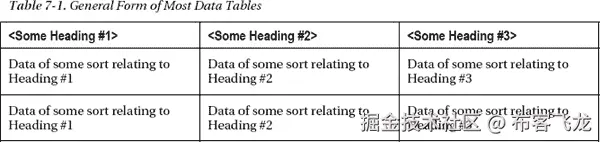
应该构建复杂的表吗?当然,你可以为跨越多列或多行的数据单元格设置标题,但是你真的需要确保在更复杂的表格中嵌入标题(见图 7-5 )并使用适当的 id 在这些标题和数据单元格之间创建编程关联。
尽管随着技术的进步,有更高级的 HTML 标记方法承诺更容易创作或只是“更好”,但在实践中,这里概述的简单方法是您应该坚持的。对于更复杂的表——使用@scope 是最理想的——记住它仍然没有得到很好的支持。因此,即使一个标记方法可能是“好的”(从纯编码的角度来看),并且在语义上有意义,你仍然必须小心,并且测试,测试,测试。困难在于 at 供应商需要赶上作者正在做的事情和规范建议的事情。其实@scope里没什么新东西。它已经存在很多年了。
注意关于新的 HTML5 表格语法,我必须承认最初我对它有着复杂的感情。然而,当我编写前面的例子时,我发现更简洁的语法首先更容易编写,然后当我检查代码时也很好。我喜欢它在网格中思考的方式。您可以在您选择的编辑器中布置代码,就像您可视化地布置数据表中的表格单元格一样。当然,您也可以用 HTML 4 做到这一点,但是新的语法要简单得多,并且使得可视化解析代码变得更加容易。虽然一开始不太情愿,但发现自己惊喜万分。
In the next table the number of animals we have in care are given in the first column,
Number in Care, the animal type is in the second column, Animal Type, and the third column
shows the number that are available currently.
The number of animals in care that we have and that are available for immediate re-
housing.
虽然在表的正上方有一个详细的描述是一个好主意(如果需要,屏幕阅读器的用户将能够更容易地发现它,因为它非常接近表),但它仍然有缺陷。这是因为在代码中没有显式的编程关联。正如您现在所知道的,屏幕阅读器用户可以使用他们的 AT 浏览 web 内容,所以显式关联非常有帮助,因为一旦表获得焦点,它就会被宣布。清单 7-6 中的会发生这种情况。
In the next table the number of animals we have in care are given in the first
column, Number in Care, the animal type is in the second column, Animal Type, and the third
column shows the number that are available currently.
Table outlining the number of animals we have in care are given in the first column,
Number in Care, the animal type is in the second column, Animal Type, and the third column
shows the number that are available currently.
The number of animals in care that we have and that are available for immediate
re-housing.
the number of animals we have in care are given in the first column, Number in Care, the
animal type is in the second column, Animal Type, and the third column shows the number that
are available currently.
The number of animals in care that we have and that are available for immediate re-
housing.Help
the number of animals we have in care are given in the first column, Number in Care, the
animal type is in the second column, Animal Type, and the third column shows the number that
are available currently.


 注意
注意 


 注而
注而

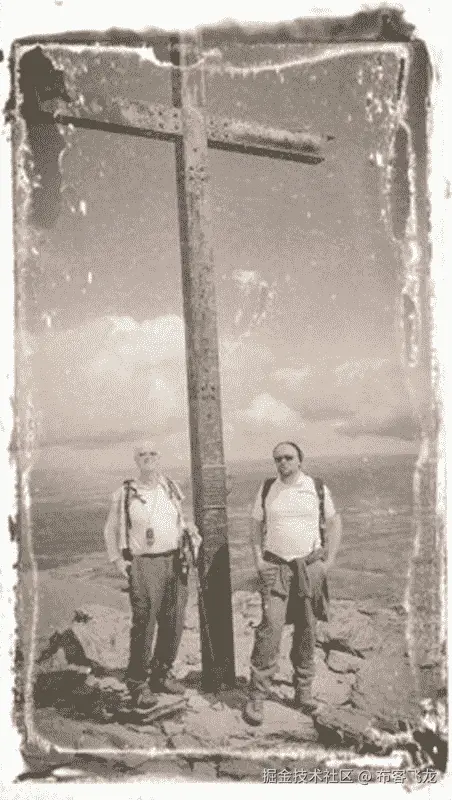
 **During the
summer of 2011, Fiachra, Dara and I climbed the three highest mountains in Ireland. This was a
stupendous day where the challenge of summiting the three peaks of Carrauntoohil, Beenkeragh &
Caher was too much to resist!
**During the
summer of 2011, Fiachra, Dara and I climbed the three highest mountains in Ireland. This was a
stupendous day where the challenge of summiting the three peaks of Carrauntoohil, Beenkeragh &
Caher was too much to resist!


 `
`

 `
`

 `
`




 Home
Home Contact
 Our Location
