好久都没写过掘金文章了,想来还是找点事做,写写知识点记录一下。
工作中真是频繁用到可编辑表格,最近一次的需求,让我把这个彻底搞明白了。
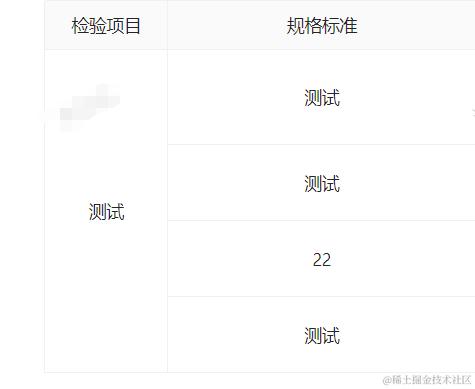
- 1、合并单元格 这个合并单元格也是常出现的需求,column里面有一个onCell的api可以实现。 我这里合并的条件是id不同且值相同
  const getRowSpan = (record: CollectIQCListType, dataIndex: string) => {
    const value = record[dataIndex];
    let rowSpan = 1;
    for (let i = 0; i < dataSource.length; i++) {
      if (dataSource[i].cacheId !== record.cacheId && dataSource[i][dataIndex] === value) {
        rowSpan++;
      }
    }
    return rowSpan;
  };

   {
      title: '检验项目',
      dataIndex: 'programName',
      key: 'programName',
      width: '8%',
      align: 'center',
      editable: false,
      onCell: (record, rowIndex = 0) => ({
        rowSpan:
          rowIndex === 0 || record.programName !== dataSource[rowIndex - 1].programName
            ? getRowSpan(record, 'programName')
            : 0,
      }),
    },
效果:
- 2、自定义单元格 有一个需求是,数值型的需要根据抽样数去生成输入框,且动态更新不良数,文字类型就显示一个textarea。这样就需要自定义单元格了
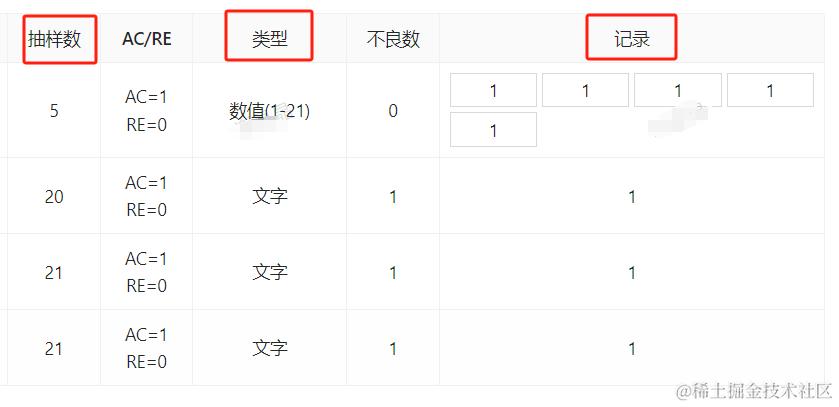 只读模式
只读模式
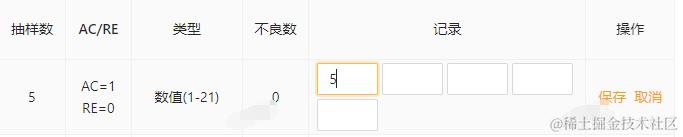

编辑模式下
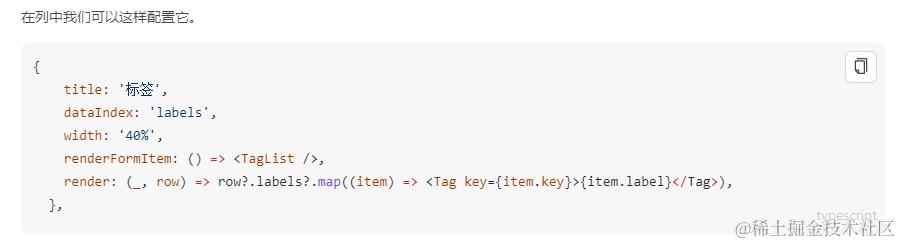
其实文档里写的很清楚,只读模式的时候用render去设置单元格,编辑模式下用renderformitem去设置单元格。最开始我没搞懂这点才像个没头苍蝇一样乱转。
 知道这两个api的作用后,代码就很简单了,在renderformitem的时候去调用自定义的组件,render只读下遍历,给每个采集值加上边框:
 {
      title: '记录',
      dataIndex: 'collectValue',
      key: 'collectValue',
      width: '25%',
      align: 'center',
      renderFormItem: (a) => {
        //@ts-ignore
        if (a?.entity?.type == '1') {
          //@ts-ignore
          return <InputList count={a?.entity?.sampleCount || 0} />;
        } else {
          return <TextArea />;
        }
      },
      render: (value, record) => {
        //数值
        if (record.type == '1') {
          const arr = record?.collectValue?.toString().split(',') || [];
          return (
            <>
              <Row gutter={[4, 4]}>
                {arr.map((item: string, index: number) => {
                  return (
                    <>
                      <Col span={6}>
                        <div
                          key={+new Date() + index}
                          style={{ border: '1px solid rgb(217,217,217)', padding: 2 }}
                        >
                          {item}
                        </div>
                      </Col>
                    </>
                  );
                })}
              </Row>
            </>
          );
        } else {
          return !value || value == '-' ? '' : value;
        }
      },
    },


    //自定义的InputList
    import { Col, Input, Row } from 'antd';

type InputListPropsType = {
  count: number;
  value?: string;
  onChange?: (value: string) => void;
};
const InputList: React.FC<InputListPropsType> = (props) => {
  const { count, value = '', onChange = () => {} } = props;
  const numArr = value?.toString().split(',') || [];
  const showArr: (string | number)[] = [];
  for (let i = 0; i < count; i++) {
    if (i < numArr.length) {
      showArr.push(numArr[i]);
    } else {
      showArr.push('');
    }
  }

  const onSave = (collectValue: number | string, index: number) => {
    const changeArr: (string | number)[] = [];
    showArr.map((item, i) => {
      if (i === index && collectValue != '') {
        changeArr.push(collectValue);
      } else if (item != '') {
        changeArr.push(item);
      }
    });
    onChange(changeArr.toString());
  };
  return (
    <Row gutter={[4, 4]} style={{ width: '100%' }}>
      {showArr.map((item, index) => {
        return (
          <>
            <Col span={6} key={+new Date() + index}>
              <Input
                style={{ width: '100%' }}
                defaultValue={item}
                onBlur={(e) => {
                  onSave(e.target.value, index);
                }}
              />
            </Col>
          </>
        );
      })}
    </Row>
  );
};

export default InputList;
自定义组件的时候,value和onchange是自动包裹的,不需要手动去传入。
这里有两个问题因为时间比较紧急还没好好去解决:
1、renderFormItem传入的参数的类型定义,总是报错,看源码的定义是这样的
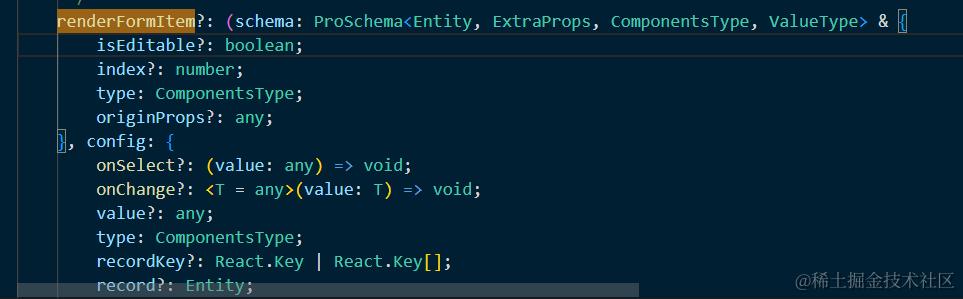 2、第二点就是遍历的时候key的选择,因为遍历的采集值也只是逗号分割的数字字符串而已,没有给唯一的id表示,用index又总是报错,最后采用了时间戳。
仔细阅读文档才发现文档上那个例子已经写的非常清晰明了了,还是要多读文档。