- 当前文章——animate*AsState
- Jetpack Compose 动画笔记2——Animatable
- Jetapck Compose 动画笔记3——AnimationSpec
- Jetpack Compose 动画笔记4——Transition
- Jetpack Compose 动画笔记5——AnimatedVisibility
- Jetpack Compose 动画笔记6——Crossfade & AnimatedContent
animateXxxAsState
在传统 Android View 系统中,要对 View 的通用属性做动画,可以利用 ViewPropertyAnimator:
view.animate()
	.alpha(0.5f)
    .rotation(90f)
	.start()
而对于其他属性,可以使用 ObjectAnimator:
ObjectAnimator
	.ofFloat(circleView, "radius", 50f, 100f)
	.start()
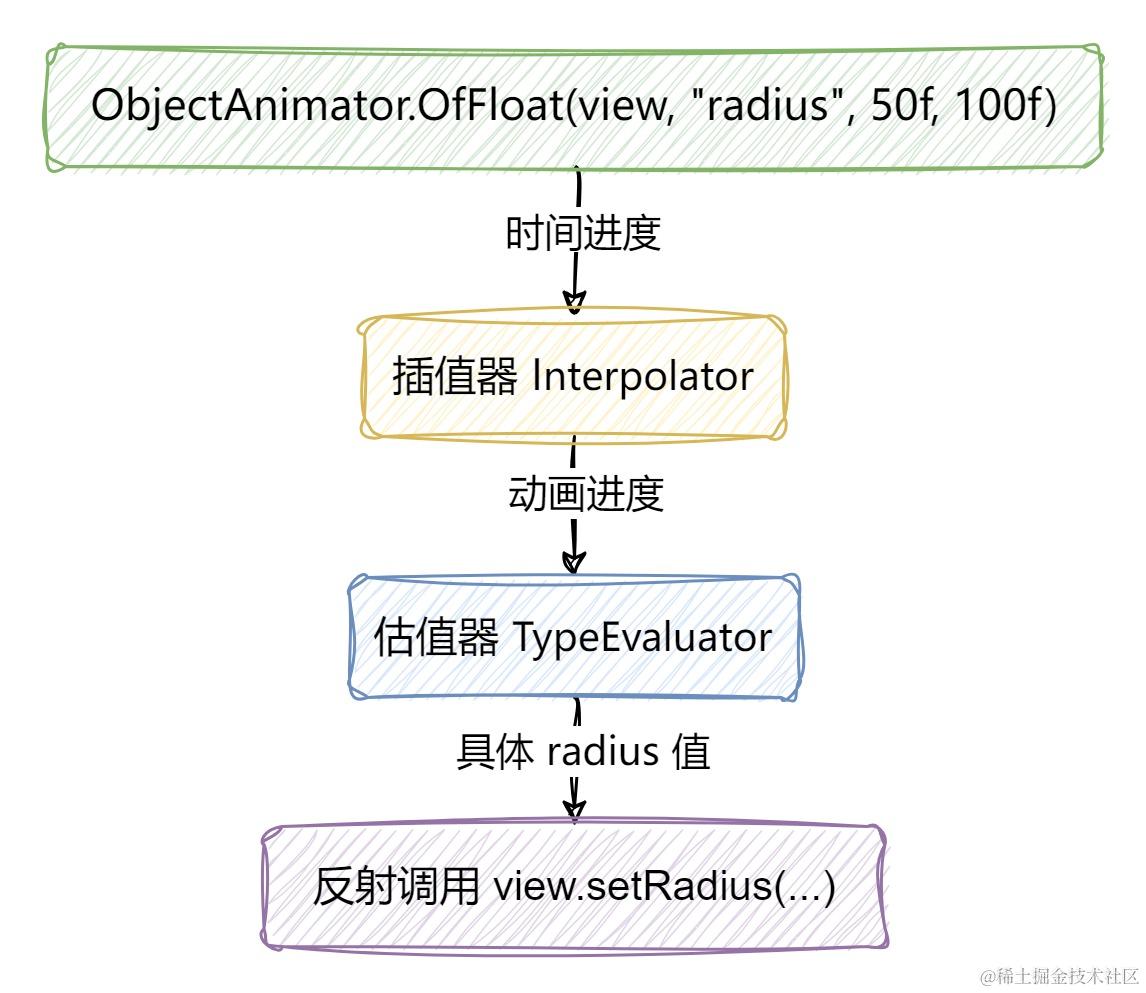
可以看出传统 View 的属性动画过程,就是在一段时间内持续调用 view 的 setXXX 函数,以此来刷新界面显示动画,这个过程是在持续地操纵 view 对象。而由于 Compose 是声明式 UI 框架,是没有办法获取到界面元素对象的,更新界面的唯一方法是通过新参数调用同一可组合项,这些参数是界面状态的表现形式。
setContent {
    var size by remember { mutableStateOf(100.dp) }
    Box(
        modifier =
            Modifier.size(size)
                .clip(RoundedCornerShape(50))
                .background(color = MaterialTheme.colorScheme.primary)
                .clickable { size = 200.dp }
    )
}
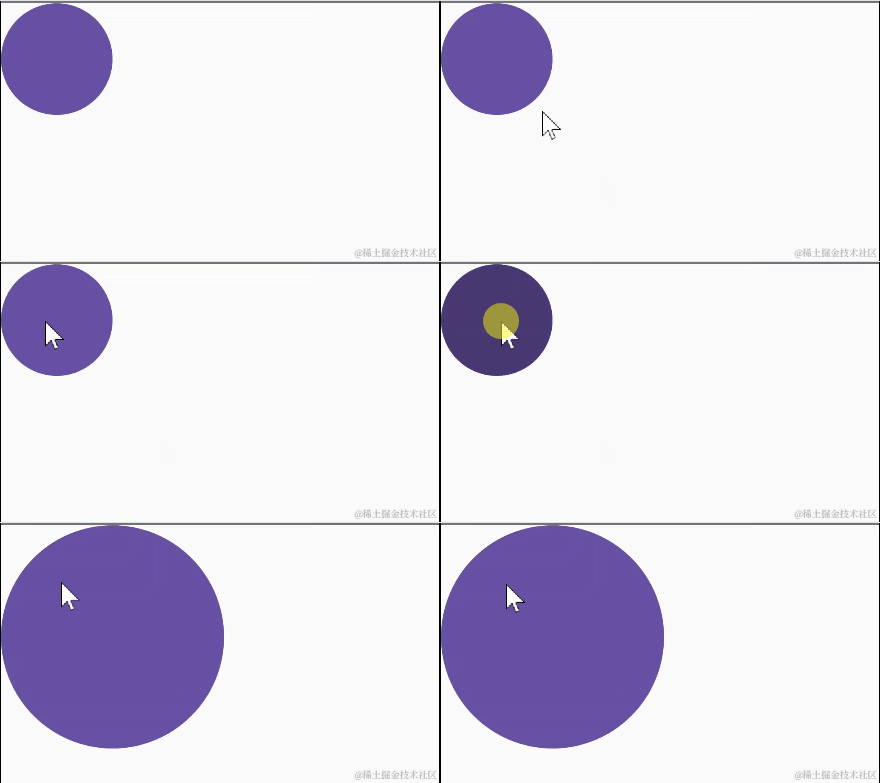
点击后界面是被更新了,可是现在要做的是动画,这种瞬间完成的界面刷新不是我们想要的,我们要的是在一段时间内 逐渐变化刷新至目标值的界面刷新。
我们要使用 animateDpAsState() 而不是 mutableStateOf()。用 animateDpAsState() 创建的 State 对象,被设置新的 target 值时,内部的 value 会从当前值逐渐变化至 target 值。
setContent {
    // var size by remember { mutableStateOf(100.dp) }
    var size by animateDpAsState(100.dp)
    // 因为 animateDpAsState() 返回的就是 State 对象,所以不需要用 mutableStateOf() 包裹它
    // 同时因为其内部会自动用 remember 包装,所以也无需手动再包装一层 remember 函数
    Box(
        modifier =
            Modifier.size(size)
                .clip(RoundedCornerShape(50))
                .background(color = MaterialTheme.colorScheme.primary)
                .clickable { size = 200.dp }
    )
}
但上面的代码还是有问题,IDE 会自动报错提示:
Type 'State<Dp>' has no method 'setValue(Nothing?, KProperty<*>, Dp)' and thus it cannot serve as a delegate for var (read-write property)
意思是说因为 size 是 var 声明的,所以它是可读可写的,而且用 by 将变量的读/写操作委托给了 animateDpAsState() 返回的 State 对象,但 State 对象并没有代理 set 操作的能力,只有 MutableState 才有代理 set 的能力。唯一的办法就是用 val 来声明 size 变量:
val size by animateDpAsState(100.dp)
...... 做动画肯定要改变状态的值,现在状态声明为不可变,那还怎么改?Compose 团队将 animateDpAsState() 返回值设计成 State 而不是 MutableState,很明显就是不想开发者去操纵这个 State 对象赋予新的动画 target 值。动画 target 值是通过 animateDpAsState(targetValue = ...) 函数参数来设置的:
setContent {
    var isSmall by remember { mutableStateOf(true) }
    val size by animateDpAsState(targetValue = if (isSmall) 100.dp else 200.dp)
    Box(
        modifier =
            Modifier.size(size)
                .clip(RoundedCornerShape(50))
                .background(color = MaterialTheme.colorScheme.primary)
                .clickable { isSmall = !isSmall }
    )
}
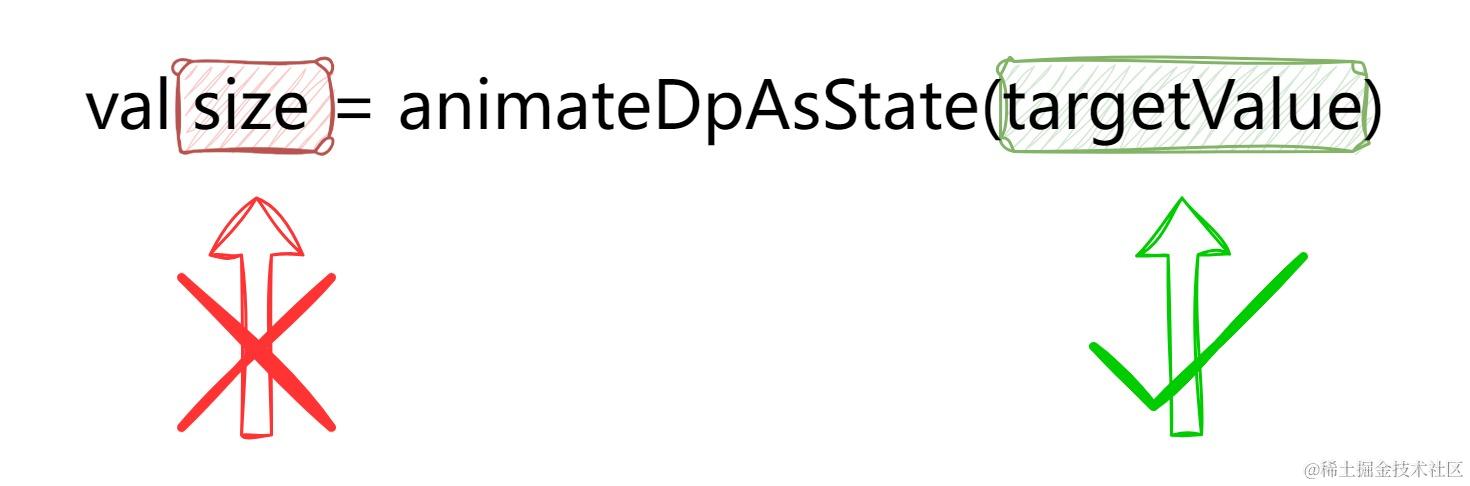
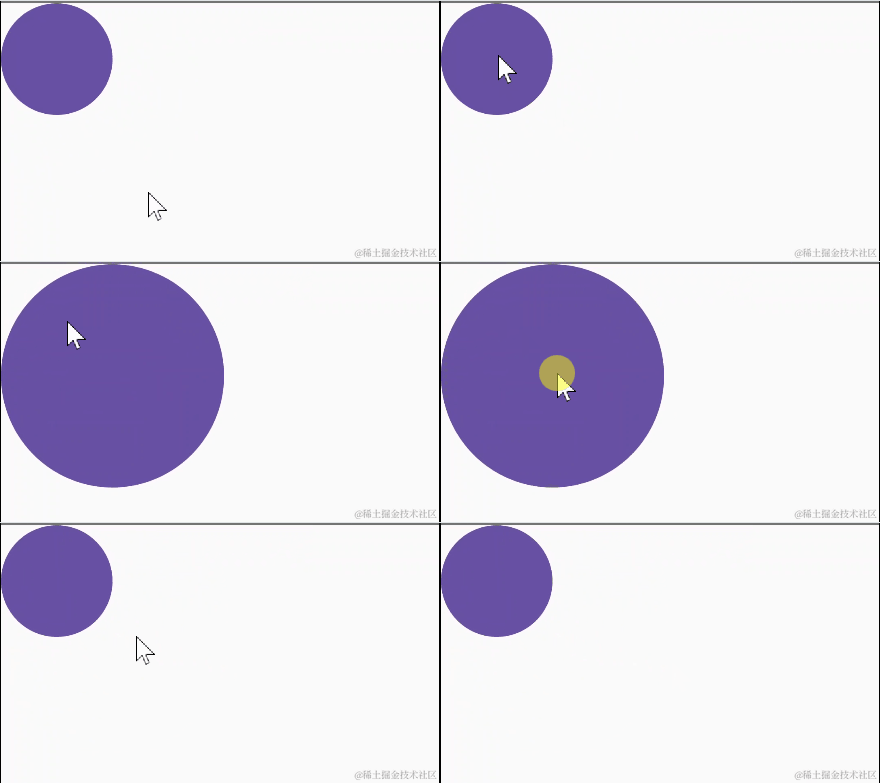
为了给 animateDpAsState() 传递不同的 targetValue(100.dp 是 small 状态下的值,200.dp 是非 small 状态下的值),所以还需要新建一个状态变量 isSmall。这么写的好处是:动画的 targetValue 与状态是挂钩的,触发动画时,不需要关心动画具体 target value 是什么,点击事件产生后只需专注于状态本身的改变。这种设计是一种思路上的改变,在上面的例子里,对于事件产生处 .clickable { ... },它脑子里只有一件事:点击切换大小状态,如果现在大就切换到小,如果现在小就切换到大。大的尺寸和小的尺寸?我不知道啊,不归我管吧。
animateValueAsState
前面只提到 animateDpAsState,其实还有很多孪生函数 animateXxxAsState,用法都是一样的
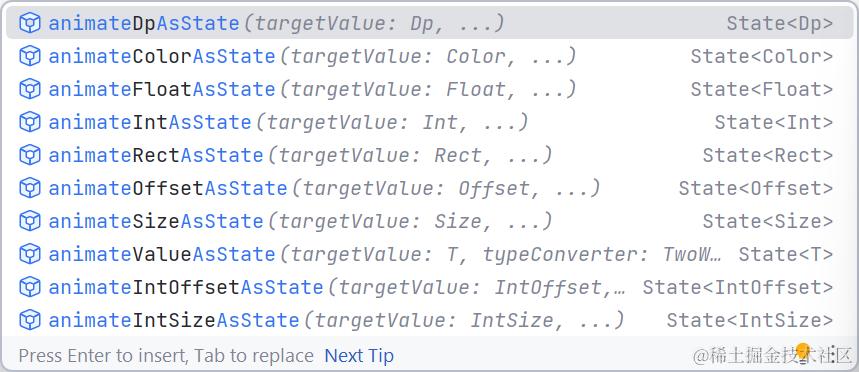
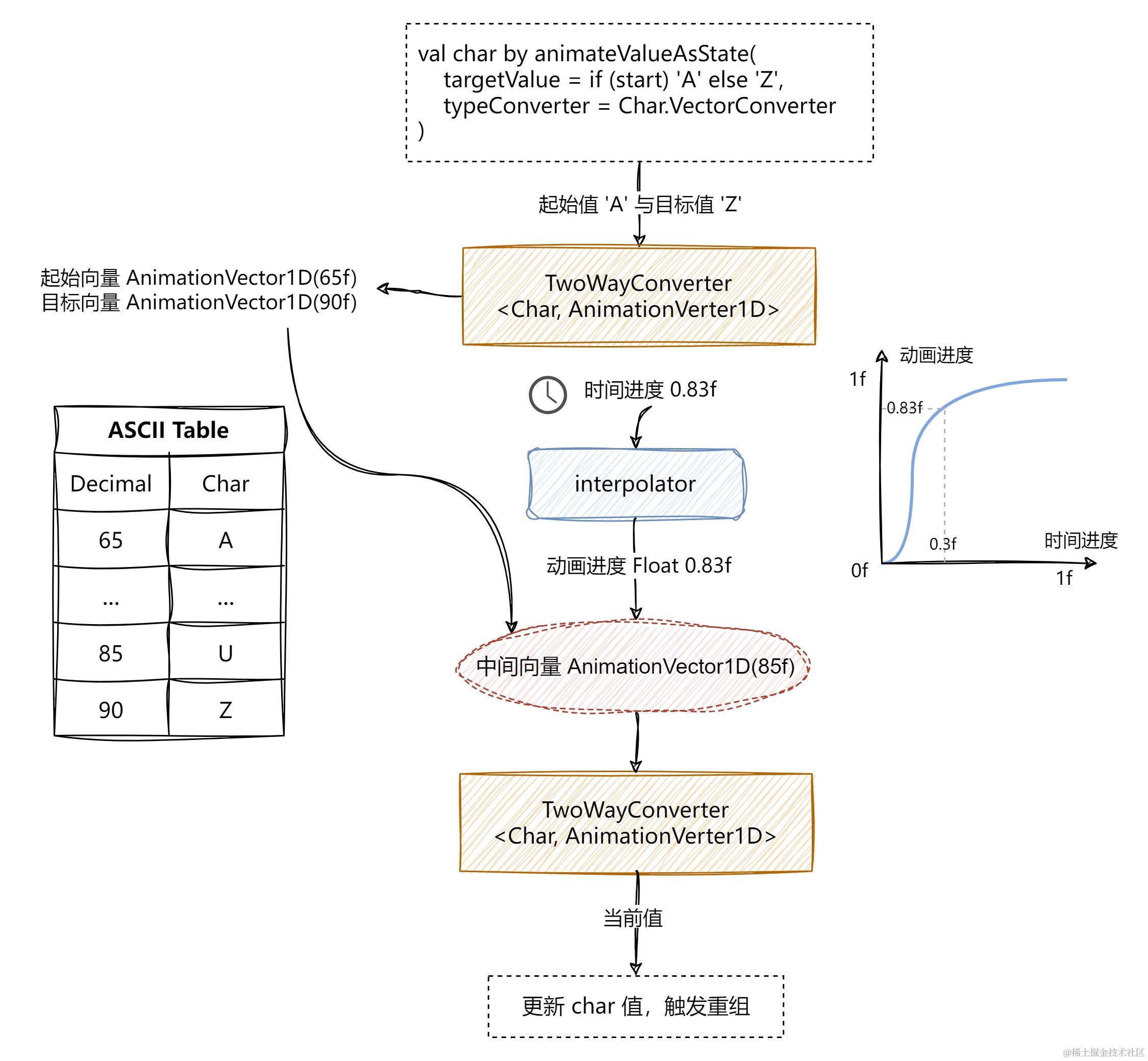
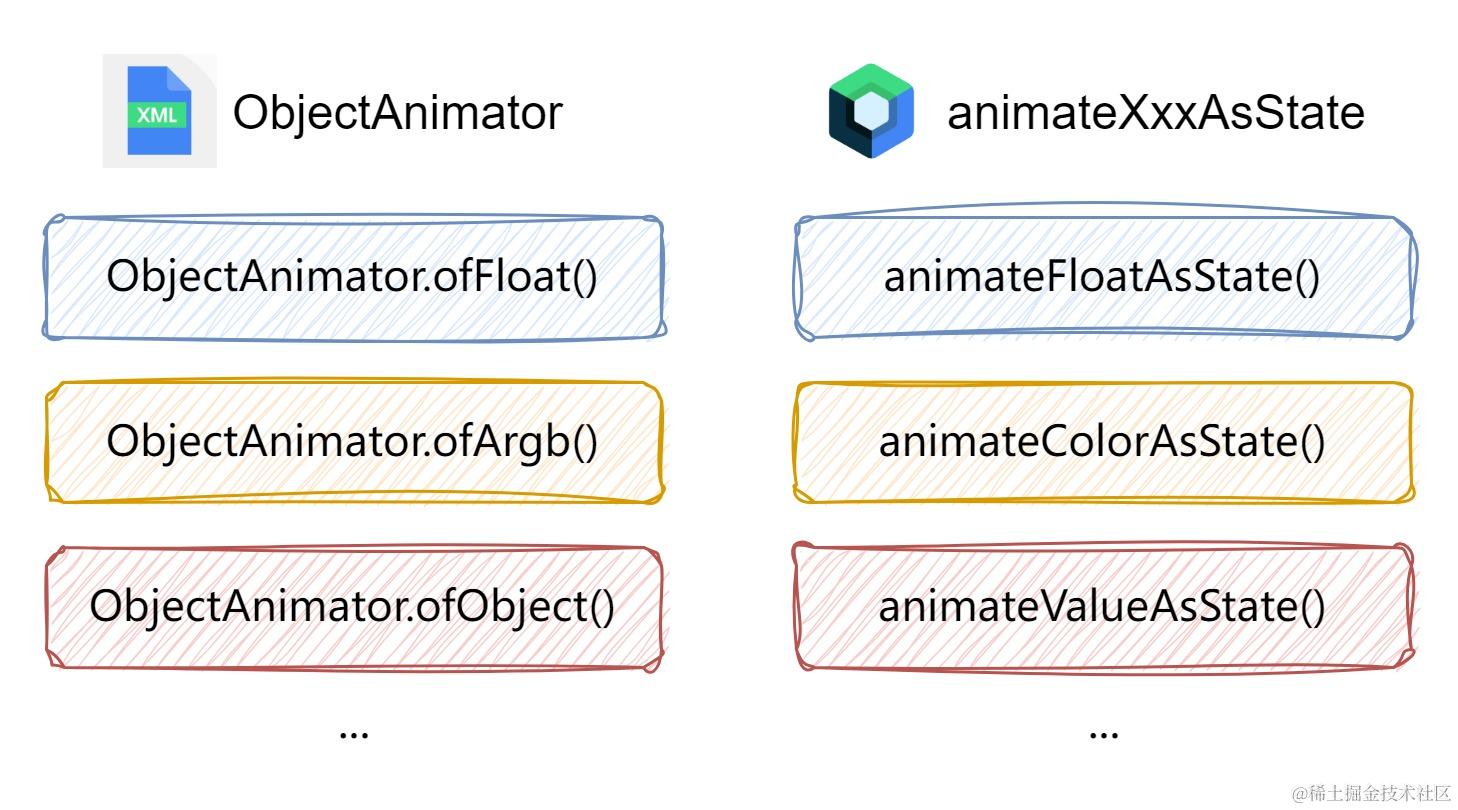
也就是说,Dp、Color、Int、Float、Rect...等等类型,我们都能使用 animateXxxAsState 轻松创建动画,那如果自定义类型呢?如果想让字符 Char 根据 ASCII 值的改变进行动画(从 A 到 Z),在传统 View 里面,可以使用 ObjectAnimator.ofObject() + 自定义 TypeEvaluator。
Compose 里面虽然没有 animateCharAsState 或 animateAsciiAsState,不过我们可以用 animateValueAsState():
setContent {
    var started by remember { mutableStateOf(false) }
    val char by animateValueAsState(
        targetValue = if (started) 'Z' else 'A',
        typeConverter = /* 需要一个类型转换器 */
    )

    Text(
        text = char.toString(),
        modifier = Modifier.clickable { started = !started },
        fontSize = MaterialTheme.typography.displayLarge.fontSize
    )
}
与其他几个 animateXxxAsState() 函数不同,除了参数 targetValue,animateValueAsState() 还要求必须填入一个类型转换器(TwoWayConverter)
@Composable
fun <T, V : AnimationVector> animateValueAsState(
    targetValue: T,
    typeConverter: TwoWayConverter<T, V>,
    ...
): State<T>


// 用于二者互相转换:动画数据类型 <-> AnimationVector
interface TwoWayConverter<T, V : AnimationVector> {
    /**
     * Defines how a type [T] should be converted to a Vector type (i.e. [AnimationVector1D],
     * [AnimationVector2D], [AnimationVector3D] or [AnimationVector4D], depends on the dimensions of
     * type T).
     */
    val convertToVector: (T) -> V
    /**
     * Defines how to convert a Vector type (i.e. [AnimationVector1D], [AnimationVector2D],
     * [AnimationVector3D] or [AnimationVector4D], depends on the dimensions of type T) back to type
     * [T].
     */
    val convertFromVector: (V) -> T
}
我们思考一下动画的过程,其实就是 动画进度 [0.0, 1.0] * (目标值 - 初始值) + 初始值,但是动画类型不一定支持相加减或者和数值相乘,比如 Color 类,Color - Color 或 0.5f * Color 都是不行的,对 Color 做动画,本质上是对 ARGB 四个分量做动画,也就是属性 red、green、blue、alpha(类型都是 Float)。动画的本质就是数字的变化,而 animateValueAsState() 是一个泛型函数,Compose 怎么知道如何在任一动画类型和数字之间进行转换呢?靠的就是 TwoWayConverter。
TwoWayConverter 用于动画数据类型与动画向量类型之间相互转换:
- 动画数据类型指的是我们要做动画的数据类型,比如 Dp、Color、Int、Float、Rect...等等类型;
- 动画向量类型指的是
AnimationVector,AnimationVector是 Compose 动画系统中的一个密封基类,共有 4 个子类AnimationVector1D、AnimationVector2D、AnimationVector3D和AnimationVector4D,分别对应 1 维、2 维、3 维、4 维的动画向量。
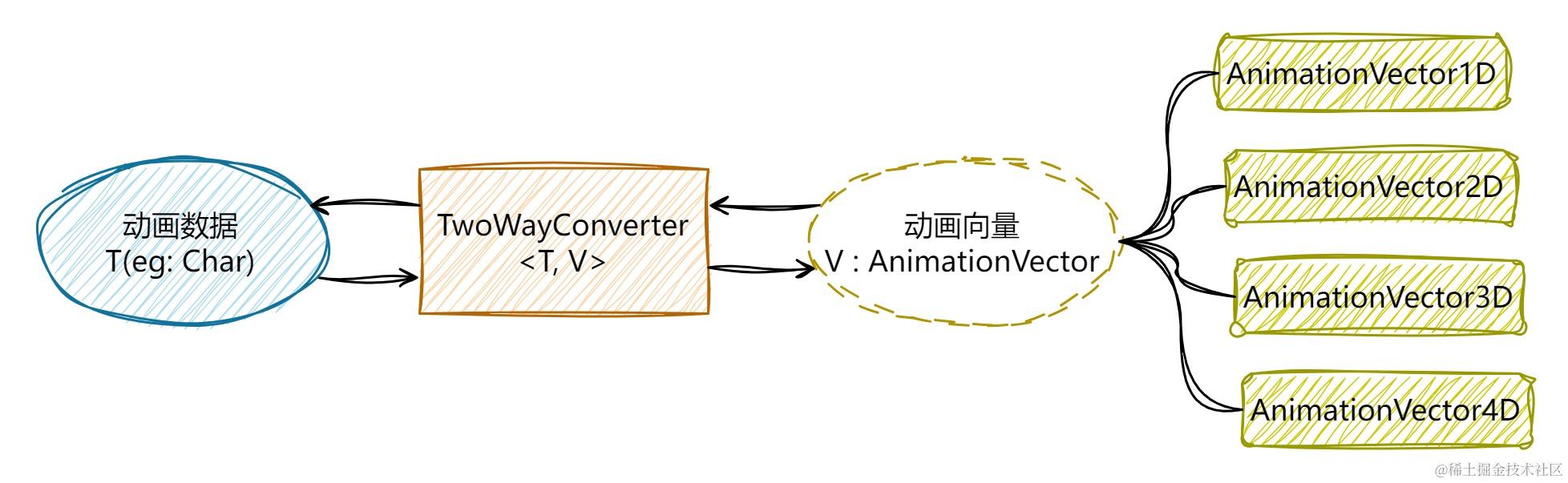
开发者应根据动画数据类型所具有的维度来选择不同的 AnimationVector,现在要对字符 Char 做动画,具体是靠对应的 ascii 码来计算的,1 个 Char 对应 1 个 ascii 码,也就是说计算 Char 动画只涉及到 1 个属性,那么数据类型 Char 的动画维度就是 1。
val Char.Companion.VectorConverter: TwoWayConverter<Char, AnimationVector1D>
    get() = object : TwoWayConverter<Char, AnimationVector1D> {
        override val convertFromVector: (AnimationVector1D) -> Char
            get() = { vector -> Char(code = vector.value.toInt()) }
        override val convertToVector: (Char) -> AnimationVector1D
            get() = { char -> AnimationVector1D(char.code.toFloat()) }
    }

...

setContent {
    var started by remember { mutableStateOf(false) }
    val char by animateValueAsState(
        targetValue = if (started) 'Z' else 'A',
        Char.VectorConverter
    )

    Text(
        text = char.toString(),
        modifier = Modifier.clickable { started = !started },
        fontSize = MaterialTheme.typography.displayLarge.fontSize
    )
}
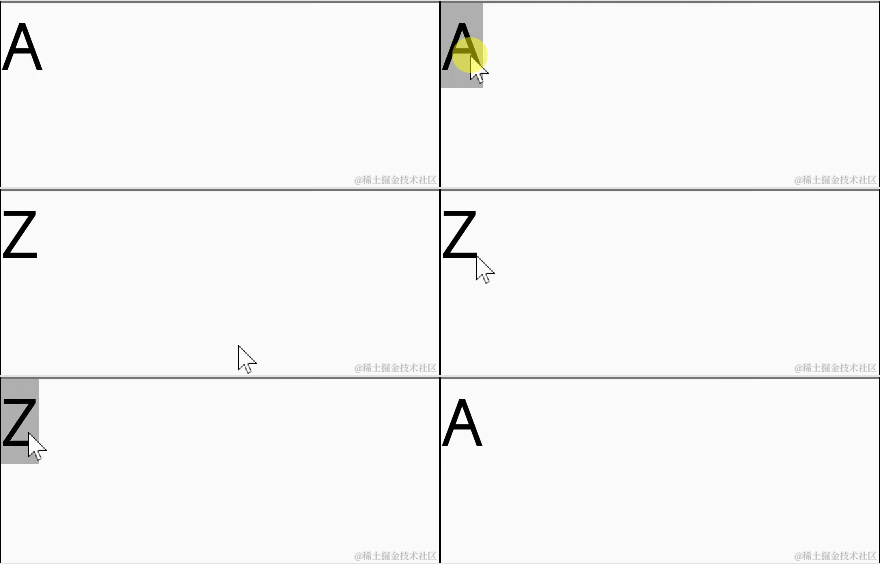
其实 animateColorAsState()、animateDpAsState()...它们都是使用animateValueAsState() 来实现的,之所以使用的时候不需要我们传入一个 typeConverter: TwoWayConverter,是因为 Compose 官方已经为几种常见类型创建了相应的 VectorConverter:
@Composable
fun animateDpAsState(
    targetValue: Dp,
    animationSpec: AnimationSpec<Dp> = dpDefaultSpring,
    label: String = "DpAnimation",
    finishedListener: ((Dp) -> Unit)? = null
): State<Dp> {
    return animateValueAsState(
        targetValue,
        Dp.VectorConverter,  // <---------------------
        animationSpec,
        label = label,
        finishedListener = finishedListener
    )
}

val Dp.Companion.VectorConverter: TwoWayConverter<Dp, AnimationVector1D>
    get() = DpToVector

private val DpToVector: TwoWayConverter<Dp, AnimationVector1D> = TwoWayConverter(
    convertToVector = { AnimationVector1D(it.value) },
    convertFromVector = { Dp(it.value) }
)
AnimationVector
这个动画向量 AnimationVector 老实说挺让人费解的。动画,明白!向量......勉强明白,中学数学知识,有大小,有方向。可是代码里面的 "动画向量" 是什么玩意,完全不理解。
向量 Vector 最初是几何学里面的概念,指具有大小和方向的几何对象,可以形象地表示为带箭头的线段:箭头所指,代表向量的方向;线段长度,代表向量的大小。中学里可以复数来表示的向量,如 3-2i,其实相当于 x 和 y 两个向量维度空间里的向量,可看作是点 (0, 0) 指向 (3, -2)
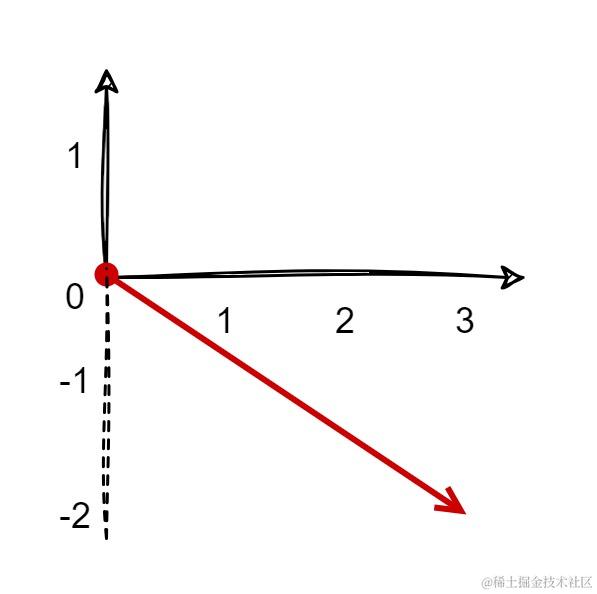
向量除了用箭头表示外,在数据计算领域常用表示方法,即用 (a, b, c, …) 来表示。其中,a、b、c...每个元素都是一个维度上的数据取值。
data class Car(
    val brand: String,    // 品牌
    val model: String,    // 型号
    val year: Int,        // 出厂年份
    val color: String     // 颜色
)

上面的叫做向量定义,下面的叫做向量实例。

val car = Car(
    brand = "Toyota",
    model = "Camry",
    year = 2022,
    color = "Blue"
)
在 kotlin 里,向量的定义其实就可以理解成类的定义,向量上每个不同的属性就是不同的维度。
我们前面用 animateValueAsState() 对 Char 进行动画,typeConverter 的类型是 TwoWayConverter<Char, AnimationVector1D>,使用 AnimationVector1D 是因为只需利用 Char 的 1 个属性来计算动画, 动画的维度是一维的。
如果需要对 class Position(val x: Int, val y: Int) 做动画,有两个属性需参与动画计算,就应该使用 AnimationVector2D。