干货|app自动化之如何参数化用例

115 阅读3分钟

获取更多技术文章分享

参数化是自动化测试的一种常用技巧,可以将测试代码中的某些输入使用参数来代替。以百度搜索功能为例,每次测试搜索场景,都需要测试不同的搜索内容,在这个过程里面,除了数据在变化,测试步骤都是重复的,这时就可以使用参数化的方式来解决测试数据变化,测试步骤不变的问题。

参数化就是把测试需要用到的参数写到数据集合里,让程序自动去这个集合里面取值,每条数据都生成一条对应的测试用例,直到集合里的值全部取完。

使用方法

使用 Appium 测试框架编写测试用例时,通常会结合 pytest 测试框架一起使用。使用 pytest 的参数化机制,可以减少代码重复,在测试代码前添加装饰器 @pytest.mark.parametrize,来完成数据的传输。示例代码如下:

@pytest.mark.parametrize("argvnames",argvalues)

@pytest.mark.parametrize() 需要传入两个参数 “argnamest” 与 “argvalues”,第一个参数需要一个或者多个变量来接收列表中的每组数据,第二个参数传递存储数据的列表。测试用例需要使用同名的字符串接收测试数据(与“argvnames”里面的名字一致),且列表有多少个元素就会生成并执行多个测试用例。下面示例使用使用参数化定义三组数据,每组数据都存放在一个元组中,分别将元组中的数据传入(test_input,expected)参数中,示例代码如下:

# content of test_expectation.py
import pytest

@pytest.mark.parametrize("test_input,expected", [("3+5", 8), ("2+4", 6), ("6*9", 42)])
def test_eval(test_input, expected):
    assert eval(test_input) == expected
    
    ```
    
    运行结果如下:
    ```
    ...
    test_expectation.py ..F
    
    test_input = '6*9', expected = 42
    
        @pytest.mark.parametrize("test_input,expected",
            [("3+5", 8), ("2+4", 6), ("6*9", 42)])
            
                def test_eval(test_input, expected):
                >       assert eval(test_input) == expected
                E       AssertionError: assert 54 == 42
                E        +  where 54 = eval('6*9')
                
                test_expectation.py:6: AssertionError
                
                ```
                
                
                上面的运行结果可以看出,执行的三条测试用例分别对应三组数据,测试步骤完全相同,只是传入的测试数据发生了变化。
                
                ## 案例
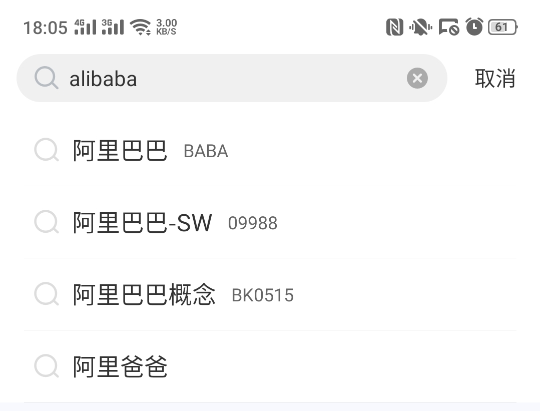
                使用“雪球”应用,打开雪球 APP,点击页面上的搜索输入框输入“alibaba”,然后在搜索联想出来的列表里面点击“阿里巴巴”,选择股票分类,获取股票类型为“BABA”的股票价格,最后验证价格在预期价格的 10%范围浮动,另一个搜索“小米”的结果数据测试步骤类似。
                这个案例使用了参数化机制和 Hamcrest 断言机制,示例代码片断如下:
                
                ![](https://ceshiren.com/uploads/default/original/3X/2/b/2b41dff867b76f25aa1aaf91b4a1d3bfc5e43933.png)
                参数化示例代码:
                ```
                from appium import webdriver
                import pytest
                from hamcrest import *
                
                class TestXueqiu:
                    省略...
                        # 参数化
                            @pytest.mark.parametrize("keyword, stock_type, expect_price", [
                                    ('alibaba', 'BABA', 170),
                                            ('xiaomi', '01810', 8.5)
                                                ])
                                                    def test_search(self, keyword, stock_type, expect_price):
                                                            # 点击搜索
                                                                    self.driver.find_element_by_id("home_search").click()
                                                                            # 向搜索框中输入keyword
                                                                                    self.driver.find_element_by_id(
                                                                                                "com.xueqiu.android:id/search_input_text"
                                                                                                            ).send_keys(keyword)
                                                                                                            
                                                                                                                    # 点击搜索结果
                                                                                                                            self.driver.find_element_by_id("name").click()
                                                                                                                                    # 获取价格
                                                                                                                                            price = float(self.driver.find_element_by_xpath(
                                                                                                                                                        "//*[contains(@resource-id, 'stockCode')\
                                                                                                                                                                    and @text='%s']/../../..\
                                                                                                                                                                                //*[contains(@resource-id, 'current_price')]"
                                                                                                                                                                                            % stock_type
                                                                                                                                                                                                    ).text)
                                                                                                                                                                                                            # 断言
                                                                                                                                                                                                                    assert_that(price, close_to(expect_price, expect_price * 0.1))
                                                                                                                                                                                                                    
                                                                                                                                                                                                                    ```
                                                                                                                                                                                                                    
                                                                                                                                                                                                                    
                                                                                                                                                                                                                    上面的代码,传入了两组测试数据,每组有三个数据分别为搜索关键词,股票类型,及股票价格。在执行测试用例时,分别将两组数据传入测试步骤中执行,对应搜索不同的关键词,使用 Hamcrest 来实现股票价格的断言。
                                                                                                                                                                                                                    
                                                                                                                                                                                                                    app自动化测试(Android)参数化用例就讲完了,大家学会了么?我们下一期为大家讲解app自动化中Andriod WebView测试,有兴趣的小伙伴可以关注一下哦!


                                                                                                                                                                                                                    内容全面升级,4 个月 20+ 项目实战强化训练,资深测试架构师、开源项目作者亲授 BAT 大厂前沿最佳实践,带你一站式掌握测试开发必备核心技能(对标阿里P6+,年薪50W+)!直推 BAT 名企测试经理,普遍涨薪 50%+!
                                                                                                                                                                                                                    
                                                                                                                                                                                                                    ### 
                                                                                                                                                                                                                    
                                                                                                                                                                                                                    [原文链接](https://mp.weixin.qq.com/s?__biz=MzU3NDM4ODEzMg==&mid=2247496152&idx=1&sn=dcd8cccd14fcce9342e6d19702ad242d&chksm=fd319313ca461a05eb77563aa05b80d7093d2191b9623a1aeb09c1f81c7469c6dec84b4ffe87#rd) 
                                                                                                                                                                                                                    
                                                                                                                                                                                                                    [获取更多技术文章分享](https://qrcode.ceba.ceshiren.com/link?name=article&project_id=qrcode&from=juejin&timestamp=1650255814
                                                                                                                                                                                                                    ) ![img](https://qrcode.ceba.ceshiren.com/link?name=article&project_id=qrcode&from=juejin&timestamp=1650255814)