iOS swift 标签选择器 居中对齐,左对齐,右对齐
文章掘金地址:juejin.cn/post/707072… 文章简书地址:www.jianshu.com/p/41600e45a…
这种方法 应该被淘汰了, 直接用约束布局 就行了。
基本效果图
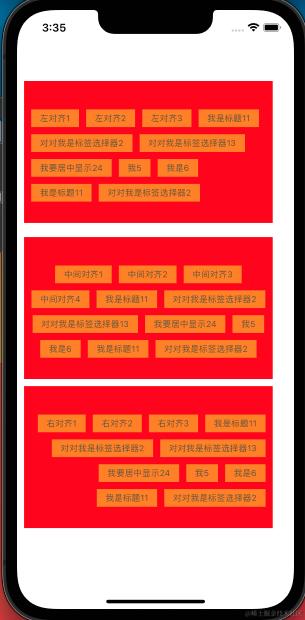
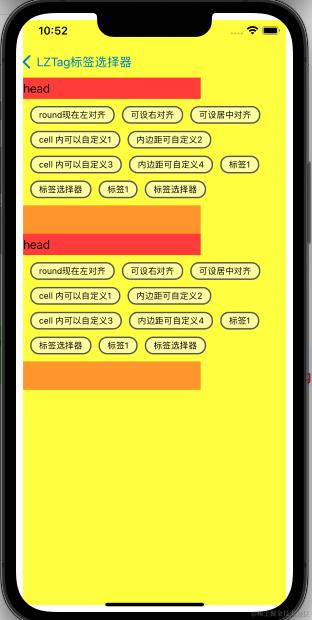
圆角效果图
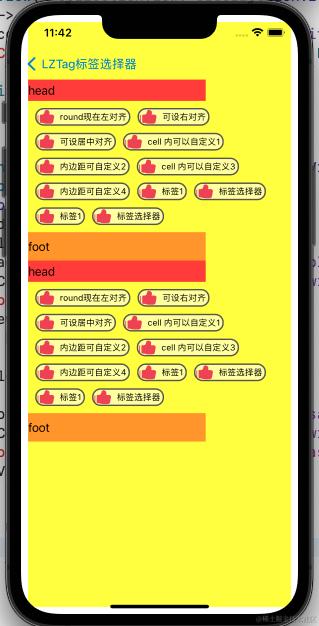
自定义cell
实现方法
UICollectionView 重新自定义 UICollectionViewLayout
demo 地址 gitee.com/Sunny0123/l… 最新代码地址:github.com/lizhi0123/L…
-
引用
更新pod命令
pod repo update
podfile 文件里添加
pod 'LZTag'
命令安装
pod install
-
使用方法
1.设置collection的layout 为 LZTagLayout
 lazy var layout: LZTagLayout = {
       let temp = LZTagLayout()
       temp.delegate = self
       return temp
   }()
 private(set) lazy var collectionView: UICollectionView = {
       let layout = self.layout
       let temp =  UICollectionView(frame: .zero, collectionViewLayout: layout)
       return temp
   }()
2.正常使用collectionview
collectionView.register(RoundCollectionCell.self, forCellWithReuseIdentifier: "RoundCollectionCell")
        collectionView.register(CollectionHeadView.self, forSupplementaryViewOfKind:UICollectionElementKindSectionHeader , withReuseIdentifier: "CollectionHeadView")
        collectionView.register(UICollectionReusableView.self, forSupplementaryViewOfKind:UICollectionElementKindSectionFooter , withReuseIdentifier: "UICollectionReusableView")
        collectionView.dataSource = self
        collectionView.backgroundColor = .yellow

        self.view.addSubview(collectionView)
3.实现UICollectionViewDataSource,cell可根据需求自定义
extension RoundViewController: UICollectionViewDataSource {
    func numberOfSections(in collectionView: UICollectionView) -> Int {
        return 2
    }
   func collectionView(_ collectionView: UICollectionView, numberOfItemsInSection section: Int) -> Int {
       return self.titles.count
   }
   func collectionView(_ collectionView: UICollectionView, cellForItemAt indexPath: IndexPath) -> UICollectionViewCell {
       let cell = collectionView.dequeueReusableCell(withReuseIdentifier: "RoundCollectionCell", for: indexPath) as! RoundCollectionCell
       let title = self.titles[indexPath.row]
       cell.fill(title: title)
       return cell
   }

    func collectionView(_ collectionView: UICollectionView, viewForSupplementaryElementOfKind kind: String, at indexPath: IndexPath) -> UICollectionReusableView {
        switch kind {
        case UICollectionElementKindSectionHeader:
            let headView = collectionView.dequeueReusableSupplementaryView(ofKind: UICollectionElementKindSectionHeader, withReuseIdentifier: "CollectionHeadView", for: indexPath)
            headView.backgroundColor = .systemRed
            return headView

        default:
            let footerView = collectionView.dequeueReusableSupplementaryView(ofKind: UICollectionElementKindSectionFooter, withReuseIdentifier: "UICollectionReusableView", for: indexPath)
            footerView.backgroundColor = .systemOrange
            return footerView
        }

    }
}
4.实现LZTagLayout 的 LZTagLayoutDelegate
extension RoundViewController: LZTagLayoutDelegate {
 /// 标签内边距
 func tagLayout(_ layout: LZTagLayout, collectionView: UICollectionView, tagInnerMarginForItemAt indexPath: IndexPath) -> CGFloat {
     return CGFloat(25)
 }

  func tagLayout(_ layout: LZTagLayout, collectionView: UICollectionView, sizeForSupplementaryElementOfKind kind: String, at section: Int) -> CGSize {
      switch kind {
      case UICollectionElementKindSectionHeader:
          return CGSize(width: 250, height: 30)
      case UICollectionElementKindSectionFooter:
          return CGSize(width: 250, height: 40)
      default:
          return CGSize(width: 250, height: 40)
      }

 }

 func tagLayout(_ layout: LZTagLayout, collectionView: UICollectionView, textForItemAt indexPath: IndexPath) -> String {
     return self.titles[indexPath.row]
 }

}