【注】本文译自: [https://www.tutorialspoint.com/spring_boot/spring_boot_interceptor.htm](https://www.tutorialspoint.com/spring_boot/spring_boot_interceptor.htm)
在以下两种情况下,可以在 Spring Boot 中使用拦截器来执行操作:
-
发送请求到控制器之前
-
发送响应到客户端之前
譬如,可以使用拦截器在发送请求到控制器之前添加请求头,并在发送响应到客户端之前添加响应头。
要用拦截器,你需要创建 @Component 类,并且要实现 HandlerInterceptor 接口。
下面是使用拦截器要知道的三个方法:
-
preHandle() 方法:用于在发送请求到控制器之前执行操作。这个方法应当返回 true 以响应客户端。
-
postHandle() 方法:用于在发送响应到客户端之前执行操作。
-
afterCompletion() 方法: 用于在请求和响应完成之后执行操作。
观察以下代码以加深理解:
@Componentpublic class ProductServiceInterceptor implements HandlerInterceptor { @Override public boolean preHandle( HttpServletRequest request, HttpServletResponse response, Object handler) throws Exception { return true; } @Override public void postHandle( HttpServletRequest request, HttpServletResponse response, Object handler, ModelAndView modelAndView) throws Exception {} @Override public void afterCompletion(HttpServletRequest request, HttpServletResponse response, Object handler, Exception exception) throws Exception {}}
还要通过 WebMvcConfigurerAdapter 用 InterceptorRegistry 注册这个拦截器:
@Componentpublic class ProductServiceInterceptorAppConfig extends WebMvcConfigurerAdapter { @Autowired ProductServiceInterceptor productServiceInterceptor; @Override public void addInterceptors(InterceptorRegistry registry) { registry.addInterceptor(productServiceInterceptor); }}
在下面给出的示例中,我们将要使用后面给出的 GET products API:
Interceptor 类文件 ProductServiceInterceptor.java 如下所示:
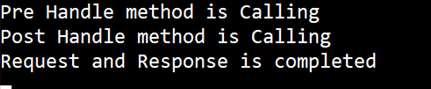
package com.tutorialspoint.demo.interceptor;import javax.servlet.http.HttpServletRequest;import javax.servlet.http.HttpServletResponse;import org.springframework.stereotype.Component;import org.springframework.web.servlet.HandlerInterceptor;import org.springframework.web.servlet.ModelAndView;@Componentpublic class ProductServiceInterceptor implements HandlerInterceptor { @Override public boolean preHandle (HttpServletRequest request, HttpServletResponse response, Object handler) throws Exception { System.out.println("Pre Handle method is Calling"); return true; } @Override public void postHandle(HttpServletRequest request, HttpServletResponse response, Object handler, ModelAndView modelAndView) throws Exception { System.out.println("Post Handle method is Calling"); } @Override public void afterCompletion (HttpServletRequest request, HttpServletResponse response, Object handler, Exception exception) throws Exception { System.out.println("Request and Response is completed"); }}
Application Configuration 类文件把拦截器注册到 Interceptor Registry中,ProductServiceInterceptorAppConfig.java 文件如下:
package com.tutorialspoint.demo.interceptor;import org.springframework.beans.factory.annotation.Autowired;import org.springframework.stereotype.Component;import org.springframework.web.servlet.config.annotation.InterceptorRegistry;import org.springframework.web.servlet.config.annotation.WebMvcConfigurerAdapter;@Componentpublic class ProductServiceInterceptorAppConfig extends WebMvcConfigurerAdapter { @Autowired ProductServiceInterceptor productServiceInterceptor; @Override public void addInterceptors(InterceptorRegistry registry) { registry.addInterceptor(productServiceInterceptor); }}
Controller 类文件 ProductServiceController.java 如下:
package com.tutorialspoint.demo.controller;import java.util.HashMap;import java.util.Map;import org.springframework.http.HttpStatus;import org.springframework.http.ResponseEntity;import org.springframework.web.bind.annotation.PathVariable;import org.springframework.web.bind.annotation.RequestBody;import org.springframework.web.bind.annotation.RequestMapping;import org.springframework.web.bind.annotation.RequestMethod;import org.springframework.web.bind.annotation.RestController;import com.tutorialspoint.demo.exception.ProductNotfoundException;import com.tutorialspoint.demo.model.Product;@RestControllerpublic class ProductServiceController { private static Map<String, Product> productRepo = new HashMap<>(); static { Product honey = new Product(); honey.setId("1"); honey.setName("Honey"); productRepo.put(honey.getId(), honey); Product almond = new Product(); almond.setId("2"); almond.setName("Almond"); productRepo.put(almond.getId(), almond); } @RequestMapping(value = "/products") public ResponseEntity<Object> getProduct() { return new ResponseEntity<>(productRepo.values(), HttpStatus.OK); }}
POJO 类文件 Product.java 如下:
package com.tutorialspoint.demo.model;public class Product { private String id; private String name; public String getId() { return id; } public void setId(String id) { this.id = id; } public String getName() { return name; } public void setName(String name) { this.name = name; }}
主 Spring Boot 应用类文件 DemoApplication.java 如下所示:
package com.tutorialspoint.demo;import org.springframework.boot.SpringApplication;import org.springframework.boot.autoconfigure.SpringBootApplication;@SpringBootApplicationpublic class DemoApplication { public static void main(String[] args) { SpringApplication.run(DemoApplication.class, args); }}
Maven build – pom.xml 文件在此:
<?xml version = "1.0" encoding = "UTF-8"?><project xmlns = "http://maven.apache.org/POM/4.0.0" xmlns:xsi = " http://www.w3.org/2001/XMLSchema-instance" xsi:schemaLocation = "http://maven.apache.org/POM/4.0.0 http://maven.apache.org/xsd/maven-4.0.0.xsd"> <modelVersion>4.0.0</modelVersion> <groupId>com.tutorialspoint</groupId> <artifactId>demo</artifactId> <version>0.0.1-SNAPSHOT</version> <packaging>jar</packaging> <name>demo</name> <description>Demo project for Spring Boot</description> <parent> <groupId>org.springframework.boot</groupId> <artifactId>spring-boot-starter-parent</artifactId> <version>1.5.8.RELEASE</version> <relativePath/> </parent> <properties> <project.build.sourceEncoding>UTF-8</project.build.sourceEncoding> <project.reporting.outputEncoding>UTF-8</project.reporting.outputEncoding> <java.version>1.8</java.version> </properties> <dependencies> <dependency> <groupId>org.springframework.boot</groupId> <artifactId>spring-boot-starter-web</artifactId> </dependency> <dependency> <groupId>org.springframework.boot</groupId> <artifactId>spring-boot-starter-test</artifactId> <scope>test</scope> </dependency> </dependencies> <build> <plugins> <plugin> <groupId>org.springframework.boot</groupId> <artifactId>spring-boot-maven-plugin</artifactId> </plugin> </plugins> </build> </project>
Gradle Build build.gradle 文件在此:
buildscript { ext { springBootVersion = '1.5.8.RELEASE' } repositories { mavenCentral() } dependencies { classpath("org.springframework.boot:spring-boot-gradle-plugin:${springBootVersion}") }}apply plugin: 'java'apply plugin: 'eclipse'apply plugin: 'org.springframework.boot'group = 'com.tutorialspoint'version = '0.0.1-SNAPSHOT'sourceCompatibility = 1.8repositories { mavenCentral()}dependencies { compile('org.springframework.boot:spring-boot-starter-web') testCompile('org.springframework.boot:spring-boot-starter-test')}
你可以使用下面的 Maven 或 Gradle 命令创建可执行的 JAR 文件,运行 Spring Boot 应用:
对于 Maven,使用以下命令:
mvn clean install
在 “BUILD SUCCESS” 之后,你可以在 target 目录下找到 JAR 文件:
对于 Gradle,使用以下命令:
gradle clean build
在 “BUILD SUCCESSFUL” 之后,你可以在 build/libs 目录下找到 JAR 文件:
可以使用以下命令运行 JAR 文件:
java –jar
此时,应用已经在 Tomcat 8080 端口启动了,如下所示:
在 POSTMAN 应用中单击以下 URL,你可以看到下面的结果:
GET API: [http://localhost:8080/products](http://localhost:8080/products):
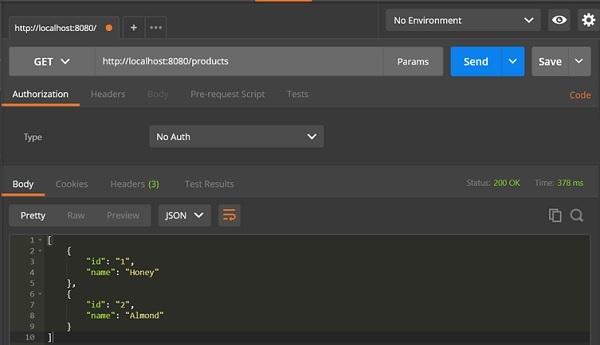
在控制台窗口,你可以看到加在拦截器中的 System.out.println 打印出来的结果,截屏如下: