【注】本文译自: [https://www.tutorialspoint.com/spring_boot/spring_boot_building_restful_web_services.htm](https://www.tutorialspoint.com/spring_boot/spring_boot_building_restful_web_services.htm)
Spring Boot 提供了构建企业应用中 RESTful Web 服务的极佳支持。本文为你详解如何使用 Spring Boot 构建 RESTful web 服务。
注意:要构建 RESTful Web 服务,我们需要在构建配置文件中加上 Spring Boot Starter Web 依赖。
对于 Maven 用户,使用以下的代码在 pom.xml 文件中加入依赖:
<dependency> <groupId>org.springframework.boot</groupId> <artifactId>spring-boot-starter-web</artifactId> </dependency>
对于 Gradle 用户,使用以下的代码在 build.gradle 文件中加入依赖:
compile('org.springframework.boot:spring-boot-starter-web')
完整的构建配置文件 Maven build – pom.xml 如下:
<?xml version = "1.0" encoding = "UTF-8"?><project xmlns = "http://maven.apache.org/POM/4.0.0" xmlns:xsi = "http://www.w3.org/2001/XMLSchema-instance" xsi:schemaLocation = "http://maven.apache.org/POM/4.0.0 http://maven.apache.org/xsd/maven-4.0.0.xsd"> <modelVersion>4.0.0</modelVersion> <groupId>com.tutorialspoint</groupId> <artifactId>demo</artifactId> <version>0.0.1-SNAPSHOT</version> <packaging>jar</packaging> <name>demo</name> <description>Demo project for Spring Boot</description> <parent> <groupId>org.springframework.boot</groupId> <artifactId>spring-boot-starter-parent</artifactId> <version>1.5.8.RELEASE</version> <relativePath/> </parent> <properties> <project.build.sourceEncoding>UTF-8</project.build.sourceEncoding> <project.reporting.outputEncoding>UTF-8</project.reporting.outputEncoding> <java.version>1.8</java.version> </properties> <dependencies> <dependency> <groupId>org.springframework.boot</groupId> <artifactId>spring-boot-starter-web</artifactId> </dependency> <dependency> <groupId>org.springframework.boot</groupId> <artifactId>spring-boot-starter-test</artifactId> <scope>test</scope> </dependency> </dependencies> <build> <plugins> <plugin> <groupId>org.springframework.boot</groupId> <artifactId>spring-boot-maven-plugin</artifactId> </plugin> </plugins> </build> </project>
完整的构建配置文件 Gradle Build – build.gradle 如下:
buildscript { ext { springBootVersion = '1.5.8.RELEASE' } repositories { mavenCentral() } dependencies { classpath("org.springframework.boot:spring-boot-gradle-plugin:${springBootVersion}") }}apply plugin: 'java'apply plugin: 'eclipse'apply plugin: 'org.springframework.boot'group = 'com.tutorialspoint'version = '0.0.1-SNAPSHOT'sourceCompatibility = 1.8repositories { mavenCentral()}dependencies { compile('org.springframework.boot:spring-boot-starter-web') testCompile('org.springframework.boot:spring-boot-starter-test')}
在继续构建 RESTful web 服务前,建议你先要熟悉下面的注解:
Rest Controller
@RestController 注解用于定义 RESTful web 服务。它提供 JSON、XML 和自定义响应。语法如下所示:
@RestControllerpublic class ProductServiceController {}
Request Mapping
@RequestMapping 注解用于定义请求 URI 以访问 REST 端点。我们可以定义 Request 方法来消费 produce 对象。默认的请求方法是 GET:
@RequestMapping(value = "/products")public ResponseEntity<Object> getProducts() { }
Request Body
@RequestBody 注解用于定义请求体内容类型。
public ResponseEntity<Object> createProduct(@RequestBody Product product) {}
Path Variable
@PathVariable 注解被用于定义自定义或动态的请求 URI,Path variable 被放在请求 URI 中的大括号内,如下所示:
public ResponseEntity<Object> updateProduct(@PathVariable("id") String id) {}
Request Parameter
@RequestParam 注解被用于从请求 URL 中读取请求参数。缺少情况下这是一个必需的参数,也可以为请求参数设置默认值,如下所示:
public ResponseEntity<Object> getProduct( @RequestParam(value = "name", required = false, defaultValue = "honey") String name) {}
GET API
默认的 HTTP 请求方法是 GET。这个方法不需要任何请求体。你可以通过发送请求参数和路径变量来定义自定义或动态 URL。
下面的示例代码定义了 HTTP GET 请求方法。在这个例子吧,我们使用 HashMap 来在存储 Product。注意我们使用了 POJO 类来存储产品。
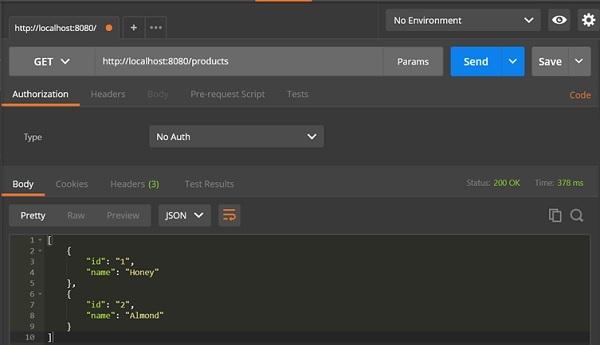
在这里,请求 URI 是 /products,它会从 HashMap 仓储中返回产品列表。下面的控制器类文件包含了 GET 方法的 REST 端点:
package com.tutorialspoint.demo.controller;import java.util.HashMap;import java.util.Map;import org.springframework.http.HttpStatus;import org.springframework.http.ResponseEntity;import org.springframework.web.bind.annotation.RequestMapping;import org.springframework.web.bind.annotation.RestController;import com.tutorialspoint.demo.model.Product;@RestControllerpublic class ProductServiceController { private static Map<String, Product> productRepo = new HashMap<>(); static { Product honey = new Product(); honey.setId("1"); honey.setName("Honey"); productRepo.put(honey.getId(), honey); Product almond = new Product(); almond.setId("2"); almond.setName("Almond"); productRepo.put(almond.getId(), almond); } @RequestMapping(value = "/products") public ResponseEntity<Object> getProduct() { return new ResponseEntity<>(productRepo.values(), HttpStatus.OK); }}
POST API
HTTP POST 请求用于创建资源。这个方法包含请求体。我们可以通过发送请求参数和路径变量来定义自定义或动态 URL。
下面的示例代码定义了 HTTP POST 请求方法。在这个例子中,我们使用 HashMap 来存储 Product,这里产品是一个 POJO 类。
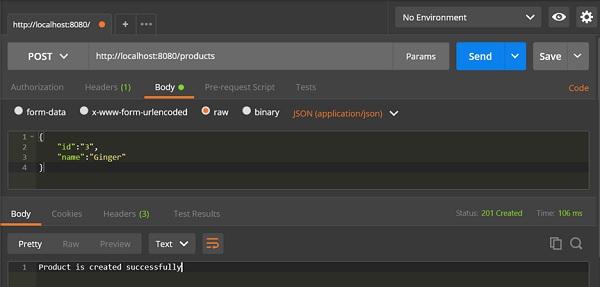
这里,请求 URI 是 /products,在产品被存入 HashMap 仓储后,它会返回字符串。
package com.tutorialspoint.demo.controller;import java.util.HashMap;import java.util.Map;import org.springframework.http.HttpStatus;import org.springframework.http.ResponseEntity;import org.springframework.web.bind.annotation.RequestBody;import org.springframework.web.bind.annotation.RequestMapping;import org.springframework.web.bind.annotation.RequestMethod;import org.springframework.web.bind.annotation.RestController;import com.tutorialspoint.demo.model.Product;@RestControllerpublic class ProductServiceController { private static Map<String, Product> productRepo = new HashMap<>(); @RequestMapping(value = "/products", method = RequestMethod.POST) public ResponseEntity<Object> createProduct(@RequestBody Product product) { productRepo.put(product.getId(), product); return new ResponseEntity<>("Product is created successfully", HttpStatus.CREATED); }}
PUT API
HTTP PUT 请求用于更新已有的资源。这个方法包含请求体。我们可以通过发送请求参数和路径变量来定义自定义或动态 URL。
下面的例子展示了如何定义 HTTP PUT 请求方法。在这个例子中,我们使用 HashMap 更新现存的产品。此处,产品是一个 POJO 类。
这里,请求 URI 是 /products/{id},在产品被存入 HashMap 仓储后,它会返回字符串。注意我们使用路径变量 {id} 定义需要更新的产品 ID:
package com.tutorialspoint.demo.controller;import java.util.HashMap;import java.util.Map;import org.springframework.http.HttpStatus;import org.springframework.http.ResponseEntity;import org.springframework.web.bind.annotation.PathVariable;import org.springframework.web.bind.annotation.RequestBody;import org.springframework.web.bind.annotation.RequestMapping;import org.springframework.web.bind.annotation.RequestMethod;import org.springframework.web.bind.annotation.RestController;import com.tutorialspoint.demo.model.Product;@RestControllerpublic class ProductServiceController { private static Map<String, Product> productRepo = new HashMap<>(); @RequestMapping(value = "/products/{id}", method = RequestMethod.PUT) public ResponseEntity<Object> updateProduct(@PathVariable("id") String id, @RequestBody Product product) { productRepo.remove(id); product.setId(id); productRepo.put(id, product); return new ResponseEntity<>("Product is updated successsfully", HttpStatus.OK); } }
DELETE API
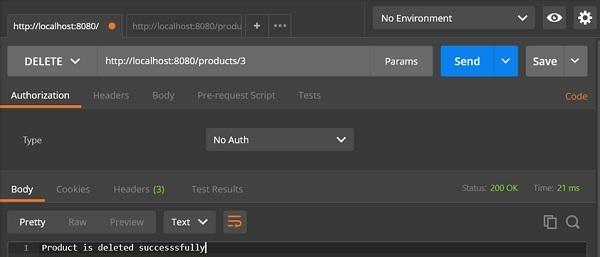
HTTP Delete 请求用于删除存在的资源。这个方法不包含任何请求体。我们可以通过发送请求参数和路径变量来定义自定义或动态 URL。
下面的例子展示如何定义 HTTP DELETE 请求方法。这个例子中,我们使用 HashMap 来移除现存的产品,用 POJO 来表示。
请求 URI 是 /products/{id} 在产品被从 HashMap 仓储中删除后,它会返回字符串。 我们使用路径变量 {id} 来定义要被删除的产品 ID。
package com.tutorialspoint.demo.controller;import java.util.HashMap;import java.util.Map;import org.springframework.http.HttpStatus;import org.springframework.http.ResponseEntity;import org.springframework.web.bind.annotation.PathVariable;import org.springframework.web.bind.annotation.RequestBody;import org.springframework.web.bind.annotation.RequestMapping;import org.springframework.web.bind.annotation.RequestMethod;import org.springframework.web.bind.annotation.RestController;import com.tutorialspoint.demo.model.Product;@RestControllerpublic class ProductServiceController { private static Map<String, Product> productRepo = new HashMap<>(); @RequestMapping(value = "/products/{id}", method = RequestMethod.DELETE) public ResponseEntity<Object> delete(@PathVariable("id") String id) { productRepo.remove(id); return new ResponseEntity<>("Product is deleted successsfully", HttpStatus.OK); }}
下面给出完整的源代码:
**Spring Boot 主应用类 – DemoApplication.java**
package com.tutorialspoint.demo;import org.springframework.boot.SpringApplication;import org.springframework.boot.autoconfigure.SpringBootApplication;@SpringBootApplicationpublic class DemoApplication { public static void main(String[] args) { SpringApplication.run(DemoApplication.class, args); }}
**POJO 类 – Product.java**
package com.tutorialspoint.demo.model;public class Product { private String id; private String name; public String getId() { return id; } public void setId(String id) { this.id = id; } public String getName() { return name; } public void setName(String name) { this.name = name; }}
**Rest Controller 类 – ProductServiceController.java**
package com.tutorialspoint.demo.controller;import java.util.HashMap;import java.util.Map;import org.springframework.http.HttpStatus;import org.springframework.http.ResponseEntity;import org.springframework.web.bind.annotation.PathVariable;import org.springframework.web.bind.annotation.RequestBody;import org.springframework.web.bind.annotation.RequestMapping;import org.springframework.web.bind.annotation.RequestMethod;import org.springframework.web.bind.annotation.RestController;import com.tutorialspoint.demo.model.Product;@RestControllerpublic class ProductServiceController { private static Map<String, Product> productRepo = new HashMap<>(); static { Product honey = new Product(); honey.setId("1"); honey.setName("Honey"); productRepo.put(honey.getId(), honey); Product almond = new Product(); almond.setId("2"); almond.setName("Almond"); productRepo.put(almond.getId(), almond); } @RequestMapping(value = "/products/{id}", method = RequestMethod.DELETE) public ResponseEntity<Object> delete(@PathVariable("id") String id) { productRepo.remove(id); return new ResponseEntity<>("Product is deleted successsfully", HttpStatus.OK); } @RequestMapping(value = "/products/{id}", method = RequestMethod.PUT) public ResponseEntity<Object> updateProduct(@PathVariable("id") String id, @RequestBody Product product) { productRepo.remove(id); product.setId(id); productRepo.put(id, product); return new ResponseEntity<>("Product is updated successsfully", HttpStatus.OK); } @RequestMapping(value = "/products", method = RequestMethod.POST) public ResponseEntity<Object> createProduct(@RequestBody Product product) { productRepo.put(product.getId(), product); return new ResponseEntity<>("Product is created successfully", HttpStatus.CREATED); } @RequestMapping(value = "/products") public ResponseEntity<Object> getProduct() { return new ResponseEntity<>(productRepo.values(), HttpStatus.OK); }}
你可以创建可执行的 JAR 文件,使用以下的 Maven 或 Gradle 命令来运行 spring boot 应用:
Maven命令如下:
mvn clean install
“构建成功“后,可以在 target 文件夹下发现 JAR 文件。
Gradle命令如下:
gradle clean build
“构建成功“后,可以在 build/libs 文件夹下发现 JAR 文件。
可以使用以下命令来运行 JAR 文件:
java –jar <JARFILE>
以 Tomcat 端口号 8080 启动应用,如下所示:

在 POSTMAN 应用中点击下面的 URL 可以看到相应的输出:
GET API URL 为: [http://localhost:8080/products](http://localhost:8080/products)
POST API URL 为: [http://localhost:8080/products](http://localhost:8080/products)
PUT API URL 为: [http://localhost:8080/products/3](http://localhost:8080/products/3)
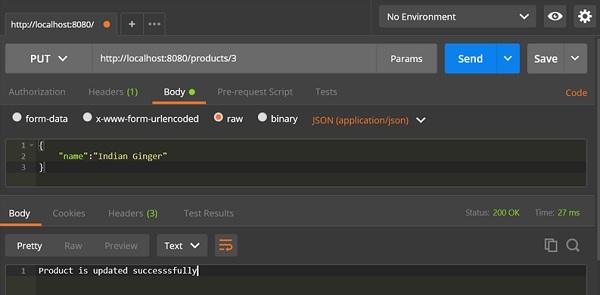
DELETE API URL 为: [http://localhost:8080/products/3](http://localhost:8080/products/3)