1.路由守卫有几种?用法分别是什么?
1全局守卫
router.beforeEach((to,from,next)=>{
    if(to.name=='Login'){
        next()
    }else{
        if(token){
            next()
        }else{
            next({name:"Login"})
        }
    }
})
export default router
//全局设置登录拦截,没有登陆则跳转到登录
2.路由独享守卫
{
    path:'/',
    name:'Index',
    component:()=>import('@/views/index'),
    beforeEnter(to,from,next){
        console.log('我是路由独享守卫')
        next()
    }
}
//可以对单个路由设置动作
3,组件内守卫
export default {
    data(){
        return {
            a:78767
        }
    },
    beforeRouteEnter(to,from,next) {
        console.log('User.vue:before route enter invoked');
        next();
    },
    beforeRouteUpdate(to,from,next) {//此处有this,等效于watch,每次路由参数更新触发
        console.log('User.vue:before route update invoked');//路由参数变化会触发
        next();
    },
    beforeRouteLeave(to,from,next) {
        console.log('User.vue:before route leave invoked');
        next();
    }
}
2.自定义指令
自定义指令有全局指令和组件内指令 1,全局指令在main.js中定义
Vue.directive('focus',{
  inserted:function(el){
    console.log('inserted',el)
    el.focus()
  }
})
<br/>
<input type="text" v-focus v-model="a"/>
2.组件内指令在组件内定义
data(){
    return {
        a:78767
    }
},
directives:{//这里可以定义多个
    changeRed:{
        inserted(el){
            el.style.background='red'
        }
    },
    changeBlue:{
        inserted(el){
            el.style.background='blue'
        }
    }
},
<br/>
<h1 v-changeRed>1111</h1>
<h1 v-changeBlue>22222</h1>
3.vue路由跳转传参的方式和区别
1.通过query传参
this.$router.push({
    name:"News",
    query:{id:"mine"}
})

2.paeams传参
this.$router.push({
    name:"News",
    params:{id:"index"}
})

两种方法获取参数都在路由对象里获取
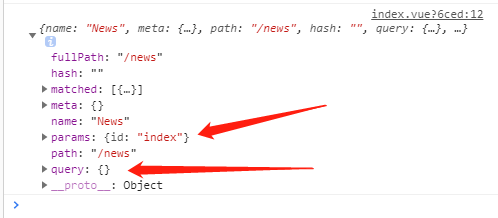
4,vue中父组件如何监听子组件的生命周期
用@hook:mounted="xxxx"
<Child @hook:mounted="childMounted"></Child>
5.vue中的事件修饰符有哪些
1,.top 阻止事件冒泡
2,.native 绑定原生事件
3,once 只触发一次
4,.self 把事件绑定再在即身上 相当于阻止事件冒泡
5,.prevent 阻止默认事件
6,.caption 用于事件捕获
6,.sync修饰符
在 vue@1.x 的时候曾作为双向绑定功能存在,即子组件可以修改父组件中的值;
在 vue@2.0 的由于违背单项数据流的设计被干掉了;
在 vue@2.3.0+ 以上版本又重新引入了这个 .sync 修饰符;
// 父组件
<home :title.sync="title" />
//编译时会被扩展为
<home :title="title"  @update:title="val => title = val"/>

// 子组件
// 所以子组件可以通过$emit 触发 update 方法改变
mounted(){
  this.$emit("update:title", '这是新的title')
}
7.生命周期有几种 ,如何理解生命周期,
生命周期是vue组件从创建到销毁所要经历的几个阶段所设置的钩子函数,一共四个阶段。
1.创建 2.挂载 3. 更新 4.销毁 所对应8个钩子函数
beforeCreate created
beforeMount mounted
beforeUpdate updated
beforeDestory destoryed
8 .父子组件的数据传递,和方法的触发
1,父传子可以用props 父组件,
<Child @hook:mounted="childMounted" :a="a"></Child>
子组件
props:{
    a:{
        type:Number,
        required:true
    }
},
父组件可以监听子组件的生命周期 用@hook:[eventname] 父组件还可以触发组组件的方法,顺便传参数
//父组件
this.$children[0].cl(9988)
//子组件
 cl(n){
    console.log(n) //9988
}
2.子传父,用自定义事件
//父组件
<Child @hook:mounted="childMounted" @getChildData="parentEvent" :a="a"></Child>
---------------------
parentEvent(ev){
    console.log(ev) //hehehehe
},
//子组件
this.$emit('getChildData','hehehehe')
子组件也可以直接触发父组件的事件并传参
this.$parent.tonews(888)
9.递归组件
组件是可以自己调用自己的,用name属性调用自己,不过要设置终止条件,不然死循环导致栈溢出