上次说到路由,现在就要开始写页面了!先来一波该系列
react全家桶
antd一个UI框架,蛮好用的,但是在next里该如何安装呢。。。超级简单,跟前端一样
npm install --save antdok了,开始尝试一下。
修改index.js如下
import Link from 'next/link'
import Router from 'next/router'
import { Button } from 'antd'

function HomePage() {
  return <div>
  	Welcome to Next.js!
  	<Link href={{ pathname: '/about', query: { name: 'abc' }}}>
      <a>to about</a>
    </Link>
    <br/>
  	<Button onClick={(e) => {
			Router.push({
		    pathname: '/about',
		    query: { name: 'abc' },
		  })
		}} >click</Button>
  </div>
}

export default HomePage
进入首页,
 我去,情况不对啊。忘了,引入css了,这记性!
首页加入import 'antd/dist/antd.css';
保存,进入首... ,不用了 ,已经报错了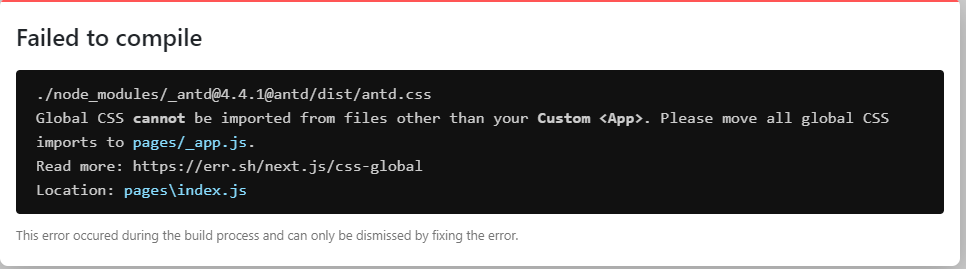
全局样式只能通过pages下的_app.js引入。
所以新建_app.js啊,但是应该写什么呢?这是个问题,到官网去看,肯定有解释。
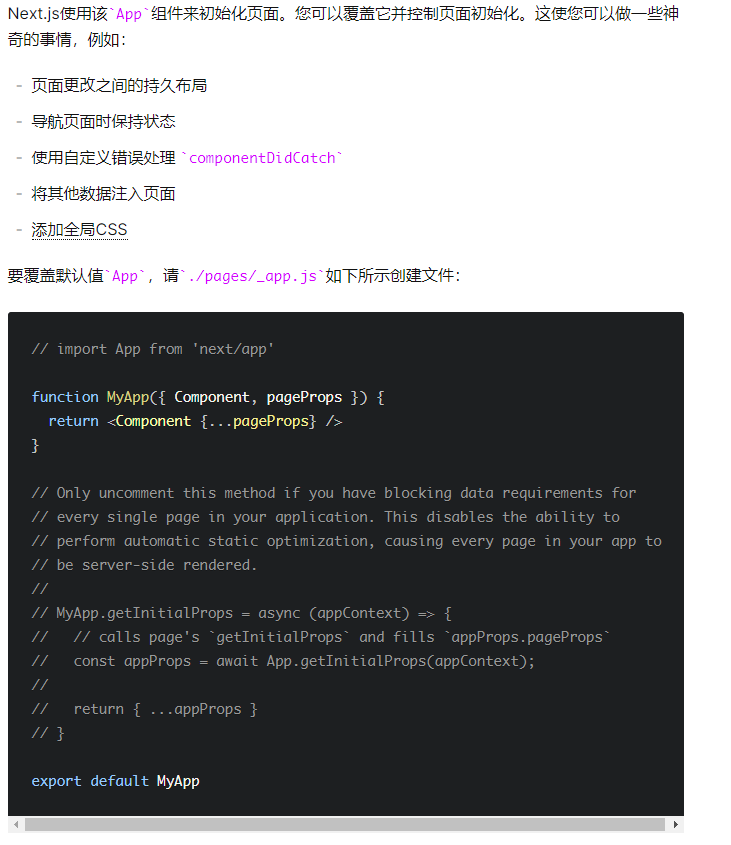
可以看到_app的作用有几个,最后一条就是我们的需求。所以整起
删除index.js里的
import 'antd/dist/antd.css'; pages文件夹下新建_app.js
import 'antd/dist/antd.css';

export default function MyApp({ Component, pageProps }) {
  return <Component {...pageProps} />;
}对了,第一次创建_app.js得重启一下才会生效
 ,熟悉的按钮回来了。
CSS-in-JS
还有一个点要说下,内联css
修改about.js如下
import React from 'react'
import { withRouter } from 'next/router'
import Child from '../components/Child'

class About extends React.Component {
  render() {
    return (
      <div>
        <span>about page! name is : {this.props.router.query.name}</span>
        <h3>子组件</h3>
        <Child></Child>
        <style jsx>{`

          span {
            background: red;
          }

        `}</style>

        <style global jsx>{`
          b {
            background: orange;
          }
        `}</style>
      </div>

    )
  }
}

export default withRouter(About)上面global,表明不止在该组件生效,同时它的子组件也会生效
在根目录下穿件components文件夹,进入里面,新建child.js如下:
import React from 'react'

class Child extends React.Component {
  render() {
    return (
      <div>
      	<span>
	        Child page
	    </span>
	    <br/>
	    <b>
	    	strong
	    </b>
      </div>
    )
  }
}

export default Child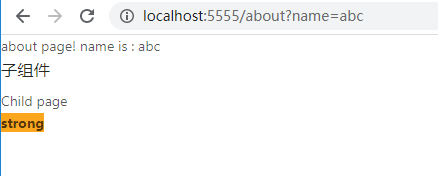
scss
查看官网找到git上的next-sass,可以这样写
npm install --save @zeit/next-sass node-sass然后创建next.config.js并写入
// next.config.js
const withSass = require('@zeit/next-sass')
module.exports = withSass({
  /* config options here */
})
之后根目录创建styles文件夹,并进入创建style.scss写入
$blue: blue;
div {
	color: $blue;}
修改_app.js
_app.js
import 'antd/dist/antd.css';
import '../styles/style.scss';

export default function MyApp({ Component, pageProps }) {
  return <Component {...pageProps} />;
}
修改about.js,并加入猜想,css-in-js是否能够使用到scss
import React from 'react'
import { withRouter } from 'next/router'
import Child from '../components/Child'
import Head from 'next/head'

class About extends React.Component {
  render() {
    return (
      <div>
        <Head>
          <link rel="stylesheet" href="../styles/style.scss"/>
        </Head>
        <div>
          <span>about page! name is : {this.props.router.query.name}</span>
          <h3>子组件</h3>
          <Child></Child>

          <style global jsx>{`
            b {
              background: orange;
              color: $red;
            }
          `}</style>
        </div>
      </div>

    )
  }
}

export default withRouter(About)
只要修改过next.config.js,就得重启一次,所以run一遍把

完。。。蛋玩意儿,有报错了,antd的css报错,没法了找一遍为啥。
config里写的貌似有点苗头可找,withSass难道是只能解析scss?
git查看next-sass,我去第一句就是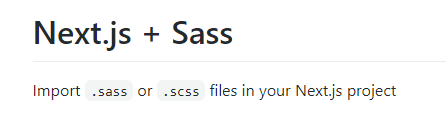
。。。。。。所以看东西还是得仔细,只能引入一个,这也太坑了吧。
不过,还是找到了解决方案
npm install --save next-compose-plugins修改next.confit.js
// next.confit.js
const withSass = require('@zeit/next-sass')
const withCss = require('@zeit/next-css');
const withPlugins = require("next-compose-plugins");

module.exports = withPlugins([withSass,withCss], {
  webpack: (config) => {
    return config
  },
});
重启run
 ,文字颜色变了,但是child里的strong没有变成红色,所以这种方式只适合scss文件使用。那如果想在内部使用又该怎么办呢?
进行babelrc配置
根目录创建.babelrc文件 有点啊,windows右键可能创建不了,可以使用命令行
type null>.babelrc// 写入一下内容
// .babelrc
{
"presets": [
[
"next/babel",
{
"styled-jsx": {
"plugins": [
"styled-jsx-plugin-sass"
]
}
}
]
]
}修改about.js
// 以上省略
<style global jsx>{`
       $red: red;
            b {
              background: orange;
              color: $red;
            }
          `}</style>
// 以下省略
看下效果
 ,红了,没问题。
由于个人比较喜欢,一个模块一个样式,而不是一个大杂烩,所以觉得这样写样式 感觉超级超级奇怪,就想有没有其他可行的方式。
然后就想到了一个简单点的方式,把style抽出来,写成一个js
把about里的style全删了
然后修改child.js
import React from 'react'
import Style from './child.style'

class Child extends React.Component {
  render() {
    return (
      <div>
      	<span>
	        Child page
	    </span>
	    <br/>
	    <b>
	    	strong
	    </b>
	    <Style></Style>
      </div>
    )
  }
}

export default Child在components里新建child.style.js
// child.style.js
export default function () {
return <style global jsx>{`
$red: red;
div {
b {
background: orange;
color: $red;
}
}
`}</style>
} ,这样是可行的。
最重要的是,可以使用高阶组件,让它在jsx里面也可以使用全局变量
最后,本来还想写rudux的,不过有点长,就不继续了。
前面给搞忘了,所以就只有现在这个版本的git地址了。。。