学习自莫烦python教程
1print
print 1
File "<stdin>", line 1
print 1
^
SyntaxError: Missing parentheses in call to 'print'. Did you mean print(1)?
print(1)
1
print("we're going to do something")
we're going to do something
print('we are going to do something')
we are going to do something
print('I\'m xhx')
File "<stdin>", line 1
print('I\'m xhx')
    ^
SyntaxError: invalid character in identifier
print('I\'m xhx')
I'm xhx
print('apple'+'car')
applecar
print('apple'+4)
Traceback (most recent call last):
File "<stdin>", line 1, in <module>
TypeError: can only concatenate str (not "int") to str
print('apple'+'4')
apple4
字符串和数字不可叠加,将数字变成字符串即可
KeyboardInterrupt
print('apple'+str(4))
apple4
print(1+2)
3
print('1+2')
1+2
print(int('1')+2)
3
print(float('1.2')+2)
3.2
2math
>>> +-*/%//双斜杠是除数取整
KeyboardInterrupt
>>> 2**3
8
>>> 2**2
4
>>> 8%3
2
>>> 9/4
2.25
>>> 9//4
2
>>> 9/5
1.8
>>> 9//5
1
3自变量
apple = 1
print(apple)

a,b,c = 1,2,3
print(a,b,c)
4循环结构
while & for
condition = 1
while condition < 10:
    print(condition)
    condition = condition + 1

while True:
    print("I'm True")

example_list = [1,2,5,7,6,4,0]
for i in example_list:
    print(i) #不断迭代出list的值

for i in [1,10]:
    print(i)
#改变缩进结构 tab 和 shift+tab

for i in range(1,10): #内部函数range,电脑自带的迭代器[1,10)
    print(i)

for i in range(1,10,2):
    print(i)
#range(start,stop,step)
continue & break
#循环中的contimue & break
#break:跳出整个循环
#continue:跳出本次循环,重新进行循环
#pass 不做任何事情,一般用做占位语句。


a = True
while a:
    b = input('type:')
    if b == '1':
        a = False
    else:
        pass
    print("still in while")
print('finish run')

while True:
    b = input('type:')
    if b == '1':
        break
    print("still in while")
print('finish run')

while True:
    b = input('type:')
    if b == '1':
        continue
    print("still in while")
print('finish run')

# 在 Python 中有时候会看到一个 def 函数:
#
# def sample(n_samples):
#     pass
# 该处的 pass 便是占据一个位置,因为如果定义一个空函数程序会报错,当你没有想好函数的内容是可以用 pass 填充,使程序可以正常运行。
5if;if_else;if_elif
condition =1
if condition:
    print('满足条件')

x=1
y=2
z=3

if x<y<z:
    print('满足条件')

z=0
if x < y > z:
    print('满足条件')

if x<=y:
    print('1')

#< > <= >= == != 无=
if x==y:
    print('2')

if x!=y:
    print('3')
# if condition:
#     to do
# else:
#     to do
x=1
y=2
z=3
if x>y:
    print("x is greater than y")
else:
    print("x is not greater than y")
# if condition:
#     to do
#elif condition:
#     to do
# else:
#     to do
x=-2
y=2
z=3
if x>1:
    print("x>1")
elif x<1:
    print('x<1')
elif x<-1:
    print('x<-1')
else:
    print("x=1")
# 结果:x<1

if x>1:
    print("x>1")
elif x<-1:
    print('x<-1')
elif x<1:
    print('x<1')
else:
    print("x=1")
#结果:x<-1
#第一次满足条件后break
6函数
#定义
def function(a,b):
    print('This is a function')
    print(a)
    a = 1+b
    print(a)

#调用
function(2,3)

function(b=3,a=2) #指定函数变量的值

def sale_car(price,colour,brand,is_second_hand):
    print('price:',price,
          'colour:',colour,
          'brand:',brand,
          'is_second_hand:',is_second_hand)

sale_car(1000,'red','carmy',True)

def sale_car_2(price,colour='red',brand='carmy',is_second_hand=True):
    print('price:',price,
          'colour:',colour,
          'brand:',brand,
          'is_second_hand:',is_second_hand)
sale_car_2(13100)

sale_car_2(1233,colour='blue')
全局变量
#全局变量
APPLE = 100
def fun():
    a = 10 #局部变量
    print(a)
    return a+100 #返回值

print(fun())
7读写文件
#write

text = 'This is my first test.\nThis is next line.\nThis is last lint'
#打开--写东西--关闭
my_file = open('my file.txt','w')
#mode: w = write r =rend a=append
my_file.write(text)
my_file.close()
#会在项目文件夹里生成my_file.tex文件
#append

append_text='\nThis is an appended file.'
my_file = open('my file.txt','a')
my_file.write(append_text)
my_file.close()
#read

file = open('my file.txt','r') #read,将文件存在file变量里面
content = file.read() #读取内容
print(content)

#可以用list的方式读取excel/tet的每一行
file = open('my file.txt','r')
content = file.readlines() #用list存取每一行
print(content)
#['This is my first test.\n', 'This is next line.\n', 'This is last lint\n', 'This is an appended file.']
8class
# #广泛的分类,特定类别有特定的属性
# class ClassName:
#    class characteristic
#    def function(self,a,b)
class Calculator:
    #类的属性
    name = 'Good calculator'
    price = 18
    #类的功能
    def add(self,x,y):
        #self变量是针对于class的属性来使用的
        print(self.name)
        result = x+y
        print(result)
    def minus(self,x,y):
        result = x - y
        print(result)
    def times(self,x,y):
        print(x*y)
    def divide(self,x,y):
        print(x/y)

cal = Calculator()
print(cal.name)
print(cal.price)
cal.add(10,11)
cal.divide(9,8)
init
#类 init功能

class Calculator:
    #类的固有属性
    name = 'Good calculator'
    price = 18
    #类的功能
    #init类的可更改属性
    def __init__(self,name,price,hight,width,weight):
        self.name = name
        self.p = price
        self.h = hight
        self.wi = width
        self.we = weight
    def add(self,x,y):
        #self变量是针对于class的属性来使用的
        print(self.name)
        result = x+y
        print(result)
    def minus(self,x,y):
        result = x - y
        print(result)
    def times(self,x,y):
        print(x*y)
    def divide(self,x,y):
        print(x/y)

c = Calculator('Bad calculator',1,2,3,4)
# print(c.name)
# print:Bad calculator   init的属性优先

#init功能可以代替类的属性代码
class Calculator:
    def __init__(self,name,price=35,hight=17,width=15,weight=2):
        self.name = name
        self.price = price
        self.hight = hight
        self.width = width
        self.weight = weight
        self.add(1,2) #可以调用别的功能
    def add(self,x,y):
        #self变量是针对于class的属性来使用的
        print(self.name)
        result = x+y
        print(result)
    def minus(self,x,y):
        result = x - y
        print(result)
    def times(self,x,y):
        print(x*y)
    def divide(self,x,y):
        print(x/y)

c=Calculator('BAD CAL')
print(c.width)
print(c.name)
9input
#input

a = input("Please give a number")
print('This input number is:',a)

b=input()#return string
print(b)

#此句有问题,因为b=input(),input()函数return的是string
# if b == 1:
#     print('haha')
# elif b == 2:
#     print('gaga')
# else:
#     print("lala")
# 法一:
if b == '1':
    print('haha')
elif b == str(2):
    print('gaga')
else:
    print("lala")
# 法二
b=int(input())#return int
if b == 1:
    print('haha')
elif b == 2:
    print('gaga')
else:
    print("lala")
10tuple & list
introduction
#元组 列表
#tuple list
#一连串有顺序的数字

a_tuple = (2,5,6,85)
b_tuple = 5,55,6,23


a_list = [1,2,856,53]

for i in a_list:
    print('i=',i,'\n')
for i in b_tuple:
    print('i=',i,'\n')

# for index in range(len(a_tuple)):
#     print('index=',index,'number in tuple=',a_tuple(index))
#

for index in range(len(a_list)):
    print('index=',index,'number in tuple=',a_list[index])
#range(5)=range(0,5)  i=0 1 2 3 4
list_function
a = [1,2,3,4,5] #list

#对list操作
#功能
a.reverse()
print(a)
a.append(0)
print(a)
a.clear()
print(a)
a.insert(0,3)
print(a)
a.pop(0) #删除[指定index]的值
print(a)

a = [1,2,3,4,5,2]
a.remove(3) #删除[第一次出现]的指定值
print(a)
print(a.index(2)) #1
print(a.count(2)) #2

#排序
a.sort() #从小到大  a=[1,2,2,3,4,5]
a.sort(reverse= True) #从大到小
print(a)


#指定值
print('第一位:',a[0],'最后一位:',a[-1])
#输出一连串 各种:的操作    start_index:stop_index
print(a[1:5])#输出第二位到第四位的值
多维list
#多维列表
#进阶版:numpy、pandas处理矩阵运算

#1维:一行
a=[1,2,3]

#多维用numpy、pandas实现更方便
#2维:行+列,以一行为一个元素
b=[  [1,2,3],
      [4,5,6,],
      [7,8,9,] ]
print(b[0][1])

#3维
c=[ [ [1,2,3],[4,5,6] ],[23] ]

print(c[0][0][1]) #2
print(c[1]) #[23]
11字典
#字典,类似list,但是没有顺序
#d = {key : value}
#dirtionary_key == list_index
#value元素可以是list、funciion、字典、变量、int、string等

d = {'apple':1,'pear':2,'orange':3}
d2 ={1:'a',2:'b'}
print(d['apple'])

d.pop('apple')
print(d)#{'pear': 2, 'orange': 3}

del d['pear']
print(d)#{'orange': 3}

d['apple'] = 4
print(d)#{'orange': 3, 'apple': 4}
d['lala'] = {1:'a',2:'b'}
print(d['lala'][2])#b
12模块的使用
模块安装
#模块安装

# import time
# import time as t

#只import部分功能,后续则可直接使用
from time import time,localtime
print(time())
print(localtime())
创建自己的模块
## print.py
def pp(a):
    print(a)

##test.py
# import print
# print.pp('I am a')

from print import pp

pp('I am a')
13try 错误处理
#错误处理 try

try:
    file = open('eeee','r+')
except Exception as e: #接收到错误后的处理
    print(e)#[Errno 2] No such file or directory: 'eeee'
    response = input('do you want to create a new file? : ')
    if response == 'y':
        file = open('eeee','w')
    else:
        pass
else: #没有接收到错误
    file.write('ssss')
file.close()
14 map、zip、lambda
#map zip lambda

#zip 把两个list对应元素合并
a = [1,2,3]
b = [4,5,6]
z = zip(a,b)
print(z) #<zip object at 0x0000019340D7BA88>
print(list(z))#[(1, 4), (2, 5), (3, 6)]

for i,j in zip(a,b):
     print(i/2,j*2)
    # 0.5 8
    # 1.0 10
    # 1.5 12

#lambda:用一行的代码定义简单的方程运算函数
def fun1(x,y):
    return(x+y)
fun2 = lambda x,y:x+y

print(fun1(2,6))#8
print(fun2(2,6))#8

#map:多次重复高效使用function传递参数

m = map(fun1,[2],[3])
print(list(m))#[5] #和zip一样,如果要可视化则需要转换为list

#运行多次函数
print(list(map(fun1,[1,3,6],[1,4,7])))#[2, 7, 13]
15 shallow copy & deep copy
>>> import copy
>>> a = 33
>>> b = a #将b指向a指向的内存空间
>>>a = 2
>>>b
2
>>> id(a)
140732413506304
>>> id(b)
140732413506304
>>> a = [3,5,7]
>>> b = a
>>> id(a) == id(b)
True
>>> c = copy.copy(a)
>>> a
[3, 5, 7]
>>> c
[3, 5, 7]
>>> b
[3, 5, 7]
>>> print('id of a:',id(a),'id of b:',id(b),'id of c:',id(c))
id of a: 2914018301448 id of b: 2914018301448 id of c: 2914018491016
>>> a = [123,[15,56]]
>>> c = copy.copy(a)
>>> id(a) == id(c)
False
>>> id(a[1][0]) == id(c[1][0])
True
>>>#浅层copy,对多维列表还是相当于指针指向同一块内存
>>>#深度copy,完全指向不同的内存空间,相当于 b = a[:]
>>>#b=a与b=a[:]的区别
>>>#b=a将两者指向同一个对象
>>>#而b=a[:]会创建一个新的与a完全相同的对象,但是与a并不指向同一对象。
>>> d = copy.deepcopy(a)
>>> id(a[1][0]) == id(d[1][0])
True
>>> id(a) == id(d)
False
>>> id(a[1][1]) == id(d[1][1])
True
>>> a
[123, [15, 56]]
>>> a[1][0] = 0
>>> a
[123, [0, 56]]
>>> d
[123, [15, 56]]
>>> c
[123, [0, 56]]
>>> a
[123, [0, 56]]
>>> b= a
>>> b
[123, [0, 56]]
>>> c = a[:]
>>> c
[123, [0, 56]]
>>> id(a),id(b),id(c)
(2914018488520, 2914018488520, 2914018490632)
16pickle存放数据
#picle 保存和提取字典、列表、变量
import pickle

a = {'apple':1,'23':{1:2,'d':'sad'}}
file = open('pickle_example.pickle','wb')
pickle.dump(a,file)
file.close()

file = open('pickle_example.pickle','rb')
b = pickle.load(file)
file.close()
print(b)
print(a)

#容易忘记file.close(),则使用with语句
# with open('','') as xxx
with open('pickle_example.pickle','rb') as file:
    c = pickle.load(file)
print(c)
17集合类set
# set集合类,用大括号直接填充元素
# 去除重合的东西,集合没有重复元素
# set是一个class,类似于int,float
#int()可以把string,float转换为int类型
#set()可以把list,字典转换成没有重复内容的一个set类型
# list = ['a','b','a','a','c','b']
# dirctionary ={'a':1,'b':2,'a':1}
# set ={1,'a',5,5}

list = ['a','b','a','a','c','b']
dict = {'a':1,'b':2,'a':1}
sentence = 'Welcome my home'

print(set(list))#{'b', 'c', 'a'}
print(set(dict))#{'a', 'b'}
print(set(sentence))#{'h', 'm', 'W', 'e', 'o', 'l', 'c', ' ', 'y'}

aa = set(list)
aa.add('x')
print(aa)#{'x', 'c', 'a', 'b'}
aa.remove('x')#{'b', 'c', 'a'}
print(aa)
aa.clear()
print(aa)#set()

set1 = {'a','b','a','a','c','b'}#这是一个集合
set2 = {'a','e','i'}
print(set2.difference(set1))#{'e', 'i'}
print(set2.intersection(set1))#{'a'}


print(type(set(list)))#<class 'set'>
print(type({1:2}))#<class 'dict'>
18正则表达
#regular expression 正则表达
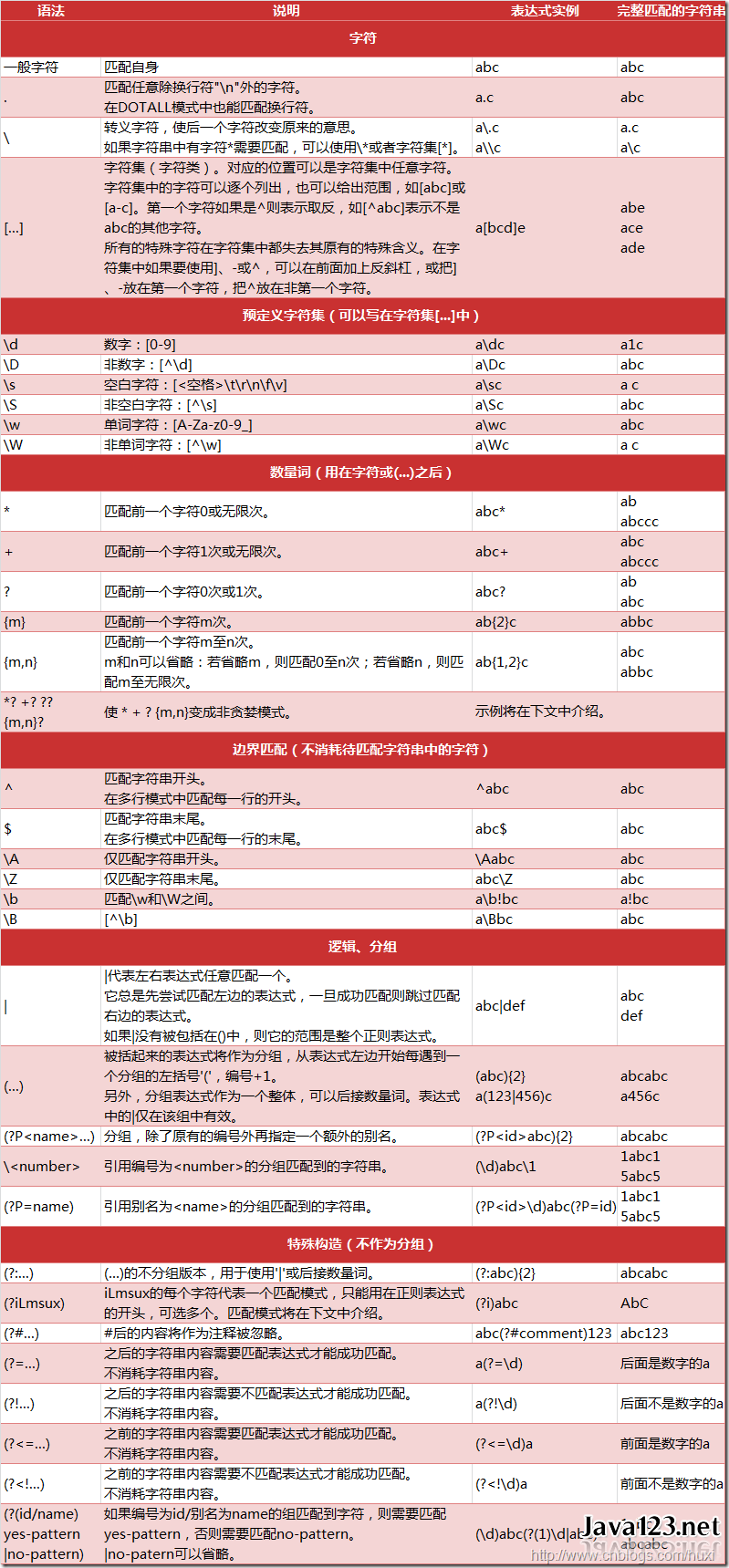
#正则表达式 (Regular Expression) 又称 RegEx, 是用来匹配字符的一种工具. 在一大串字符中寻找你需要的内容. 它常被用在很多方面, 比如网页爬虫, 文稿整理, 数据筛选等等.

# #import re