

通信的方式
要想实现多个线程之间的协同,如:线程执行先后顺序、获取某个线程执行的结果等等。 涉及到线程之间相互通信,分为下面四类:
- 文件共享
- 网络共享
- 共享变量
- jdk提供的线程协调API 细分为:Suspend/resume、wait/notify、park/unpark
文件共享
代码示例:
public class Demo5 {
    public static void main(String[] args) {
        //线程1 写入数据
        new Thread(() -> {
            try {
                while (true) {
                    Files.write(Paths.get("Demo7.log"), ("当前时间" + String.valueOf(System.currentTimeMillis())).getBytes());
                    Thread.sleep(1000L);
                }
            } catch (Exception e) {
                e.printStackTrace();
            }
        }).start();

        //线程2 - 读取数据
        new Thread(() -> {
            try {
                while (true) {
                    Thread.sleep(1000L);
                    byte[] allBytes = Files.readAllBytes(Paths.get("Demo7.log"));
                    System.out.println(new String(allBytes));
                }
            } catch (Exception e) {
                e.printStackTrace();
            }
        }).start();
    }
}
运行结果:
当前时间1578362699992
当前时间1578362701010
当前时间1578362702015
当前时间1578362703020
当前时间1578362704024
当前时间1578362705029
当前时间1578362706035
当前时间1578362707041
当前时间1578362708046
变量共享
代码示例:
public class Demo5 {
    public static String content = "空";
    public static void main(String[] args) {
        //线程1 写入数据
        new Thread(() -> {
            try {
                while (true) {
                    content = "当前时间" + String.valueOf(System.currentTimeMillis());
                    Thread.sleep(1000L);
                }
            } catch (Exception e) {
                e.printStackTrace();
            }
        }).start();

        //线程2 - 读取数据
        new Thread(() -> {
            try {
                while (true) {
                    Thread.sleep(1000L);
                    System.out.println(content);
                }
            } catch (Exception e) {
                e.printStackTrace();
            }
        }).start();
    }
}
运行结果
当前时间1578363398473
当前时间1578363398473
当前时间1578363400480
线程协作-JDD API
jdk中对于需要多线程协作完成某一任务的场景,提供了对应API支持。多线程协作的典型场景是:生产者-消费者模型(线程阻塞,线程唤醒)
- 示例:线程1去买包子,没有包子,则不在执行。线程2生产包子,通知线程1继续执行。
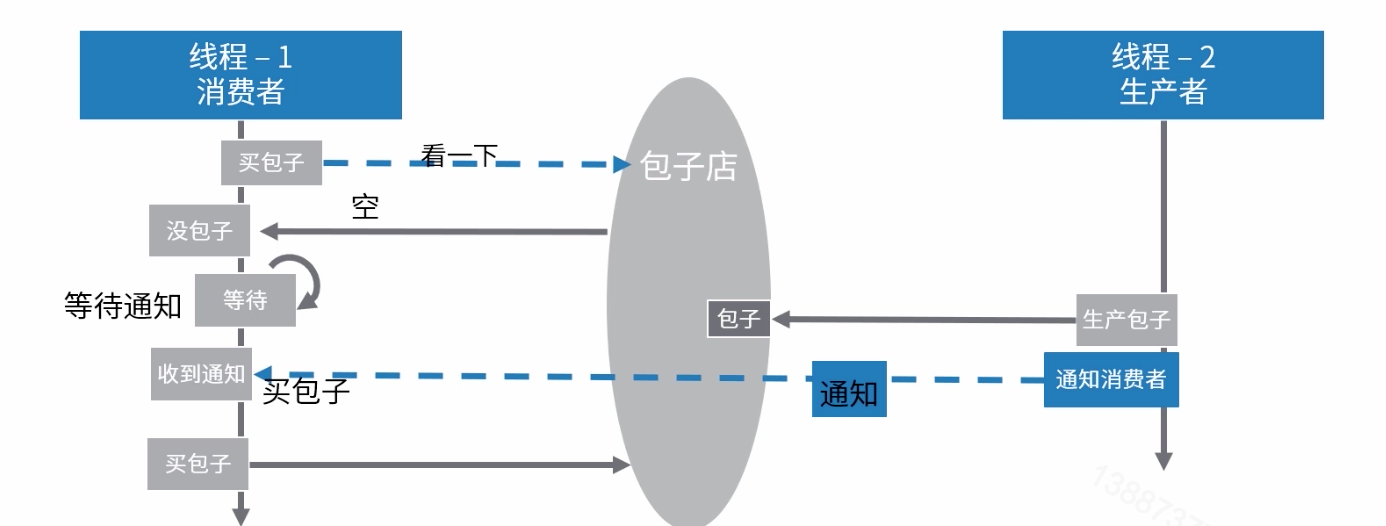
被弃用的suspend和resume
作用:被调用suspend挂起目标线程,通过resume可以恢复线程执行:
public static Object baozidian = null;
    public void suspendResumeTest()throws Exception{
        Thread consumerThread = new Thread(()->{
         if (baozidian==null){
             System.out.println("1、没包子,进入等待");
             Thread.currentThread().suspend();
         }
            System.out.println("2、买到包子,回家");

        });

        consumerThread.start();
        //3秒之后,生产一个包子
        Thread.sleep(3000L);
        baozidian = new Object();
        consumerThread.resume();
        System.out.println("3、通知消费者");
    }
suspend/resume很显然被弃用了,被弃用的原因是,容易写出死锁的代码。所以用wait/notify和park/unpark机制对他进行替代。
suspend/resume死锁示例
- 同步的时候出现死锁 代码如下:
public static Object baozidian = null;
    public void suspendResumeTest()throws Exception{
        Thread consumerThread = new Thread(()->{
         if (baozidian==null){
             System.out.println("1、没包子,进入等待");
             //当前线程拿到锁,然后挂起
             synchronized (this) {
                 Thread.currentThread().suspend();
             }
         }
            System.out.println("2、买到包子,回家");

        });

        consumerThread.start();
        //3秒之后,生产一个包子
        Thread.sleep(3000L);
        baozidian = new Object();
        //争取到说以后,再回复consumerThread
        synchronized (this) {
            consumerThread.resume();
        }
        System.out.println("3、通知消费者");
    }
- suspend比resume后执行
  public void suspendResumeTest() throws Exception {
        Thread consumerThread = new Thread(() -> {
            if (baozidian == null) {
                System.out.println("1、没包子,进入等待");
                try {
                    Thread.sleep(5000L);
                } catch (Exception e) {
                    e.printStackTrace();
                }
                //当前线程拿到锁,然后挂起
                Thread.currentThread().suspend();
            }
            System.out.println("2、买到包子,回家");
        });
        //3秒之后,生产一个包子
        Thread.sleep(3000L);
        consumerThread.start();
        baozidian = new Object();
        //3秒后,生产一个包子
        consumerThread.resume();
        System.out.println("3、通知消费者");
        consumerThread.join();
    }
wait/notify机制
- 这些方法只能由同一对象锁的持有者线程调用,也就是写在同步块里面,否则会抛出illegalMonitorStateException异常。
- wait 方法导致当前线程等待,加入该对象的等待集合中,并且放弃当前持有的对象锁。notify/notifyAll方法唤醒一个或所有正在等待这个对象锁的线程。
- 注意:虽然会wait自动解锁,但是对顺序有要求,如果在notify被调用之后,才开始wait方法的调用,线程会永远处于waitting状态。
    public static Object baozidian = null;

    public void suspendResumeTest() throws Exception {
        Thread consumerThread = new Thread(() -> {
            if (baozidian == null) {
                System.out.println("1、进入等待");
                Thread.currentThread().suspend();
            }
            System.out.println("2、买到包子,回家");
        });
        consumerThread.start();
        //3秒之后,生产一个包子
        Thread.sleep(3000L);
        baozidian = new Object();
        consumerThread.resume();
        System.out.println("3、通知消费者");
    }


    //    死锁suspend/resume。suspend并不会像wait一样释放锁,故此容易写出死锁代码
    public void suspendResumeDeadLockTest() throws Exception {
        Thread consumerThread = new Thread(() -> {
            if (baozidian == null) {
                System.out.println("1、进入等待");
                synchronized (this) {
                    Thread.currentThread().suspend();
                }
            }
            System.out.println("2、买到包子,回家");
        });
        consumerThread.start();
        Thread.sleep(3000L);
        baozidian = new Object();
        synchronized (this) {
            consumerThread.resume();
        }
        System.out.println("3、通知消费者");
    }

    //    导致程序永久挂起的suspend/resume
    public void suspendResumeDeadLockTest2() throws Exception {
        //启动线程
        Thread consumerThread = new Thread(() -> {
            if (baozidian == null) {
                System.out.println("1、没包子,进入等待");
                try { //为这个线程加上一点延时
                    Thread.sleep(5000L);
                } catch (InterruptedException e) {
                    e.printStackTrace();
                }
                //这个的挂起执行在resume后面
                Thread.currentThread().suspend();
            }
            System.out.println("2、买到包子,回家");
        });
        consumerThread.start();
        //3秒之后,生产一个包子
        Thread.sleep(3000L);
        baozidian = new Object();
        consumerThread.resume();
        System.out.println("3、通知消费者");
        consumerThread.join();
    }

    public void waitNotifyTest() throws Exception {
        //启动线程
        new Thread(() -> {
            if (baozidian == null){ // 如果没包子,则进入等待
                synchronized (this){
                    try {
                        System.out.println("1、进入等待");
                        this.wait();
                    } catch (InterruptedException e){
                        e.printStackTrace();
                    }
                }
            }
            System.out.println("2、买到包子,回家");
        }).start();
        //3秒之后,生产了一个包子
        Thread.sleep(3000L);
        baozidian = new Object();
        synchronized (this){
            this.notifyAll();
            System.out.println("3、通知消费者");
        }
    }

    /** 会导致程序永久等待的wait/notify */
    public void waitNotifyDeadLockTest() throws Exception {
        // 启动线程
        new Thread(() -> {
            if (baozidian == null) { // 如果没包子,则进入等待
                try {
                    Thread.sleep(5000L);
                } catch (InterruptedException e1) {
                    e1.printStackTrace();
                }
                synchronized (this) {
                    try {
                        System.out.println("1、进入等待");
                        this.wait();
                    } catch (InterruptedException e) {
                        e.printStackTrace();
                    }
                }
            }
            System.out.println("2、买到包子,回家");
        }).start();
        // 3秒之后,生产一个包子
        Thread.sleep(3000L);
        baozidian = new Object();
        synchronized (this) {
            this.notifyAll();
            System.out.println("3、通知消费者");
        }
    }

    /** 正常的park/unpark */
    public void parkUnparkTest() throws Exception {
        // 启动线程
        Thread consumerThread = new Thread(() -> {
            if (baozidian == null) { // 如果没包子,则进入等待
                System.out.println("1、进入等待");
                LockSupport.park();
            }
            System.out.println("2、买到包子,回家");
        });
        consumerThread.start();
        // 3秒之后,生产一个包子
        Thread.sleep(3000L);
        baozidian = new Object();
        LockSupport.unpark(consumerThread);
        System.out.println("3、通知消费者");
    }

    /** 死锁的park/unpark */
    public void parkUnparkDeadLockTest() throws Exception {
        // 启动线程
        Thread consumerThread = new Thread(() -> {
            if (baozidian == null) { // 如果没包子,则进入等待
                System.out.println("1、进入等待");
                // 当前线程拿到锁,然后挂起
                synchronized (this) {
                    LockSupport.park();
                }
            }
            System.out.println("2、买到包子,回家");
        });
        consumerThread.start();
        // 3秒之后,生产一个包子
        Thread.sleep(3000L);
        baozidian = new Object();
        // 争取到锁以后,再恢复consumerThread
        synchronized (this) {
            LockSupport.unpark(consumerThread);
        }
        System.out.println("3、通知消费者");
    }


    public static void main(String[] args) throws Exception {
        // 对调用顺序有要求,也要开发自己注意锁的释放。这个被弃用的API,容易死锁,也容易导致永久挂起
        new Demo6().suspendResumeTest();
        new Demo6().suspendResumeDeadLockTest();
        new Demo6().suspendResumeDeadLockTest2();

        // wait/notify要求再同步关键字里面使用,免去了死锁的困扰,但是一定要先调用wait,再调用notify,否则永久等待了
        new Demo6().waitNotifyTest();
        new Demo6().suspendResumeDeadLockTest();
    }
park/unpark 机制
- 线程调用park则等待"许可",unpark方法为指定线程提供"许可(permit)"
- 不要求park和unpark方法的调用顺序
- 对此调用unpark之后,在调用park,线程会直接运行
- 但不会叠加,也就是说,连续多次调用park方法,第一次会拿到"许可"直接运行,后续调用会进入等待。
伪唤醒
- 警告!之前代码中用if语句来判断,是否进入等待状态,是错误的。
- 官方建议应该在循环中检查等待条件,原因是处于等待状态的线程可能会收到错误警报和伪唤醒,如果不在循环中检查等待条件,程序就会在没有满足的结束的条件的情况下退出。
- 伪唤醒是指线程并非因为notify、notifyall、unpark等api调用而唤醒,是更底层原因导致的。
结语
本内容涉及很多JDK线程开始工具类,他底层实现的原理。

