package.json
{
  "name": "react-webpack-typescript-init",
  "version": "1.0.0",
  "description": "react webapck typescript",
  "main": "src/index.tsx",
  "repository": "git@git.threatbook-inc.cn:zoushijun/react-webpack-typescript-init.git",
  "author": "zsj <zoushijun@threatbook.cn>",
  "license": "MIT",
  "scripts": {
    "dll": "./node_modules/.bin/webpack --config ./config/webpack/webpack.dll.js",
    "build": "./node_modules/.bin/webpack --env production --config ./config/webpack/webpack.config.js && node express.js",
    "start": "webpack-dev-server --env development --config ./config/webpack/webpack.config.js"
  },
  "dependencies": {
    "react": "^16.12.0",
    "react-dom": "^16.12.0",
    "typescript": "^3.7.4"
  },
  "devDependencies": {
    "@babel/core": "^7.7.7",
    "@babel/preset-env": "^7.7.7",
    "@babel/preset-react": "^7.7.4",
    "@types/react": "^16.9.17",
    "@types/react-css-modules": "^4.6.2",
    "@types/react-dom": "^16.9.4",
    "add": "^2.0.6",
    "add-asset-html-webpack-plugin": "^3.1.3",
    "babel-loader": "^8.0.6",
    "babel-plugin-react-css-modules": "^5.2.6",
    "css-loader": "^3.4.0",
    "express": "^4.17.1",
    "fork-ts-checker-webpack-plugin": "^4.0.0-beta.4",
    "generic-names": "^2.0.1",
    "happypack": "^5.0.1",
    "html-webpack-plugin": "^3.2.0",
    "os": "^0.1.1",
    "postcss-styl": "^0.5.1",
    "shelljs": "^0.8.3",
    "style-loader": "^1.1.2",
    "stylus": "^0.54.7",
    "stylus-loader": "^3.0.2",
    "sugarss": "^2.0.0",
    "ts-loader": "^6.2.1",
    "webpack": "^4.41.4",
    "webpack-cli": "^3.3.10",
    "webpack-dev-server": "^3.10.1",
    "webpack-merge": "^4.2.2",
    "yarn": "^1.21.1"
  }
}
基本配置
初始化项目
1, 新建一个项目prod。
2, cd prod, mkdir src 和 mkdir dist
3, npm init
这里遇到了一个小坑,在目录里边添加了一个src目录,git一直检测不到,我还以为我建的git仓库有问题呢,后来想到git是通过文件的变化来检测的,如果只是建立了目录,里边没有,git是不会检测到变化的。
安装项目依赖
1, yarn add react react-dom
2, yarn add webpack webpack-cli webpack-dev-server -D
3, yarn add ts-loader source-map-loader -D (source-map-loader 为了调试方便,可以深入的到源码内部)
4, yarn add @types/react @types/react-dom -D (TS 不知道 React、 React-dom 的类型,以及该模块导出了什么,此时需要引入 .d.ts 的声明文件)
5,yarn add html-webpack-plugin -D
建立项目基本文件结构
1,新建src/index.html
<!DOCTYPE html>
<html lang="en">
  <head>
    <meta charset="UTF-8" />
    <meta name="viewport" content="width=device-width, initial-scale=1.0" />
    <meta http-equiv="X-UA-Compatible" content="ie=edge" />
    <title>Document</title>
  </head>
  <body>
    <div id="container"></div>
  </body>
</html>
2, 新建./src/index.tsx
import * as React from "react";
import * as ReactDOM from "react-dom";

const ROOT = document.getElementById("container");

import { HelloWorld } from "./components/HelloWorld";

ReactDOM.render(<HelloWorld firstName="Chris" lastName="Parker" />, ROOT);
3,在src/components 里边新建Helloworld.tsx
import * as React from "react";

export interface HelloWorldProps {
  firstName: string;
  lastName: string;
}

export const HelloWorld = (props: HelloWorldProps) => (
  <h1>
    Hi there from React! Welcome {props.firstName} and {props.lastName}!
  </h1>
);
4,新建tsconfig.json,告诉webapack去寻找typescript 文件
{
  "compilerOptions": {
    "jsx": "react",
    "module": "commonjs",
    "noImplicitAny": true,
    "outDir": "./dist/",
    "preserveConstEnums": true,
    "removeComments": true,
    "sourceMap": true,
    "target": "es5"
  },
  "include": ["./src/**/**/*"]
}
5,新建 webpack.config.js
const path = require("path");
const webpack = require("webpack");
const HtmlWebpackPlugin = require("html-webpack-plugin");

module.exports = {
  entry: "./src/index.tsx",
  output: {
    path: path.resolve(__dirname, "dist"),
    filename: "bundle.js"
  },
  devtool: "source-map",
  mode: "development",
  resolve: {
    extensions: [".js", ".ts", ".tsx"]
  },

  module: {
    rules: [
      {
        test: /\.tsx?$/,
        loader: "ts-loader"
      },
      { enforce: "pre", test: /\.js$/, loader: "source-map-loader" }
    ]
  },
  plugins: [
    new HtmlWebpackPlugin({
      template: path.resolve(__dirname, "src", "index.html")
    })
  ]
};
6, 修改package.json
"build": "./node_modules/.bin/webpack"
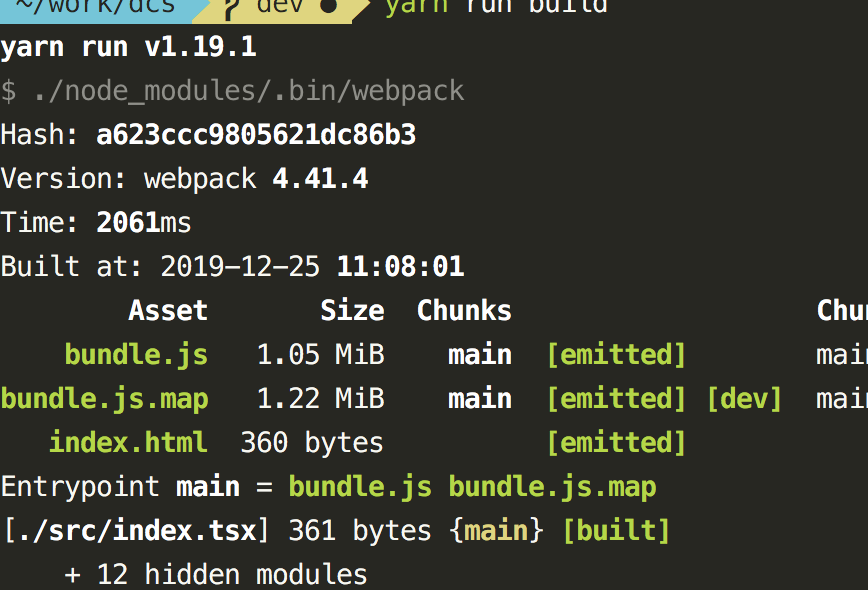
7, 执行yarn run build
webpack 热更新
安装依赖
1, yarn add webpack-dev-server -D
修改package.json
"start:dev": "webpack-dev-server"
增加webpack.config.js配置
devServer: {
    port: 3001,
    hot: true
  },
  module: {
    rules: [
      {
        test: /\.tsx?$/,
        loader: "ts-loader"
      }
      // include: path.resolve(__dirname, "./src"),
      // exclude: "./node_modules/",
    ]
  },
  plugins: [
    new HtmlWebpackPlugin({
      template: path.resolve(__dirname, "src", "index.html")
    }),
    new webpack.HotModuleReplacementPlugin()
  ]
error
1, Property 'hot' does not exist on type 'Module'
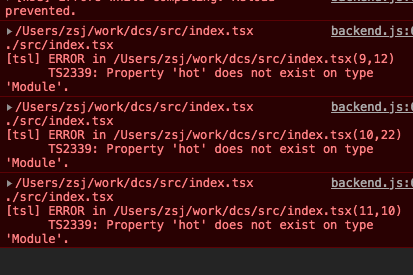
解决办法: 使用以下方法:
if ((module as any).hot) {}
使用css,并且使用局域化css
1, 安装依赖
yarn add style-loader css-loader stylus-loader stylus babel-plugin-react-css-modules -D(简单来说就是翻译文件,把style文件翻译为css文件)
2, yarn add happypack -D (并行化的tsx文件)
3, yarn add babel-loader -D (为了使用babel-plugin-react-css-modules)
4, yarn add generic-names -D (生成name)
5, yarn add os -D
6, yarn add @babel/core -D
7, yarn add fork-ts-checker-webpack-plugin -D (配合happypack使用typescript)
修改webpack.config.js
const path = require("path");
const webpack = require("webpack");
const genericNames = require("generic-names");
const HtmlWebpackPlugin = require("html-webpack-plugin");
const os = require("os");
const ForkTsCheckerWebpackPlugin = require("fork-ts-checker-webpack-plugin");
const HappyPack = require("happypack");
const happyThreadPool = HappyPack.ThreadPool({
  size: os.cpus().length
});

const stylModuleRegex = /\.cssmodule\.styl$/;
const localIdentName = "[name]__[local]-[hash:base64:5]";
const generateScope = genericNames(localIdentName, {
  context: process.cwd()
});

const getStyleLoaders = (cssOptions, preProcessor) => {
  const loaders = [
    require.resolve("style-loader"),
    // MiniCssExtractPlugin.loader,
    {
      loader: require.resolve("css-loader"),
      options: cssOptions
    }
  ];
  if (preProcessor) {
    loaders.push(require.resolve(preProcessor));
  }
  return loaders;
};
module.exports = {
  entry: "./src/index.tsx",
  output: {
    path: path.resolve(__dirname, "dist"),
    filename: "bundle.js"
  },
  devtool: "inline-source-map",
  mode: "development",
  resolve: {
    extensions: [".tsx", ".ts", ".js", ".styl"]
  },
  devServer: {
    port: 3001,
    hot: true
  },
  module: {
    rules: [
      {
        oneOf: [
          {
            test: stylModuleRegex,
            use: getStyleLoaders(
              {
                importLoaders: 1,
                modules: true,
                camelCase: "dashes",
                getLocalIdent({ resourcePath }, localIdentName, localName) {
                  return generateScope(localName, resourcePath);
                }
              },
              "stylus-loader"
            )
          },
          {
            test: /\.css$/,
            include: path.resolve(__dirname, "./src"),
            use: ["style-loader", "css-loader"]
          }
        ]
      },
      {
        test: /\.tsx?$/,
        include: path.resolve(__dirname, "./src"),
        exclude: [path.resolve("./node_modules/")],
        use: ["happypack/loader?id=happybabel"]
      }
    ]
  },
  plugins: [
    new HtmlWebpackPlugin({
      template: path.resolve(__dirname, "src", "index.html")
    }),
    new webpack.HotModuleReplacementPlugin(),
    new ForkTsCheckerWebpackPlugin(),
    new HappyPack({
      id: "happybabel",
      loaders: [
        {
          loader: "babel-loader",
          options: {
            // babelrc: false,
            // configFile: false,
            // 设置缓存
            cacheDirectory: true,
            exclude: [path.resolve("./node_modules/")],
            plugins: [
              [
                "react-css-modules",
                {
                  // 生成css名字样式
                  generateScopedName: "[name]__[local]-[hash:base64:5]",
                  filetypes: { ".styl": { syntax: "sugarss" } },
                  webpackHotModuleReloading: true,
                  exclude: ".css$"
                }
              ]
            ]
          }
        },
        {
          loader: "ts-loader",
          options: {
            happyPackMode: true,
            // disable type checker - we will use it in fork plugin
            transpileOnly: true
          }
        }
      ],
      threadPool: happyThreadPool
    })
  ]
};
error
1,提示css-loader options报错

查了下css-loader的文档,修改webpack.config.js 的css-loader的配置如下
{
            test: stylModuleRegex,
            use: getStyleLoaders(
              {
                importLoaders: 1,
                modules: {
                  getLocalIdent({ resourcePath }, localIdentName, localName) {
                    return generateScope(localName, resourcePath);
                  }
                }
              },
              "stylus-loader"
            )
          },
2 DetailHTMLProps 错误

解决办法:
1, 图中第一个错误的解决办法
yarn add @types/react-css-modules -D
2, 图中第二个错误的解决办法
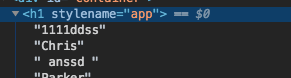
原因是指styleName 被转成了stylename,导致不认识该属性,也就是说styleName配置有问题
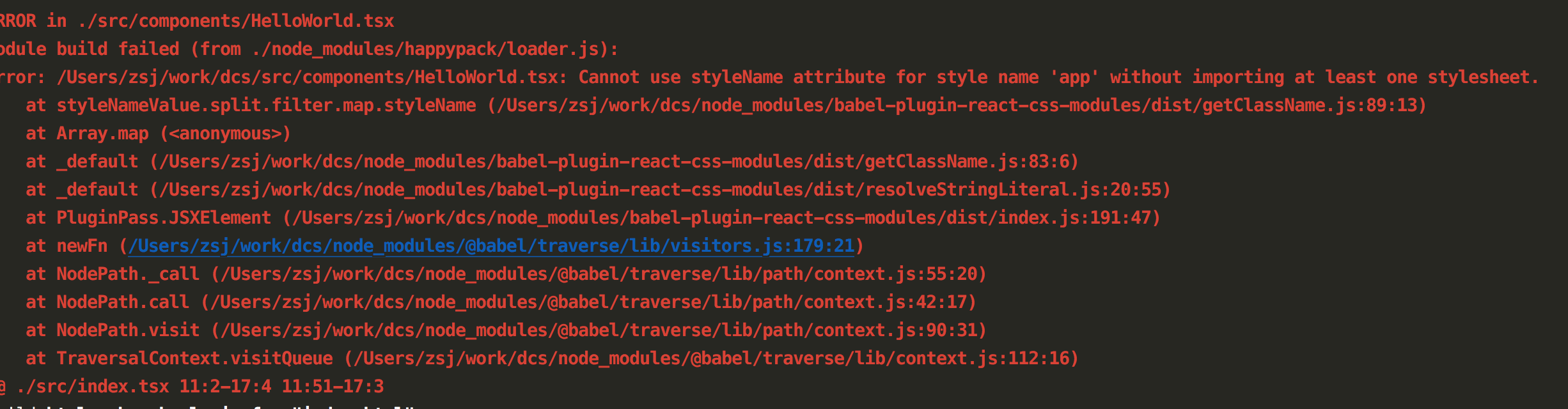
3 without importing at least one styleSheet
1
引入styl文件的时候,不省略.styl
import "./index.cssmodule.styl";
2
在tsconfig.json 添加
// 这三项解决 import * as React from react to import React from react 和 babel-plugin-react-css-modules 提示without importing at least one stylesheet.
    "allowSyntheticDefaultImports": true,
    "moduleResolution": "node",
    "module": "esNext"
4 not find module sugarss
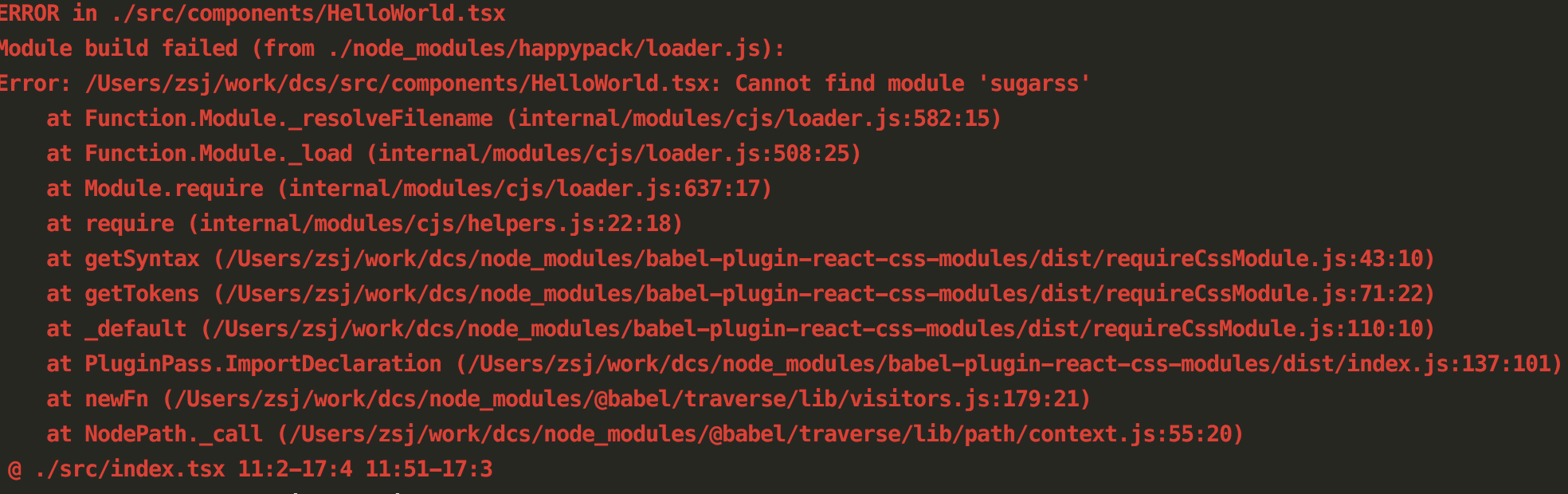
5 Type '{ first: true; }' is not assignable to type 'IntrinsicAttributes & HelloWorldProps

原因:
if ((module as any).hot) {
 (module as any).hot.accept("./components/HelloWorld.tsx", function() {
   console.log("Accepting the updated printMe module!");
   console.log(111);
   ReactDOM.render(<HelloWorld first
 });
}
解决:
if ((module as any).hot) {
  (module as any).hot.accept("./components/HelloWorld.tsx", function() {
    console.log("Accepting the updated printMe module!");
    console.log(111);
    ReactDOM.render(<HelloWorld firstName="Chris" lastName="Parker" />, ROOT);
  });
}
配置babel-plugin-react-css-modules 总结
babel-plugin-react-css-modules这个包因为配置需要babel-loader的配合使用,所以在配置的时候首先使用ts-loader转然后再使用babel-loader转,流程没有什么问题,可是在配置过程中就出现了很多问题。
1 tsconfig.json
在配置tsconfig.json的时候,把jsx 配置成了react,这就出现了一个问题,实际上是全部都通过ts-loader给转化了,并没有走到babel-loader这里,所以一直出现写的styleName,经过转化之后,就转成了stylename,一直报错。
拆分webpack.config.js
原理
其实就是利用webpack-merge,根据传入的参数的不同,来区分是开发环境还是生产环境,然后把webpack.config.js 拆成一个公共的webpack.common.config.js,一个开发环境用的webpack.dev.config.js,一个生产环境用的 webpack.prod.config.js,还有一个根目录下的webpack.config.js
webpack.config.js 代码
const commConfig = require("./config/webpack.common.config.js");
const devConfig = require("./config/webpack.dev.config.js");
const prodConfig = require("./config/webpack.prod.config.js");
const merge = require("webpack-merge");

module.exports = mode => {
  if (mode === "development") {
    return merge(commConfig, devConfig, { mode });
  }
  return merge(commConfig, prodConfig, { mode });
};
package.json
"start": "webpack-dev-server --env development",
"build": "./node_modules/.bin/webpack --env production"
增加express
1, 安装express yarn add express -D
2, 新建express.js
const express = require("express");
const app = express();
const portNumber = 3888;
const sourceDir = "dist";

app.use(express.static(sourceDir));

app.listen(portNumber, () => {
  console.log(`Express web server started: http://localhost:${portNumber}`);
  console.log(`Serving content from /${sourceDir}/`);
});
3, 修改package.json
"build": "./node_modules/.bin/webpack --env production --config ./config/webpack/webpack.config.js && node express.js",
把react,reat-dom 等静态文件打包成dll文件
1, 新建lib.dep.js
// 资源依赖包,提前编译

const lib = ["react", "react-dom"];

module.exports = lib;
新建webpack.dll.js
/* webpack --config  webpack.dll.config.js --progress */

const path = require("path");
const webpack = require("webpack");
const lib = require("./lib.dep");
const outputPath = path.join(__dirname, "../dll");
const shelljs = require("shelljs");
shelljs.rm("-r", outputPath);

module.exports = {
  devtool: "eval",
  entry: {
    dllSelf: lib
  },
  mode: "production",
  optimization: {
    minimize: true
  },
  output: {
    path: outputPath,
    filename: "[name].[hash].js",
    /**
     * output.library
     * 将会定义为 window.${output.library}
     * 在这次的例子中,将会定义为`window.vendor_library`
     */
    library: "[name]"
  },
  plugins: [
    new webpack.DllPlugin({
      /**
       * path
       * 定义 manifest 文件生成的位置
       * [name]的部分由entry的名字替换
       */
      path: path.join(outputPath, "manifest.json"),
      /**
       * name
       * dll bundle 输出到那个全局变量上
       * 和 output.library 一样即可。
       */
      name: "[name]",
      context: __dirname
    }),
    new webpack.DefinePlugin({
      "process.env.NODE_ENV": JSON.stringify("production")
    })
  ]
};
3, 在webpack 的pulgin中引用dll文件
module.exports = {
  plugins: [
    new webpack.DllReferencePlugin({
      context: __dirname,
      manifest: require("../dll/manifest.json")
    }),
    new AddAssetHtmlPlugin([
      {
        filepath: utils.getDllPath("../dll"),
        includeSourcemap: false
      }
    ])
  ]
};