上一篇安卓自定义view-Paint 画笔 已经对画笔的常用 api 进行进行阐述总结,这一片主要讨论安卓关于文字的处理方法。也是属于画笔的范畴。
1. 画笔设置API
. 构造方法
在安卓中绘制文字相关,有专门的处理画笔。
mTextPaint = new TextPaint(Paint.ANTI_ALIAS_FLAG);
. 设置文字大小
mTextPaint.setTextSize(30);
. 设置文本对齐方式
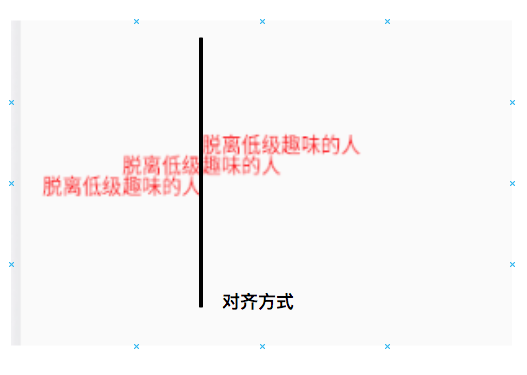
文本对齐方式有三中分别是: LEFT(左对齐)、CENTER(居中对齐)、RIGHT(右对齐), 用过 office 办公软件的应该都不会陌生。
 mTextPaint.setTextAlign(Paint.Align.LEFT);
canvas.drawText(text, (float)(mWidth / 2 - width / 2),
               400,
                mTextPaint);

mTextPaint.setTextAlign(Paint.Align.CENTER);
canvas.drawText(text, (float)(mWidth / 2 - width / 2),
                400 + height,
                mTextPaint);

mTextPaint.setTextAlign(Paint.Align.RIGHT);
canvas.drawText(text, (float)(mWidth / 2 - width / 2) ,
                400 + 2 * height,
                mTextPaint);
. 设置地区文字语言
不过我在真机上测试并没有任何变化,我的真机只有简体、繁体、中文切换。模拟器测试野咩用。 有大佬知道的好心讲解一下👍。
mTextPaint.setTextLocale(Locale.CHINA);
canvas.drawText(text, (float)(mWidth / 2 - width / 2),
               400,
                mTextPaint);

mTextPaint.setTextLocale(Locale.TAIWAN);
canvas.drawText(text, (float)(mWidth / 2 - width / 2),
                400 + height,
                mTextPaint);
. 设置文字水平缩放
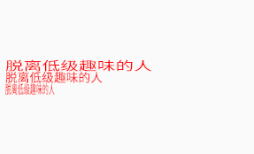
大于 1 边宽,小于 1 变窄, 等于 1 没有变化。
mTextPaint.setTextScaleX(3.0f);
. 设置文字错切
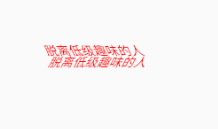
即让文字有一定倾斜角度, 大于 0 逆时针, 小于 0 顺时针。
mTextPaint.setTextSkewX(0.5f);
        canvas.drawText(text, (float)(mWidth / 2 - width / 2),
               400,
                mTextPaint);

        mTextPaint.setTextSkewX(-0.5f);
        canvas.drawText(text, (float)(mWidth / 2 - width / 2),
                400 + height,
                mTextPaint);
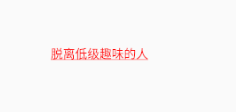
. 设置下划线
 mTextPaint.setUnderlineText(true);
        canvas.drawText(text, (float)(mWidth / 2 - width / 2),
               400,
                mTextPaint);
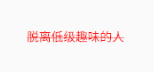
. 设置删除线
 mTextPaint.setStrikeThruText(true);
        canvas.drawText(text, (float)(mWidth / 2 - width / 2),
               400,
                mTextPaint);
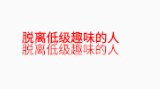
. 设置文字加粗
mTextPaint.setFakeBoldText(true);
canvas.drawText(text, (float)(mWidth / 2 - width / 2),
               400,
                mTextPaint);

mTextPaint.setFakeBoldText(false);
canvas.drawText(text, (float)(mWidth / 2 - width / 2),
                400 + height,
                mTextPaint);
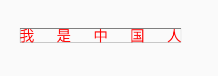
. 设置文字间距
mTextPaint.setLetterSpacing(1.5f);
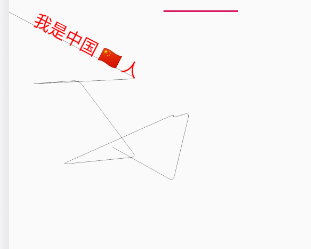
. drawTextOnPath(@NonNull String text, @NonNull Path path, float hOffset,float vOffset, @NonNull Paint paint)
根据路径绘制文本内容。
 mPath = new Path();
for (int i = 0; i < 10; i++) {
     mPath.lineTo((float)(Math.random() * 500 + i * 35), (float)(Math.random() * 500 + 250));
}


canvas.drawPath(mPath, mPaint);
canvas.drawTextOnPath(text, mPath, 100, 0, mTextPaint);
. StaticLayout
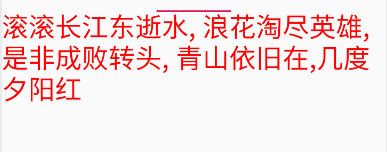
用来显示多行文本,它是一个容器,通过自身的 draw() 进行文本的绘制。StaticLayout 支持换行,它既可以为文字设置宽度上限来让文字自动换行,也会在换行符 \n 处主动换行。
private String text = "滚滚长江东逝水, 浪花淘尽英雄,是非成败转头, 青山依旧在,几度夕阳红";

layout = new StaticLayout(text, mTextPaint,
                mWidth,
                Layout.Alignment.ALIGN_NORMAL,
                1.0f,
                0.0f,
                false);


layout.draw(canvas);
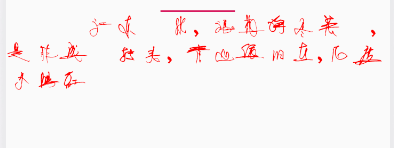
. setTypeface(Typeface typeface) 设置字体
private String text = "滚滚长江东逝水, 浪花淘尽英雄,是非成败转头, 青山依旧在,几度夕阳红";
mTextPaint.setTypeface(Typeface.createFromAsset(getContext().getAssets(), "ygyqianmt.ttf"));

layout = new StaticLayout(text, mTextPaint,
                mWidth,
                Layout.Alignment.ALIGN_NORMAL,
                1.0f,
                0.0f,
                false);


layout.draw(canvas);
2. 测量文字相关
既然是测量文字,必然要知道安卓中是怎样表示文字的,这个世界上不同的文字繁多,必然需要了解安卓系统是怎么满足不同的文字的显示问题的。请看下面的图,这就是安卓系统文字的描述,对应的类是 Paint 的内部类 FontMetrics。其描述如下:
/**
     * Class that describes the various metrics for a font at a given text size.
     * Remember, Y values increase going down, so those values will be positive,
     * and values that measure distances going up will be negative. This class
     * is returned by getFontMetrics().
     */
    public static class FontMetrics {
        /**
         * The maximum distance above the baseline for the tallest glyph in
         * the font at a given text size.
         */
        public float   top;
        /**
         * The recommended distance above the baseline for singled spaced text.
         */
        public float   ascent;
        /**
         * The recommended distance below the baseline for singled spaced text.
         */
        public float   descent;
        /**
         * The maximum distance below the baseline for the lowest glyph in
         * the font at a given text size.
         */
        public float   bottom;
        /**
         * The recommended additional space to add between lines of text.
         */
        public float   leading;
    }
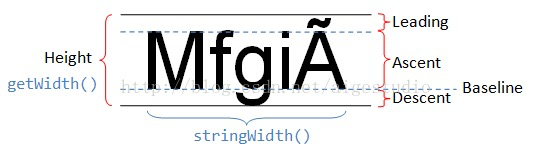
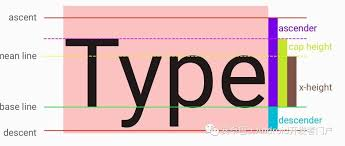
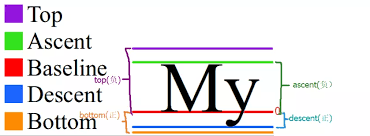
来解释说明下这几个值的含义,首先看 Baseline,这个叫基准线,为什么要设置这个呢?说白了就是为了排版更加美观。我们最后一张图,基准线红色线到上面的绿色线之间的距离为上坡度 ascent, 基准线到下面蓝色线的距离为下坡度 descent。但是有的文字有类似与中文拼音的标点符号,所以需要额外预留一个空间,在上面的部分从 ascent 到顶部还有一个空间称为 top, 下面也是一样称为 bottom。这就说明了 top 应该是要比 ascent 要大一点。bottom 比 descent 要大。leading 为上一个文字的 bottom 到当前文字的 top 之间的距离。 我们可以在代码中打印看看。
Paint.FontMetrics fontMetrics = mTextPaint.getFontMetrics();
Log.i(TAG, "top: " + fontMetrics.top);
Log.i(TAG, "ascent: " + fontMetrics.ascent);
Log.i(TAG, "descent: " + fontMetrics.descent);
Log.i(TAG, "bottom: " + fontMetrics.bottom);


 canvas.drawText(text, (float)(mWidth / 2 - width / 2),
            400,
            mTextPaint);
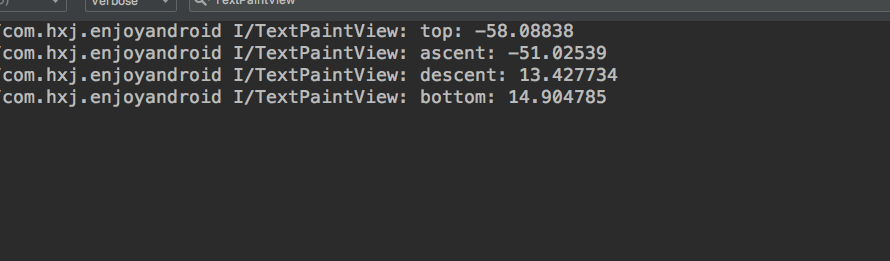
是不是跟描述的一致,还发现在安卓中基准线以下为正,基准线以上为负数。
. float getFontSpacing()
获取文本行间距,它的计算为 descent - ascent 之间的距离,而不是 bottom - top + leading,这个值是要比前面计算的要大的。为了让文字排版更加好看,而不至于间距过大,所以选择前面的方式计算。
private String text1 = "少小离家老大回";
private String text2 = "乡音未改鬓毛衰";
private String text3 = "儿童相见不相识";
private String text4 = "笑问客从何处来";

canvas.drawText(text1, 300, 300, mTextPaint);
canvas.drawText(text2, 300, 300 + mTextPaint.getFontSpacing(), mTextPaint);
canvas.drawText(text3, 300, 300 + 2 * mTextPaint.getFontSpacing(), mTextPaint);
canvas.drawText(text4, 300, 300 + 3 * mTextPaint.getFontSpacing(), mTextPaint);
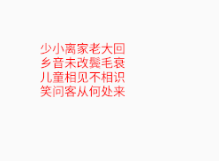
我们可以看看 getFontSpacing() 的源码,可以发现它内部是通过 getFontMetrics 来计算的。
public float getFontSpacing() {
    return getFontMetrics(null);
}
.FontMetircs getFontMetrics()
在前面一个方法中已经看到过它的身影啦!也是通过这个方法拿到 descent、ascent、top、bottom、leading 等值。我们这里打印一下 bottom - top + leading, descent - ascent 的值。
Paint.FontMetrics fontMetrics = mTextPaint.getFontMetrics();
Log.i(TAG, "bottom - top + leading: " + (fontMetrics.bottom - fontMetrics.top + fontMetrics.leading));
Log.i(TAG, "descent - ascent: " + (fontMetrics.descent - fontMetrics.leading));
Log.i(TAG, "getFontSpacing: " + mTextPaint.getFontSpacing());

这样验证了前面所说的,getFontSpacing() 的计算为 descent - ascent
. getTextBounds(String text, int start, int end, Rect bounds)
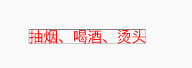
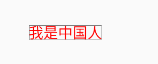
从字面意义可知,这个是用来获取文字的范围的。会将计算的值存储到一个 rect 中。可以通过 rect 去获取文本的宽和高。
mTextPaint.getTextBounds(text1, 0, text1.length(), mTextRect);
canvas.drawText(text1, 300, 300, mTextPaint);
mPaint.setColor(Color.BLACK);
canvas.drawRect(mTextRect.left + 300,
                mTextRect.top + 300,
                mTextRect.right + 300,
                mTextRect.bottom + 300, mPaint);
. getTextBounds(char[] text, int index, int count, Rect bounds)
mTextPaint.getTextBounds(chars, 0, chars.length, mTextRect);
canvas.drawText(chars, 0, chars.length - 1, 300, 300, mTextPaint);

mPaint.setColor(Color.BLACK);
canvas.drawRect(mTextRect.left + 300,
                mTextRect.top + 300,
                mTextRect.right + 300,
                mTextRect.bottom + 300, mPaint);
. float measureText(String text) 测量文本宽度
mTextPaint.getTextBounds(chars, 0, chars.length, mTextRect);
Log.i(TAG, "width: " + mTextRect.width());
Log.i(TAG, "height: " + mTextRect.height());

float measureTextWidth = mTextPaint.measureText(chars, 0, chars.length);
Log.i(TAG, "measureTextWidth: " + measureTextWidth);
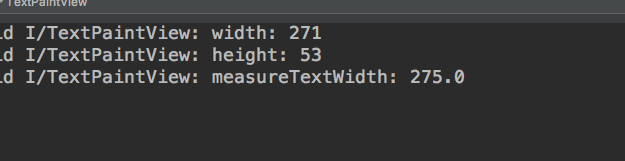
可以看到使用 measureText 要比 getTextBounds 要大一点,这是因为文字之间有间隙,加上文字间距后再看效果。
mTextPaint.setLetterSpacing(1.5f);

mTextPaint.getTextBounds(chars, 0, chars.length, mTextRect);
Log.i(TAG, "width: " + mTextRect.width());
Log.i(TAG, "height: " + mTextRect.height());

float measureTextWidth = mTextPaint.measureText(chars, 0, chars.length);
Log.i(TAG, "measureTextWidth: " + measureTextWidth);

canvas.drawText(chars, 0, chars.length, 300, 300, mTextPaint);

mPaint.setColor(Color.BLACK);
canvas.drawRect(mTextRect.left + 300,
                mTextRect.top + 300,
                mTextRect.right + 300,
                mTextRect.bottom + 300, mPaint);
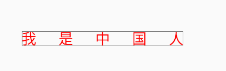

是不是发现变大了许多,这就是有间距的区别。
. int getTextWidths(char[] text, int index, int count, float[] widths)
获取指定字符的宽度,相当与对每个字符执行 measureText。将测量到的字符宽度存放到 widths 中,它的变体方法也是类似的。
mTextPaint.getTextWidths(chars, 0, 3, widths);
Log.i(TAG, "width: " + widths[0]);
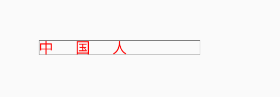
. int breakText(char[] text, int index, int count,float maxWidth, float[] measuredWidth)
int number = mTextPaint.breakText(chars, 0, chars.length, 400, measureWidths);
Log.i(TAG, "breakText width: " + measureWidths[0]);

canvas.drawText(chars, number, chars.length - number, 300, 300, mTextPaint);

mPaint.setColor(Color.BLACK);
canvas.drawRect(mTextRect.left + 300,
                mTextRect.top + 300,
                mTextRect.right + 300,
                mTextRect.bottom + 300, mPaint);
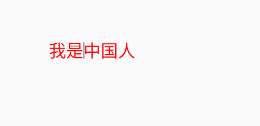
. getRunAdvance(CharSequence text, int start, int end, int contextStart, int contextEnd, boolean isRtl, int offset)
计算光标位置, 在 API 23 后引入。这几个参数意思:start 起始字符位置,end 字符结束位置, contextStart: 上下文的字符其实起始位置, contextEnd: 上下文字符结束位置。 文字方向,从左往右或从右往左, offset: 需要测量的字符个数
必须符合这个条件
0 <= contextStart <= start <= offset <= end <= contextEnd <= text.length
 if (Build.VERSION.SDK_INT >= Build.VERSION_CODES.M) {
            float runAdvance = mTextPaint.getRunAdvance(chars,
                    0,
                    3,
                    0,
                    chars.length,
                    false,
                    2);
            Log.i(TAG, "runAdvance: " + runAdvance);

            mPaint.setColor(Color.BLACK);
            mPaint.setStrokeWidth(3);
            canvas.drawLine(mTextRect.left + runAdvance + 300, mTextRect.top + 300,
                    mTextRect.left + runAdvance + 300, mTextRect.bottom + 300, mPaint);
        }
  mTextPaint.getTextBounds(text, 0, text.length(), mTextRect);

        if (Build.VERSION.SDK_INT >= Build.VERSION_CODES.M) {
            float runAdvance = mTextPaint.getRunAdvance(text,
                    0,
                    text.length(),
                    0,
                    text.length(),
                    false,
                    text.length());

            mPaint.setColor(Color.BLACK);
            mPaint.setStrokeWidth(3);
            canvas.drawLine(mTextRect.left + 300 + runAdvance,
                    mTextRect.top + 300,
                    mTextRect.left + 300 + runAdvance,
                    mTextRect.bottom + 300,
                    mPaint);
        }

canvas.drawText(text, 300, 300, mTextPaint);
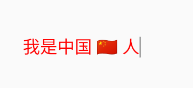
.hasGlyph(String string)
检查是否相同字形。
if (Build.VERSION.SDK_INT >= Build.VERSION_CODES.M) {
            boolean b = mTextPaint.hasGlyph("\uD83C\uDDE8\uD83C\uDDF3");
            boolean aa = mTextPaint.hasGlyph("aa");
            boolean ab = mTextPaint.hasGlyph("ab");

            Log.i(TAG, "b: " + b);
            Log.i(TAG, "aa: " + aa);
            Log.i(TAG, "ab: " + ab);

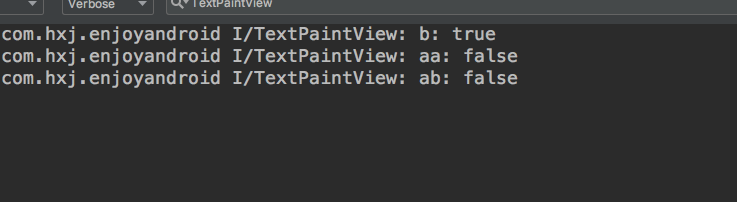
        }
由于两个不同字符串组合不算字形。所以是相同的。