问题描述
1,代码如下
import React from "react";
import _ from "lodash";
// import RGL, { WidthProvider } from "react-grid-layout";
import RGL from "../../lib/ReactGridLayout";
import WidthProvider from "../../lib/components/WidthProvider";
import cssmodules from "react-css-modules";
import styles from "./index.cssmodule.styl";

const ReactGridLayout = WidthProvider(RGL);

// @cssmodules(styles, { allowMultiple: true })
class BasicLayout extends React.PureComponent {
 static defaultProps = {
   className: "layout",
   items: 2,
   rowHeight: 50,
   onLayoutChange: function() {},
   cols: 12
 };

 constructor(props) {
   super(props);

   const layout = this.generateLayout();
   this.state = { layout };
 }

 generateDOM() {
   return _.map(_.range(this.props.items), function(i) {
     return (
       <div key={i}>
         <span className="text">{i}</span>
       </div>
     );
   });
 }

 generateLayout() {
   const p = this.props;
   // return _.map(new Array(p.items), function(item, i) {
   //   const y = _.result(p, "y") || Math.ceil(Math.random() * 4) + 1;
   //   return {
   //     x: i * 6,
   //     y: Math.floor(i / 6) * y,
   //     w: 6,
   //     h: y,
   //     i: i.toString()
   //   };
   // });
   return [
     {
       x: 0,
       y: 0,
       w: 6,
       h: 4,
       i: "a"
     },
     {
       x: 6,
       y: 0,
       w: 6,
       i: "b",
       h: 4
     }
     // {
     //   x: 0,
     //   y: 1,
     //   w: 6,
     //   i: "2",
     //   h: 8
     // },
     // {
     //   x: 6,
     //   y: 1,
     //   w: 6,
     //   i: "3",
     //   h: 8
     // }
   ];
 }

 onLayoutChange(layout) {
   this.props.onLayoutChange(layout);
 }

 render() {
   console.log("basic", this.state.layout);
   return (
     <ReactGridLayout
       layout={this.state.layout}
       onLayoutChange={this.onLayoutChange}
       {...this.props}
       // isResizable={false}
       margin={[20, 20]}
     >
       <div key="a" itemKey="a">
         <span className="text">aaa</span>
       </div>
       <div key="b" itemKey="b">
         <span className="text">hhhhh</span>
       </div>
     </ReactGridLayout>
   );
 }
}
运行效果如下
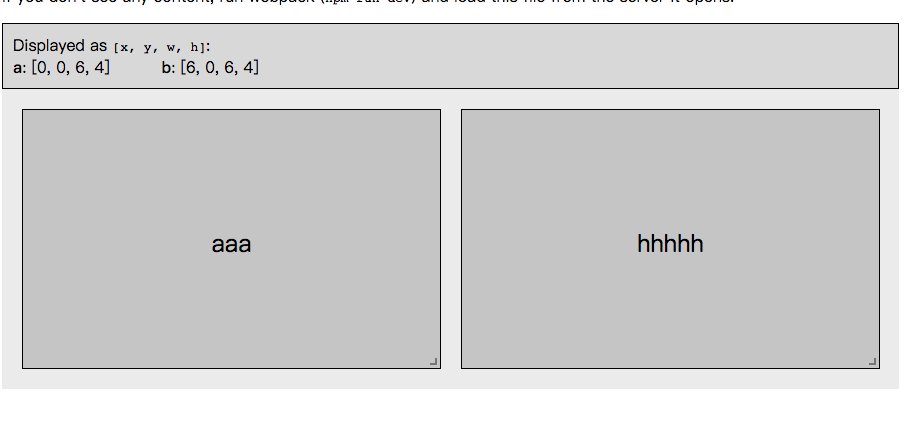
但是当引入这句代码的时候,
@cssmodules(styles, { allowMultiple: true })
效果就变成了下面这样
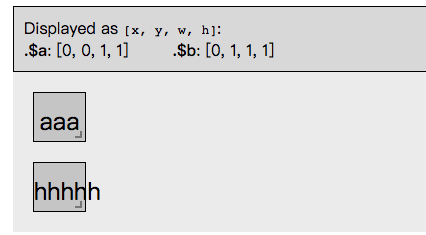
最后在react-grid-layout里边找到原因, 在react-grid-layout/lib/utils.js里边有个函数如下
export function synchronizeLayoutWithChildren(
  initialLayout: Layout,
  children: ReactChildren,
  cols: number,
  compactType: CompactType
): Layout {
  initialLayout = initialLayout || [];

  // Generate one layout item per child.
  let layout: Layout = [];
  React.Children.forEach(children, (child: ReactElement<any>, i: number) => {
    // Don't overwrite if it already exists.
    const exists = getLayoutItem(initialLayout, String(child.key));
    if (exists) {
      layout[i] = cloneLayoutItem(exists);
    } else {
      if (!isProduction && child.props._grid) {
        console.warn(
          "`_grid` properties on children have been deprecated as of React 15.2. " + // eslint-disable-line
            "Please use `data-grid` or add your properties directly to the `layout`."
        );
      }
      const g = child.props["data-grid"] || child.props._grid;

      // Hey, this item has a data-grid property, use it.
      if (g) {
        if (!isProduction) {
          validateLayout([g], "ReactGridLayout.children");
        }
        layout[i] = cloneLayoutItem({ ...g, i: child.key });
      } else {
        // Nothing provided: ensure this is added to the bottom
        layout[i] = cloneLayoutItem({
          w: 1,
          h: 1,
          x: 0,
          y: bottom(layout),
          i: String(child.key)
        });
      }
    }
  });

  // Correct the layout.
  layout = correctBounds(layout, { cols: cols });
  layout = compact(layout, compactType, cols);

  console.log("layout", layout);
  return layout;
}
其中这里
const exists = getLayoutItem(initialLayout, String(child.key));
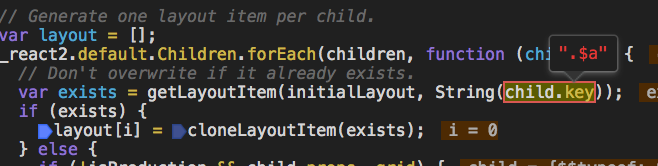
当引入 @cssmodules(styles, { allowMultiple: true }) 会把你的child.key给重新,比如你传如的时候key是“a”,代码如下
<div key="a" itemKey="a">
         <span className="text">aaa</span>
       </div>
但是react-css-module会把你的key 重写成“.$a”,所以最后结果就不正确
解决办法,可以这样
const layout = [
  {
    x: 0,
    y: 0,
    w: 6,
    h: 4,
    i: ".$a"
  },
  {
    x: 6,
    y: 0,
    w: 6,
    i: ".$b",
    h: 4
  }
];
<div key="a">
            <span className="text">999999</span>
          </div>
          <div key="b">
            <span className="text">80099</span>
          </div>