当一个app变得复杂,就数据而言,将会被多个组件传递使用的时候,那该考虑使用Vuex了。
Vuex是一个状态维护器,是个Vue的类库。它为应用中所有组件提供了(状态)中心化存储,它的规则确保了数据的更改只能够通过可预测的方式去做。
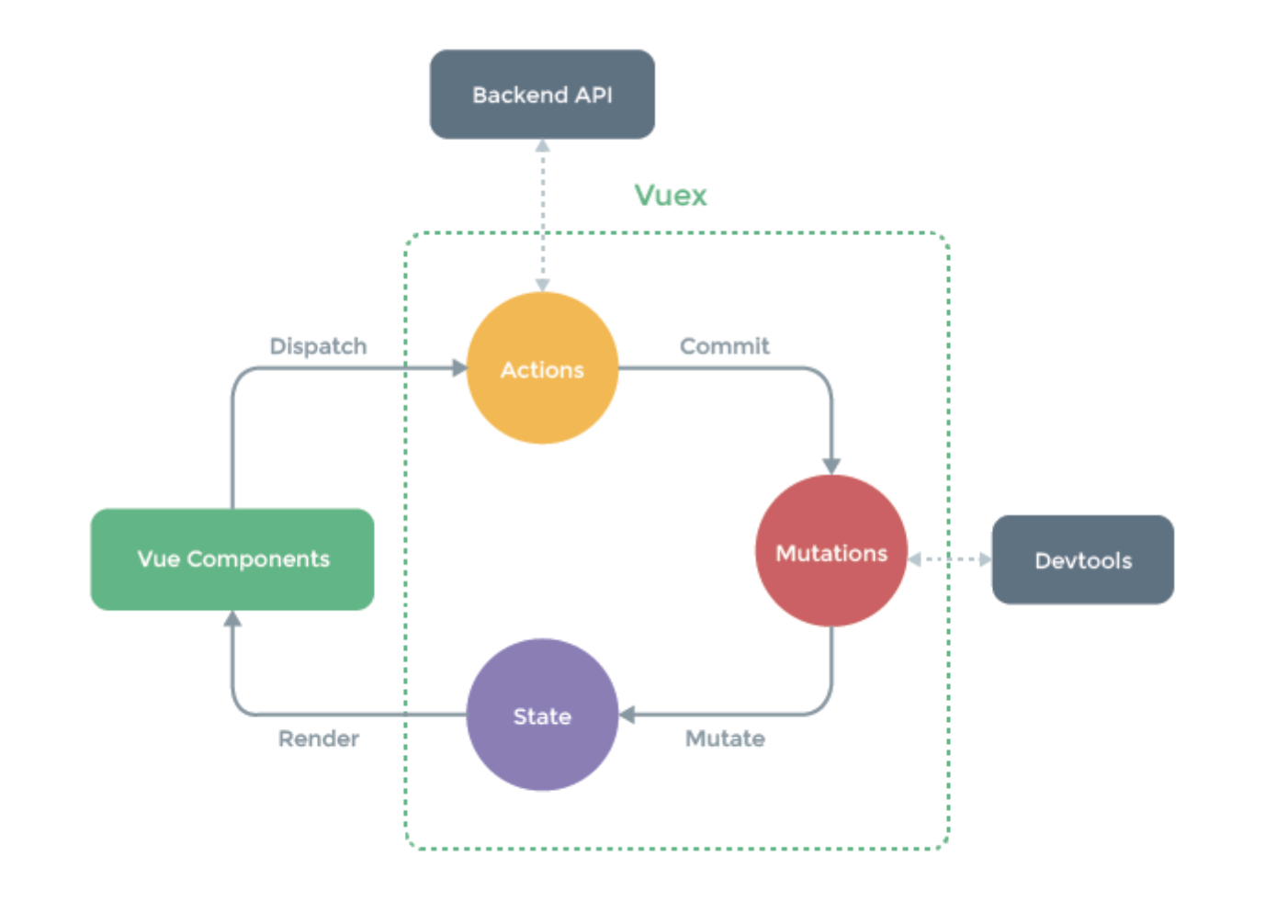
为啥用Vuex?
- Vuex提供了一个真实的(数据)来源
- 每个组件都能够访问全局的state
- 这个全局的state响应起来就像本地state一样(触手可得)
- 减少了放在组件里的data,从而使追踪数据源变得不那么复杂
- Vuex提供了一个模式,使更改状态变得标准化
用npm来安装一下Vuex:
npm i vuex --save
开一个store.js文件,大概长成这样:
import Vue from 'vue';
import Vuex from 'vuex';

Vue.use(Vuex);

export const store = new Vuex.Store({
  state: {},
  mutations: {},
  actions: {},
  getters: {},
});
在main.js里,引入store文件,然后加到Vue里,让store和Vue实例关联了起来。
import Vue from 'vue';
import App from './App.vue';
import { store } from './store/store';

Vue.config.productionTip = false;

new Vue({
  store,
  render: h => h(App),
}).$mount('#app');
现在我们store建立好了,但是还不能访问和修改它。
Vuex是怎样和store协同的
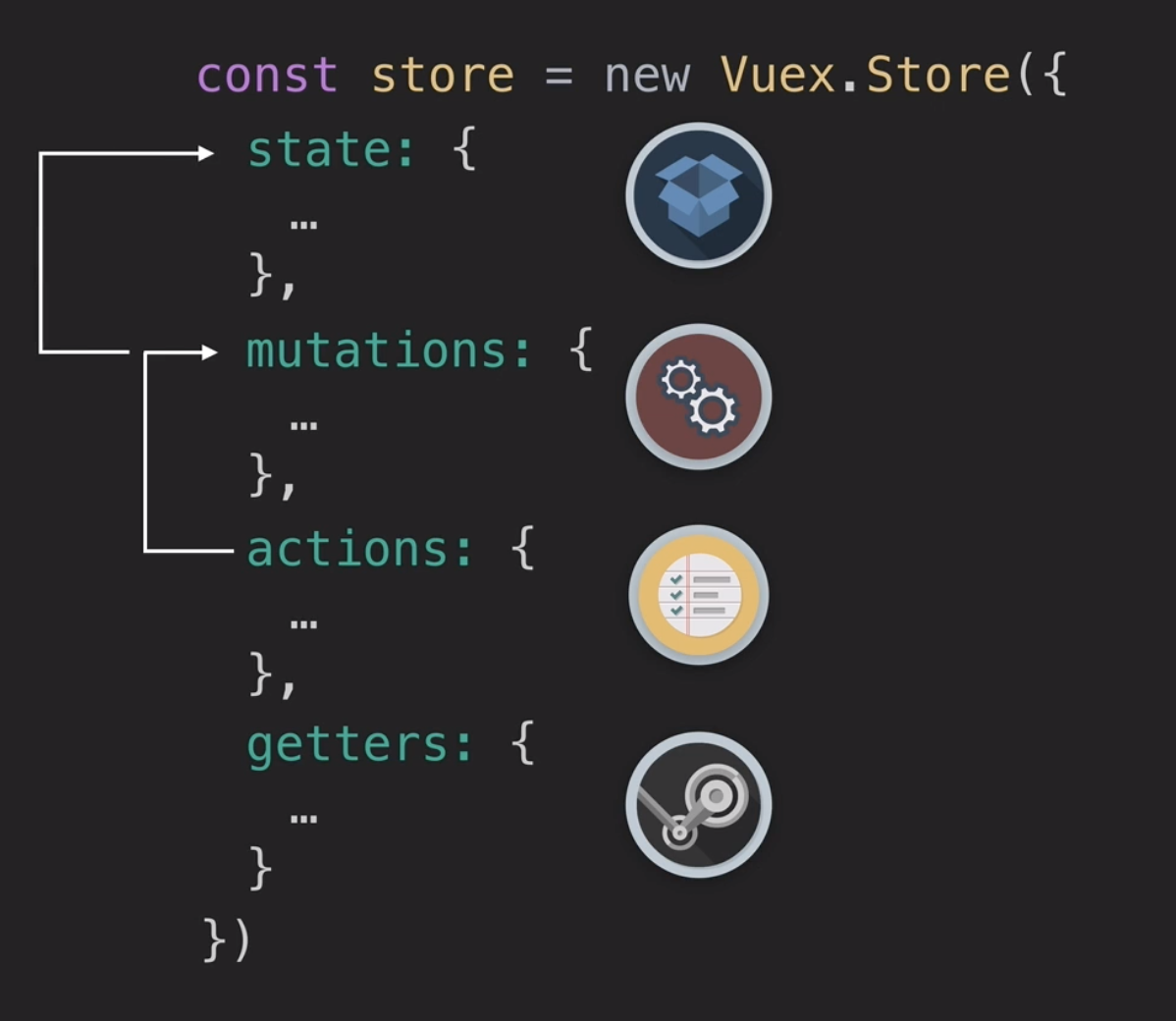
Getters
将Vuex里的state转成(Vue组件)的计算属性里
在store.js里,我们能够创建getters,这能够直接获取store里的state。接着我们就能够通过计算属性在组件内显示getters。
示例如下:
import Vue from 'vue'
import Vuex from 'vuex'

Vue.use(Vuex)

export default new Vuex.Store({
  state: {
    user: { id: 'aaa', name: 'Adsasas' },
    events: [
      {
        id: 1,
        title: 'title one',
        organizer: 'a'
      },
      {
        id: 2,
        title: 'title two',
        organizer: 'b'
      },
      {
        id: 3,
        title: 'title three',
        organizer: 'c'
      }
    ],
    categories: [
      'sustainability',
      'nature',
      'animal welfare',
      'housing',
      'education',
      'food',
      'community'
    ]
  },
  mutations: {},
  actions: {},
  getters: {
    catLength: state => {
      return state.categories.length
    },
    doneToDos: state => {
      return state.todos.filter(todo => todo.done)
    },
    activeTodosCount: state => {
      return state.todos.filter(todo => !todo.done).length
    },
    getEventById: state => id => {
      return state.events.find(event => event.id === id)
    }
  }
})
怎样把getters和组件关联起来?
答案是使用计算属性(computed properties),不过我们能够通过(Vuex的)map器来方便的达到这个目的。
<template>
<div>
  <h1>Create Event {{ userName }}</h1>
  <p>There are {{catLength}} categories</p>
  <ul>
    <li v-for="cat in categories" :key="cat">
        {{cat}}
    </li>
  </ul>
<p>
{{ getEventById(3) }}
</p>
</div>

</template>

<script>
import { mapState, mapGetters } from 'vuex'
export default {
  computed: {
    ...mapState(['user', 'categories']),
    ...mapGetters(['getEventById', 'catLength'])
  }
}
</script>
在计算属性里通过展开语法,把getter的名字作为字符串拼成数组来调用map器,然后我们就能够在template里引用这些getter了。
我们还能够创建带参数的getter,这些参数可以从template调用进来。getEventById就是这么个例子。
Mutations
- 提交+跟踪+更改状态
- 最佳实践是调用(提交)mutations,然后让mutations来直接更新state
- 使用devtools我们能够回滚mutations到前一个state
- Mutations的函数都是同步的,一个接一个地发生。
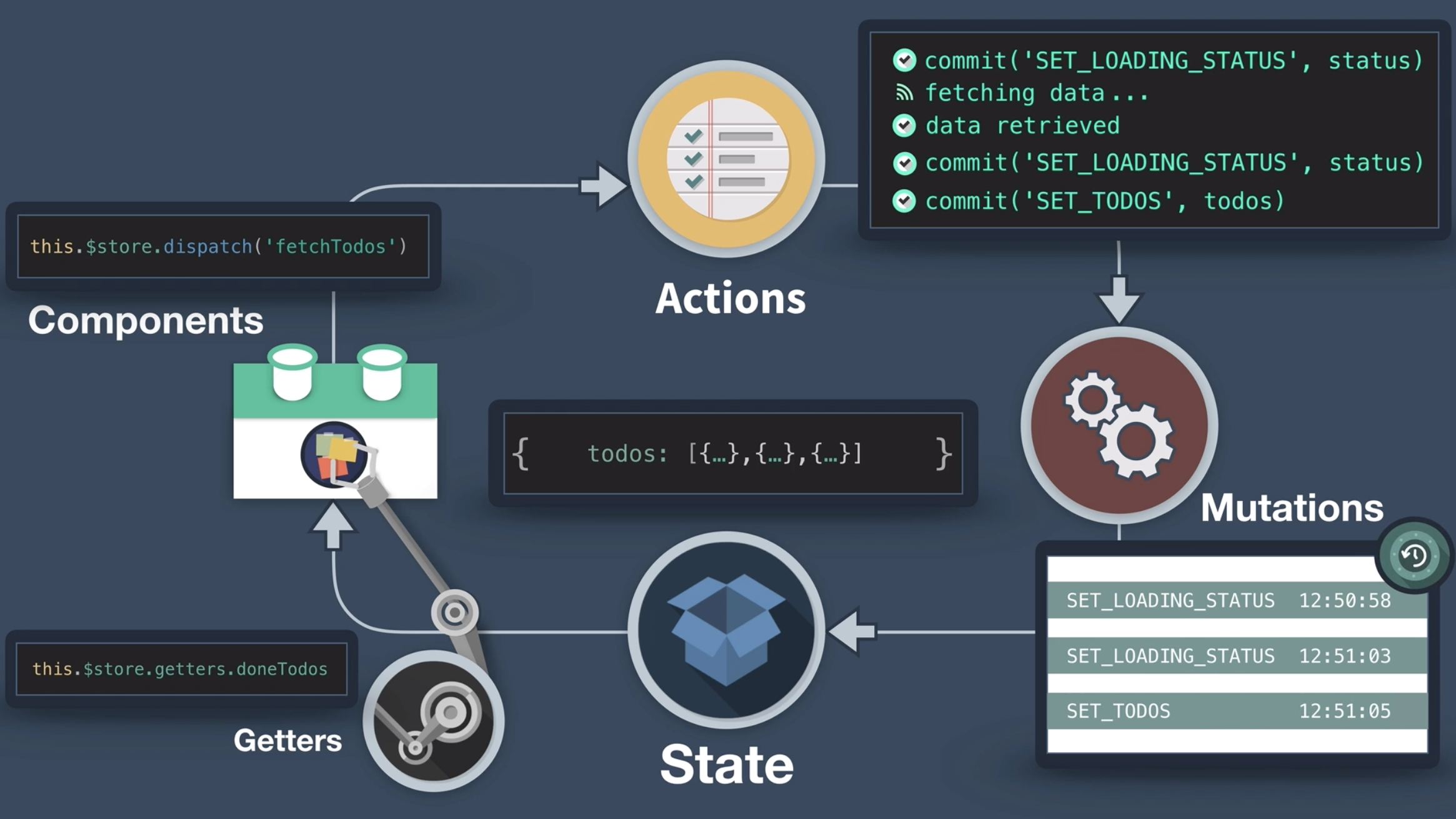
Actions
- 可以是异步的
- 能够围绕mutations写业务逻辑(commit mutations等)
- (最好)始终把Mutations放在Actions里 —— 这样业务逻辑就方便使用,能增加扩展性
import Vue from 'vue';
import Vuex from 'vuex';

Vue.use(Vuex);
export const store = new Vuex.Store({
  state: {
    categories: ['travel', 'fun', 'social', 'work', 'other'],
    events: [],
  },
  getters: {
    cat: state => {
      return state.categories;
    },
    getEventById: state => id => {
      return state.events.find(event => event.id === id);
    },
    events: state => {
      return state.events;
    },
  },
  mutations: {
    ADD_EVENT(state, event) {
      state.events.push(event);
    },
  },
  actions: {
    createEvent({ commit }, event) {
      commit('ADD_EVENT', event);
    },
  },
});
这里我们能看到mutation已经创建好了,能够把参数event放到events的数组里。那个action将会调用这个mutation去更新store。
我们看下如何在组件里调用这个action。
this.$store.dispatch('createEvent', this.event)
通过(组件中)引用的store(this.$store),调用dispatch方法,用action的名字(作参数),又把this.event传进了action,然后就能让mutation来更新state了。
使用以上这种方式来使用Vuex,能够避免在各个组件里追踪数据的传递。在大型项目里(以上这种写法)代码可能会变得十分臃肿,因此需要模块化来解决这个问题。模块化的文档能够在这里找到。
以上就是Vuex的基础~