

配置
为了专注在展示如何使用 Zipkin 这一点上,本文在配置和编程模型上没有采用更多的高级技术,而是使用了最传统的 Spring XML 的配置方式,帮助读者理解。更高级的通过 annotation 甚至 spring boot 的方式,读者可以自行查阅 Dubbo 和 Zipkin 相关的文档。
- 暴露 HelloService 服务 在 resouces/spring/hello-service.xml 中增加以下的配置来将 HelloServiceImpl 暴露成一个 Dubbo 服务:
- 使用了本地启动的 Zookeeper Server 作为注册中心,地址为默认值 zookeeper://127.0.0.1:2181
- 用 Dubbo 原生服务在端口 20880 上暴露服务
- 将 HelloServiceImpl 注册成 id 是 helloService 的 Spring Bean,这样就可以在后续的 <dubbo:service> 中引用到这个实现类
- 通过 <dubbo:service> 将 HelloServiceImpl 暴露成 Dubbo 服务
<!-- 定义 HelloService 的应用名 -->
    <dubbo:application name="hello-service-provider"/>

    <!-- 指定注册中心地址 -->
    <dubbo:registry address="zookeeper://127.0.0.1:2181"/>

    <!-- 使用 Dubbo 原生协议在 20880 端口上暴露服务 -->
    <dubbo:protocol name="dubbo" port="20880"/>

    <!-- 将 HelloServiceImpl 的实现声明成一个 spring bean -->
    <bean id="helloService" class="com.alibaba.dubbo.samples.service.hello.HelloServiceImpl"/>

    <!-- 将 HelloServiceImpl 声明成一个 Dubbo 服务 -->
    <dubbo:service interface="com.alibaba.dubbo.samples.api.HelloService" ref="helloService"/>
2. 增加 Zipkin 相关的配置 在 resources/spring/hello-service.xml 中增加 Zipkin 相关的配置:
- 修改 dubbo 服务暴露的配置,添加 Zipkin 的 tracing filter 到 Dubbo 的 filter chain 中
- 按照 https://github.com/openzipkin/brave/blob/master/spring-beans/README.md 来配置 Zipkin 的 sender 和 tracing 的 spring bean
<!-- 1. 修改 dubbo 服务暴露配置,在 filter chain 中增加 zipkin 的 tracing 过滤器 -->
    <dubbo:service interface="com.alibaba.dubbo.samples.api.HelloService" ref="helloService" filter="tracing"/>

    <!-- 2. zipkin 相关的配置 -->
    <!-- 使用 OKHttp 来发送 trace 信息到 Zipkin Server。这里的 Zipkin Server 启动在本地 -->
    <bean id="sender" class="zipkin2.reporter.beans.OkHttpSenderFactoryBean">
        <property name="endpoint" value="http://localhost:9411/api/v2/spans"/>
    </bean>

    <bean id="tracing" class="brave.spring.beans.TracingFactoryBean">
        <property name="localServiceName" value="hello-service"/>
        <property name="spanReporter">
            <bean class="zipkin2.reporter.beans.AsyncReporterFactoryBean">
                <property name="sender" ref="sender"/>
                <!-- wait up to half a second for any in-flight spans on close -->
                <property name="closeTimeout" value="500"/>
            </bean>
        </property>
        <property name="currentTraceContext">
            <bean class="brave.spring.beans.CurrentTraceContextFactoryBean">
                <property name="scopeDecorators">
                    <bean class="brave.context.slf4j.MDCScopeDecorator" factory-method="create"/>
                </property>
            </bean>
        </property>
    </bean>
3. 增加 HelloService 的启动类 在 com.alibaba.dubbo.samples.service.hello.Application 中通过 ClassPathXmlApplicationContext 读取 刚才配置的 spring/hello-service.xml 来初始化一个 spring context 并启动
package com.alibaba.dubbo.samples.service.hello;

import org.springframework.context.support.ClassPathXmlApplicationContext;

import java.io.IOException;

public class Application {
    public static void main(String[] args) throws IOException {
        ClassPathXmlApplicationContext context = new ClassPathXmlApplicationContext("spring/hello-service.xml");
        context.start();

        System.out.println("Hello service started");
        // press any key to exit
        System.in.read();
    }
}
4. 暴露 GreetingService 服务,并使用 Zipkin 在 resources/spring/greeting-service.xml 中配置 GreetingService。相关步骤与 HelloService 类似,不再赘述,重点关注如何在 GreetingService 中配置下游服务的依赖。完整的 XML 配置如下:
<beans xmlns:xsi="http://www.w3.org/2001/XMLSchema-instance"
       xmlns:dubbo="http://dubbo.apache.org/schema/dubbo"
       xmlns="http://www.springframework.org/schema/beans"
       xsi:schemaLocation="http://www.springframework.org/schema/beans http://www.springframework.org/schema/beans/spring-beans.xsd
       http://dubbo.apache.org/schema/dubbo http://dubbo.apache.org/schema/dubbo/dubbo.xsd">

    <!-- 1. 定义 GreetingService 的应用名 -->
    <dubbo:application name="greeting-service-provider"/>

    <!-- 2. 指定注册中心地址 -->
    <dubbo:registry address="zookeeper://127.0.0.1:2181"/>

     <!-- 3. 使用 Dubbo 原生协议在 20881 端口上暴露服务 -->
    <dubbo:protocol name="dubbo" port="20881"/>

    <!-- 4. 声明 HelloService 的远程代理,并在 Dubbo 的 filter chain 中增加 tracing filter -->
    <dubbo:reference id="helloService" check="false" interface="com.alibaba.dubbo.samples.api.HelloService" filter="tracing"/>

    <!-- 5. 将 GreetingServiceImpl 的实现声明成一个 spring bean,并将 HelloService 的远程代理装配进去 -->
    <bean id="greetingService" class="com.alibaba.dubbo.samples.service.greeting.GreetingServiceImpl">
        <property name="helloService" ref="helloService"/>
    </bean>

    <!-- 6. 将 GreetingServiceImpl 声明成一个 Dubbo 服务,并在 Dubbo 的 filter chain 中增加 tracing filter -->
    <dubbo:service interface="com.alibaba.dubbo.samples.api.GreetingService" ref="greetingService" filter="tracing"/>

    <!-- 7. zipkin 相关的配置 -->
    <bean id="sender" class="zipkin2.reporter.beans.OkHttpSenderFactoryBean">
        <property name="endpoint" value="http://localhost:9411/api/v2/spans"/>
    </bean>

    <bean id="tracing" class="brave.spring.beans.TracingFactoryBean">
        <property name="localServiceName" value="greeting-service"/>
        <property name="spanReporter">
            <bean class="zipkin2.reporter.beans.AsyncReporterFactoryBean">
                <property name="sender" ref="sender"/>
                <!-- wait up to half a second for any in-flight spans on close -->
                <property name="closeTimeout" value="500"/>
            </bean>
        </property>
        <property name="currentTraceContext">
            <bean class="brave.spring.beans.CurrentTraceContextFactoryBean">
                <property name="scopeDecorators">
                    <bean class="brave.context.slf4j.MDCScopeDecorator" factory-method="create"/>
                </property>
            </bean>
        </property>
    </bean>
</beans>
这里的配置与上面的 HelloService 类似,需要重点关注的有两点:
- 第 3 步中注意服务需要暴露在不同的端口上,否则会和 HelloService 冲突,本例中选择的是 20881 这个端口
- 通过第 4 步先声明 HelloService 的远程代理,然后在第 5 步中将其组装给 GreetingService 来完成服务上下游依赖的声明
增加 GreeeingService 的启动类,与 HelloService 类似,通过 spring/greeting-service.xml 的配置来初始化一个新的 spring context 来完成。
package com.alibaba.dubbo.samples.service.greeting;

   import org.springframework.context.support.ClassPathXmlApplicationContext;

   import java.io.IOException;

   public class Application {
       public static void main(String[] args) throws IOException {
           ClassPathXmlApplicationContext context = new ClassPathXmlApplicationContext("spring/greeting-service.xml");
           context.start();

           System.out.println("Greeting service started");
           // press any key to exit
           System.in.read();
       }
}- 实现客户端 通过 resources/spring/client.xml 初始化一个 spring context,从其中获取 GreetingService 的远程代理,发起远程调用。
package com.alibaba.dubbo.samples.client;

import com.alibaba.dubbo.samples.api.GreetingService;
import org.springframework.context.support.ClassPathXmlApplicationContext;

public class Application {

    public static void main(String[] args) {
        ClassPathXmlApplicationContext context = new ClassPathXmlApplicationContext("spring/client.xml");
        context.start();
        // 获取远程代理并发起调用
        GreetingService greetingService = (GreetingService) context.getBean("greetingService");
        System.out.println(greetingService.greeting("world"));
    }
}
resource/spring/client.xml 中的配置与 Dubbo 服务的配置类似,主要是配置远程代理,以及配置 Zipkin
<beans xmlns:xsi="http://www.w3.org/2001/XMLSchema-instance"
       xmlns:dubbo="http://dubbo.apache.org/schema/dubbo"
       xmlns="http://www.springframework.org/schema/beans"
       xsi:schemaLocation="http://www.springframework.org/schema/beans http://www.springframework.org/schema/beans/spring-beans.xsd
       http://dubbo.apache.org/schema/dubbo http://dubbo.apache.org/schema/dubbo/dubbo.xsd">

   <!-- 1. 定义 dubbo 客户端的应用名 -->
    <dubbo:application name="dubbo-client"/>

    <!-- 2. 指定注册中心地址 -->
    <dubbo:registry address="zookeeper://127.0.0.1:2181"/>

    <!-- 3. 声明 GreetingService 的远程代理,并在 Dubbo 的 filter chain 中增加 tracing filter -->
    <dubbo:reference id="greetingService" check="false" interface="com.alibaba.dubbo.samples.api.GreetingService" filter="tracing"/>

    <!-- 4. zipkin 相关的配置 -->
    <bean id="sender" class="zipkin2.reporter.beans.OkHttpSenderFactoryBean">
        <property name="endpoint" value="http://localhost:9411/api/v2/spans"/>
    </bean>

    <bean id="tracing" class="brave.spring.beans.TracingFactoryBean">
        <property name="localServiceName" value="client"/>
        <property name="spanReporter">
            <bean class="zipkin2.reporter.beans.AsyncReporterFactoryBean">
                <property name="sender" ref="sender"/>
                <!-- wait up to half a second for any in-flight spans on close -->
                <property name="closeTimeout" value="500"/>
            </bean>
        </property>
        <property name="currentTraceContext">
            <bean class="brave.spring.beans.CurrentTraceContextFactoryBean">
                <property name="scopeDecorators">
                    <bean class="brave.context.slf4j.MDCScopeDecorator" factory-method="create"/>
                </property>
            </bean>
        </property>
    </bean>
</beans>
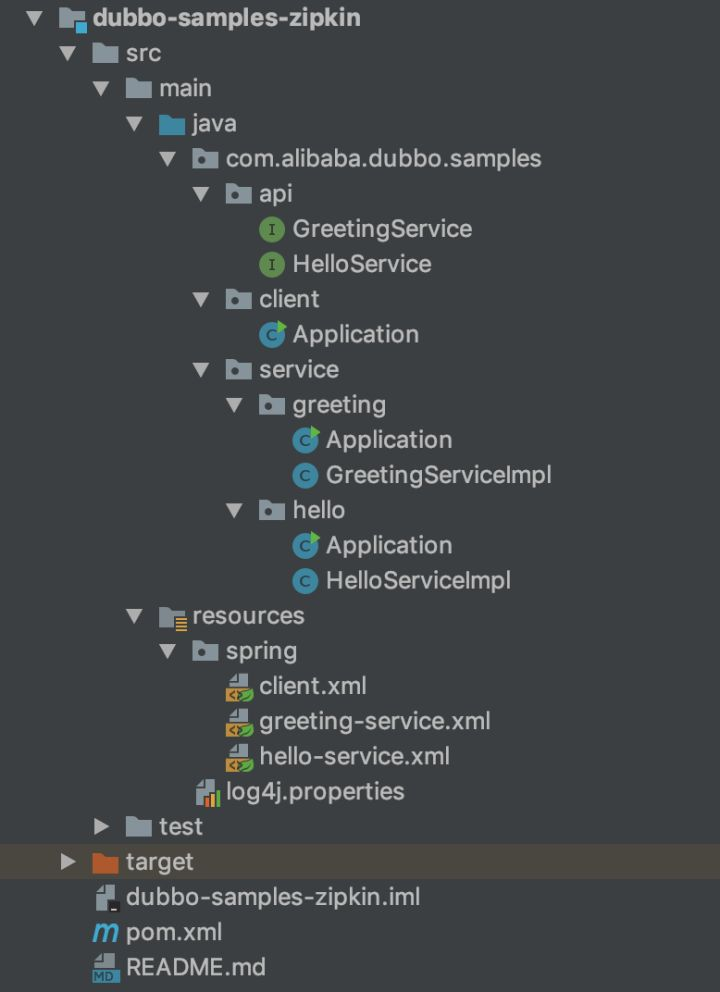
完成之后的工程的目录结构如下:
运行
现在让我们把整个链路运行起来,看看 Zipkin 链路追踪的效果。
启动 Zookeeper Server
执行以下命令在本地启动一个 Zookeeper Server,如果没有安装,请自行从 ZooKeeper 官网 下载:
$ zkServer start启动 Zipkin Server
执行以下命令在本地启动一个 Zipkin Server:
$ curl -sSL https://zipkin.io/quickstart.sh | bash -s
$ java -jar zipkin.jar
启动 HelloService
使用下面的命令启动 HelloService,当然也可以直接在 IDE 中启动:
$ mvn exec:java -Dexec.mainClass=com.alibaba.dubbo.samples.service.hello.Application启动成功后应该可以在终端上看到 “Hello service started” 的字样。
启动 GreetingService
使用下面的命令启动 GreetingService,当然也可以直接在 IDE 中启动:
$ mvn exec:java -Dexec.mainClass=com.alibaba.dubbo.samples.service.greeting.Application启动成功后应该可以在终端上看到 “Greeting service started” 的字样。
运行 Dubbo 客户端
使用下面的命令运行 Dubbo 客户端向 GreetingService 发起远程调用,当然也可以直接在 IDE 中运行:
$ mvn exec:java -Dexec.mainClass=com.alibaba.dubbo.samples.client.Application执行成功后,客户端会在终端上输出 “greeting, hello, world”。
链路追踪
打开浏览器访问 "http://localhost:9411" 并通过 "Find Traces" 按钮来搜索,可以找到刚刚调用的链路追踪,效果如下图所示:

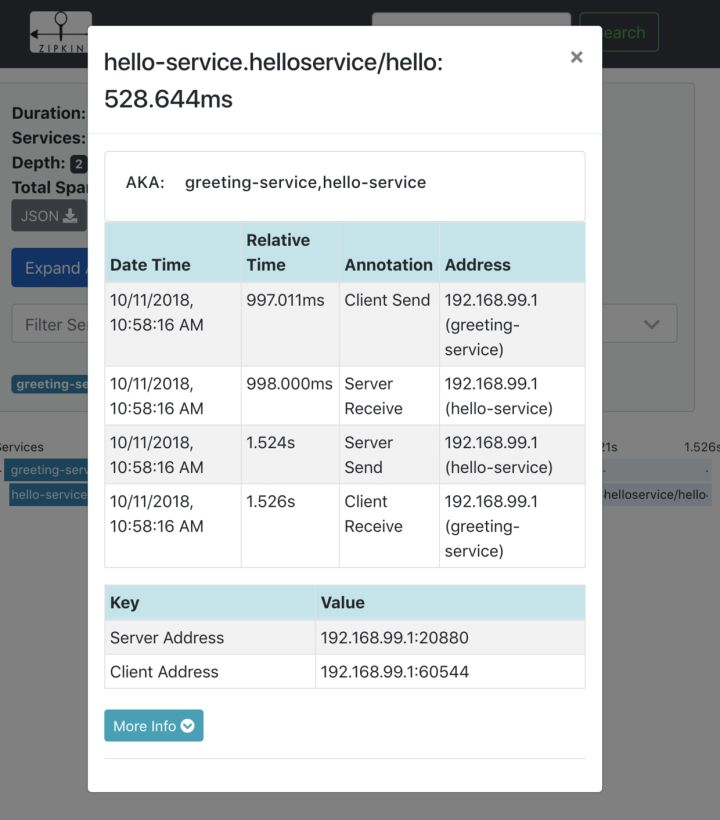
还可以进一步的选择每一个 span 来查看本次调用边界内的详情,比如,hello-service 这个 span 的详情如下:
总结
本文介绍了链路追踪的基本概念以及 Zipkin 的基本用法,然后用 Dubbo 构建了一条最简单的调用链路,并引入了 Zipkin 做全链路追踪。由于 Zipkin 对 Dubbo 做了很好的支持,整个集成的过程还是十分简单明了的。
Zipkin 对 Dubbo 的支持是构建在 Dubbo 的 filter 扩展机制上的,有兴趣的读者可以通过 https://github.com/openzipkin/brave/blob/master/instrumentation/dubbo-rpc/src/main/java/brave/dubbo/rpc/TracingFilter.java 了解其实现细节。
本文中涉及的例子可以从 https://github.com/dubbo/dubbo-samples 中的 "dubbo-samples-zipkin" 子模块中获取。另外,spring-cloud-sleth 2.0 中开始 正式支持 Dubbo,相关的文章和例子后续计划提供。
本文作者:中间件小哥
更多技术干货敬请关注云栖社区知乎机构号:阿里云云栖社区 - 知乎
本文为云栖社区原创内容,未经允许不得转载。
