什么是注解
@Override重写 @Deprecated 已过期 这些都是我们常见的注解。
-
从作用角度讲 注解是干嘛的呢?
注解是起到解释说明作用的。 比如@Override说明这个方法是重写的父类的方法,如果父类没有这个方法编辑器就会贴心的给你红线警告了
-
本质上讲注解是什么呢
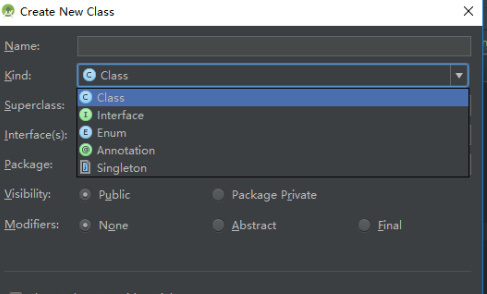
如何定义注解
源注解
定义一个注解就要先了解“元注解”,元注解就是修饰注解的注解主要是有以下四种
-
@Target,修饰注解的范围也就是说我们定义的这个注解可以用在什么地方
- CONSTRUCTOR:用于描述构造器
- FIELD:用于描述域
- LOCAL_VARIABLE:用于描述局部变量
- METHOD:用于描述方法
- PACKAGE:用于描述包
- PARAMETER:用于描述参数
- TYPE:用于描述类、接口(包括注解类型) 或enum声明
-
@Retention,描述的是注解能修饰的生命周期,源码阶段,编译的class阶段和加载到JVM的RunTime阶段
-
@Documented, doc文档
-
@Inherited 用这个修饰的注解被用于类的时候 这个类的子类也被这个注解修饰
注解元素
注解元素就是注解主体里的一些抽象方法。抽象方法的特点是没有方法但是有返回值和方法名,而且注解里面的抽象方法没有方法参数。如下
@Target(ElementType.TYPE)
@Retention(RetentionPolicy.RUNTIME)
public @interface Student {
     int value();
     String name() default "";
}
特殊的当注解中只有一个方法并且方法名为value时可以不用写可以直接写value
如何使用
注解种的值可以使用反射获取到然后做相应的处理。
- 创建注解
/**
 * Created by WESHAPE-DEV02 on 2017/12/21.
 */
@Target(ElementType.TYPE)
@Retention(RetentionPolicy.RUNTIME)
public @interface StudentDes {
    String name() default "";
    int ID() default -1;
}
特殊的当注解中只有一个抽象方法且方法名为value的时候z在使用注解添加属性值的时候可以不用标注使用(value = xxx)而是直接(XXX)
- 使用注解
@StudentDes(ID = 1008,name = "Frank")
public class Student {
    String name ;
    int ID ;
    static void getStudent(Student student){
        Class<?extends Student> cls = student.getClass();
        StudentDes studentDes = (StudentDes) cls.getAnnotation(StudentDes.class);
        /**
         * 在注解中获取名字和学号
         */
        String name = studentDes.name();
        int ID = studentDes.ID();
        Field[] fields = cls.getFields();
        for(Field field:fields){
           if(field.getName().equals("name")) {
               try {
                   field.setAccessible(true);
                   field.set(student,name);//设置名字
               } catch (IllegalAccessException e) {
                   e.printStackTrace();
               }
           }else if (field.getName().equals("ID")){
               try {
                   field.setAccessible(true);
                   field.set(student,ID);//设置学号
               } catch (IllegalAccessException e) {
                   e.printStackTrace();
               }
           }
        }

    }
}
注解的运用
模拟一个butterknife的功能
- 定义一个修饰Activity中View这种属性的注解如下:
@Target(ElementType.FIELD)
@Retention(RetentionPolicy.RUNTIME)
public @interface BindView {
    int value();
     String getMyName() default "";
}
- 写一个工具类
public class BindViewUtil {
    public static void binderView(Activity activity){
       Class<? extends Activity> mcls =  activity.getClass();
        Field[] fields = mcls.getFields();
        for(Field field:fields){
            BindView bindView = field.getAnnotation(BindView.class);
          if(bindView!=null)  {
              int viewID = bindView.value();
              bindView.getMyName();
              View view =  activity.findViewById(viewID);
              try {
                  field.setAccessible(true);
                  field.set(activity,view);
              } catch (IllegalAccessException e) {
                  e.printStackTrace();
              }
          }
        }
    }
}
- 使用
public class MainActivity extends Activity {
    @BindView(R.id.view_a)
    TextView textView;
    @Override
    protected void onCreate(Bundle savedInstanceState) {
        super.onCreate(savedInstanceState);
        setContentView(R.layout.activity_main);
        BindViewUtil.binderView(this);
    }

}
时间仓促,不免鄙陋,望诸君不吝指正。