


TensorFlow源码学习-初探一
一、Debugging Tensorflow's C++ code behind the SWIG interface
#启动一个python程序
$ python
>>> import tensorflow as tf
>>> import os
>>> os.getpid()
28671 #这里给出该python程序的进程号pid
使用gdb设置断点,并调试程序
$ gdb -p 28671
(gdb) break TF_Session #设置断点,简化操作->b TF_Session
Breakpoint 1 at 0x7f15f450a4d0
(gdb) continue
Continuing.
在第一步python程序中创建一个Session
#tf.Session是tf.v1的版本,根据不同的tensorflow可以写不同的创建语句
>>> sess=tf.Session()
在gdb调试处获得如下输出
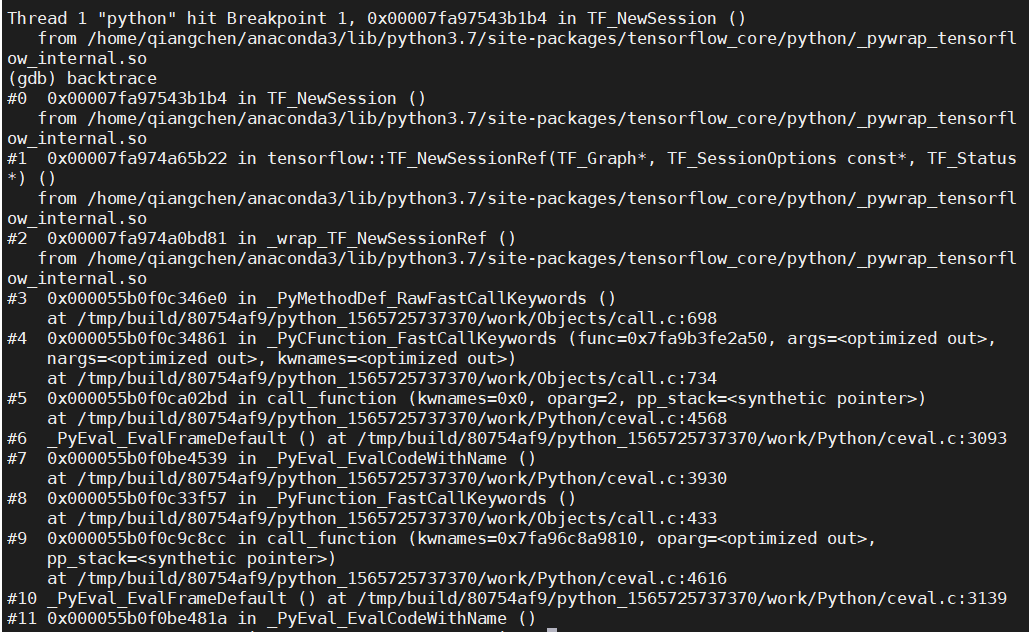 如果上面的gdb attach进程时出现,Could not attach to process
#解决方法
sudo vi /etc/sysctl.d/10-ptrace.conf
将kernel.yama.ptrace_scope=1
改为kernel.yama.ptrace_scope=0
Tensorflow中python代码跟踪:
>>>sess = tf.Session()
>>>Class Session(BaseSession)->super(Session, self).__init__(target, graph, config=config)
>>>Class BaseSession(SessionInterface),文件在/anaconda3/lib/python3.7/site-packages/tensorflow_core/python/client/session.python
>>>self._graph=ops.get_default_graph() #ops来自于from tensorflow.python.framework import ops
#ops.py位于/anaconda3/lib/python3.7/site-packages/tensorflow_core/python/framework/ops.python
>>>class _DefaultGraphStack(_DefaultStack)->_GetGlobalDefaultGraph()->Graph()
可以看出tf.Session就是为了去创建一个graph 在使用tensorflowd的操作的时候,例如变量和占位符的时候,都会在graph进行相应参数的设置 前端Session与C_API的交互是在pywrap_tensorflow.py中导入的,而pywrap_tensorflow.py中导入了swig生成的pywrap_tensorflow_internal.py文件
>>>from tensorflow.python import pywrap_tensorflow as c_api
>>>c_api.TFE_Py_UID()
>>>c_api.TF_GraphGetTensorShapeHelper()
>>>c_api.TF_OperationOutputType(tf_output) #等等
前端Session的阶段: 1、创建:tf.Session(),系统资源分配,graph引用计数加1; 2、运行:tf.Session.run()触发计算执行,client会将graph传递给master; 3、关闭:通过tf.Session.close()关闭,系统回收,graph引用计数减1; 4、销毁:python垃圾回收器GC调用tf.Session.del()回收; 用于调试的Tensorflow代码
import tensorflow as tf
import numpy as np
def add_layer(inputs, in_size, out_size, activation_function=None):  # inputs.shape=[None,1],in_size.shape=1,out_size=10 |inputs.shape=[None,10],in_size.shape=10,out_size=1
    with tf.name_scope('layer'):
        with tf.name_scope('weights'):
            Weights = tf.Variable(tf.random_normal([in_size, out_size]), name='w')  # [1,10] | [10,1]
        with tf.name_scope('bias'):
            biases = tf.Variable(tf.zeros([1, out_size]) + 0.1, name='b')  # [1,10],这个1跟上面那个1貌似不是一个意思 | [1,1]
        with tf.name_scope('wx_plus_b'):
            Wx_plus_b = tf.matmul(inputs, Weights) + biases  # 注意这里顺序,inputs在前。[None,1]×[1,10]+[1,10](python广播)=[None,10] | [None,10]×[10,1]+[1,1](python广播)=[None,1]
        if activation_function is None:
            outputs = Wx_plus_b
        else:
            outputs = activation_function(Wx_plus_b)
        return outputs

# 训练集数据和标签
train_data_x = np.linspace(-1,1,300, dtype=np.float32)[:, np.newaxis]  # shape=(300,1)
noise = np.random.normal(0, 0.05, train_data_x.shape).astype(np.float32)
label_y = np.square(train_data_x) - 0.5 + noise
with tf.name_scope('inputs'):
    inputer_x = tf.placeholder(tf.float32, [None, 1], name='inputer_x')
    inputer_y = tf.placeholder(tf.float32, [None, 1], name='inputer_y')

# 设计的网络结构是1-10-1的
l1 = add_layer(inputer_x, 1, 10, activation_function=tf.nn.relu)
prediction = add_layer(l1, 10, 1, activation_function=None)
with tf.name_scope('loss'):
    loss = tf.reduce_mean(tf.reduce_sum(tf.square(inputer_y-prediction), reduction_indices=[1]))
with tf.name_scope('train_scope'):
    train_step = tf.train.GradientDescentOptimizer(0.1).minimize(loss)

sess = tf.Session()

init = tf.global_variables_initializer()
sess.run(init)
writer = tf.summary.FileWriter("logs", sess.graph)  # 文件写在该.py文件同级,在命令行中,用tensorboard --logdir=.打开

for i in range(1000):
    # training
    sess.run(train_step, feed_dict={inputer_x: train_data_x, inputer_y: label_y})
    if i % 50 == 0:
        # to see the step improvement
        print(sess.run(loss, feed_dict={inputer_x: train_data_x, inputer_y: label_y}))

