在当前的市场中,集成一些问答 API 并非易事,例如 OpenAI 的 Chat Completions API,它需要通过 messages 字段传递所有历史上下文,以完成持续对话,并且还需要处理超出 token 限制的问题。
Ace Data Cloud 提供的 AI 问答 API 针对上述情况进行了优化。它在确保问答效果不变的前提下,封装了持续对话的实现,因此在集成过程中无需担心消息的传递,也无需担心 token 限制问题(该问题由 API 自动处理)。此外,它还提供了查询和修改对话的功能,大大简化了整体集成过程。
本文将为您介绍 AI 问答 API 的集成指南。
申请流程
要使用该 API,首先需要在 AI 问答 API 页面申请相应服务。访问该页面后,点击“获取”按钮,如下图所示:

如果您尚未登录或注册,系统会自动重定向到登录页面,邀请您注册并登录。登录或注册后,您将自动返回到当前页面。
首次申请时,会获得一个免费的配额,允许您免费使用该 API。
基本用法
首先,了解基本用法,即输入问题并接收答案。只需传递一个 question 字段,并指定相应的模型。
例如,询问:“你叫什么名字?”可以在界面上填写对应内容,如下图所示:
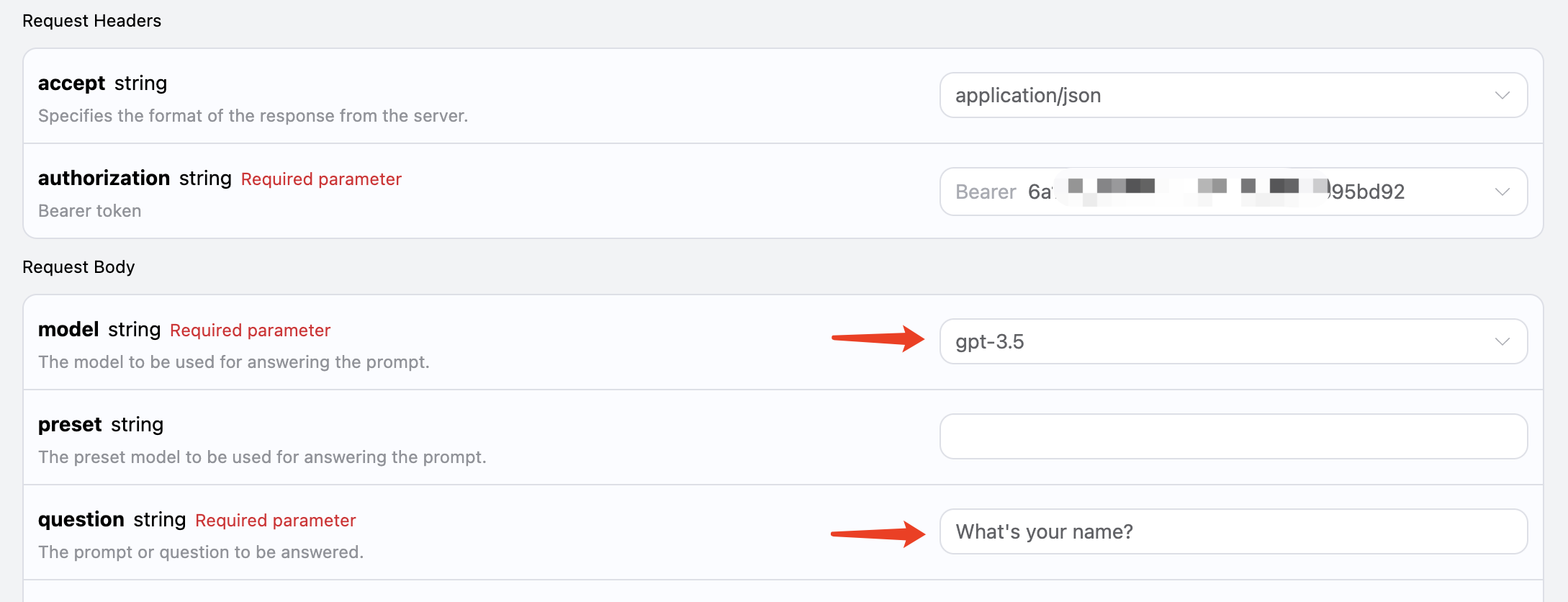
可以看到,我们设置了请求头,包括:
accept: 您希望接收的响应结果格式,这里填写为application/json,表示 JSON 格式。authorization: 调用 API 的密钥,申请后可以直接选择。
此外,我们设置了请求体,包括:
model: 模型选择,如主流的 GPT 3.5、GPT 4 等。question: 要询问的问题,可以是任何纯文本。
完成选择后,右侧会生成相应的代码,如下图所示:
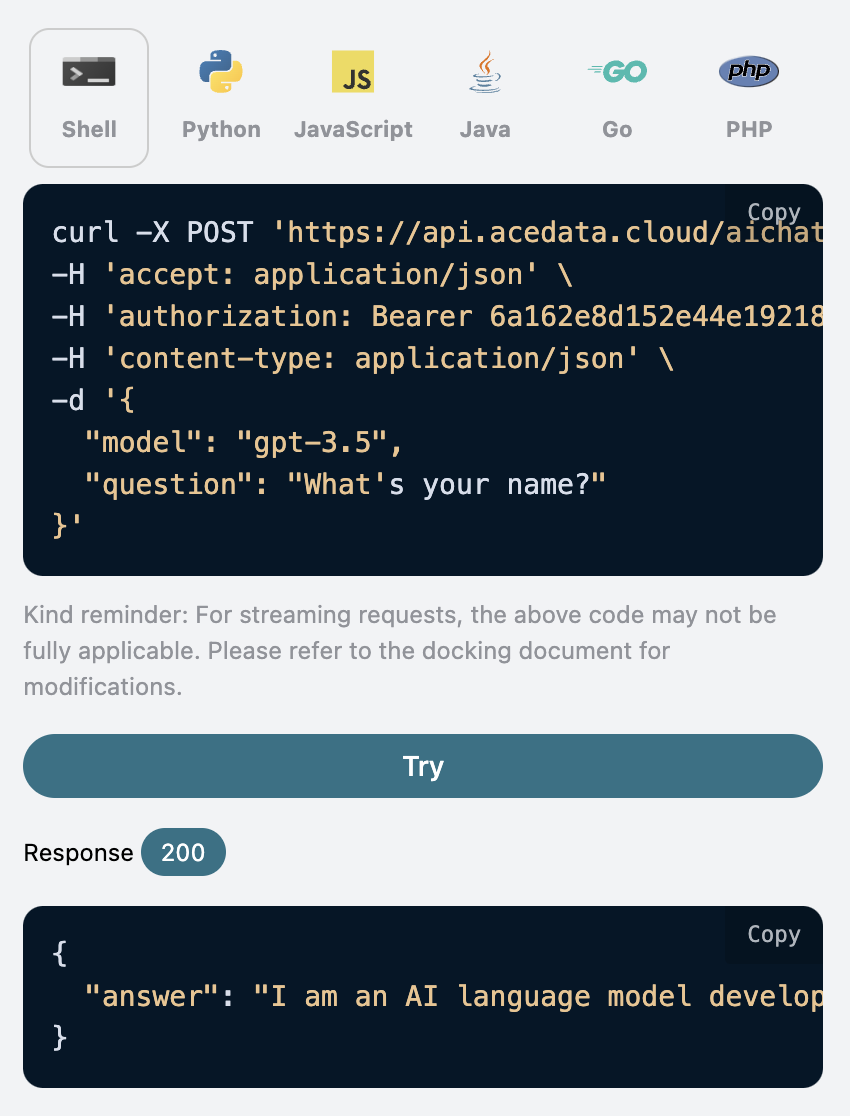
点击“尝试”按钮进行测试,结果如下:
{
  "answer": "I am an AI language model developed by OpenAI and I don't have a personal name. However, you can call me GPT or simply Chatbot. How can I assist you today?"
}
可以看到,返回结果包含 answer 字段,即问题的答案。您可以输入任何问题并获得相应的答案。
如果不需要支持多轮对话,该 API 可大大简化您的集成过程。
生成的集成代码示例
您也可以直接复制生成的代码,例如,以下是 CURL 代码:
curl -X POST 'https://api.acedata.cloud/aichat/conversations' \
-H 'accept: application/json' \
-H 'authorization: Bearer {token}' \
-H 'content-type: application/json' \
-d '{
  "model": "gpt-3.5",
  "question": "What's your name?"
}'
Python 集成代码如下:
import requests

url = "https://api.acedata.cloud/aichat/conversations"

headers = {
    "accept": "application/json",
    "authorization": "Bearer {token}",
    "content-type": "application/json"
}

payload = {
    "model": "gpt-3.5",
    "question": "What's your name?"
}

response = requests.post(url, json=payload, headers=headers)
print(response.text)
多轮对话
如果您希望集成多轮对话功能,需要额外传递一个参数 stateful,其值设置为 true。每个后续请求必须携带该参数。传递 stateful 参数后,API 将额外返回一个 id 参数,表示当前对话的 ID。随后,我们只需将此 ID 作为参数传递,即可轻松实现多轮对话。
操作示例
在第一次请求中,设置 stateful 参数为 true,并正常传递 model 和 question 参数,如下图所示:
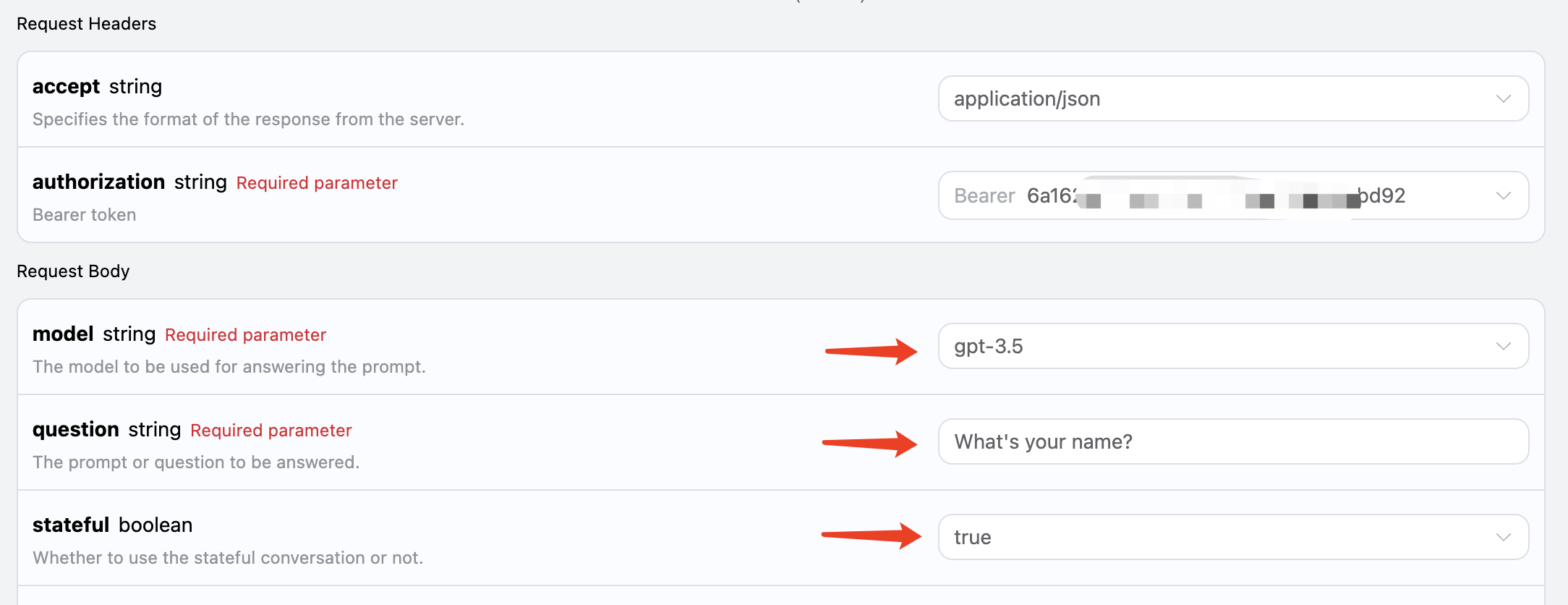
对应的代码示例如下:
curl -X POST 'https://api.acedata.cloud/aichat/conversations' \
-H 'accept: application/json' \
-H 'authorization: Bearer {token}' \
-H 'content-type: application/json' \
-d '{
  "model": "gpt-3.5",
  "question": "What's your name?",
  "stateful": true
}'
您可以得到如下响应:
{
  "answer": "I am an AI language model created by OpenAI and I don't have a personal name. You can simply call me OpenAI or ChatGPT. How can I assist you today?",
  "id": "7cdb293b-2267-4979-a1ec-48d9ad149916"
}
在第二次请求中,传递第一次请求返回的 id 字段作为参数,同时保持 stateful 参数为 true,询问“我刚才问了什么?”如下图所示:
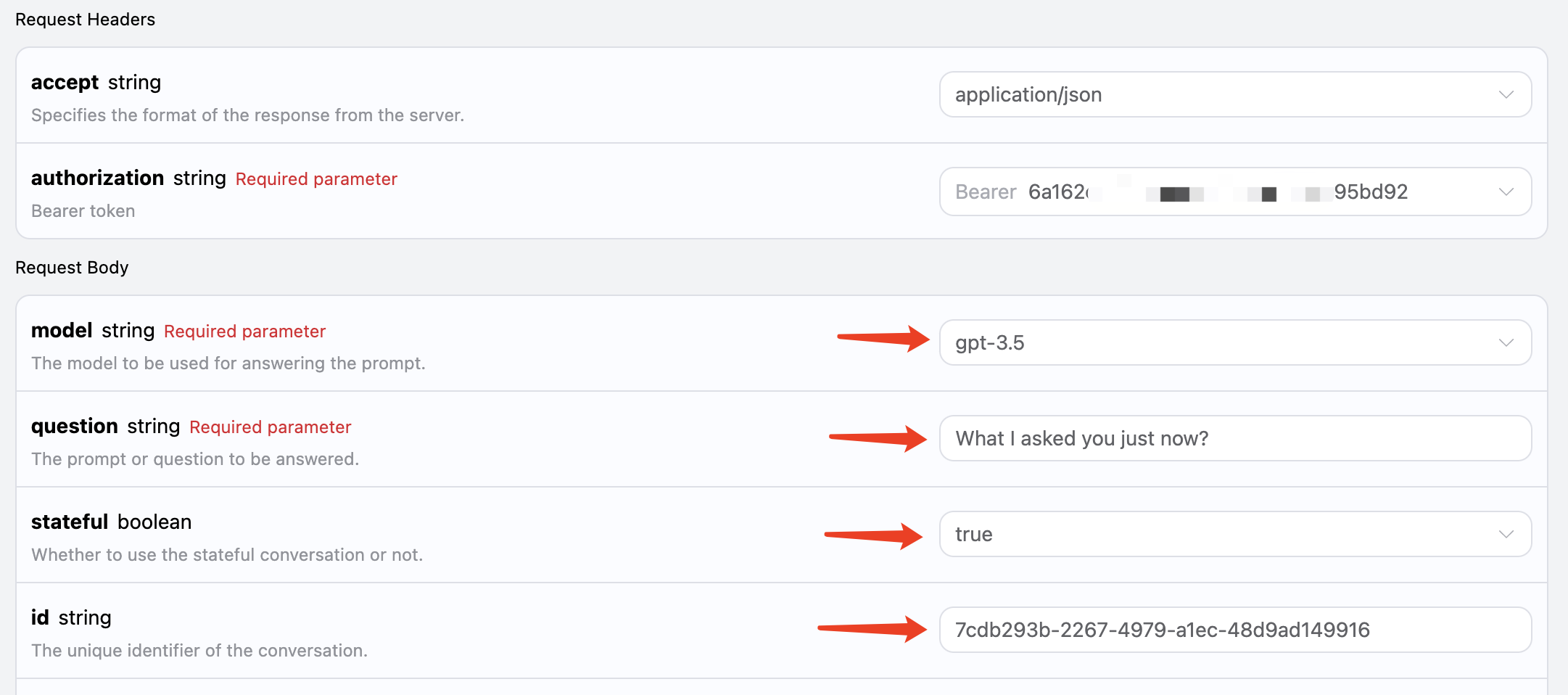
对应的代码如下:
curl -X POST 'https://api.acedata.cloud/aichat/conversations' \
-H 'accept: application/json' \
-H 'authorization: Bearer {token}' \
-H 'content-type: application/json' \
-d '{
  "model": "gpt-3.5",
  "stateful": true,
  "id": "7cdb293b-2267-4979-a1ec-48d9ad149916",
  "question": "What I asked you just now?"
}'
返回结果为:
{
  "answer": "You asked me what my name is. As an AI language model, I do not possess a personal identity, so I don't have a specific name. However, you can refer to me as OpenAI or ChatGPT, the names used for this AI model. Is there anything else I can help you with?",
  "id": "7cdb293b-2267-4979-a1ec-48d9ad149916"
}
可以看到,它能够根据上下文回答相应的问题。
流式响应
此接口还支持流式响应,这对于网页集成非常有用,允许网页实现逐字显示效果。
要以流式方式返回响应,可以将请求头中的 accept 参数更改为 application/x-ndjson。
如图所示修改,但调用代码需要有相应更改以支持流式响应。
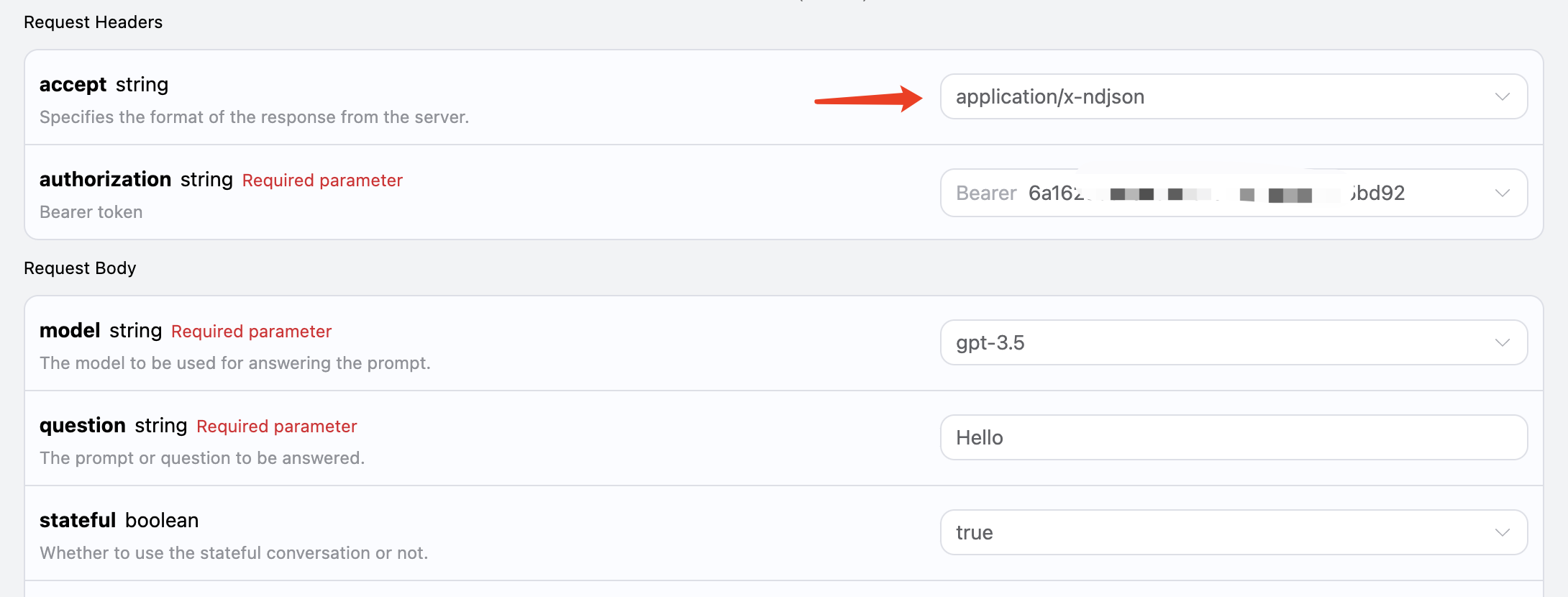
将 accept 更改为 application/x-ndjson 后,API 将逐行返回相应的 JSON 数据。在代码层面,我们需要进行相应的修改以逐行获取结果。
Python 示例代码
import requests

url = "https://api.acedata.cloud/aichat/conversations"

headers = {
    "accept": "application/x-ndjson",
    "authorization": "Bearer {token}",
    "content-type": "application/json"
}

payload = {
    "model": "gpt-3.5",
    "stateful": True,
    "id": "7cdb293b-2267-4979-a1ec-48d9ad149916",
    "question": "Hello"
}

response = requests.post(url, json=payload, headers=headers, stream=True)
for line in response.iter_lines():
    print(line.decode())
输出结果如下:
{"answer": "Hello", "delta_answer": "Hello", "id": "7cdb293b-2267-4979-a1ec-48d9ad149916"}
{"answer": "Hello!", "delta_answer": "!", "id": "7cdb293b-2267-4979-a1ec-48d9ad149916"}
{"answer": "Hello! How", "delta_answer": " How", "id": "7cdb293b-2267-4979-a1ec-48d9ad149916"}
{"answer": "Hello! How can", "delta_answer": " can", "id": "7cdb293b-2267-4979-a1ec-48d9ad149916"}
{"answer": "Hello! How can I", "delta_answer": " I", "id": "7cdb293b-2267-4979-a1ec-48d9ad149916"}
{"answer": "Hello! How can I assist", "delta_answer": " assist", "id": "7cdb293b-2267-4979-a1ec-