大家好,这里是 Lucifer三思而后行,专注于提升数据库运维效率。
@TOC
前言
昨天群里有位朋友分享了芬达大佬的 MySQL 部署工具:dbops,抱着试一试的心态玩了一把,确实很给力。今天给大家分享一下,完全免费哦!
介绍
dbops 是一套高效的 ansible playbook 集合,目前是一个可以自动化安装和部署生产级别的 MySQL 及周边生态的工具。dbops 正在持续迭代开发中,目前已经支持:
- MySQL 5.7、8.0、8.4
- openGauss 5.0
dbops 的理念:
- 高效
- 并发推送安装包,并发地部署数据库
- 全自动化部署,无需人工干预
- 安装包体积小,节省下载时间
- 优雅
- 采用 ansible-lint 做代码优化
- 使用纯优雅语言编写(python),尽量使用内置模块,避免使用 shell
- 规范 (Code as Standrad)
- MySQL 满足企业生产级规范
Code as Standrad 这个理念由芬达提出,目的是减少对部署规范文档的依赖,通过 playbook 编码来固定部署规范。如果你使用 dbops 进行部署,那就相当于满足了交维规范。
目前支持的数据库小版本的硬限制:
- MySQL 5.7: >= 5.7.26
- MySQL 8.0: >= 8.0.28
- MySQL 8.4.0: >= 8.4.0
- Percona 5.7: 暂未设限制
- Percona 8.0: 暂未设限制
- GreatSQL 8.0: 8.0.32-24、8.0.32-25
- openGauss: == 5.0.0
请注意,这些仅仅是硬编码到
pre_tasks/validate_common_config_setting.yml的硬限制,是由于作者没有测过小于等于这些版本。特殊需要时,用户也可以自行修改代码,放开限制。
支持的系统和数据库架构:
ansible:
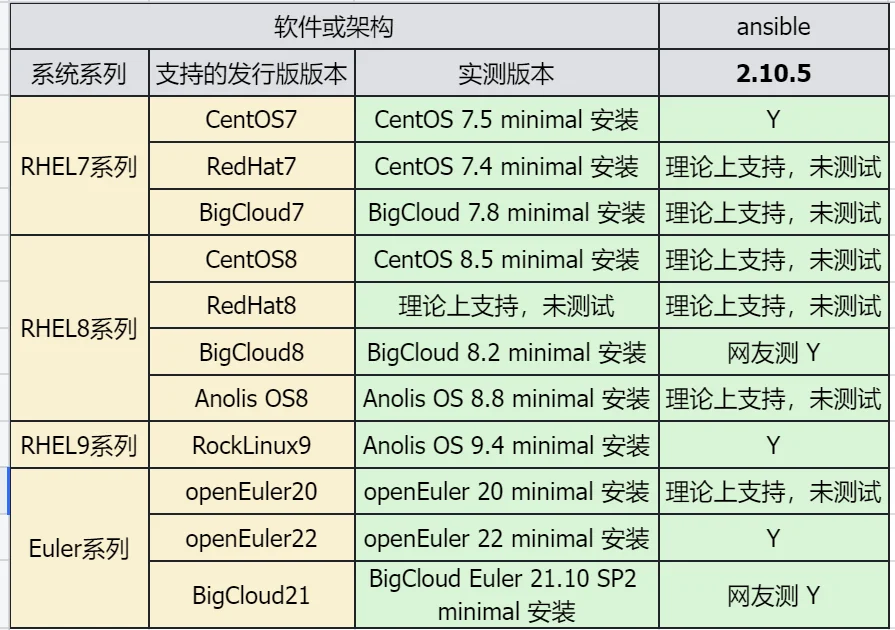
mysql-ansible:

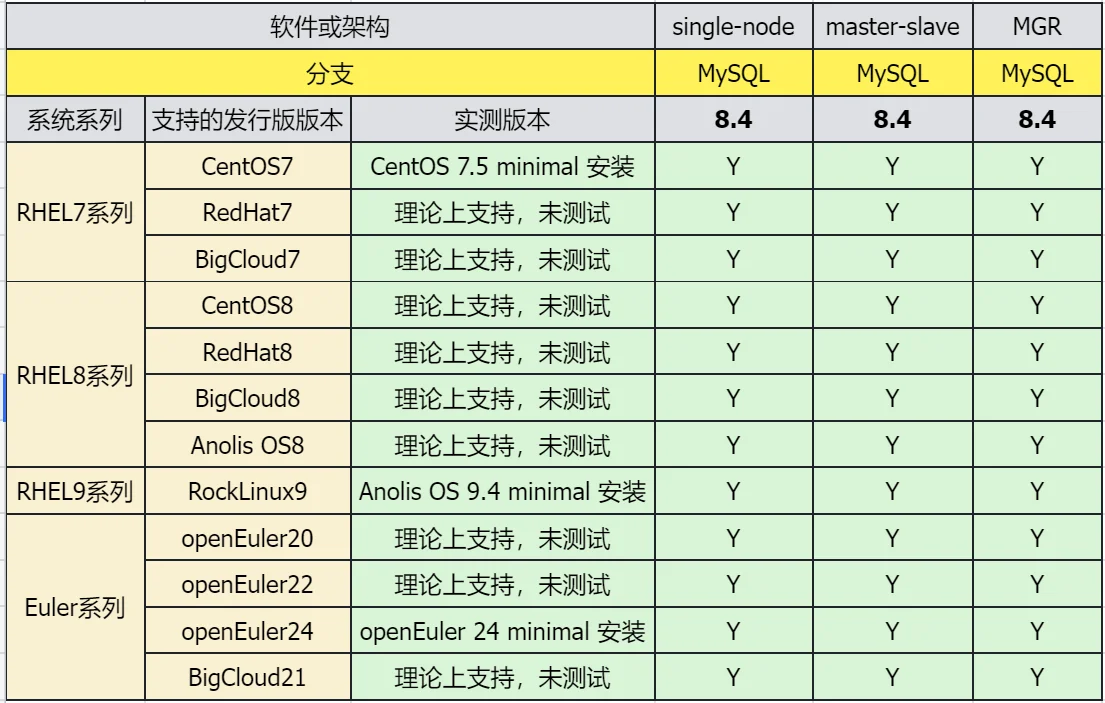
opengauss-ansible:
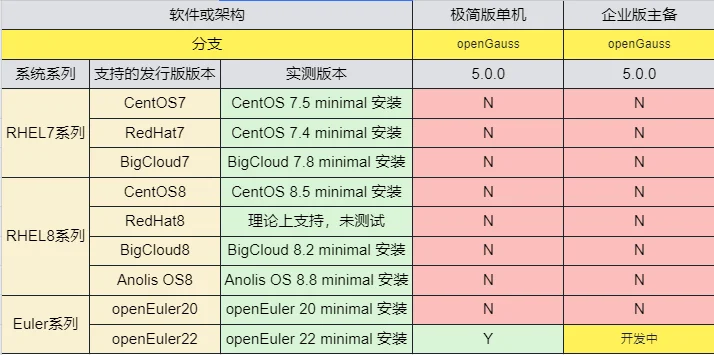
注意,作者在开发时已考虑了某些系统或版本的兼容性,经过判断后填写了 Y,但实际上并未进行过严格实测。
下载 dbops
这里建议下载稳定发行版,如果需要测试可以下载开发版进行尝鲜。
Gitee 下载地址:gitee.com/fanderchan/…
Gitee 下载
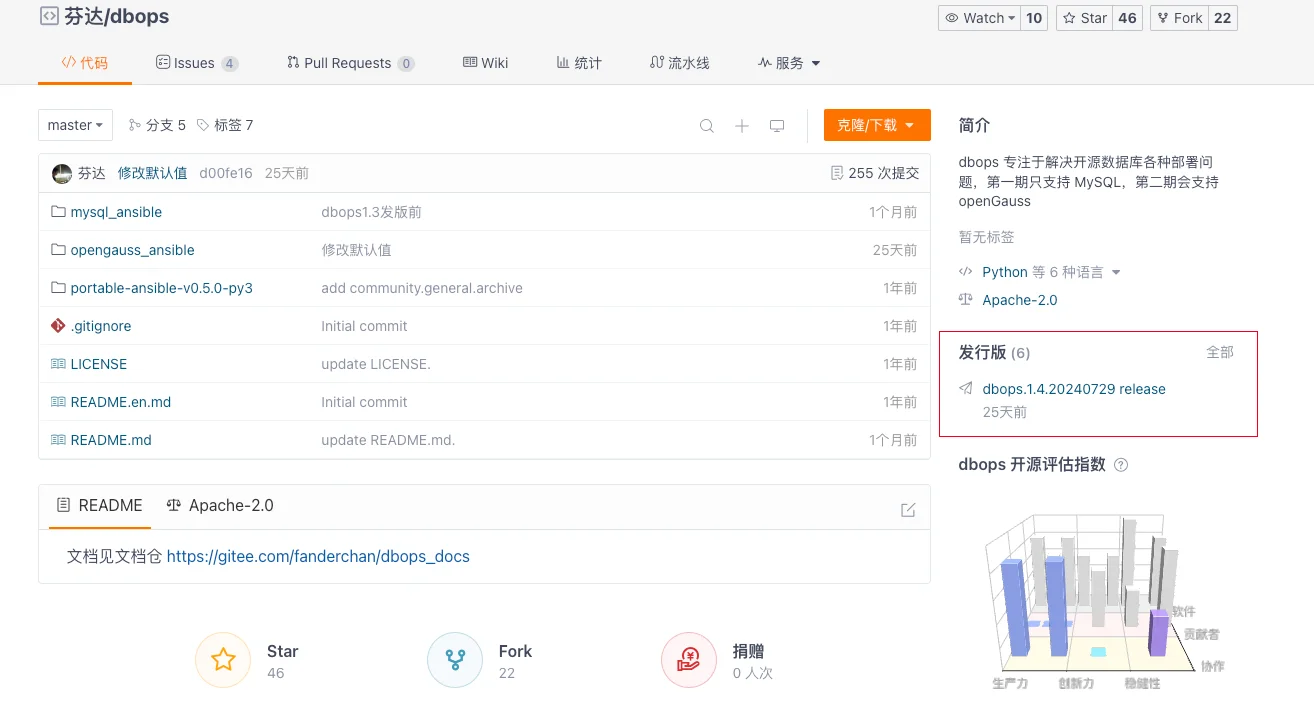
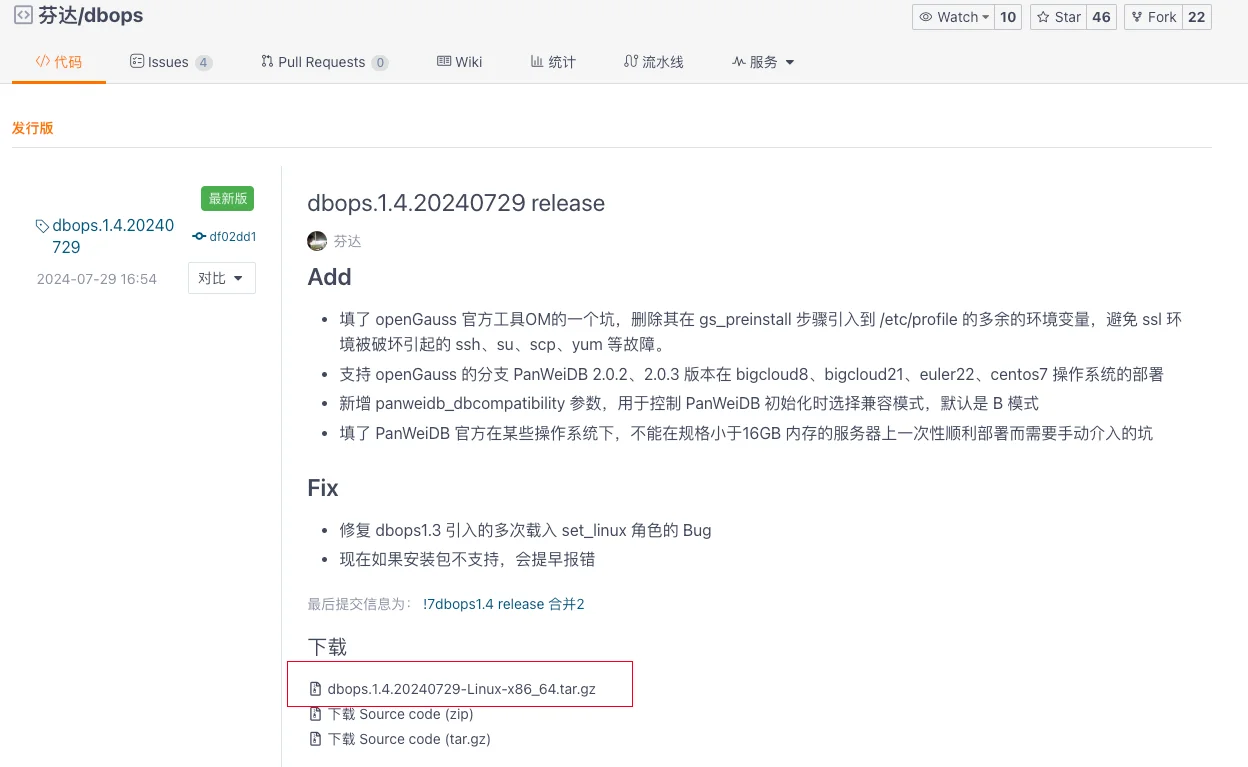
开发版下载
选择 克隆/下载即可:
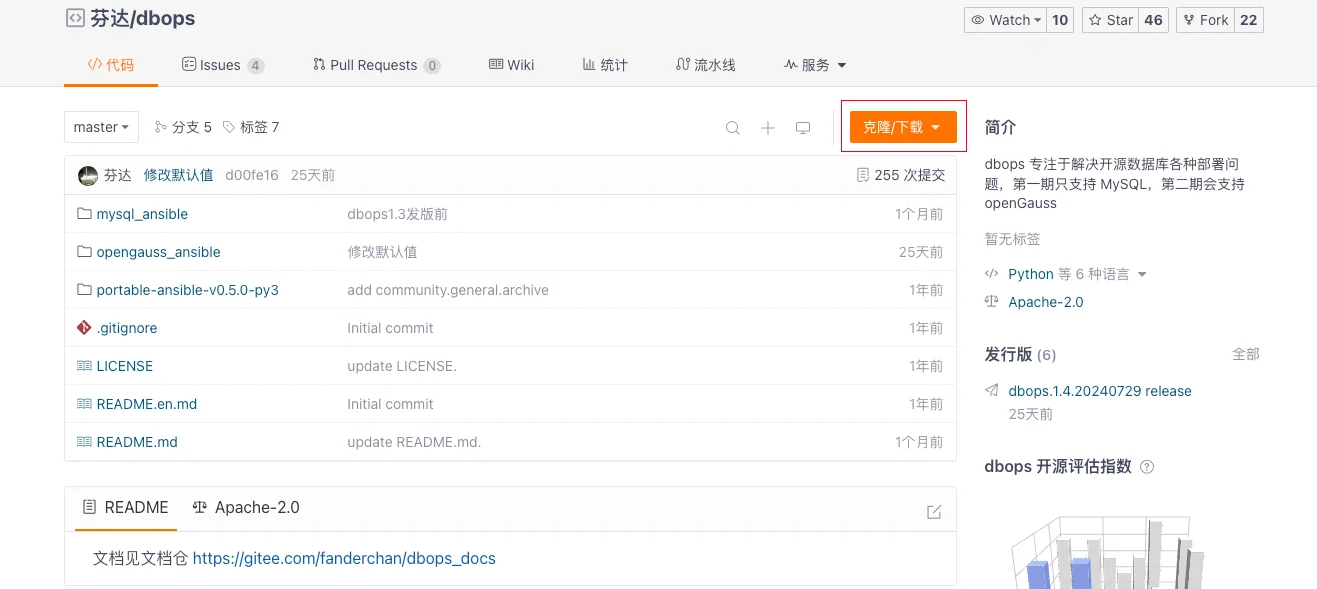
我这里是通过服务器联网直接下载的方式:
# 挂载本地 ISO
mount /dev/sr0 /mnt/

# 配置本地 YUM 源
## 备份系统初始配置文件
mkdir -p /etc/yum.repos.d/bak
mv /etc/yum.repos.d/* /etc/yum.repos.d/bak
## 一键配置软件源,默认 ISO 安装镜像挂载在 /mnt 目录下
cat<<-EOF>/etc/yum.repos.d/local.repo
[server]
name=server
baseurl=file:///mnt
enabled=1
gpgcheck=0
EOF
## 查看配置好的软件源
cat /etc/yum.repos.d/local.repo

# 最小化安装需要自行安装 wget 功能
yum install -y wget

# 通过 wget 方式下载稳定发行版
cd ~
dbops_version="1.4.20240729"
wget https://gitee.com/fanderchan/dbops/releases/download/dbops.${dbops_version}/dbops.${dbops_version}-Linux-x86_64.tar.gz
无法联网的朋友建议直接下载上传即可。
部署 dbops
为了降低 Ansible 部署难度和兼容性问题,统一版本以避免因使用不同版本产生 bug,所以作者特意采用了绿色版 Ansible 2.10.5,并集成到了 dbops 中。部署过程中,系统会自动安装 Python3,并搭配使用 Python3 和 Ansible 2.10.5。为加快 dbops 的下载速度,作者精简了绿色版 Ansible 中不常用的功能,使其体积非常小。ansible-portable 目录压缩后仅有 3.6 MB,整个 dbops.tar.gz 压缩包仅有 20 MB!
解压缩 dbops
作者推荐将安装路径设置为 /usr/local:
# 解压
[root@mysql8 ~]# tar zxvf dbops.1.4.20240729-Linux-x86_64.tar.gz -C /usr/local

# 查看解压后的目录
[root@mysql8 ~]# cd /usr/local/dbops/
[root@mysql8 dbops]# ll
total 20
-rw-r--r--. 1 root root 11356 Jul 29 16:41 LICENSE
drwxr-xr-x. 6 root root   148 Jul 29 16:41 mysql_ansible
drwxr-xr-x. 6 root root   120 Jul 29 16:41 opengauss_ansible
drwxr-xr-x. 3 root root    97 Jul 29 16:41 portable-ansible-v0.5.0-py3
-rw-r--r--. 1 root root   915 Jul 29 16:41 README.en.md
-rw-r--r--. 1 root root    58 Jul 29 16:41 README.md
部署 ansible
进入目录,执行 shell 脚本:
[root@mysql8 dbops]# cd /usr/local/dbops/portable-ansible-v0.5.0-py3
[root@mysql8 portable-ansible-v0.5.0-py3]# sh setup_portable_ansible.sh
Loaded plugins: fastestmirror
Loading mirror speeds from cached hostfile
Resolving Dependencies
--> Running transaction check
---> Package python3.x86_64 0:3.6.8-17.el7 will be installed
--> Processing Dependency: python3-libs(x86-64) = 3.6.8-17.el7 for package: python3-3.6.8-17.el7.x86_64
--> Processing Dependency: python3-setuptools for package: python3-3.6.8-17.el7.x86_64
--> Processing Dependency: python3-pip for package: python3-3.6.8-17.el7.x86_64
--> Processing Dependency: libpython3.6m.so.1.0()(64bit) for package: python3-3.6.8-17.el7.x86_64
--> Running transaction check
---> Package python3-libs.x86_64 0:3.6.8-17.el7 will be installed
--> Processing Dependency: libtirpc.so.1()(64bit) for package: python3-libs-3.6.8-17.el7.x86_64
---> Package python3-pip.noarch 0:9.0.3-8.el7 will be installed
---> Package python3-setuptools.noarch 0:39.2.0-10.el7 will be installed
--> Running transaction check
---> Package libtirpc.x86_64 0:0.2.4-0.16.el7 will be installed
--> Finished Dependency Resolution

Dependencies Resolved

=====================================================================================================================================================================================================
 Package                                               Arch                                      Version                                             Repository                                 Size
=====================================================================================================================================================================================================
Installing:
 python3                                               x86_64                                    3.6.8-17.el7                                        server                                     70 k
Installing for dependencies:
 libtirpc                                              x86_64                                    0.2.4-0.16.el7                                      server                                     89 k
 python3-libs                                          x86_64                                    3.6.8-17.el7                                        server                                    6.9 M
 python3-pip                                           noarch                                    9.0.3-8.el7                                         server                                    1.6 M
 python3-setuptools                                    noarch                                    39.2.0-10.el7                                       server                                    629 k

Transaction Summary
=====================================================================================================================================================================================================
Install  1 Package (+4 Dependent packages)

Total download size: 9.3 M
Installed size: 48 M
Downloading packages:
-----------------------------------------------------------------------------------------------------------------------------------------------------------------------------------------------------
Total                                                                                                                                                                114 MB/s | 9.3 MB  00:00:00
Running transaction check
Running transaction test
Transaction test succeeded
Running transaction
  Installing : libtirpc-0.2.4-0.16.el7.x86_64                                                                                                                                                    1/5
  Installing : python3-pip-9.0.3-8.el7.noarch                                                                                                                                                    2/5
  Installing : python3-setuptools-39.2.0-10.el7.noarch                                                                                                                                           3/5
  Installing : python3-3.6.8-17.el7.x86_64                                                                                                                                                       4/5
  Installing : python3-libs-3.6.8-17.el7.x86_64                                                                                                                                                  5/5
  Verifying  : libtirpc-0.2.4-0.16.el7.x86_64                                                                                                                                                    1/5
  Verifying  : python3-pip-9.0.3-8.el7.noarch                                                                                                                                                    2/5
  Verifying  : python3-3.6.8-17.el7.x86_64                                                                                                                                                       3/5
  Verifying  : python3-setuptools-39.2.0-10.el7.noarch                                                                                                                                           4/5
  Verifying  : python3-libs-3.6.8-17.el7.x86_64                                                                                                                                                  5/5

Installed:
  python3.x86_64 0:3.6.8-17.el7

Dependency Installed:
  libtirpc.x86_64 0:0.2.4-0.16.el7              python3-libs.x86_64 0:3.6.8-17.el7              python3-pip.noarch 0:9.0.3-8.el7              python3-setuptools.noarch 0:39.2.0-10.el7

Complete!
which: no sshpass in (/usr/local/sbin:/usr/local/bin:/usr/sbin:/usr/bin:/root/bin)
Please run 'source ~/.bashrc' to apply the changes in your current shell.
生效 .bashrc:
[root@mysql8 portable-ansible-v0.5.0-py3]# source ~/.bashrc
确认是否部署成功:
[root@mysql8 portable-ansible-v0.5.0-py3]# ansible --version
ansible 2.10.5
  config file = None
  configured module search path = ['/root/.ansible/plugins/modules', '/usr/share/ansible/plugins/modules']
  ansible python module location = /usr/local/dbops/portable-ansible-v0.5.0-py3/ansible/ansible
  executable location = /usr/local/dbops/portable-ansible-v0.5.0-py3/ansible
  python version = 3.6.8 (default, Oct 13 2020, 16:18:22) [GCC 4.8.5 20150623 (Red Hat 4.8.5-44)]
python 版本是 3.x 为正确。ansible 版本为 2.10.5 为正确。
使用 dbops
dbops 支持的部署架构中有些至少需要 3 台机器,例如 MySQL 的 MGR 架构。建议 dbops 独立用一台机器,那么整套实验就至少需要 4 台机器。如果实在没办法,可以把 dbops 部署到第一台 MySQL 复用机器。
本次只演示单机模式部署,dbops 和 MySQL 共用一台服务器主机。
部署单机
修改 hosts.ini,添加需要操作的机器进去:
## 进入 hosts.ini 所在目录
[root@mysql8 inventory]# pwd
/usr/local/dbops/mysql_ansible/inventory

## 修改 hosts.ini 中对应的 IP 和 root 密码
[root@mysql8 inventory]# vi hosts.ini
[root@mysql8 inventory]# cat hosts.ini
[dbops_mysql]
192.168.168.162 ansible_user=root ansible_ssh_pass="'oracle'"

[all:vars]
#ansible_python_interpreter=/usr/bin/python3
建议在配置完 host.ini 之后验证一下服务器的连通性:
[root@mysql8 playbooks]# pwd
/usr/local/dbops/mysql_ansible/playbooks
[root@mysql8 playbooks]# ansible all -m ping
192.168.6.162 | SUCCESS => {
    "ansible_facts": {
        "discovered_interpreter_python": "/usr/bin/python"
    },
    "changed": false,
    "ping": "pong"
}
修改公共配置参数文件 common_config.yml:
## 主要关注 MySQL 版本和端口号,如果不需要修改则跳过
[root@mysql8 playbooks]# pwd
/usr/local/dbops/mysql_ansible/playbooks
[root@mysql8 playbooks]# grep mysql_version: common_config.yml
mysql_version: "8.4.0"
[root@mysql8 playbooks]# grep mysql_port: common_config.yml
mysql_port: 3306
上传安装包:
MySQL 安装包下载地址:MySQL Product Archives
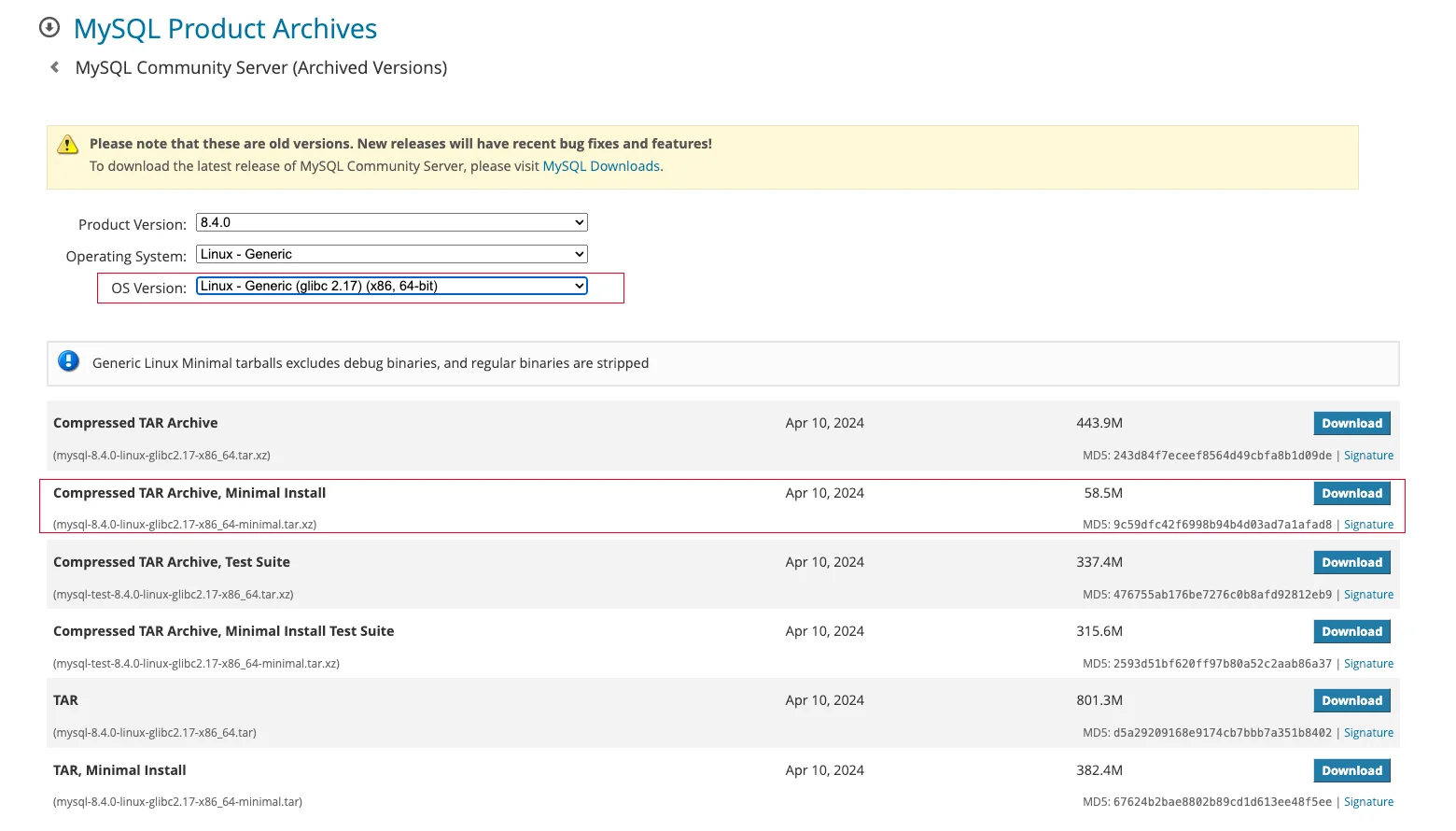
选择安装包版本时,需要注意主机的 glibc 版本以及 CPU 架构:
## glibc 版本
[root@mysql8 ~]# ldd --version
ldd (GNU libc) 2.17
Copyright (C) 2012 Free Software Foundation, Inc.
This is free software; see the source for copying conditions.  There is NO
warranty; not even for MERCHANTABILITY or FITNESS FOR A PARTICULAR PURPOSE.
Written by Roland McGrath and Ulrich Drepper.
## CPU 架构
[root@mysql8 ~]# uname -m
x86_64
下载完成后上传至指定目录:
[root@mysql8 downloads]# pwd
/usr/local/dbops/mysql_ansible/downloads
[root@mysql8 downloads]# ll
total 59872
-rw-r--r--. 1 root root 61305888 Aug 23 16:03 mysql-8.4.0-linux-glibc2.17-x86_64-minimal.tar.xz
执行 playbook 部署,安装过程不需要联网:
[root@mysql8 playbooks]# pwd
/usr/local/dbops/mysql_ansible/playbooks
[root@mysql8 playbooks]# ansible-playbook single_node.yml

PLAY [Deploy single-node MySQL server using binary installation] ************************************************************************************************************************************

TASK [Gathering Facts] ******************************************************************************************************************************************************************************
ok: [192.168.6.162]

TASK [Check if password meets complexity requirements] **********************************************************************************************************************************************
ok: [192.168.6.162] => (item=None)
ok: [192.168.6.162] => (item=None)
ok: [192.168.6.162] => (item=None)
ok: [192.168.6.162] => (item=None)
ok: [192.168.6.162] => (item=None)
ok: [192.168.6.162] => (item=None)
ok: [192.168.6.162]

TASK [Print custom error message] *******************************************************************************************************************************************************************
skipping: [192.168.6.162]

TASK [Validate fcs_ setting are 0 or 1] *************************************************************************************************************************************************************
skipping: [192.168.6.162] => (item=fcs_skip_db_mount_verification)
skipping: [192.168.6.162] => (item=fcs_skip_check_ntpd_or_chrony_running)
skipping: [192.168.6.162] => (item=fcs_auto_download_mysql)
skipping: [192.168.6.162] => (item=fcs_create_mysql_fast_login)
skipping: [192.168.6.162] => (item=fcs_backup_script_create_backup_user)
skipping: [192.168.6.162] => (item=fcs_mysql_use_jemalloc)
skipping: [192.168.6.162] => (item=fcs_use_greatsql_ha)

TASK [Validate mysql_port is within range] **********************************************************************************************************************************************************
skipping: [192.168.6.162]

TASK [Validate mysql_version is within range] *******************************************************************************************************************************************************
skipping: [192.168.6.162]

TASK [Validate mysql_version is within range] *******************************************************************************************************************************************************
skipping: [192.168.6.162]

TASK [Validate db_type is a valid option] ***********************************************************************************************************************************************************
skipping: [192.168.6.162]

TASK [Validate server_specs is a valid option] ******************************************************************************************************************************************************
skipping: [192.168.6.162]

TASK [Check if mysql-8.4.0-linux-glibc2.17-x86_64-minimal.tar.xz exists in ../downloads/ (local)] ***************************************************************************************************
changed: [192.168.6.162]

TASK [Set the OS type variable] *********************************************************************************************************************************************************************
ok: [192.168.6.162]

TASK [Print the OS type] ****************************************************************************************************************************************************************************
ok: [192.168.6.162] => {
    "msg": "The OS type of host 192.168.6.162 is CentOS7"
}

TASK [Assert if OS type is supported] ***************************************************************************************************************************************************************
ok: [192.168.6.162] => {
    "changed": false,
    "msg": "All assertions passed"
}

TASK [Check for Python 3] ***************************************************************************************************************************************************************************
ok: [192.168.6.162]

TASK [Check for Python 2] ***************************************************************************************************************************************************************************
ok: [192.168.6.162]

TASK [Set Python interpreter] ***********************************************************************************************************************************************************************
ok: [192.168.6.162]

TASK [Print the Python interpreter] *****************************************************************************************************************************************************************
ok: [192.168.6.162] => {
    "msg": "The Python interpreter of host 192.168.6.162 is /usr/bin/python2"
}

TASK [Set server_specs_processor_count and server_specs_memtotal_gb based on server_specs] **********************************************************************************************************
skipping: [192.168.6.162]

TASK [Gen random MySQL server_id] *******************************************************************************************************************************************************************
ok: [192.168.6.162]

TASK [Collect mysql_server_id to a list on localhost] ***********************************************************************************************************************************************
ok: [192.168.6.162]

TASK [Check for duplicate mysql_server_id] **********************************************************************************************************************************************************
ok: [192.168.6.162] => {
    "changed": false,
    "msg": "All assertions passed"
}

TASK [Generate random UUID if mgr_use_random_uuid is set to 1] **************************************************************************************************************************************
changed: [192.168.6.162]

TASK [set_fact] *************************************************************************************************************************************************************************************
ok: [192.168.6.162]

TASK [Display the list of target hosts and additional information] **********************************************************************************************************************************
ok: [192.168.6.162] => {
    "msg": [
        "Hosts to be affected by Deploy single-node MySQL server using binary installation: 192.168.6.162",
        "DB type: mysql",
        "MySQL port: 3306",
        "MySQL version: 8.4.0",
        "Server specs: auto",
        "Roles to be executed: ../roles/pre_check_and_set, ../roles/mysql_server"
    ]
}

TASK [Prompt user for confirmation] *****************************************************************************************************************************************************************
[Prompt user for confirmation]
This will perform Deploy single-node MySQL server using binary installation on the displayed hosts. Please type 'confirm' to continue or press Ctrl+C to cancel.:
ok: [192.168.6.162]

TASK [Check if user confirmed] **********************************************************************************************************************************************************************
skipping: [192.168.6.162]

TASK [Include role] *********************************************************************************************************************************************************************************

TASK [../roles/pre_check_and_set : Check yum and install libselinux-python3] ************************************************************************************************************************
ok: [192.168.6.162]

TASK [../roles/pre_check_and_set : Install ncurses-compat-libs if necessary] ************************************************************************************************************************
skipping: [192.168.6.162]

TASK [../roles/pre_check_and_set : Intall tar for openEuler20] **************************************************************************************************************************************
ok: [192.168.6.162]

TASK [../roles/pre_check_and_set : Set SeLinux disabled] ********************************************************************************************************************************************
[WARNING]: SELinux state change will take effect next reboot
ok: [192.168.6.162]

TASK [../roles/pre_check_and_set : Stop and Disabled Firewalld] *************************************************************************************************************************************
ok: [192.168.6.162]

TASK [../roles/pre_check_and_set : Gather service facts] ********************************************************************************************************************************************
skipping: [192.168.6.162]

TASK [../roles/pre_check_and_set : Assert NTP or Chrony is running and only one is enabled] *********************************************************************************************************
skipping: [192.168.6.162]

TASK [../roles/pre_check_and_set : Check whether NUMA is turned off] ********************************************************************************************************************************
fatal: [192.168.6.162]: FAILED! => {"changed": false, "cmd": ["grep", "-q", "numa=off", "/proc/cmdline"], "delta": "0:00:00.004868", "end": "2024-08-23 16:07:01.721770", "msg": "non-zero return code", "rc": 1, "start": "2024-08-23 16:07:01.716902", "stderr": "", "stderr_lines": [], "stdout": "", "stdout_lines": []}
...ignoring

TASK [../roles/pre_check_and_set : Show warning if NUMA is not turned off] **************************************************************************************************************************
ok: [192.168.6.162] => {
    "msg": "Warning: NUMA is not turned off."
}

TASK [../roles/pre_check_and_set : Update sysctl configuration file] ********************************************************************************************************************************
ok: [192.168.6.162]

TASK [../roles/pre_check_and_set : Reload sysctl] ***************************************************************************************************************************************************
changed: [192.168.6.162]

TASK [../roles/pre_check_and_set : Extract parent directories of mysql_data_dir_base] ***************************************************************************************************************
skipping: [192.168.6.162]

TASK [../roles/pre_check_and_set : Remove root '/' from parent directories list] ********************************************************************************************************************
skipping: [192.168.6.162]

TASK [../roles/pre_check_and_set : Check if mount points exist for pre_check_and_set__mysql_data_dir_base_parents list] *****************************************************************************
skipping: [192.168.6.162]

TASK [../roles/pre_check_and_set : Find the first matching mount point for mysql_data_dir_base and its parents] *************************************************************************************
skipping: [192.168.6.162] => (item={'block_used': 35061, 'uuid': '3d53107e-ce12-4c21-a78d-82f97fef2750', 'size_total': 1063256064, 'block_total': 259584, 'mount': '/boot', 'block_available': 224523, 'size_available': 919646208, 'fstype': 'xfs', 'inode_total': 524288, 'options': 'rw,seclabel,relatime,attr2,inode64,noquota', 'device': '/dev/sda1', 'inode_used': 326, 'block_size': 4096, 'inode_available': 523962})
skipping: [192.168.6.162] => (item={'block_used': 4980714, 'uuid': '2020-11-02-15-15-23-00', 'size_total': 10200502272, 'block_total': 4980714, 'mount': '/mnt', 'block_available': 0, 'size_available': 0, 'fstype': 'iso9660', 'inode_total': 0, 'options': 'ro,relatime', 'device': '/dev/sr0', 'inode_used': 0, 'block_size': 2048, 'inode_available': 0})
skipping: [192.168.6.162] => (item={'block_used': 379986, 'uuid': '3342f530-81a3-43d8-8405-5f4ecb2d6389', 'size_total': 97658605568, 'block_total': 23842433, 'mount': '/', 'block_available': 23462447, 'size_available': 96102182912, 'fstype': 'xfs', 'inode_total': 47708160, 'options': 'rw,seclabel,relatime,attr2,inode64,noquota', 'device': '/dev/mapper/centos-root', 'inode_used': 34255, 'block_size': 4096, 'inode_available': 47673905})

TASK [../roles/pre_check_and_set : Debug output for mount point] ************************************************************************************************************************************
skipping: [192.168.6.162]

TASK [../roles/pre_check_and_set : Assert mount point is using xfs filesystem] **********************************************************************************************************************
skipping: [192.168.6.162]

TASK [../roles/pre_check_and_set : If it is a physical machine, double network card binding is required] ********************************************************************************************
ok: [192.168.6.162] => {
    "msg": "ens192"
}

TASK [../roles/pre_check_and_set : If it is a physical machine, double network card binding is required] ********************************************************************************************
skipping: [192.168.6.162]

TASK [../roles/pre_check_and_set : Add network interface alias to a temporary file] *****************************************************************************************************************
changed: [192.168.6.162]

TASK [../roles/pre_check_and_set : Fetch copy] ******************************************************************************************************************************************************
changed: [192.168.6.162]

TASK [../roles/pre_check_and_set : Append file /tmp/net_aliases.txt (delegate to 127.0.0.1)] ********************************************************************************************************
ok: [192.168.6.162]

TASK [../roles/pre_check_and_set : Check if shell output is 1] **************************************************************************************************************************************
ok: [192.168.6.162] => {
    "changed": false,
    "msg": "All assertions passed"
}

TASK [../roles/pre_check_and_set : Delete /tmp/net_aliases.txt] *************************************************************************************************************************************
changed: [192.168.6.162]

TASK [../roles/pre_check_and_set : Delete /tmp/ssh/ (delegate to 127.0.0.1)] ************************************************************************************************************************
changed: [192.168.6.162]

TASK [../roles/mysql_server : Check if flag exists or not] ******************************************************************************************************************************************
ok: [192.168.6.162]

TASK [../roles/mysql_server : Fail if flag exists] **************************************************************************************************************************************************
skipping: [192.168.6.162]

TASK [../roles/mysql_server : Check port not in use —— mysql port 3306] *****************************************************************************************************************************
ok: [192.168.6.162]

TASK [../roles/mysql_server : Ensure group "mysql" exists] ******************************************************************************************************************************************
ok: [192.168.6.162]

TASK [../roles/mysql_server : Create mysql user] ****************************************************************************************************************************************************
changed: [192.168.6.162]

TASK [../roles/mysql_server : Create mysql directories] *********************************************************************************************************************************************
ok: [192.168.6.162] => (item=/database/mysql/etc)
ok: [192.168.6.162] => (item=/database/mysql/data)
ok: [192.168.6.162] => (item=/database/mysql/tmp)
ok: [192.168.6.162] => (item=/database/mysql/run)
ok: [192.168.6.162] => (item=/database/mysql/log/binlog)
ok: [192.168.6.162] => (item=/database/mysql/log/redolog)
ok: [192.168.6.162] => (item=/database/mysql/log/relaylog)
ok: [192.168.6.162] => (item=/database/mysql/etc/3306)
ok: [192.168.6.162] => (item=/database/mysql/data/3306)
ok: [192.168.6.162] => (item=/database/mysql/tmp/3306)
ok: [192.168.6.162] => (item=/database/mysql/log/binlog/3306)
ok: [192.168.6.162] => (item=/database/mysql/log/redolog/3306)
ok: [192.168.6.162] => (item=/database/mysql/log/relaylog/3306)
ok: [192.168.6.162] => (item=/database/mysql/base/8.4.0)

TASK [../roles/mysql_server : Config /etc/my.cnf for mysql-5.7.x] ***********************************************************************************************************************************
skipping: [192.168.6.162]

TASK [../roles/mysql_server : Config /etc/my.cnf for mysql-8.0.x] ***********************************************************************************************************************************
skipping: [192.168.6.162]

TASK [../roles/mysql_server : Config /etc/my.cnf for mysql-8.4.x] ***********************************************************************************************************************************
changed: [192.168.6.162]

---

> ⚠️ **文章内容较长,完整版请访问原文阅读:**
> [使用 dbops 快速部署 MySQL 数据库](https://ora100.com/blog/使用-dbops-快速部署-mysql-数据库)