效果
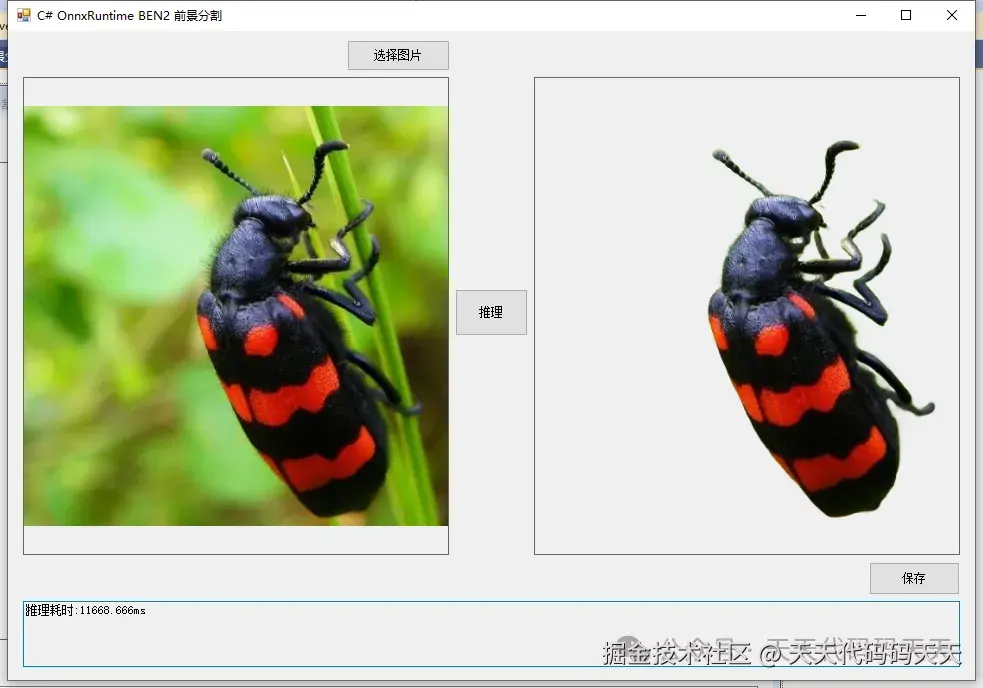
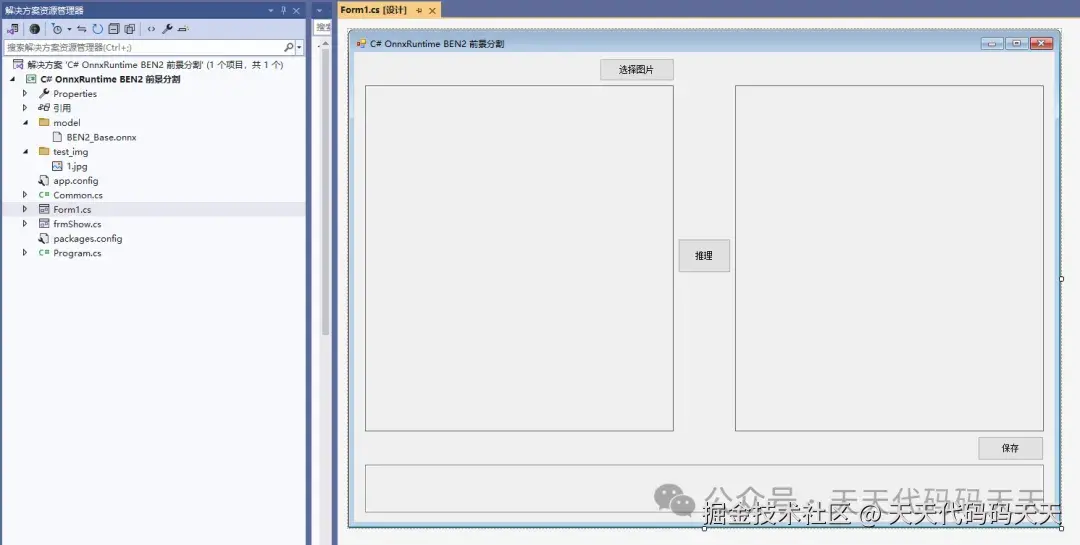
项目
模型信息
Model Properties
-------------------------
---------------------------------------------------------------

Inputs
-------------------------
name:input.1
tensor:Float[1, 3, 1024, 1024]
---------------------------------------------------------------

Outputs
-------------------------
name:17728
tensor:Float16[1, 1, 1024, 1024]
---------------------------------------------------------------
代码
using Microsoft.ML.OnnxRuntime
using Microsoft.ML.OnnxRuntime.Tensors
using OpenCvSharp
using System
using System.Collections.Generic
using System.Drawing
using System.Drawing.Imaging
using System.Linq
using System.Windows.Forms
namespace Onnx_Demo
{
public partial class Form1 : Form
{
public Form1()
{
InitializeComponent()
}
string fileFilter = "*.*|*.bmp;*.jpg;*.jpeg;*.tiff;*.tiff;*.png"
string image_path = ""
string startupPath
DateTime dt1 = DateTime.Now
DateTime dt2 = DateTime.Now
string model_path
Mat image
Mat result_image_with_alpha
SessionOptions options
InferenceSession onnx_session
Tensor<float> input_tensor
List<NamedOnnxValue> input_container
IDisposableReadOnlyCollection<DisposableNamedOnnxValue> result_infer
DisposableNamedOnnxValue[] results_onnxvalue
Tensor<Float16> result_tensors
int inpHeight, inpWidth
private void button1_Click(object sender, EventArgs e)
{
OpenFileDialog ofd = new OpenFileDialog()
ofd.Filter = fileFilter
if (ofd.ShowDialog() != DialogResult.OK) return
pictureBox1.Image = null
image_path = ofd.FileName
pictureBox1.Image = new Bitmap(image_path)
textBox1.Text = ""
image = new Mat(image_path)
pictureBox2.Image = null
}
private void button2_Click(object sender, EventArgs e)
{
if (image_path == "")
{
return
}
button2.Enabled = false
pictureBox2.Image = null
textBox1.Text = ""
Application.DoEvents()
// 读取原始图像(BGR)
image = new Mat(image_path)
int originalWidth = image.Cols
int originalHeight = image.Rows
// ------------------ 预处理 ------------------
// 1. 转换为RGB
Mat rgb = new Mat()
Cv2.CvtColor(image, rgb, ColorConversionCodes.BGR2RGB)
// 2. Resize到模型输入尺寸(1024x1024)
Mat resized = new Mat()
Cv2.Resize(rgb, resized, new OpenCvSharp.Size(inpWidth, inpHeight))
// 3. 转换为浮点并归一化到 [0,1]
resized.ConvertTo(resized, MatType.CV_32FC3, 1.0 / 255.0)
// 4. 将HWC转换为CHW顺序,并构建输入张量
int height = inpHeight
int width = inpWidth
Mat[] channels = Cv2.Split(resized)
List<float> dataList = new List<float>()
for (int c = 0
{
float[] channelData = new float[height * width]
System.Runtime.InteropServices.Marshal.Copy(channels[c].Data, channelData, 0, height * width)
dataList.AddRange(channelData)
}
float[] inputData = dataList.ToArray()
input_tensor = new DenseTensor<float>(inputData, new[] { 1, 3, height, width })
// 将输入放入容器
input_container.Clear()
input_container.Add(NamedOnnxValue.CreateFromTensor("input.1", input_tensor))
// ------------------ 推理 ------------------
dt1 = DateTime.Now
result_infer = onnx_session.Run(input_container)
dt2 = DateTime.Now
// 获取输出
results_onnxvalue = result_infer.ToArray()
result_tensors = results_onnxvalue[0].AsTensor<Float16>()
int[] outShape = result_tensors.Dimensions.ToArray()
int outChannels = outShape.Length == 4 ? outShape[1] : 1
int outH = outShape.Length == 4 ? outShape[2] : outShape[1]
int outW = outShape.Length == 4 ? outShape[3] : outShape[2]
Float16[] predHalf = result_tensors.ToArray()
float[] predFloat = predHalf.Select(x => (float)x).ToArray()
// 创建 OpenCV 单通道 Mat(CV_32FC1)
Mat outputMat = new Mat(outH, outW, MatType.CV_32FC1, predFloat)
// ------------------ 后处理 ------------------
// 1. 双线性插值到原始尺寸
Mat maskResized = new Mat()
Cv2.Resize(outputMat, maskResized, new OpenCvSharp.Size(originalWidth, originalHeight), interpolation: InterpolationFlags.Linear)
// 2. Min-Max 归一化到 [0,1]
double minVal, maxVal
Cv2.MinMaxLoc(maskResized, out minVal, out maxVal)
Mat maskNorm = new Mat()
if (maxVal - minVal > 1e-8)
{
maskResized.ConvertTo(maskNorm, MatType.CV_32FC1, 1.0 / (maxVal - minVal), -minVal / (maxVal - minVal))
}
else
{
// 防止除以零
maskNorm = maskResized.Clone()
}
// 3. 转换为8位单通道(alpha通道)
Mat alphaMask = new Mat()
maskNorm.ConvertTo(alphaMask, MatType.CV_8UC1, 255.0)
//Cv2.ImShow("maskNorm", maskNorm)
// ------------------ 合成透明背景图像 ------------------
// 原始图像(BGR)转为 BGRA
Mat rgba = new Mat()
Cv2.CvtColor(image, rgba, ColorConversionCodes.BGR2BGRA)
// 替换 alpha 通道
Mat[] bgraChannels = Cv2.Split(rgba)
bgraChannels[3] = alphaMask
Cv2.Merge(bgraChannels, rgba)
// 保存最终结果,以便后续保存时使用
result_image_with_alpha = rgba.Clone()
// 显示最终图像(PictureBox 支持透明背景,但可能需要设置 BackColor)
pictureBox2.Image = new Bitmap(rgba.ToMemoryStream())
textBox1.Text = "推理耗时:" + (dt2 - dt1).TotalMilliseconds + "ms"
button2.Enabled = true
}
private void Form1_Load(object sender, EventArgs e)
{
startupPath = System.Windows.Forms.Application.StartupPath
model_path = "model/BEN2_Base.onnx"
// 创建会话,使用 CPU(可根据需要改为 CUDA)
options = new SessionOptions()
options.LogSeverityLevel = OrtLoggingLevel.ORT_LOGGING_LEVEL_INFO
options.AppendExecutionProvider_CPU(0)
onnx_session = new InferenceSession(model_path, options)
input_container = new List<NamedOnnxValue>()
// 设置模型输入尺寸
inpHeight = 1024
inpWidth = 1024
// 测试图片路径(可选)
image_path = "test_img/1.jpg"
if (System.IO.File.Exists(image_path))
{
pictureBox1.Image = new Bitmap(image_path)
image = new Mat(image_path)
}
}
private void pictureBox1_DoubleClick(object sender, EventArgs e)
{
Common.ShowNormalImg(pictureBox1.Image)
}
private void pictureBox2_DoubleClick(object sender, EventArgs e)
{
Common.ShowNormalImg(pictureBox2.Image)
}
SaveFileDialog sdf = new SaveFileDialog()
private void button3_Click(object sender, EventArgs e)
{
if (result_image_with_alpha == null || result_image_with_alpha.Empty())
{
MessageBox.Show("请先进行推理!")
return
}
sdf.Title = "保存透明背景图片"
sdf.Filter = "PNG图片 (*.png)|*.png|JPEG图片 (*.jpg)|*.jpg|BMP图片 (*.bmp)|*.bmp"
sdf.FilterIndex = 1
if (sdf.ShowDialog() == DialogResult.OK)
{
string ext = System.IO.Path.GetExtension(sdf.FileName).ToLower()
ImageFormat format = ImageFormat.Png
if (ext == ".jpg" || ext == ".jpeg")
format = ImageFormat.Jpeg
elseif (ext == ".bmp")
format = ImageFormat.Bmp
// 将 Mat 转换为 Bitmap 并保存
using (var stream = result_image_with_alpha.ToMemoryStream())
using (var bitmap = new Bitmap(stream))
{
bitmap.Save(sdf.FileName, format)
}
MessageBox.Show("保存成功,位置:" + sdf.FileName)
}
}
}
}
参考
github.com/PramaLLC/BE…