最近,有一个比较火的很有趣且灵动的登录页火了。
- 角色视觉跟随鼠标
- 输入框打字时扯脖子瞅
- 显示密码明文时避开视线
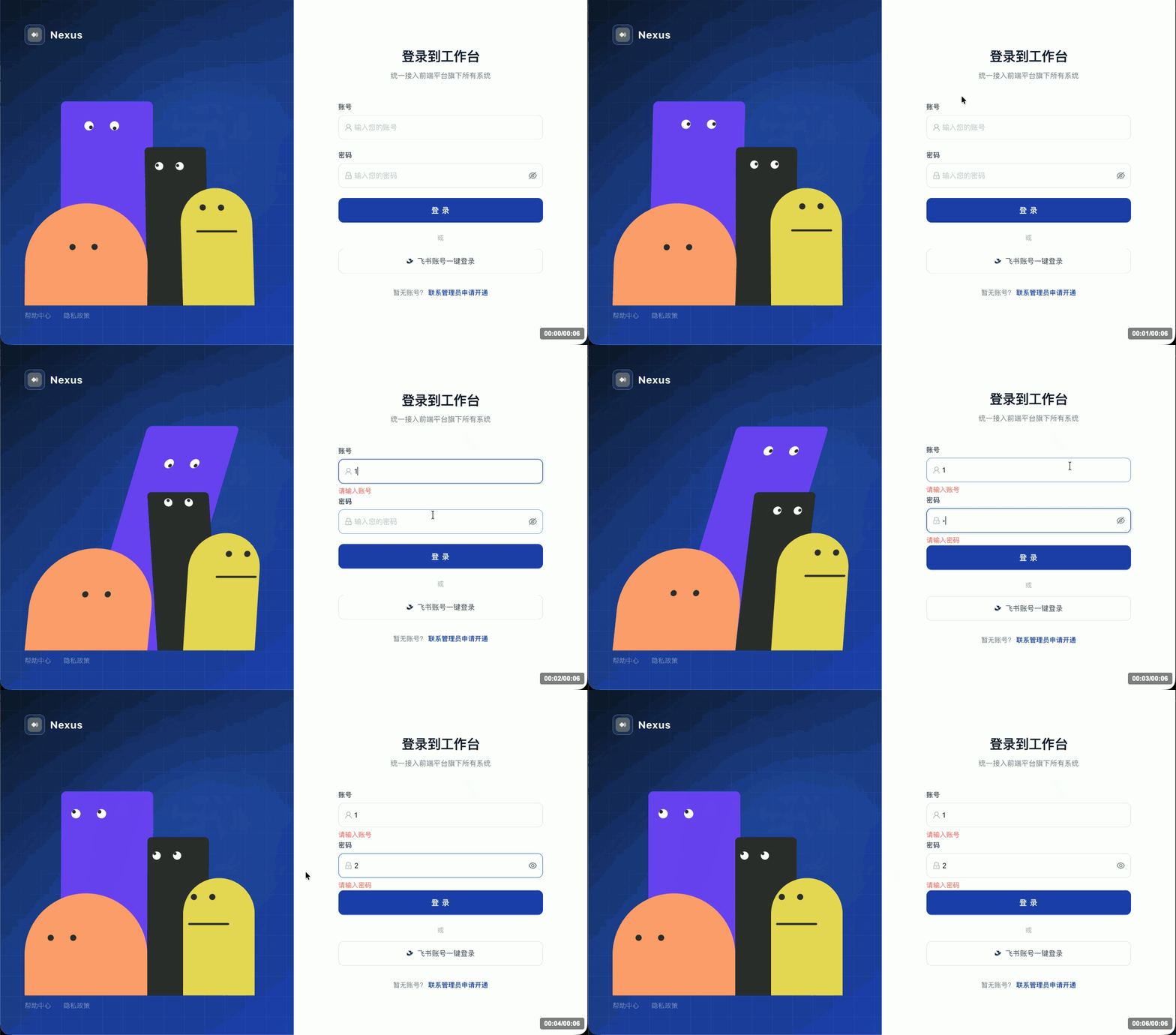
已经有大神(katavii)复刻了动画效果,并在github上开源了:github.com/katavii/ani… ,基于React实现。
如果你的项目是用Vue开发的,可以考虑用AI将此项目转换成了Vue3的语法写法。
最简单的方式,直接用Claude Code一句话就能完成,根据模型能力,你可能需要多次调试。
claude
帮我把这个项目转成vue3 + ant-design-vue的前端项目
以下是我的转换代码,如果你的AI代码没有调试成功,可以参考下。
创建项目
现在开发前端项目,肯定首选Vite。
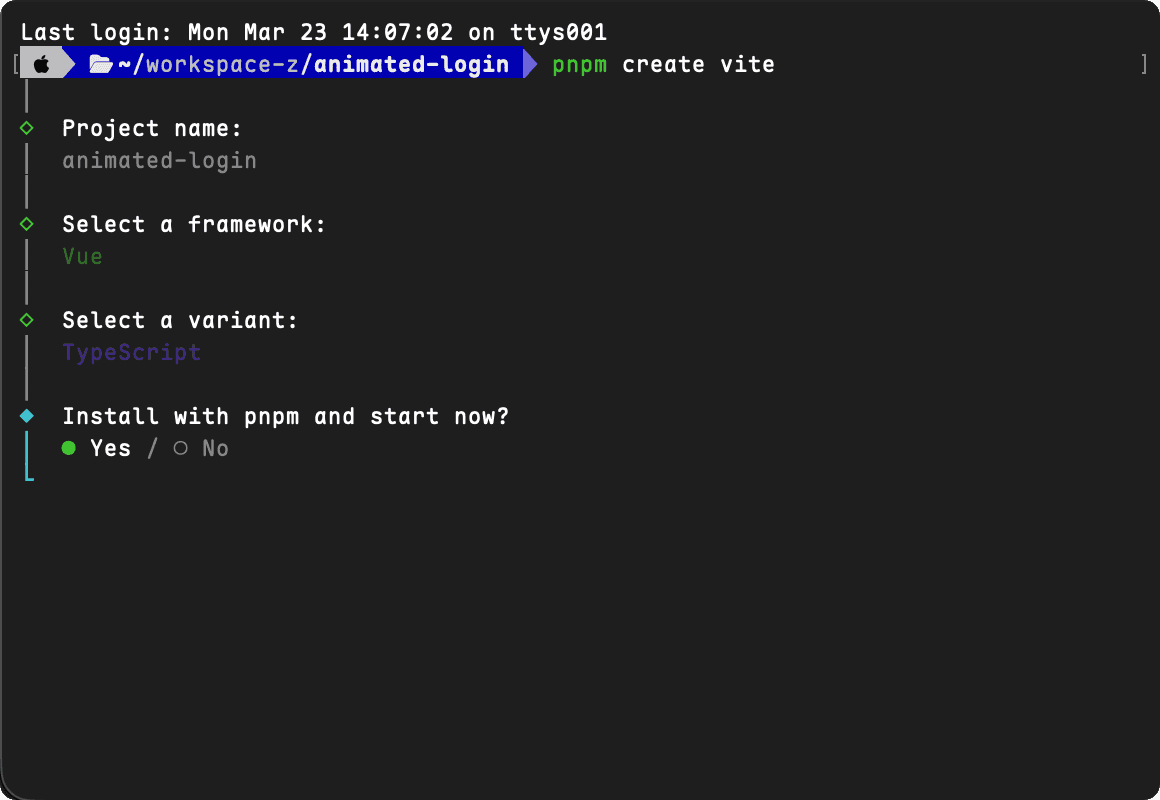
pnpm create vite
# 选择Vue模板、TypeScript语法
封装组件
在src/components/创建animated-characters文件夹
EyeBall
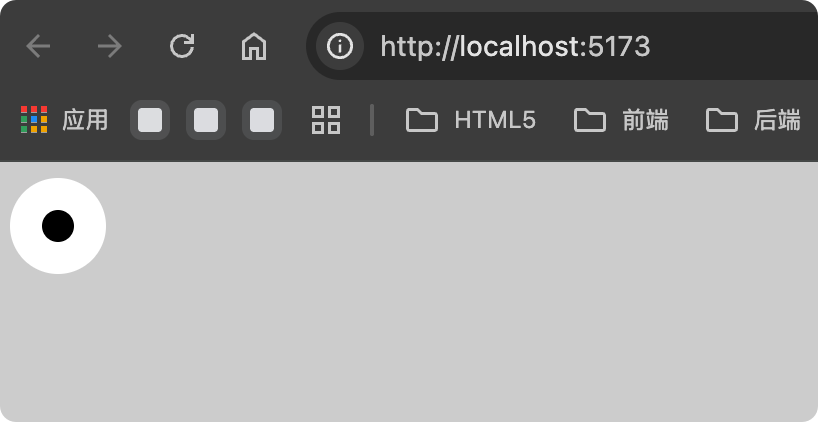
创建 src/components/animated-characters/EyeBall.vue,制作动画的大眼睛。
<template>
  <div
    class="eyeball"
    :data-max-distance="maxDistance"
    :style="eyeballStyle"
  >
    <div
      class="eyeball-pupil"
      :style="pupilStyle"
    />
  </div>
</template>

<script setup lang="ts">
interface Props {
  size?: string
  pupilSize?: string
  maxDistance?: number
  eyeColor?: string
  pupilColor?: string
}

const {
  size,
  pupilSize,
  maxDistance,
  eyeColor,
  pupilColor
} = withDefaults(defineProps<Props>(), {
  size: '48px',
  pupilSize: '16px',
  maxDistance: 10,
  eyeColor: 'white',
  pupilColor: 'black'
})

const eyeballStyle = {
  width: size,
  height: size,
  borderRadius: '50%',
  backgroundColor: eyeColor,
  display: 'flex',
  alignItems: 'center',
  justifyContent: 'center',
  overflow: 'hidden',
  willChange: 'height'
}

const pupilStyle = {
  width: pupilSize,
  height: pupilSize,
  borderRadius: '50%',
  backgroundColor: pupilColor,
  willChange: 'transform'
}
</script>
Pupil
创建 src/components/animated-characters/Pupil.vue,制作动画的小眼睛。
<template>
  <div
    :data-max-distance="maxDistance"
    class="pupil"
    :style="pupilStyle"
  />
</template>

<script setup lang="ts">
interface Props {
  size?: string
  maxDistance?: number
  pupilColor?: string
}

const {
  size,
  maxDistance,
  pupilColor
} = withDefaults(defineProps<Props>(), {
  size: '12px',
  maxDistance: 5,
  pupilColor: 'black'
})

const pupilStyle = {
  width: size,
  height: size,
  borderRadius: '50%',
  backgroundColor: pupilColor,
  willChange: 'transform'
}
</script>
角色
安装依赖
pnpm install gsap --save
创建 src/components/animated-characters/Index.vue,制作动画的角色。
props属性

- is-typing         是否正在输入
- show-password     显示密码明文
- password-length   密码输入框是否有值
<template>
  <div ref="containerRef" :style="containerStyle">
    <!-- 紫色角色 -->
    <div
      ref="purpleRef"
      :style="purpleBodyStyle"
    >
      <div ref="purpleFaceRef" :style="purpleFaceStyle">
        <EyeBall
          size="18px"
          pupil-size="7px"
          :max-distance="5"
          eye-color="white"
          pupil-color="#2D2D2D"
        />
        <EyeBall
          size="18px"
          pupil-size="7px"
          :max-distance="5"
          eye-color="white"
          pupil-color="#2D2D2D"
        />
      </div>
    </div>

    <!-- 黑色角色 -->
    <div
      ref="blackRef"
      :style="blackBodyStyle"
    >
      <div ref="blackFaceRef" :style="blackFaceStyle">
        <EyeBall
          size="16px"
          pupil-size="6px"
          :max-distance="4"
          eye-color="white"
          pupil-color="#2D2D2D"
        />
        <EyeBall
          size="16px"
          pupil-size="6px"
          :max-distance="4"
          eye-color="white"
          pupil-color="#2D2D2D"
        />
      </div>
    </div>

    <!-- 橘黄色角色 -->
    <div
      ref="orangeRef"
      :style="orangeBodyStyle"
    >
      <div ref="orangeFaceRef" :style="orangeFaceStyle">
        <Pupil size="12px" :max-distance="5" pupil-color="#2D2D2D" />
        <Pupil size="12px" :max-distance="5" pupil-color="#2D2D2D" />
      </div>
    </div>

    <!-- 黄色角色 -->
    <div
      ref="yellowRef"
      :style="yellowBodyStyle"
    >
      <div ref="yellowFaceRef" :style="yellowFaceStyle">
        <Pupil size="12px" :max-distance="5" pupil-color="#2D2D2D" />
        <Pupil size="12px" :max-distance="5" pupil-color="#2D2D2D" />
      </div>
      <div ref="yellowMouthRef" :style="yellowMouthStyle" />
    </div>
  </div>
</template>

<script setup lang="ts">
import { ref, reactive, onMounted, onBeforeUnmount, watch, toRef } from 'vue'
import gsap from 'gsap'
import Pupil from './Pupil.vue'
import EyeBall from './EyeBall.vue'

interface Props {
  isTyping?: boolean
  showPassword?: boolean
  passwordLength?: number
}

const props = withDefaults(defineProps<Props>(), {
  isTyping: false,
  showPassword: false,
  passwordLength: 0
})

const containerRef = ref<HTMLElement | null>(null)
const mouseRef = reactive({ x: 0, y: 0 })
const rafIdRef = ref<number>(0)

const purpleRef = ref<HTMLElement | null>(null)
const blackRef = ref<HTMLElement | null>(null)
const yellowRef = ref<HTMLElement | null>(null)
const orangeRef = ref<HTMLElement | null>(null)

const purpleFaceRef = ref<HTMLElement | null>(null)
const blackFaceRef = ref<HTMLElement | null>(null)
const yellowFaceRef = ref<HTMLElement | null>(null)
const orangeFaceRef = ref<HTMLElement | null>(null)

const yellowMouthRef = ref<HTMLElement | null>(null)

const purpleBlinkTimerRef = ref<ReturnType<typeof setTimeout>>()
const blackBlinkTimerRef = ref<ReturnType<typeof setTimeout>>()
const purplePeekTimerRef = ref<ReturnType<typeof setTimeout>>()

const isHidingPassword = toRef(() => props.passwordLength > 0 && !props.showPassword)
const isShowingPassword = toRef(() => props.passwordLength > 0 && props.showPassword)

const isLookingRef = ref(false)
const lookingTimerRef = ref<ReturnType<typeof setTimeout>>()

const stateRef = reactive({
  isTyping: false,
  isHidingPassword: false,
  isShowingPassword: false,
  isLooking: false
})

watch(
  () => [props.isTyping, isHidingPassword.value, isShowingPassword.value, isLookingRef.value] as const,
  ([isTyping, isHiding, isShowing, isLooking]) => {
    stateRef.isTyping = isTyping
    stateRef.isHidingPassword = isHiding
    stateRef.isShowingPassword = isShowing
    stateRef.isLooking = isLooking
  }
)

// GSAP quickTo instances
const quickToRef = ref<Record<string, any> | null>(null)

const containerStyle = {
  position: 'relative' as const,
  width: '550px',
  height: '400px'
}

const purpleBodyStyle = ref<any>({
  position: 'absolute',
  bottom: 0,
  left: '70px',
  width: '180px',
  height: '400px',
  backgroundColor: '#6C3FF5',
  borderRadius: '10px 10px 0 0',
  zIndex: 1,
  transformOrigin: 'bottom center',
  willChange: 'transform'
})

const blackBodyStyle = ref<any>({
  position: 'absolute',
  bottom: 0,
  left: '240px',
  width: '120px',
  height: '310px',
  backgroundColor: '#2D2D2D',
  borderRadius: '8px 8px 0 0',
  zIndex: 2,
  transformOrigin: 'bottom center',
  willChange: 'transform'
})

const orangeBodyStyle = ref<any>({
  position: 'absolute',
  bottom: 0,
  left: 0,
  width: '240px',
  height: '200px',
  backgroundColor: '#FF9B6B',
  borderRadius: '120px 120px 0 0',
  zIndex: 3,
  transformOrigin: 'bottom center',
  willChange: 'transform'
})

const yellowBodyStyle = ref<any>({
  position: 'absolute',
  bottom: 0,
  left: '310px',
  width: '140px',
  height: '230px',
  backgroundColor: '#E8D754',
  borderRadius: '70px 70px 0 0',
  zIndex: 4,
  transformOrigin: 'bottom center',
  willChange: 'transform'
})

const purpleFaceStyle = ref<any>({
  position: 'absolute',
  display: 'flex',
  gap: '32px',
  left: '45px',
  top: '40px'
})

const blackFaceStyle = ref<any>({
  position: 'absolute',
  display: 'flex',
  gap: '24px',
  left: '26px',
  top: '32px'
})

const orangeFaceStyle = ref<any>({
  position: 'absolute',
  display: 'flex',
  gap: '32px',
  left: '82px',
  top: '90px'
})

const yellowFaceStyle = ref<any>({
  position: 'absolute',
  display: 'flex',
  gap: '24px',
  left: '52px',
  top: '40px'
})

const yellowMouthStyle = ref<any>({
  position: 'absolute',
  width: '80px',
  height: '4px',
  backgroundColor: '#2D2D2D',
  borderRadius: '9999px',
  left: '40px',
  top: '88px'
})

// Initialize GSAP
onMounted(() => {
  gsap.set('.pupil', { x: 0, y: 0 })
  gsap.set('.eyeball-pupil', { x: 0, y: 0 })
})

onMounted(() => {
  if (
    !purpleRef.value ||
    !blackRef.value ||
    !orangeRef.value ||
    !yellowRef.value ||
    !purpleFaceRef.value ||
    !blackFaceRef.value ||
    !orangeFaceRef.value ||
    !yellowFaceRef.value ||
    !yellowMouthRef.value
  )
    return

  const qt = {
    purpleSkew: gsap.quickTo(purpleRef.value, 'skewX', { duration: 0.3, ease: 'power2.out' }),
    blackSkew: gsap.quickTo(blackRef.value, 'skewX', { duration: 0.3, ease: 'power2.out' }),
    orangeSkew: gsap.quickTo(orangeRef.value, 'skewX', { duration: 0.3, ease: 'power2.out' }),
    yellowSkew: gsap.quickTo(yellowRef.value, 'skewX', { duration: 0.3, ease: 'power2.out' }),
    purpleX: gsap.quickTo(purpleRef.value, 'x', { duration: 0.3, ease: 'power2.out' }),
    blackX: gsap.quickTo(blackRef.value, 'x', { duration: 0.3, ease: 'power2.out' }),
    purpleHeight: gsap.quickTo(purpleRef.value, 'height', { duration: 0.3, ease: 'power2.out' }),
    purpleFaceLeft: gsap.quickTo(purpleFaceRef.value, 'left', { duration: 0.3, ease: 'power2.out' }),
    purpleFaceTop: gsap.quickTo(purpleFaceRef.value, 'top', { duration: 0.3, ease: 'power2.out' }),
    blackFaceLeft: gsap.quickTo(blackFaceRef.value, 'left', { duration: 0.3, ease: 'power2.out' }),
    blackFaceTop: gsap.quickTo(blackFaceRef.value, 'top', { duration: 0.3, ease: 'power2.out' }),
    orangeFaceX: gsap.quickTo(orangeFaceRef.value, 'x', { duration: 0.2, ease: 'power2.out' }),
    orangeFaceY: gsap.quickTo(orangeFaceRef.value, 'y', { duration: 0.2, ease: 'power2.out' }),
    yellowFaceX: gsap.quickTo(yellowFaceRef.value, 'x', { duration: 0.2, ease: 'power2.out' }),
    yellowFaceY: gsap.quickTo(yellowFaceRef.value, 'y', { duration: 0.2, ease: 'power2.out' }),
    mouthX: gsap.quickTo(yellowMouthRef.value, 'x', { duration: 0.2, ease: 'power2.out' }),
    mouthY: gsap.quickTo(yellowMouthRef.value, 'y', { duration: 0.2, ease: 'power2.out' })
  }
  quickToRef.value = qt

  const calcPos = (el: HTMLElement) => {
    const rect = el.getBoundingClientRect()
    const cx = rect.left + rect.width / 2
    const cy = rect.top + rect.height / 3
    const dx = mouseRef.x - cx
    const dy = mouseRef.y - cy
    return {
      faceX: Math.max(-15, Math.min(15, dx / 20)),
      faceY: Math.max(-10, Math.min(10, dy / 30)),
      bodySkew: Math.max(-6, Math.min(6, -dx / 120))
    }
  }

  const calcEyePos = (el: HTMLElement, maxDist: number) => {
    const r = el.getBoundingClientRect()
    const cx = r.left + r.width / 2
    const cy = r.top + r.height / 2
    const dx = mouseRef.x - cx
    const dy = mouseRef.y - cy
    const dist = Math.min(Math.sqrt(dx ** 2 + dy ** 2), maxDist)
    const angle = Math.atan2(dy, dx)
    return { x: Math.cos(angle) * dist, y: Math.sin(angle) * dist }
  }

  const tick = () => {
    const container = containerRef.value
    if (!container) return

    const { isTyping: typing, isHidingPassword: hiding, isShowingPassword: showing, isLooking: looking } = stateRef

    if (purpleRef.value && !showing) {
      const pp = calcPos(purpleRef.value)
      if (typing || hiding) {
        qt.purpleSkew(pp.bodySkew - 12)
        qt.purpleX(40)
        qt.purpleHeight(440)
      } else {
        qt.purpleSkew(pp.bodySkew)
        qt.purpleX(0)
        qt.purpleHeight(400)
      }
    }

    if (blackRef.value && !showing) {
      const bp = calcPos(blackRef.value)
      if (looking) {
        qt.blackSkew(bp.bodySkew * 1.5 + 10)
        qt.blackX(20)
      } else if (typing || hiding) {
        qt.blackSkew(bp.bodySkew * 1.5)
        qt.blackX(0)
      } else {
        qt.blackSkew(bp.bodySkew)
        qt.blackX(0)
      }
    }

    if (orangeRef.value && !showing) {
      const op = calcPos(orangeRef.value)
      qt.orangeSkew(op.bodySkew)
    }

    if (yellowRef.value && !showing) {
      const yp = calcPos(yellowRef.value)
      qt.yellowSkew(yp.bodySkew)
    }

    if (purpleRef.value && !showing && !looking) {
      const pp = calcPos(purpleRef.value)
      const purpleFaceX = pp.faceX >= 0 ? Math.min(25, pp.faceX * 1.5) : pp.faceX
      qt.purpleFaceLeft(45 + purpleFaceX)
      qt.purpleFaceTop(40 + pp.faceY)
    }

    if (blackRef.value && !showing && !looking) {
      const bp = calcPos(blackRef.value)
      qt.blackFaceLeft(26 + bp.faceX)
      qt.blackFaceTop(32 + bp.faceY)
    }

    if (orangeRef.value && !showing) {
      const op = calcPos(orangeRef.value)
      qt.orangeFaceX(op.faceX)
      qt.orangeFaceY(op.faceY)
    }

    if (yellowRef.value && !showing) {
      const yp = calcPos(yellowRef.value)
      qt.yellowFaceX(yp.faceX)
      qt.yellowFaceY(yp.faceY)
      qt.mouthX(yp.faceX)
      qt.mouthY(yp.faceY)
    }

    if (!showing) {
      const allPupils = container.querySelectorAll('.pupil')
      allPupils.forEach((p) => {
        const el = p as HTMLElement
        const maxDist = Number(el.dataset.maxDistance) || 5
        const ePos = calcEyePos(el, maxDist)
        gsap.set(el, { x: ePos.x, y: ePos.y })
      })

      if (!looking) {
        const allEyeballs = container.querySelectorAll('.eyeball')
        allEyeballs.forEach((eb) => {
          const el = eb as HTMLElement
          const maxDist = Number(el.dataset.maxDistance) || 10
          const pupil = el.querySelector('.eyeball-pupil') as HTMLElement
          if (!pupil) return
          const ePos = calcEyePos(el, maxDist)
          gsap.set(pupil, { x: ePos.x, y: ePos.y })
        })
      }
    }

    rafIdRef.value = requestAnimationFrame(tick)
  }

  const onMove = (e: MouseEvent) => {
    mouseRef.x = e.clientX
    mouseRef.y = e.clientY
  }

  window.addEventListener('mousemove', onMove, { passive: true })
  rafIdRef.value = requestAnimationFrame(tick)

  onBeforeUnmount(() => {
    window.removeEventListener('mousemove', onMove)
    cancelAnimationFrame(rafIdRef.value)
  })
})

// Purple character blink
onMounted(() => {
  const purpleEyeballs = purpleRef.value?.querySelectorAll('.eyeball')
  if (!purpleEyeballs?.length) return

  const scheduleBlink = () => {
    purpleBlinkTimerRef.value = setTimeout(() => {
      purpleEyeballs.forEach((el) => {
        gsap.to(el, { height: 2, duration: 0.08, ease: 'power2.in' })
      })
      setTimeout(() => {
        purpleEyeballs.forEach((el) => {
          const size = Number((el as HTMLElement).style.width.replace('px', '')) || 18
          gsap.to(el, { height: size, duration: 0.08, ease: 'power2.out' })
        })
        scheduleBlink()
      }, 150)
    }, Math.random() * 4000 + 3000)
  }

  scheduleBlink()
  onBeforeUnmount(() => clearTimeout(purpleBlinkTimerRef.value))
})

// Black character blink
onMounted(() => {
  const blackEyeballs = blackRef.value?.querySelectorAll('.eyeball')
  if (!blackEyeballs?.length) return

  const scheduleBlink = () => {
    blackBlinkTimerRef.value = setTimeout(() => {
      blackEyeballs.forEach((el) => {
        gsap.to(el, { height: 2, duration: 0.08, ease: 'power2.in' })
      })
      setTimeout(() => {
        blackEyeballs.forEach((el) => {
          const size = Number((el as HTMLElement).style.width.replace('px', '')) || 16
          gsap.to(el, { height: size, duration: 0.08, ease: 'power2.out' })
        })
        scheduleBlink()
      }, 150)
    }, Math.random() * 4000 + 3000)
  }

  scheduleBlink()
  onBeforeUnmount(() => clearTimeout(blackBlinkTimerRef.value))
})

const applyLookAtEachOther = () => {
  const qt = quickToRef.value
  if (qt) {
    qt.purpleFaceLeft(55)
    qt.purpleFaceTop(65)
    qt.blackFaceLeft(32)
    qt.blackFaceTop(12)
  }
  purpleRef.value?.querySelectorAll('.eyeball-pupil').forEach((p) => {
    gsap.to(p, { x: 3, y: 4, duration: 0.3, ease: 'power2.out', overwrite: 'auto' })
  })
  blackRef.value?.querySelectorAll('.eyeball-pupil').forEach((p) => {
    gsap.to(p, { x: 0, y: -4, duration: 0.3, ease: 'power2.out', overwrite: 'auto' })
  })
}

const applyHidingPassword = () => {
  const qt = quickToRef.value
  if (qt) {
    qt.purpleFaceLeft(55)
    qt.purpleFaceTop(65)
  }
}

const applyShowPassword = () => {
  const qt = quickToRef.value
  if (qt) {
    qt.purpleSkew(0)
    qt.blackSkew(0)
    qt.orangeSkew(0)
    qt.yellowSkew(0)
    qt.purpleX(0)
    qt.blackX(0)
    qt.purpleHeight(400)

    qt.purpleFaceLeft(20)
    qt.purpleFaceTop(35)
    qt.blackFaceLeft(10)
    qt.blackFaceTop(28)
    qt.orangeFaceX(50 - 82)
    qt.orangeFaceY(85 - 90)
    qt.yellowFaceX(20 - 52)
    qt.yellowFaceY(35 - 40)
    qt.mouthX(10 - 40)
    qt.mouthY(0)
  }

  purpleRef.value?.querySelectorAll('.eyeball-pupil').forEach((p) => {
    gsap.to(p, { x: -4, y: -4, duration: 0.3, ease: 'power2.out', overwrite: 'auto' })
  })
  blackRef.value?.querySelectorAll('.eyeball-pupil').forEach((p) => {
    gsap.to(p, { x: -4, y: -4, duration: 0.3, ease: 'power2.out', overwrite: 'auto' })
  })
  orangeRef.value?.querySelectorAll('.pupil').forEach((p) => {
    gsap.to(p, { x: -5, y: -4, duration: 0.3, ease: 'power2.out', overwrite: 'auto' })
  })
  yellowRef.value?.querySelectorAll('.pupil').forEach((p) => {
    gsap.to(p, { x: -5, y: -4, duration: 0.3, ease: 'power2.out', overwrite: 'auto' })
  })
}

// Password peek effect
watch(
  () => [isShowingPassword.value, props.passwordLength],
  ([showing, len]) => {
    if (!showing || (len as number) <= 0) {
      clearTimeout(purplePeekTimerRef.value)
      return
    }

    const purpleEyePupils = purpleRef.value?.querySelectorAll('.eyeball-pupil')
    if (!purpleEyePupils?.length) return

    const schedulePeek = () => {
      purplePeekTimerRef.value = setTimeout(() => {
        purpleEyePupils.forEach((p) => {
          gsap.to(p, {
            x: 4,
            y: 5,
            duration: 0.3,
            ease: 'power2.out',
            overwrite: 'auto'
          })
        })
        const qt = quickToRef.value
        if (qt) {
          qt.purpleFaceLeft(20)
          qt.purpleFaceTop(35)
        }

        setTimeout(() => {
          purpleEyePupils.forEach((p) => {
            gsap.to(p, {
              x: -4,
              y: -4,
              duration: 0.3,
              ease: 'power2.out',
              overwrite: 'auto'
            })
          })
          schedulePeek()
        }, 800)
      }, Math.random() * 3000 + 2000)
    }

    schedulePeek()
    onBeforeUnmount(() => clearTimeout(purplePeekTimerRef.value))
  }
)

// Look at each other when typing
watch(
  () => [props.isTyping, isShowingPassword.value],
  ([typing, showing]) => {
    if (typing && !showing) {
      isLookingRef.value = true
      stateRef.isLooking = true
      applyLookAtEachOther()

      clearTimeout(lookingTimerRef.value)
      lookingTimerRef.value = setTimeout(() => {
        isLookingRef.value = false
        stateRef.isLooking = false
        purpleRef.value?.querySelectorAll('.eyeball-pupil').forEach((p) => {
          gsap.killTweensOf(p)
        })
      }, 800)
    } else {
      clearTimeout(lookingTimerRef.value)
      isLookingRef.value = false
      stateRef.isLooking = false
    }
  }
)

// Password state effects
watch(
  () => [isShowingPassword.value, isHidingPassword.value],
  ([showing, hiding]) => {
    if (showing) {
      applyShowPassword()
    } else if (hiding) {
      applyHidingPassword()
    }
  }
)
</script>
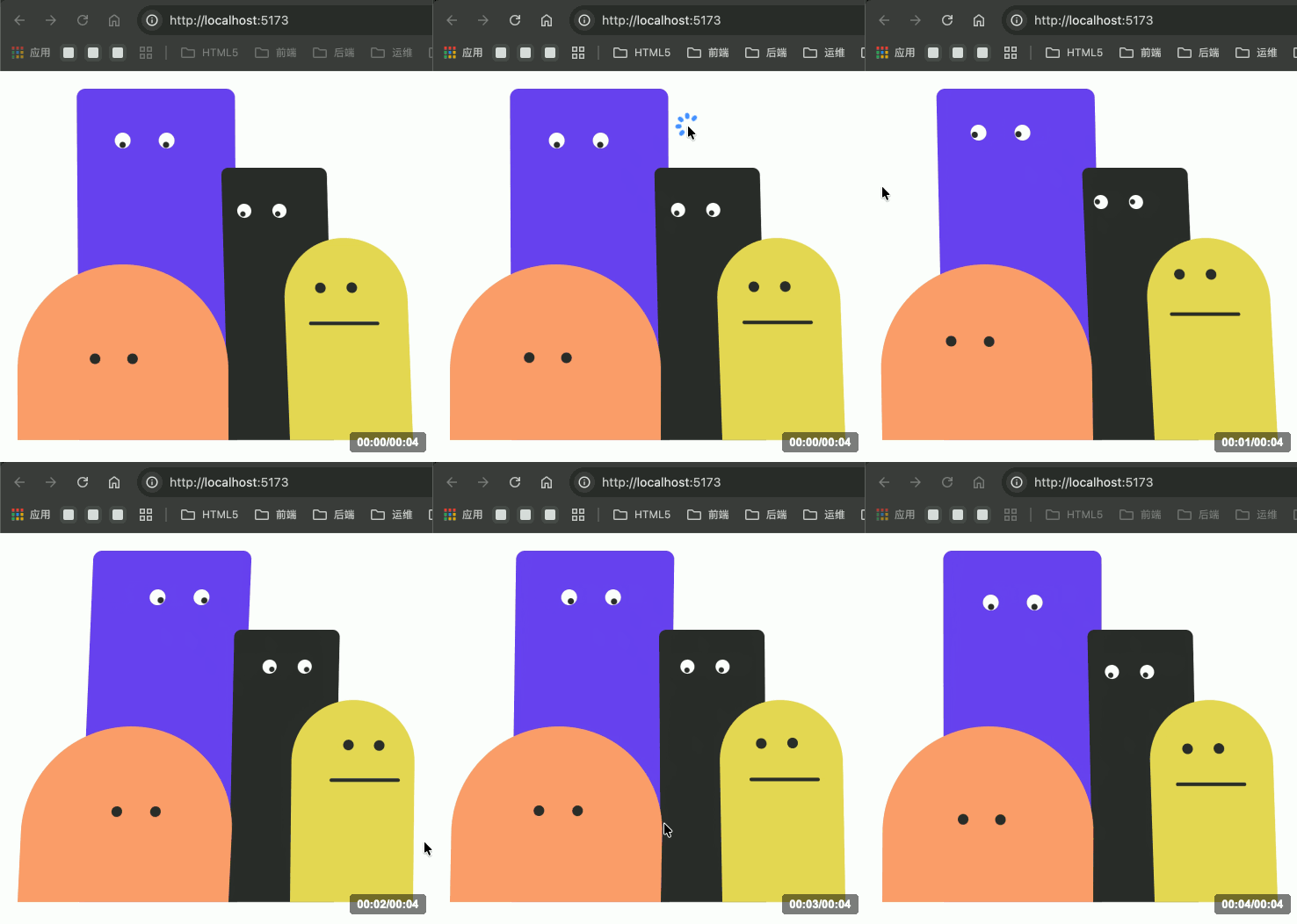
登录页
安装依赖
pnpm install --save ant-design-vue @ant-design/icons-vue
在src/main.js添加以下内容
import Antd from 'ant-design-vue'
import 'ant-design-vue/dist/reset.css'

app.use(Antd)
创建 src/pages/login/Index.vue,登录页。
<script setup lang="ts">
import { ref } from 'vue'
import { message } from 'ant-design-vue'
import {
  UserOutlined,
  LockOutlined,
  EyeOutlined,
  EyeInvisibleOutlined,
} from '@ant-design/icons-vue'
import AnimatedCharacters from '../../components/animated-characters/Index.vue'
import styles from './index.module.css'

/** 模拟登录 API(仅前端逻辑,无真实请求) */
async function mockLogin(_values: { username: string; password: string }) {
  await new Promise((resolve) => setTimeout(resolve, 800))
  return { data: { access_token: 'mock_token_' + Date.now() } }
}

const loading = ref(false)
const showPassword = ref(false)
const isTyping = ref(false)
const passwordValue = ref('')
const error = ref('')

const handleLogin = async (values: { username: string; password: string }) => {
  loading.value = true
  error.value = ''
  try {
    const { data } = await mockLogin(values)
    localStorage.setItem('access_token', data.access_token)
    message.success('登录成功')
    setTimeout(() => {
      window.location.href = '/'
    }, 500)
  } catch {
    error.value = '账号或密码有误,请重新输入'
  } finally {
    loading.value = false
  }
}
</script>

<template>
  <div :class="styles.container">
    <!-- 左侧:品牌视觉区 -->
    <div :class="styles.leftPanel">
      <div :class="styles.leftTop">
        <div :class="styles.brandMark">
          <svg width="28" height="28" viewBox="0 0 28 28" fill="none">
            <rect width="28" height="28" rx="7" fill="white" fill-opacity="0.15" />
            <path d="M7 14L12 9L17 14L12 19L7 14Z" fill="white" fill-opacity="0.9" />
            <path d="M13 14L18 9L21 12V16L18 19L13 14Z" fill="white" fill-opacity="0.5" />
          </svg>
        </div>
        <span :class="styles.brandName">Nexus</span>
      </div>

      <div :class="styles.charactersArea">
        <AnimatedCharacters
            :is-typing="isTyping"
            :show-password="showPassword"
            :password-length="passwordValue.length"
        />
      </div>

      <div :class="styles.leftFooter">
        <a href="#">帮助中心</a>
        <a href="#">隐私政策</a>
      </div>

      <div :class="styles.decorBlur1" />
      <div :class="styles.decorBlur2" />
      <div :class="styles.decorGrid" />
    </div>

    <!-- 右侧:登录表单 -->
    <div :class="styles.rightPanel">
      <div :class="styles.formWrapper">
        <div :class="styles.mobileLogo">
          <div :class="styles.mobileLogoIcon">
            <svg width="20" height="20" viewBox="0 0 28 28" fill="none">
              <path d="M7 14L12 9L17 14L12 19L7 14Z" fill="#1E40AF" fill-opacity="0.9" />
              <path d="M13 14L18 9L21 12V16L18 19L13 14Z" fill="#3B82F6" fill-opacity="0.7" />
            </svg>
          </div>
          <span>Nexus 平台</span>
        </div>

        <div :class="styles.formHeader">
          <h1 :class="styles.formTitle">登录到工作台</h1>
          <p :class="styles.formSubtitle">
            统一接入前端平台旗下所有系统
          </p>
        </div>

        <a-form
            name="login"
            @finish="handleLogin"
            autocomplete="off"
            size="large"
            :class="styles.form"
        >
          <div :class="styles.fieldLabel">账号</div>
          <a-form-item
              name="username"
              :rules="[
              { required: true, message: '请输入账号' },
              { min: 3, message: '账号长度不能少于 3 个字符' },
            ]"
          >
            <a-input
                placeholder="输入您的账号"
                @focus="isTyping = true"
                @blur="isTyping = false"
            >
              <template #prefix>
                <UserOutlined :class="styles.prefixIcon" />
              </template>
            </a-input>
          </a-form-item>

          <div :class="styles.fieldLabel">密码</div>
          <a-form-item
              name="password"
              :rules="[
              { required: true, message: '请输入密码' },
              { min: 6, message: '密码长度不能少于 6 个字符' },
            ]"
          >
            <a-input
                :type="showPassword ? 'text' : 'password'"
                placeholder="输入您的密码"
                v-model:value="passwordValue"
            >
              <template #prefix>
                <LockOutlined :class="styles.prefixIcon" />
              </template>
              <template #suffix>
                <span
                    :class="styles.eyeToggle"
                    @click="showPassword = !showPassword"
                >
                  <EyeOutlined v-if="showPassword" />
                  <EyeInvisibleOutlined v-else />
                </span>
              </template>
            </a-input>
          </a-form-item>

          <div v-if="error" :class="styles.errorBox">{{ error }}</div>

          <a-form-item :style="{ marginBottom: 0 }">
            <a-button
                type="primary"
                html-type="submit"
                :loading="loading"
                block
                :class="styles.submitBtn"
            >
              {{ loading ? '登录中...' : '登录' }}
            </a-button>
          </a-form-item>
        </a-form>

        <div :class="styles.divider">
          <span>或</span>
        </div>

        <a-button block :class="styles.googleBtn">
          飞书账号一键登录
        </a-button>

        <div :class="styles.signupRow">
          暂无账号?
          <a href="#" :class="styles.signupLink">
            联系管理员申请开通
          </a>
        </div>
      </div>
    </div>
  </div>
</template>
创建 src/pages/login/index.module.css,登录页样式。
.container {
    min-height: 100vh;
    display: grid;
    grid-template-columns: 1fr 1fr;
}

@media (max-width: 1024px) {
    .container {
        grid-template-columns: 1fr;
    }
}

/* ─── 左侧面板 ───────────────────────────────────────────────────────────────── */

.leftPanel {
    position: relative;
    display: flex;
    flex-direction: column;
    justify-content: space-between;
    padding: 48px;
    background: linear-gradient(145deg, #0f172a 0%, #1e3a8a 50%, #1e40af 100%);
    overflow: hidden;
}

@media (max-width: 1024px) {
    .leftPanel {
        display: none;
    }
}

.leftTop {
    position: relative;
    z-index: 20;
    display: flex;
    align-items: center;
    gap: 10px;
    font-size: 20px;
    font-weight: 700;
    color: #ffffff;
    letter-spacing: 0.5px;
}

.brandMark {
    width: 40px;
    height: 40px;
    border-radius: 10px;
    background: rgba(255, 255, 255, 0.12);
    border: 1px solid rgba(255, 255, 255, 0.2);
    display: flex;
    align-items: center;
    justify-content: center;
    flex-shrink: 0;
    backdrop-filter: blur(8px);
}

.brandName {
    color: #ffffff;
    font-size: 20px;
    font-weight: 700;
    letter-spacing: 1px;
}

.charactersArea {
    position: relative;
    z-index: 20;
    display: flex;
    align-items: flex-end;
    justify-content: center;
    height: 500px;
}

.leftFooter {
    position: relative;
    z-index: 20;
    display: flex;
    align-items: center;
    gap: 24px;
}

.leftFooter a {
    font-size: 13px;
    color: rgba(255, 255, 255, 0.45);
    text-decoration: none;
    transition: color 0.2s;
    cursor: pointer;
}

.leftFooter a:hover {
    color: rgba(255, 255, 255, 0.85);
}

.decorBlur1 {
    position: absolute;
    top: 15%;
    right: 10%;
    width: 300px;
    height: 300px;
    background: rgba(59, 130, 246, 0.25);
    border-radius: 50%;
    filter: blur(80px);
    pointer-events: none;
    z-index: 0;
}

.decorBlur2 {
    position: absolute;
    bottom: 10%;
    left: 5%;
    width: 400px;
    height: 400px;
    background: rgba(30, 64, 175, 0.3);
    border-radius: 50%;
    filter: blur(100px);
    pointer-events: none;
    z-index: 0;
}

.decorGrid {
    position: absolute;
    inset: 0;
    background-image:
            linear-gradient(rgba(255, 255, 255, 0.03) 1px, transparent 1px),
            linear-gradient(90deg, rgba(255, 255, 255, 0.03) 1px, transparent 1px);
    background-size: 40px 40px;
    pointer-events: none;
    z-index: 1;
}

/* ─── 右侧面板 ───────────────────────────────────────────────────────────────── */

.rightPanel {
    display: flex;
    align-items: center;
    justify-content: center;
    padding: 32px;
    background: #ffffff;
}

.formWrapper {
    width: 100%;
    max-width: 400px;
}

.mobileLogo {
    display: none;
    align-items: center;
    justify-content: center;
    gap: 8px;
    font-size: 18px;
    font-weight: 700;
    color: #0f172a;
    margin-bottom: 48px;
}

@media (max-width: 1024px) {
    .mobileLogo {
        display: flex;
    }
}

.mobileLogoIcon {
    width: 32px;
    height: 32px;
    border-radius: 8px;
    background: #eff6ff;
    display: flex;
    align-items: center;
    justify-content: center;
}

.formHeader {
    text-align: center;
    margin-bottom: 40px;
}

.formTitle {
    font-size: 26px;
    font-weight: 700;
    letter-spacing: -0.02em;
    color: #0f172a;
    margin: 0 0 10px 0;
    line-height: 1.3;
}

.formSubtitle {
    font-size: 14px;
    color: #6b7280;
    margin: 0;
    line-height: 1.6;
}

.form :global(.ant-form-item) {
    margin-bottom: 20px;
}

.form :global(.ant-input-affix-wrapper) {
    height: 48px !important;
    background: #fafafa !important;
    border: 1px solid #e5e7eb !important;
    border-radius: 10px !important;
    transition: border-color 0.2s, box-shadow 0.2s !important;
}

.form :global(.ant-input-affix-wrapper:hover) {
    border-color: #3b82f6 !important;
}

.form :global(.ant-input-affix-wrapper:focus),
.form :global(.ant-input-affix-wrapper-focused) {
    border-color: #1e40af !important;
    box-shadow: 0 0 0 3px rgba(30, 64, 175, 0.08) !important;
    background: #ffffff !important;
}

.form :global(.ant-input-affix-wrapper .ant-input) {
    background: transparent !important;
    font-size: 14px !important;
    color: #111827 !important;
}

.form :global(.ant-input-affix-wrapper .ant-input::placeholder) {
    color: #c0c4cc !important;
}

.form :global(.ant-form-item-explain-error) {
    font-size: 13px !important;
    margin-top: 4px !important;
}

.fieldLabel {
    font-size: 13px;
    font-weight: 500;
    color: #374151;
    margin-bottom: 6px;
    letter-spacing: 0.2px;
}

.prefixIcon {
    color: #b0b7c3;
    font-size: 15px;
}

.eyeToggle {
    color: #6b7280;
    cursor: pointer;
    font-size: 16px;
    display: flex;
    align-items: center;
    transition: color 0.2s;
}

.eyeToggle:hover {
    color: #374151;
}

.errorBox {
    padding: 10px 14px;
    font-size: 13px;
    color: #dc2626;
    background: #fef2f2;
    border: 1px solid #fecaca;
    border-radius: 8px;
    margin-bottom: 16px;
}

.submitBtn {
    height: 48px !important;
    font-size: 15px !important;
    font-weight: 600 !important;
    border-radius: 10px !important;
    background: #1e40af !important;
    border-color: #1e40af !important;
    letter-spacing: 1px;
    transition: background 0.2s, opacity 0.2s !important;
    cursor: pointer;
}

.submitBtn:hover {
    background: #1d4ed8 !important;
    border-color: #1d4ed8 !important;
    opacity: 1 !important;
}

.submitBtn:active {
    opacity: 0.85 !important;
}

.divider {
    display: flex;
    align-items: center;
    gap: 12px;
    margin: 20px 0 0;
    color: #d1d5db;
    font-size: 13px;
}

.divider::before,
.divider::after {
    content: '';
    flex: 1;
    height: 1px;
    background: #e5e7eb;
}

.divider span {
    color: #9ca3af;
    white-space: nowrap;
}

.googleBtn {
    height: 48px !important;
    font-size: 14px !important;
    border-radius: 10px !important;
    margin-top: 12px !important;
    background: #ffffff !important;
    border: 1px solid #e5e7eb !important;
    color: #374151 !important;
    transition: background 0.2s, border-color 0.2s !important;
    cursor: pointer;
}

.googleBtn:hover {
    background: #eff6ff !important;
    border-color: rgba(30, 64, 175, 0.25) !important;
    color: #1e40af !important;
}

.signupRow {
    text-align: center;
    font-size: 13px;
    color: #6b7280;
    margin-top: 28px;
}

.signupLink {
    color: #1e40af;
    font-weight: 500;
    text-decoration: none;
    cursor: pointer;
}

.signupLink:hover {
    text-decoration: underline;
    color: #1d4ed8;
}
源代码
- GitHub:github.com/BugShare404…
- Gitee:gitee.com/bugshare/an…
vue2分支是Vue2 + Element-ui实现。