背景
- 在做一个研究型的项目时,想结合之前学习的Dify知识,所以就有了下面文章
- 整体思路:
- 在Dify中创建工作流,接入大模型,输入为excel文档,通过大模型进行数据清洗,输出json方便后续修改
- 使用python调用dify工作流提供的API接口,在其他程序中进行调用
Dify端
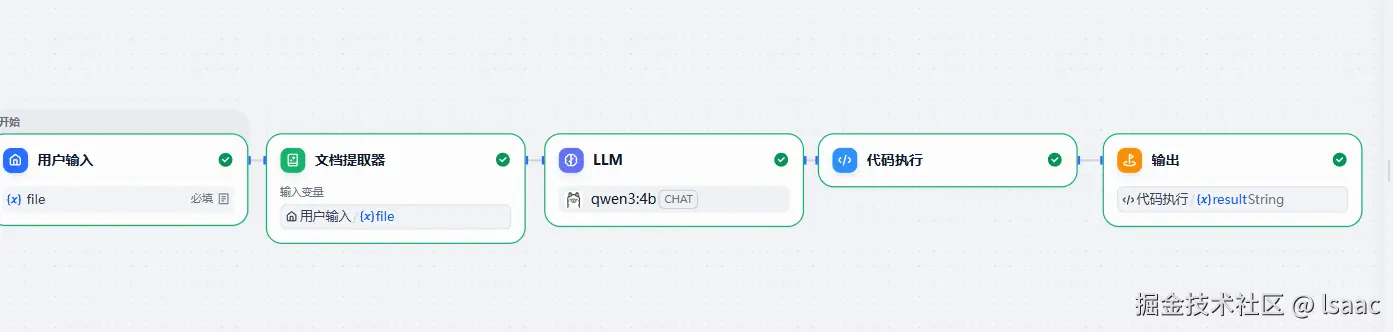
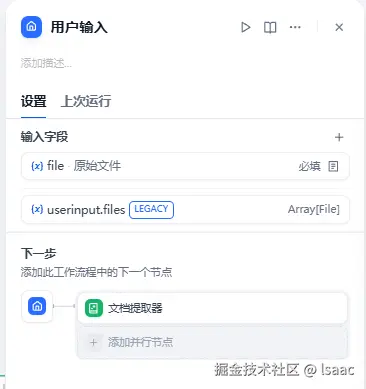
- 用户输入节点
- 用户输入接收一个传入文件作为输入,取名为'file'
- 文档提取器节点
- 文档提取器节点将用户输入作为参数,将文档内容转化成大模型方便理解的语言
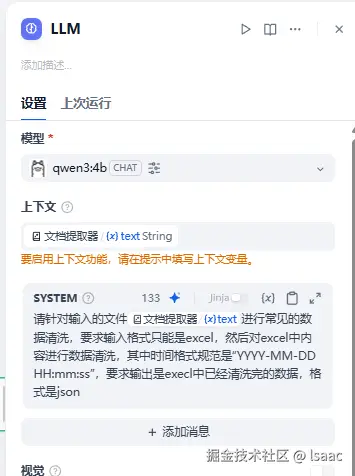
- LLM节点
- 大语言节点,接收文档提取器节点的输出作为输入,使用本地的大模型,在提示词中进行控制(图中提示词随便写的,不规范,只测试用,疯狂叠甲)
- 代码执行节点
- 此节点主要作用是去除大模型输出中的 '<think> '标签,输入参数是LLM节点的输出text
import re
def main(arg1):
"""
删除输入字符串中的 <think>...</think> 标签及其内容,返回剩余文本。
参数 arg1: 原始字符串(可能包含 <think> 标签)
返回: 字典,键 "result" 对应处理后的字符串
"""
def remove_think_tags(text: str) -> str:
return re.sub(r'<think>.*?</think>', '', text, flags=re.DOTALL)
cleaned = remove_think_tags(arg1)
return {"result": cleaned}
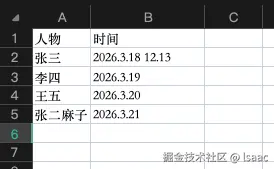
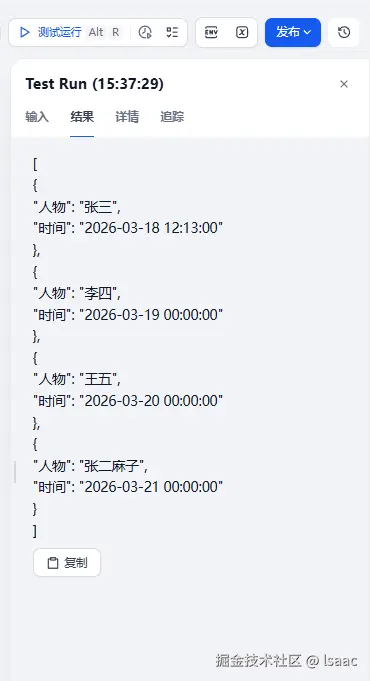
- 因为在提示词里面对时间格式做出了要求,所以工作流输出结果中对时间格式进行了标准化
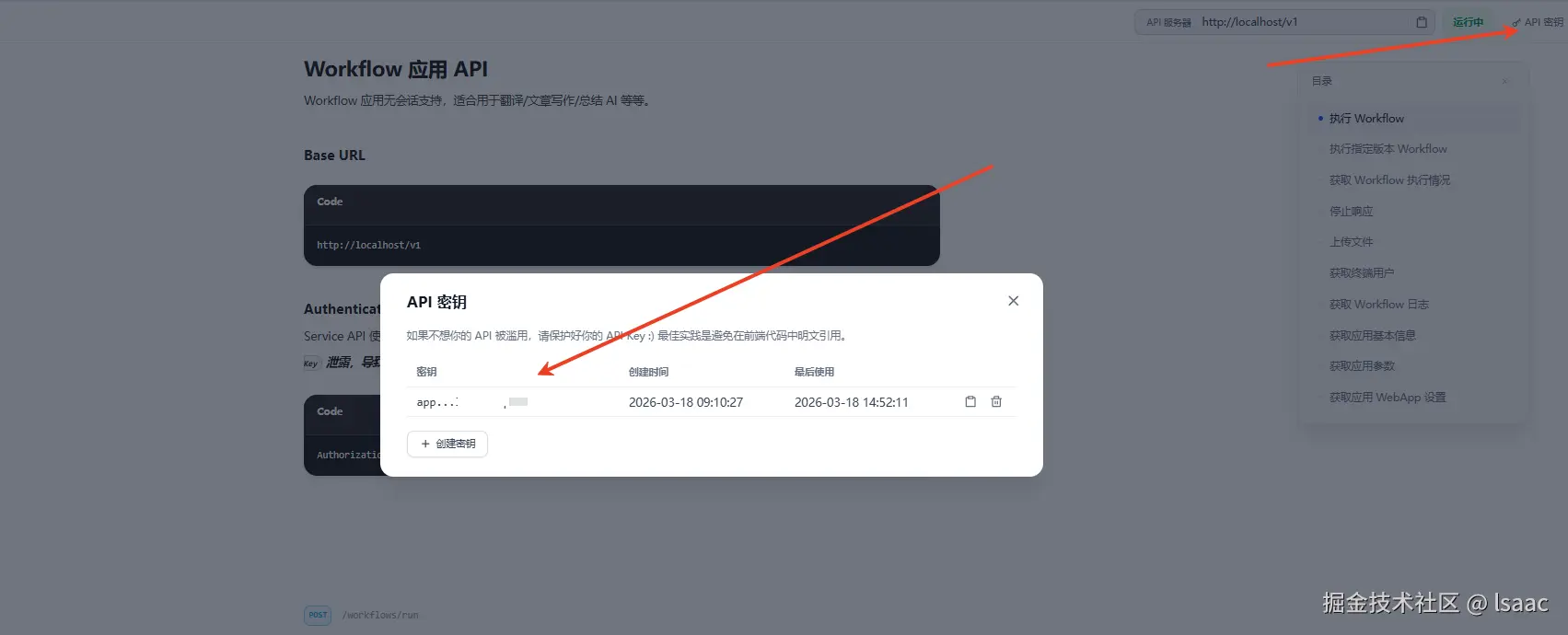
- 在访问API处记录需要用到的key
python端
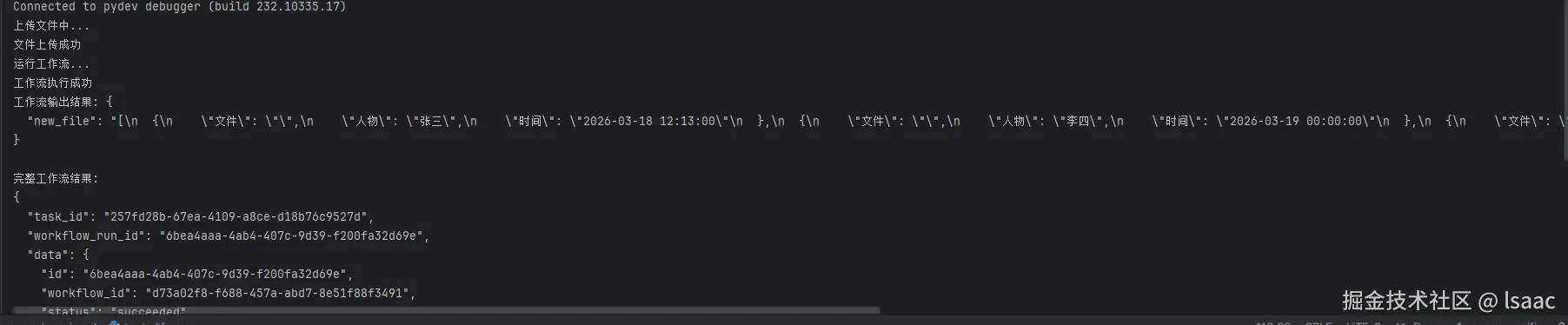
- python端分为两部分,一个是上传文件,一个是运行工作流,首先先上传文件,获取到对应的文件id后,再运行工作流
- 上传文件代码
def upload_file(file_path, user):
upload_url = "http://localhost/v1/files/upload"
headers = {
"Authorization": "Bearer app-XXXX"
}
try:
if not os.path.exists(file_path):
print(f"错误:文件 {file_path} 不存在")
return None
file_name = os.path.basename(file_path)
file_ext = os.path.splitext(file_name)[1].lower()
mime_type, _ = mimetypes.guess_type(file_path)
allowed_ext = ['.xlsx', '.txt']
if file_ext not in allowed_ext:
print(f"错误:不支持的文件类型 {file_ext},仅支持 {allowed_ext}")
return None
print("上传文件中...")
with open(file_path, 'rb') as file:
files = {
'file': (
file_name,
file,
mime_type or 'application/octet-stream'
)
}
data = {
"user": user
}
response = requests.post(
upload_url,
headers=headers,
files=files,
data=data,
timeout=30
)
if response.status_code == 201:
print("文件上传成功")
return response.json().get("id")
else:
print(f"文件上传失败,状态码: {response.status_code}")
print(f"错误详情: {response.text}")
return None
except Exception as e:
print(f"上传异常: {str(e)}")
return None
def run_workflow(file_id, user, response_mode="blocking"):
    workflow_url = "http://localhost/v1/workflows/run"
    headers = {
        "Authorization": "Bearer app-xxxxx",
        "Content-Type": "application/json"
    }

    data = {
        "inputs": {
            "file": {
                "transfer_method": "local_file",
                "upload_file_id": file_id,
                "type": "document"
            }
        },
        "response_mode": response_mode,
        "user": user
    }

    try:
        print("运行工作流...")
        response = requests.post(
            workflow_url,
            headers=headers,
            json=data,
        )
        if response.status_code == 200:
            print("工作流执行成功")
            return response.json()
        else:
            print(f"工作流执行失败,状态码: {response.status_code}")
            print(f"错误详情: {response.text}")
            return {
                "status": "error",
                "message": f"Failed to execute workflow, status code: {response.status_code}",
                "detail": response.text
            }
    except Exception as e:
        print(f"工作流执行异常: {str(e)}")
        return {"status": "error", "message": str(e)}
import os
import mimetypes
import requests
import json
def upload_file(file_path, user):
upload_url = "http://localhost/v1/files/upload"
headers = {
"Authorization": "Bearer app-xxxx"
}
try:
if not os.path.exists(file_path):
print(f"错误:文件 {file_path} 不存在")
return None
file_name = os.path.basename(file_path)
file_ext = os.path.splitext(file_name)[1].lower()
mime_type, _ = mimetypes.guess_type(file_path)
allowed_ext = ['.xlsx', '.txt']
if file_ext not in allowed_ext:
print(f"错误:不支持的文件类型 {file_ext},仅支持 {allowed_ext}")
return None
print("上传文件中...")
with open(file_path, 'rb') as file:
files = {
'file': (
file_name,
file,
mime_type or 'application/octet-stream'
)
}
data = {
"user": user
}
response = requests.post(
upload_url,
headers=headers,
files=files,
data=data,
timeout=30
)
if response.status_code == 201:
print("文件上传成功")
return response.json().get("id")
else:
print(f"文件上传失败,状态码: {response.status_code}")
print(f"错误详情: {response.text}")
return None
except Exception as e:
print(f"上传异常: {str(e)}")
return None
def run_workflow(file_id, user, response_mode="blocking"):
workflow_url = "http://localhost/v1/workflows/run"
headers = {
"Authorization": "Bearer app-xxxxx",
"Content-Type": "application/json"
}
data = {
"inputs": {
"file": {
"transfer_method": "local_file",
"upload_file_id": file_id,
"type": "document"
}
},
"response_mode": response_mode,
"user": user
}
try:
print("运行工作流...")
response = requests.post(
workflow_url,
headers=headers,
json=data,
)
if response.status_code == 200:
print("工作流执行成功")
return response.json()
else:
print(f"工作流执行失败,状态码: {response.status_code}")
print(f"错误详情: {response.text}")
return {
"status": "error",
"message": f"Failed to execute workflow, status code: {response.status_code}",
"detail": response.text
}
except Exception as e:
print(f"工作流执行异常: {str(e)}")
return {"status": "error", "message": str(e)}
if __name__ == "__main__":
file_path = r"dify_test.xlsx"
user = "difyuser"
file_id = upload_file(file_path, user)
if file_id:
result = run_workflow(file_id, user)
if isinstance(result, dict) and result.get("status") != "error":
outputs = result.get("data", {}).get("outputs", "未找到输出数据")
print("工作流输出结果:", json.dumps(outputs, indent=2, ensure_ascii=False))
print("\n完整工作流结果:")
print(json.dumps(result, indent=2, ensure_ascii=False))
else:
print("工作流结果:", json.dumps(result, indent=2, ensure_ascii=False))
else:
print("文件上传失败,无法执行工作流")
总结
- 流程走通
- 有点走远了,完全可以python直接调用大模型的哈哈哈哈,但是为了实战一下dify就这样吧
- 最后附上python直接调用大模型进行数据清洗,已测试走通
from openai import OpenAI
import pandas as pd
import json
import os
client = OpenAI(
base_url="http://localhost:11434/v1",
api_key="xxxxxxxxx"
)
def read_excel_data(file_path, sheet_name=0):
"""
读取Excel文件数据
:param file_path: Excel文件路径
:param sheet_name: 工作表名称/索引,默认第一个sheet
:return: 格式化后的Excel数据字符串
"""
try:
df = pd.read_excel(file_path)
df = df.fillna("")
excel_data_str = df.to_string(index=False)
print("✅ 成功读取Excel数据:")
print(excel_data_str[:200] + "..." if len(excel_data_str) > 200 else excel_data_str)
return excel_data_str
except FileNotFoundError:
print(f"❌ 错误:未找到文件 {file_path}")
return None
except Exception as e:
print(f"❌ 读取Excel失败:{str(e)}")
return None
def clean_data_with_llm(excel_data, clean_prompt):
"""
调用大模型根据提示词清洗数据
:param excel_data: Excel数据字符串
:param clean_prompt: 自定义数据清洗提示词
:return: 清洗后的JSON格式结果
"""
if not excel_data:
return None
messages = [
{
"role": "system",
"content": """你是专业的数据清洗工程师,仅输出JSON格式的清洗结果,不输出任何多余文字。
要求:
1. 严格按照用户的清洗提示词处理数据
2. 保证输出的JSON格式合法、可解析
3. 保留原始数据的字段结构,仅修正数据内容"""
},
{
"role": "user",
"content": f"""请清洗以下Excel数据,清洗要求:{clean_prompt}
Excel原始数据:
{excel_data}"""
}
]
try:
completion = client.chat.completions.create(
model="qwen3:4b",
messages=messages,
stream=True
)
cleaned_result = ""
print("\n📝 正在清洗数据(流式输出):")
for chunk in completion:
content = chunk.choices[0].delta.content
if content:
cleaned_result += content
print(content, end="", flush=True)
cleaned_json = json.loads(cleaned_result)
return cleaned_json
except json.JSONDecodeError:
print("\n❌ 错误:大模型返回的结果不是合法JSON格式")
return None
except Exception as e:
print(f"\n❌ 调用大模型失败:{str(e)}")
return None
def save_json_result(data, output_path="cleaned_data.json"):
"""
保存清洗后的JSON结果到文件
:param data: 清洗后的JSON数据
:param output_path: 输出文件路径
"""
if not data:
print("❌ 无数据可保存")
return
try:
with open(output_path, "w", encoding="utf-8") as f:
json.dump(data, f, ensure_ascii=False, indent=4)
print(f"\n✅ 清洗后的数据已保存至:{os.path.abspath(output_path)}")
except Exception as e:
print(f"\n❌ 保存JSON失败:{str(e)}")
if __name__ == "__main__":
EXCEL_FILE_PATH = r"data/dify_test.xlsx"
CLEAN_PROMPT = """1. 将日期格式统一为YYYY-MM-DD HH:mm:ss"""
OUTPUT_JSON_PATH = "cleaned_data.json"
excel_data = read_excel_data(EXCEL_FILE_PATH)
if not excel_data:
exit(1)
cleaned_json_data = clean_data_with_llm(excel_data, CLEAN_PROMPT)
if not cleaned_json_data:
exit(1)
save_json_result(cleaned_json_data, OUTPUT_JSON_PATH)