一. 图集参数
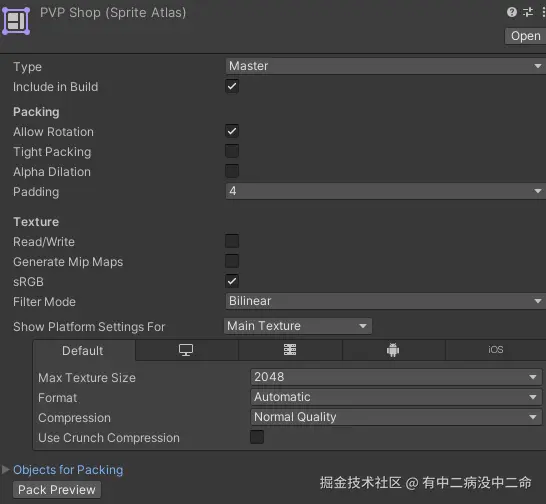
Atlas Settings(图集设置)
- 基础设置
| 参数 | 含义 |
|---|
| Allow Rotation | 允许打包时旋转 Sprite 以节省空间(UGUI 建议关闭,旋转可能导致 UI 异常) |
| Tight Packing | 紧密打包,按像素轮廓打包(非矩形),更节省空间,但有一定性能开销 |
| Alpha Dilation | Alpha 扩展,向外扩展透明边缘颜色,减少图片边缘渗色问题 |
| Padding | 图集中每张图片之间的像素间距,防止图片边缘渗色(推荐值:2~4) |
- Allow Rotation 和 Tight Packing同时打开时, 会出现异常 => 如果在图集中图片被旋转了, 那么使用时, 也会被旋转
- Texture Settings(纹理设置)
| 参数 | 含义 |
|---|
| Read/Write | 开启后可通过脚本读写纹理像素,会占用额外内存 |
| Generate Mip Maps | 生成 Mip Maps,适用于 3D 场景,UI 通常不需要开启 |
| sRGB | 将纹理作为 sRGB 颜色空间处理(默认开启) |
| Filter Mode | 纹理过滤模式:Point(像素风)/ Bilinear(双线性)/ Trilinear(三线性) |
| Aniso Level | 各向异性过滤等级,提升斜视角纹理质量(0~16,UI 通常设为 1) |
- Read/Write: 相当于在内存中创建一个副本进行读写操作, 所以对于开启此选项的图片来说, 内存为未开启的两倍
- Read/Write:与alphaHitTestMinimumThreshold参数相关联,开启后才能使用; 打图集后alphaHitTestMinimumThreshold参数失效
- sRGB: 详情看伽马空间和线性空间的介绍
- Generate Mip Maps
- 远近关系:
Mip Map 通过根据物体与摄像机的距离选择合适分辨率的纹理,来减少远处物体的过度渲染,从而提高渲染性能
- Project Setting 中的Quality 里面的
Global MipMap Limit,用于控制全局范围内的 Mip Map 使用级别
- 限制最高级别的纹理细节:通过设置一个特定的限制值,开发者可以指定游戏只能使用到某个级别的 Mip Map。例如,限制在较低级别可能导致纹理更加模糊,但提高运行效率
- Format Settings(平台压缩格式)
| 参数 | 含义 |
|---|
| Max Texture Size | 图集最大尺寸 |
| Format | 纹理压缩格式,如 RGBA32、ETC2、ASTC、DXT5 等 |
| Compression | 压缩质量:None / Low Quality / Normal Quality / High Quality |
| Use Crunch Compression | 使用 Crunch 压缩,进一步压缩体积(会增加解压时间) |
| Compressor Quality | Crunch 压缩质量(0~100) |
- Max Texture Size: 即一张图的尺寸, 尺寸越大,可以容纳的图片越多
- Format是压缩格式, 而Compression是在该压缩格式下的压缩程度
- 常用压缩格式
| 格式 | 平台 | 说明 |
|---|
RGBA32 | 通用 | 无压缩,质量最高,体积最大 |
DXT5 | PC/Windows | 支持透明,压缩比高 |
ETC2 | Android | 支持透明通道,Android 推荐 |
ASTC | iOS/Android | 灵活压缩比,现代移动端推荐 |
PVRTC | iOS | 旧版 iOS 格式,需尺寸为 2 的幂次方 |
二. 图集生成代码
using System.Collections.Generic;
using System.IO;
using UnityEditor;
using UnityEditor.U2D;
using UnityEngine.U2D;
using UnityEngine;
using System.Reflection;
namespace LogicEditor.Editor
{
public static class AutoAtlasGenerator
{
private static readonly string[] SupportedImageExtensions = { ".png", ".jpg" };
private static int GetPackedPageCount(SpriteAtlas atlas, string atlasPath)
{
var editorAsm = typeof(SpriteAtlasUtility).Assembly;
var extType = editorAsm.GetType("UnityEditor.U2D.SpriteAtlasExtensions");
if (extType != null)
{
var mi = extType.GetMethod("GetPreviewTextures", BindingFlags.Static | BindingFlags.NonPublic, null, new[] { typeof(SpriteAtlas) }, null);
if (mi != null)
{
var textures = mi.Invoke(null, new object[] { atlas }) as Texture2D[];
if (textures != null)
return textures.Length;
}
}
return 1;
}
private static void ProcessSingleFolder(string folderPath, string outputPath)
{
string[] imagePaths = Directory.GetFiles(folderPath, "*.*", SearchOption.TopDirectoryOnly);
List<Object> validTextures = new List<Object>();
foreach (var path in imagePaths)
{
bool isValidImage = false;
foreach (var ext in SupportedImageExtensions)
{
if (path.EndsWith(ext))
{
isValidImage = true;
break;
}
}
if (isValidImage)
{
string assetPath = path.Replace(Application.dataPath, "Assets");
Object tex = AssetDatabase.LoadAssetAtPath<Texture2D>(assetPath);
if (tex != null)
validTextures.Add(tex);
}
}
if (validTextures.Count == 0)
return;
string folderName = new DirectoryInfo(folderPath).Name;
string atlasPath = Path.Combine(outputPath, folderName + ".spriteatlas").Replace("\\", "/");
SpriteAtlas atlas = AssetDatabase.LoadAssetAtPath<SpriteAtlas>(atlasPath);
if (atlas == null)
{
atlas = new SpriteAtlas();
SetAtlasSettings(atlas);
AssetDatabase.CreateAsset(atlas, atlasPath);
}
atlas.Remove(atlas.GetPackables());
atlas.Add(validTextures.ToArray());
SpriteAtlasUtility.PackAtlases(new SpriteAtlas[] { atlas }, EditorUserBuildSettings.activeBuildTarget, false);
AssetDatabase.SaveAssets();
int pageCount = GetPackedPageCount(atlas, atlasPath);
if (pageCount > 1)
{
throw new System.Exception($"图集【{folderPath}】页数为 {pageCount},超出限制,路径:{atlasPath}");
}
else
{
Debug.Log($"图集【{folderPath}】页数为 {pageCount},正常");
}
}
public static void SetAtlasSettings(SpriteAtlas atlas)
{
atlas.SetPackingSettings(new SpriteAtlasPackingSettings
{
padding = 4,
enableRotation = true,
enableTightPacking = false,
enableAlphaDilation = false,
});
atlas.SetTextureSettings(new SpriteAtlasTextureSettings
{
sRGB = true,
readable = false,
generateMipMaps = false,
filterMode = FilterMode.Bilinear
});
atlas.SetPlatformSettings(new TextureImporterPlatformSettings
{
name = "DefaultTexturePlatform",
overridden = false,
maxTextureSize = 2048
});
atlas.SetPlatformSettings(new TextureImporterPlatformSettings
{
name = "iPhone",
overridden = true,
format = TextureImporterFormat.ASTC_4x4,
compressionQuality = (int)TextureCompressionQuality.Best
});
atlas.SetPlatformSettings(new TextureImporterPlatformSettings
{
name = "Android",
overridden = true,
format = TextureImporterFormat.ASTC_4x4,
compressionQuality = (int)TextureCompressionQuality.Best,
androidETC2FallbackOverride = AndroidETC2FallbackOverride.UseBuildSettings
});
}
public static void GenerateAtlases(string sourceFolder, string outputFolder)
{
if (!Directory.Exists(sourceFolder))
{
throw new System.Exception($"源图片文件夹不存在: {sourceFolder}");
}
if (!Directory.Exists(outputFolder))
{
throw new System.Exception($"输出文件夹不存在: {outputFolder}");
}
List<string> allDirs = new List<string>();
allDirs.Add(sourceFolder);
allDirs.AddRange(Directory.GetDirectories(sourceFolder, "*", SearchOption.AllDirectories));
foreach (string dir in allDirs)
{
if (new DirectoryInfo(dir).Name.Contains("_NoNeedAtlas"))
{
Debug.Log($"忽略目录: {dir}");
continue;
}
ProcessSingleFolder(dir, outputFolder);
}
AssetDatabase.Refresh();
Debug.Log($"图集生成完成!");
}
}
}



