引言
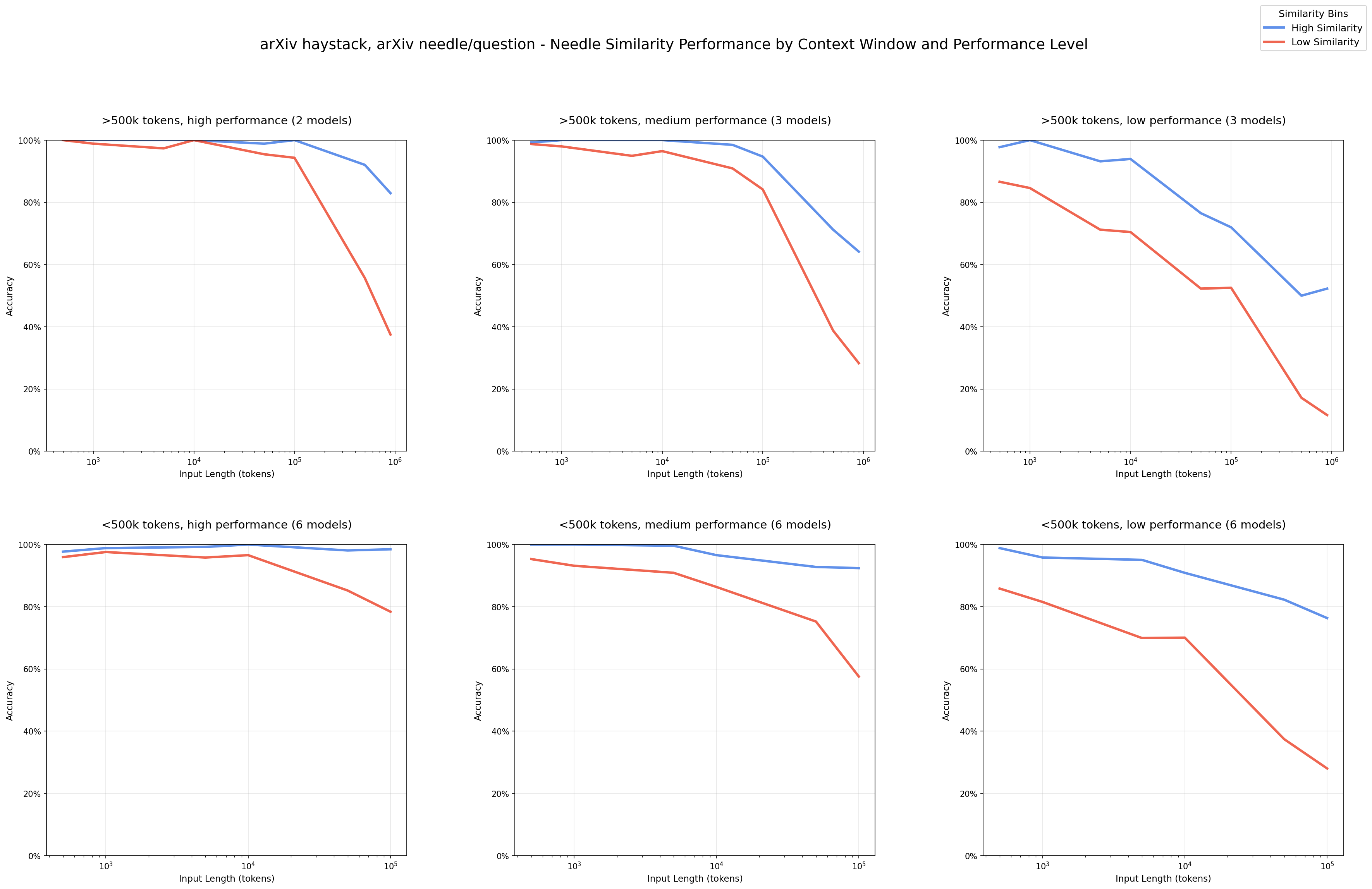
虽然有些标题党,但当前 SOTA 大语言模型虽然支持百万级 token 的上下文窗口的现状下,实证研究却表明,其有效工作区间呈现出 U-Shaped。超出该范围后,模型性能系统性下降、错误率上升、注意力分散、成本增加,而收益显著递减且计算成本线性增长。本文的核心目标是讨论如何在有限上下文限制下,通过精细的上下文管理、终端原生架构、标准化协议和校准机制,构建高可靠性的 AI Agent。
以下所有讨论均围绕一个基础循环展开,并在此基础上逐步引入工程增强。
基础 Agent 循环
async def agent_loop(task: str, system_prompt: str = SYSTEM_PROMPT) -> str:
    messages = [
        {"role": "system", "content": system_prompt},
        {"role": "user", "content": task}
    ]
    while True:
        response = await llm.chat(messages)
        messages.append({"role": "assistant", "content": response.content})
        if response.tool_calls:
            for tool_call in response.tool_calls:
                result = await execute_tool(tool_call)
                messages.append({
                    "role": "tool",
                    "tool_call_id": tool_call.id,
                    "content": result
                })
        else:
            return response.content
该循环简洁但脆弱:随着对话轮次增加,上下文膨胀、错误累积、注意力偏移等问题迅速显现。下文将逐层加固这一基础结构。
AI Agent 的基本结构及其失效原因
所有 Agent 都依赖上述循环,但 LLM 本身是无状态的“下一个词预测器”,不具备目标导向能力。Agent 的作用是为其注入结构化工作流。
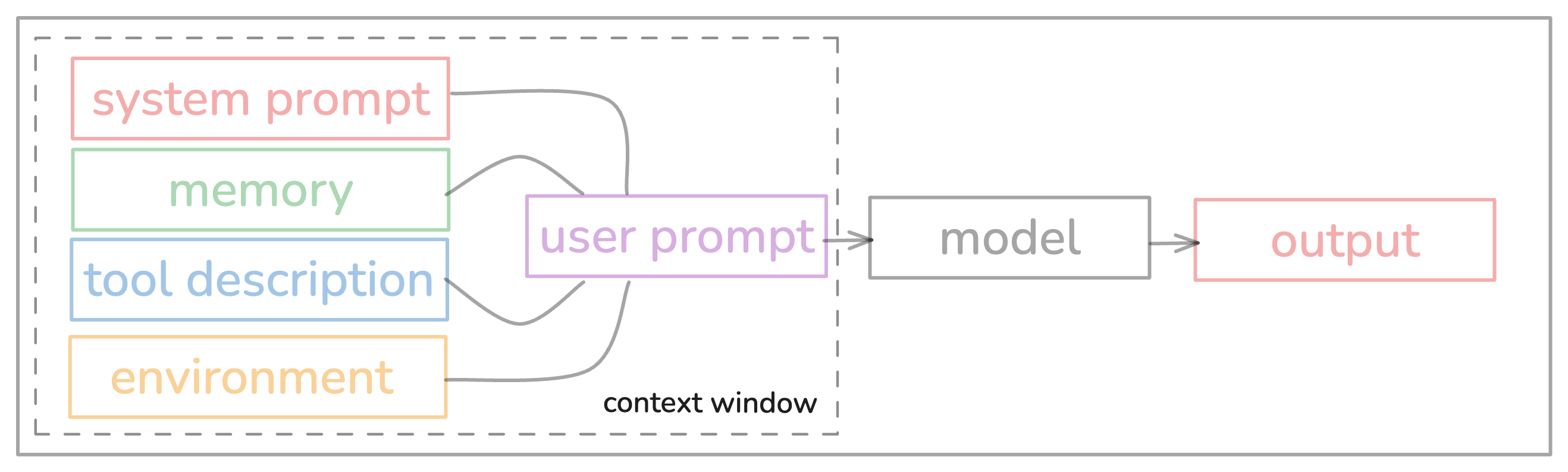
然而,在长任务中,该循环频繁失效。主要原因包括:
- Context Rot(上下文腐烂):输入越长,模型对关键信息的提取能力越弱。
- 错误累积:早期步骤的微小偏差会在后续被指数级放大。
- Lost-in-the-Middle 效应:模型注意力集中在上下文开头与结尾,忽略中间内容。。
在响应速度与输出准确性之间取得平衡
- 对静态背景信息(如项目文档)采用显式缓存,对会话历史依赖 KV 缓存实现隐式复用。
- 多个独立工具调用可并行执行,总延迟等于其中最慢的一次请求。
- 使用约束解码技术,确保模型输出严格符合预定义的 JSON Schema 或 API 规范。
- 可引入小型快速模型预测下一步可能的操作,提前发起请求以缩短整体响应时间。
1、引入主动上下文管理,解决上下文膨胀问题
问题现象
一般情况下当任务超过 10 轮交互后,Agent 开始:
- 忘记早期决策
- 重复执行相同工具
- 输出与历史矛盾的内容
根本原因
上下文长度线性增长,但模型对中间信息的注意力呈 U 型分布(开头和结尾强,中间弱)。同时,token 使用成本随长度非线性上升。
原则
主动管理优于被动等待:在上下文达到临界点前主动压缩,而非等到失败后再处理。
解决方案
在每次调用 LLM 前,检查上下文使用率;若超过 80%,触发压缩。那么在超过 50 轮长任务中,任务完成率预期可以翻倍。
# 新主循环:加入上下文管理
async def agent_loop_v1(task: str, max_tokens: int = 200_000) -> str:
    messages = [
        {"role": "system", "content": SYSTEM_PROMPT},
        {"role": "user", "content": task}
    ]
    while True:
        # ← 关键增强:每次调用前压缩上下文
        messages = await manage_context(messages, max_tokens)

        response = await llm.chat(messages)
        messages.append({"role": "assistant", "content": response.content})
        if response.tool_calls:
            for tool_call in response.tool_calls:
                result = await execute_tool(tool_call)
                messages.append({
                    "role": "tool",
                    "tool_call_id": tool_call.id,
                    "content": result
                })
        else:
            return response.content
manage_context 实现:
async def manage_context(messages: List[dict], max_tokens: int = 200_000) -> List[dict]:
    # 计算当前上下文token使用量
    current_tokens = count_tokens(messages)
    if current_tokens < max_tokens * 0.8:
        return messages

    # 清理旧工具结果(保留最近5个)
    tool_messages = [m for m in messages if m["role"] == "tool"]
    if len(tool_messages) > 5:
        kept_ids = {m["tool_call_id"] for m in tool_messages[-5:]}
        messages = [m for m in messages if m["role"] != "tool" or m["tool_call_id"] in kept_ids]

    # 生成结构化摘要
    summary_prompt = """Summarize the conversation, preserving:
    - Key decisions made
    - Errors encountered and solutions
    - Pending todos
    Keep under 500 tokens."""

    summary_resp = await llm.chat([
        {"role": "system", "content": "You are a context summarizer."},
        {"role": "user", "content": summary_prompt}
    ])

    # 重建上下文:保留 system + 最新 user + 摘要
    system_msg = next(m for m in messages if m["role"] == "system")
    latest_user = next((m for m in reversed(messages) if m["role"] == "user"), None)

    new_msgs = [system_msg]
    if latest_user:
        new_msgs.append(latest_user)
    new_msgs.append({"role": "assistant", "content": summary_resp.content})
    return new_msgs
2、引入 MCP 标准化协议,解决跨模型调用与工具调用碎片化问题
问题现象
不同项目需为每个工具编写专属调用逻辑,且工具参数校验、权限控制分散在各处,难以复用。
根本原因
工具调用未抽象为统一接口,导致 Agent 逻辑与领域细节耦合。
原则
接口解耦,实现复用:所有工具通过标准化协议暴露,Agent 逻辑与具体实现无关。
解决方案
定义 Model Context Protocol(MCP):工具注册为带 JSON Schema 的端点,由统一执行器调度。新增一个工具不用考虑模型与 MaaS 服务提供属性,快速上线。。
# 替换 execute_tool 为 MCP 执行器
async def execute_tool(tool_call: ToolCall) -> str:
    return await execute_mcp_tool(tool_call)  # 见前文实现

# MCP 工具库集中管理:
# - 参数合法性(通过 JSON Schema 验证)
# - 路径/权限检查(如 is_allowed_path)
# - 沙箱执行(如 read_file_sandboxed)
MCP 工具注册示例:
# 定义工具规范
mcp_tools = {
    "read_file": {
        "description": "Read file content",
        "parameters": {
            "type": "object",
            "properties": {
                "path": {"type": "string", "format": "path"}
            }
        }
    },
    "write_file": {
        "description": "Write content to file",
        "parameters": {
            "type": "object",
            "properties": {
                "path": {"type": "string", "format": "path"},
                "content": {"type": "string"}
            }
        }
    }
}

async def execute_mcp_tool(tool_call: ToolCall) -> str:
    tool_name = tool_call.function.name
    if tool_name not in mcp_tools:
        return f"Error: Unknown tool '{tool_name}'"

    # 验证参数
    params = json.loads(tool_call.function.arguments)
    schema = mcp_tools[tool_name]["parameters"]
    validate(params, schema)

    # 路径权限检查
    if "path" in params and not is_allowed_path(params["path"]):
        return "Error: Path not allowed"

    # 执行工具
    if tool_name == "read_file":
        return await read_file_sandboxed(params["path"])
    elif tool_name == "write_file":
        return await write_file_sandboxed(params["path"], params["content"])
3、安全与隔离,解决权限滥用问题
问题现象
Agent 被授权写文件后,因提示注入误删项目目录;执行网络请求时暴露内部 IP;运行 Shell 命令时意外覆盖关键配置
根本原因
工具执行未隔离,权限过于宽泛,且缺乏执行前验证机制。
原则
- 任何能执行 Shell 命令、安装软件或发起网络请求的 Agent 必须运行在隔离环境中。
- 推荐使用 gVisor 或微虚拟机(MicroVMs)实现内核级隔离。
- 权限应遵循最小化原则,例如只读代理仅允许读取文件,写入代理限制目录范围。
- 所有代码修改必须在沙箱中通过自动化测试验证后,才允许合并到主流程。
解决方案
# 所有文件操作走沙箱
ALLOWED_DIRS = ["/project", "/tmp"]

def is_allowed_path(path: str) -> bool:
    abs_path = os.path.abspath(path)
    return any(abs_path.startswith(d) for d in ALLOWED_DIRS)

async def write_file_sandboxed(path: str, content: str) -> str:
    if not is_allowed_path(path):
        raise PermissionError("Path not allowed")

    # 沙箱执行:限制文件操作
    with open(path, "w") as f:
        f.write(content)
    return f"Wrote to {path}"
4、规范驱动开发(Spec-Driven Development, SDD)
SDD 是一种以"规范文档"为核心的工程方法论,它彻底改变了软件开发的流程。与传统"代码优先"模式不同,SDD 要求开发流程的每一步都必须以明确的规格(specifications)为依据,实现了"规范第一,代码第二"的范式转变。
问题现象
开发中,需求模糊、文档过时导致大量返工;AI 辅助编码时,自由文本输入导致 AI 猜测意图,产生"氛围编码"(Vibe Coding)
根本原因
项目文档与代码脱节,无法自动验证一致性;缺乏规范与代码的双向同步机制。
原则
- 规范即代码:使用结构化规范替代自由文本输入,规范文档是代码的"活文档",可自动生成代码、测试和文档
- 意图驱动:开发活动以明确的业务意图为基础,而非技术实现
- 可执行规范:规范包含约束、示例、输入/输出范式和校验规则
- 持续精炼:规范文档随项目演进而不断更新,确保与业务目标一致
解决方案
使用 YAML/JSON 定义结构化规范,AI 根据规范生成代码,同时生成对应的测试,规范与代码双向关联
# 规范示例:Expense Tracker异常检测
task: "当单笔支出超过用户历史月均消费的30%时,系统自动标记为异常"
specification:
  - name: detect_anomaly
    description: "检测异常交易"
    input:
      transaction: {type: dict, properties: {amount: {type: number}}}
      monthly_avg: {type: number}
    output:
      anomaly: {type: boolean}
    examples:
      - input: {transaction: {amount: 150}, monthly_avg: 100}
        output: {anomaly: true}
      - input: {transaction: {amount: 80}, monthly_avg: 100}
        output: {anomaly: false}
# AI生成的代码与测试
def detect_anomaly(transaction: dict, monthly_avg: float) -> bool:
    """当单笔支出超过用户历史月均消费的30%时,系统自动标记为异常"""
    return transaction["amount"] > monthly_avg * 1.3

# 自动生成的测试
def test_detect_anomaly():
    assert detect_anomaly({"amount": 150}, 100) == True
    assert detect_anomaly({"amount": 80}, 100) == False
5、Weekly Project:Minimalist CLI AI Agent(CLIA)
又是标题党了,这并不是一个周末可以完成的。为了“一次性把简单的事情做对”,并通过持续校准,将这种能力内化为系统本能。不自量力的提出了一个新的想法:Calibration of Thoughts and Actions,思想与行动校准。哲学的讨论就不必了,直白的讲就是思想先行、行动反馈、校准进化三个步骤,采用认知-行为对齐机制,进行思想校准、行为校准、目标校准。
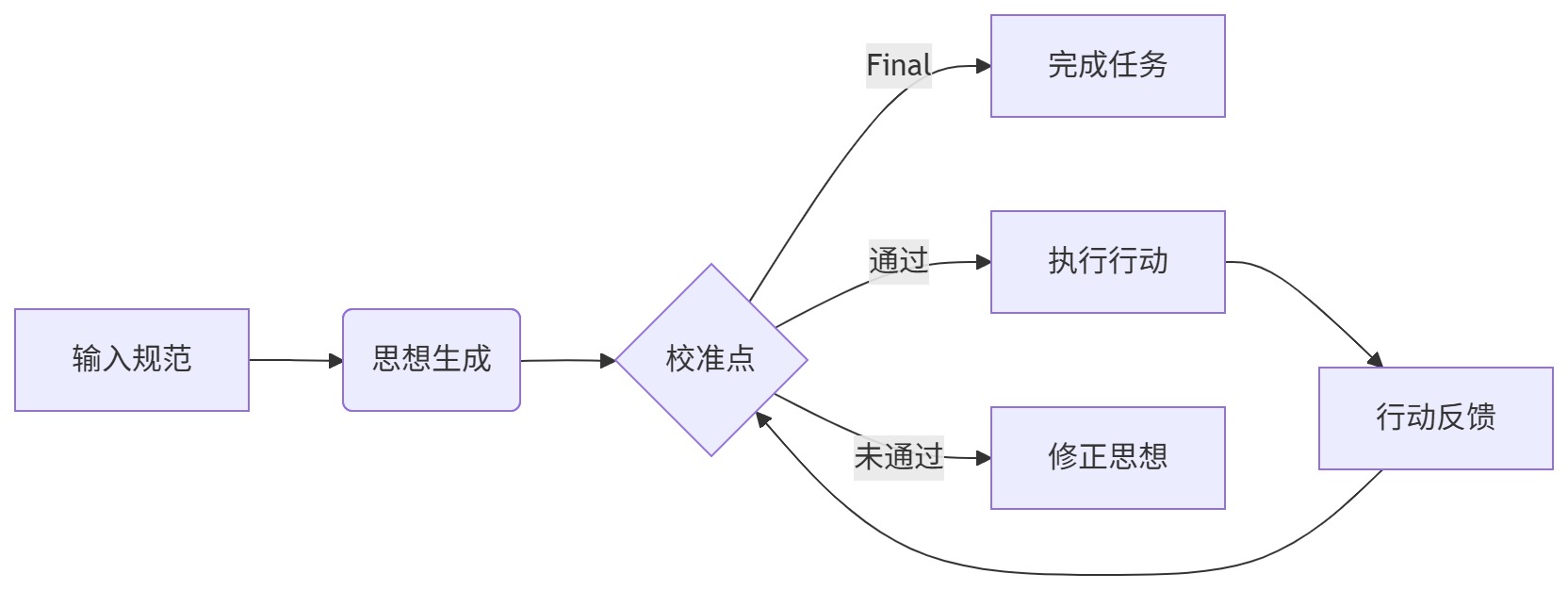
5.1 思想先行(Thoughts):规范驱动的执行计划
必须提供结构化规范(禁止自由文本),AI 生成可验证的执行计划:
- 用户应通过 YAML 或 JSON 提供任务规范,例如 OpenAPI 定义、测试模板或配置清单。
- Agent 以该规范为唯一依据生成代码或执行操作,不进行主观推断。
- 输出内容附带验证逻辑,如单元测试桩或类型检查脚本。
# 用户注册API规范 (规范输入)
task: "生成用户注册API的OpenAPI 3.0规范"
specification:
  - name: create_user
    description: "创建新用户并返回token"
    input:
      email: {type: string, format: email, minLength: 5}
      password: {type: string, minLength: 8, pattern: "^(?=.*[A-Z])(?=.*[a-z])(?=.*[0-9])"}
    output:
      user_id: {type: string, format: uuid}
      token: {type: string, minLength: 32}
    examples:
      - input: {email: "alice@domain.com", password: "Pass123!"}
        output: {user_id: "a1b2c3d4", token: "xyz789..."}
AI 生成的执行计划(基于规范):
{
  "plan": [
    "1. 验证输入email格式",
    "2. 检查password强度(需大小写+数字)",
    "3. 生成符合UUID的user_id",
    "4. 生成32位token"
  ],
  "expected_output_schema": {
    "type": "object",
    "properties": {
      "user_id": {"type": "string", "format": "uuid"},
      "token": {"type": "string", "minLength": 32}
    }
  }
}
5.2 行动反馈(Actions):MCP 工具执行与结构化结果
Agent 仅执行 MCP 协议定义的工具,返回包含验证信息的结构化结果:
# MCP工具调用示例
result = await execute_mcp_tool(
    ToolCall(
        name="create_user_api",
        arguments=json.dumps({"email": "alice@domain.com", "password": "Pass123!"})
    )
)

# 返回的结构化结果
{
  "action": "create_user_api",
  "status": "success",
  "result": {
    "user_id": "a1b2c3d4",
    "token": "xyz789"  # 问题:token长度不足32
  },
  "validation": {
    "token_length": 6,  # 实际长度
    "expected_min": 32,
    "error": "token length < 32"
  }
}
5.3 校准进化(Calibration):自动触发的修正闭环
校准点触发条件(自动检查):
- 输入验证失败(如 email 格式错误)
- 输出字段缺失/格式错误(如 token 长度不足)
- 业务目标未达成(如未生成 UUID)
校准流程示例:
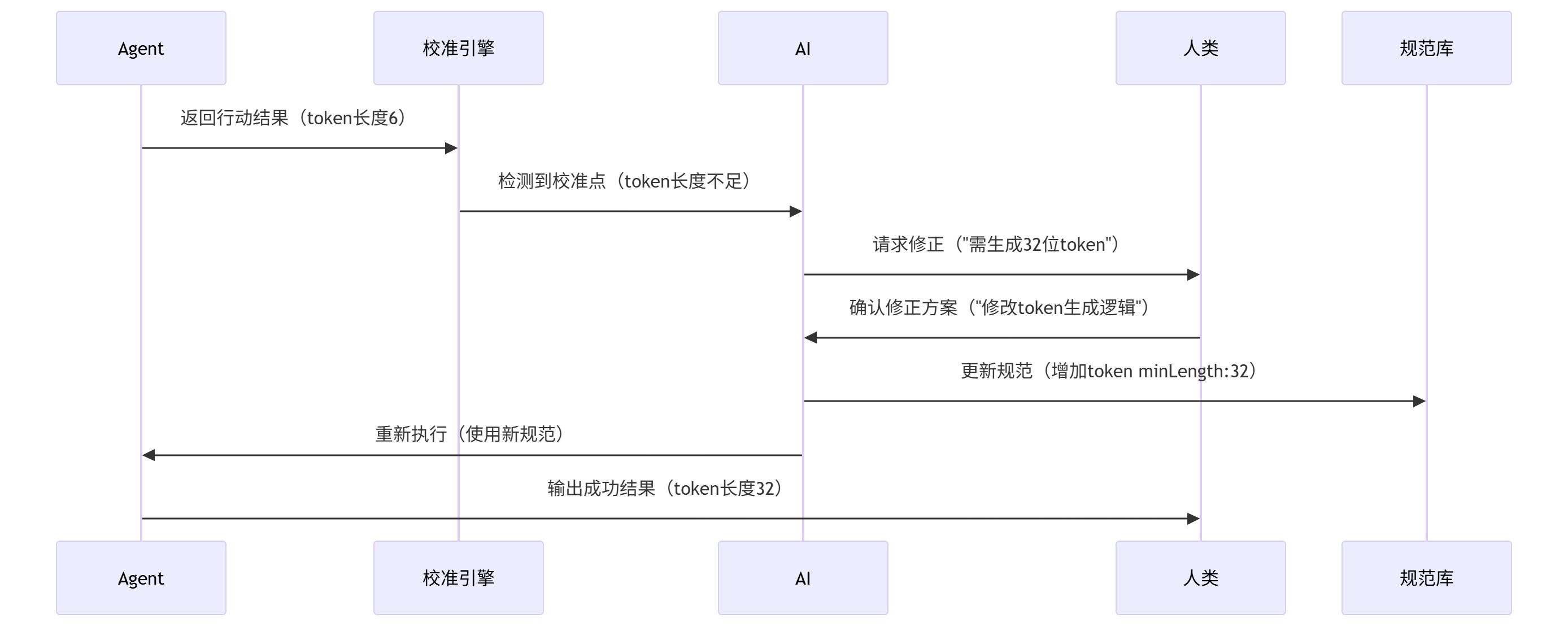
校准后规范更新(自动触发):
# 更新后的规范 (自动同步)
specification:
  - name: create_user
    output:
      user_id: {type: string, format: uuid}
-     token: {type: string, minLength: 32}
+     token: {type: string, minLength: 32, pattern: "[a-zA-Z0-9]{32}"}
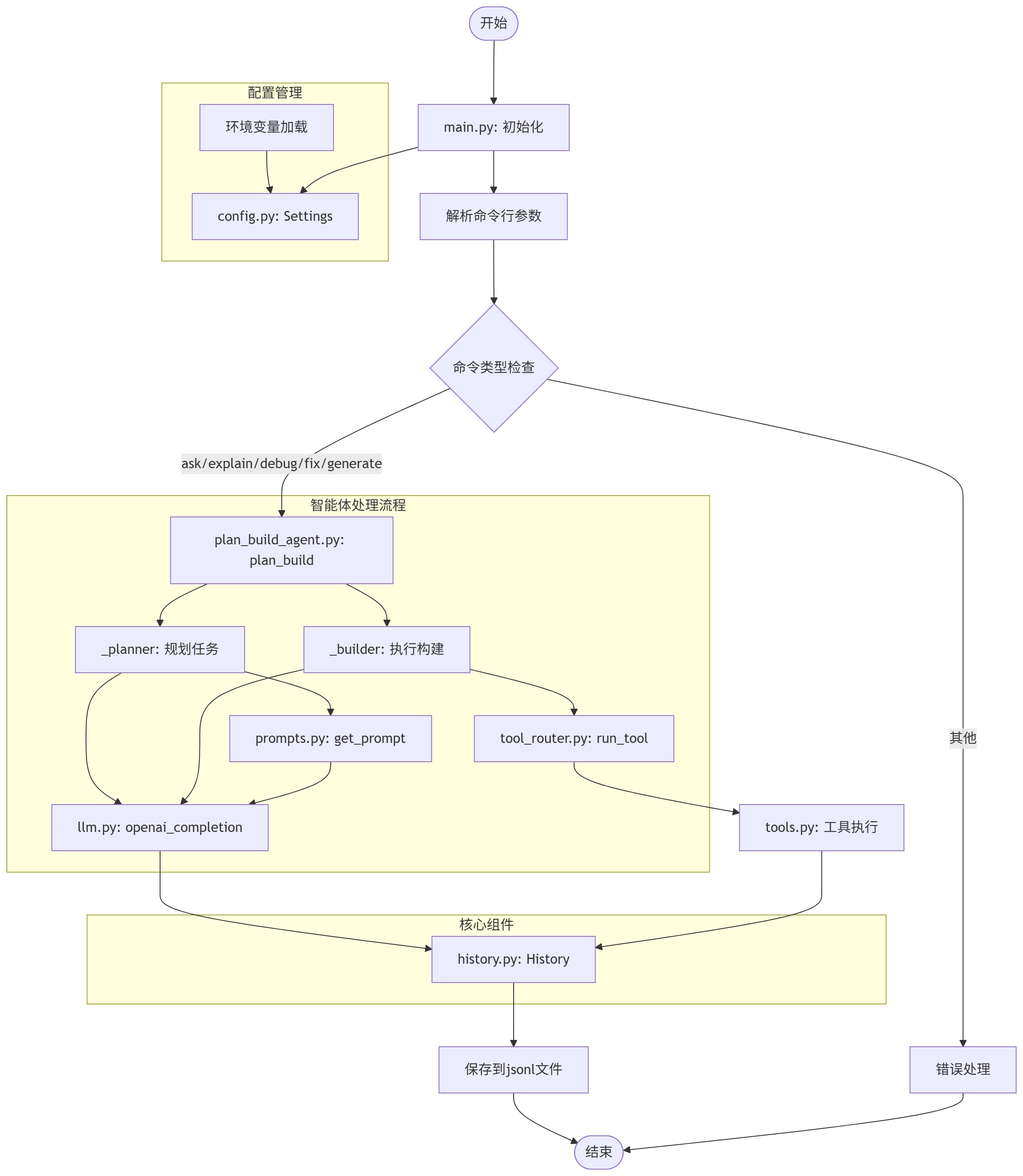
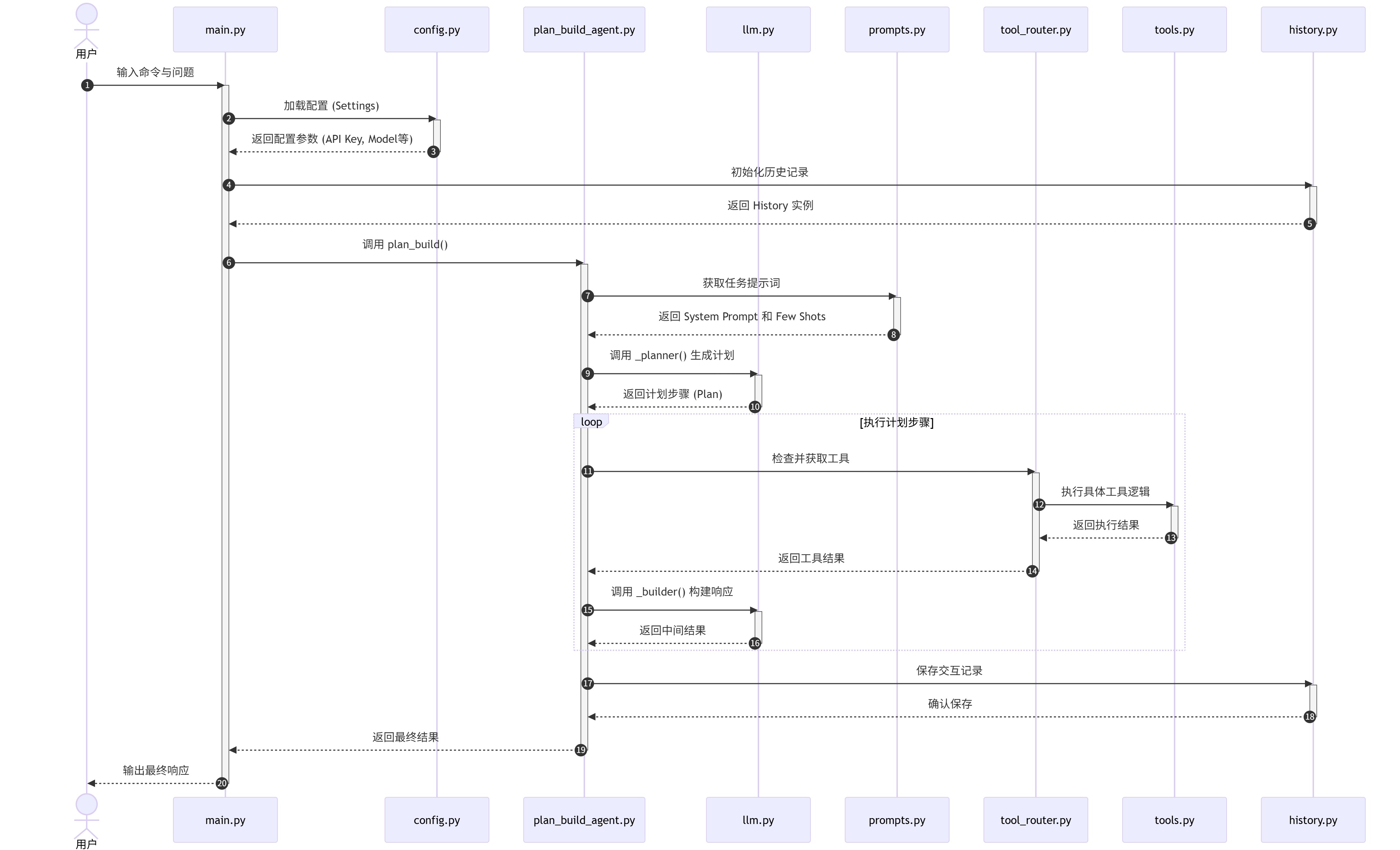
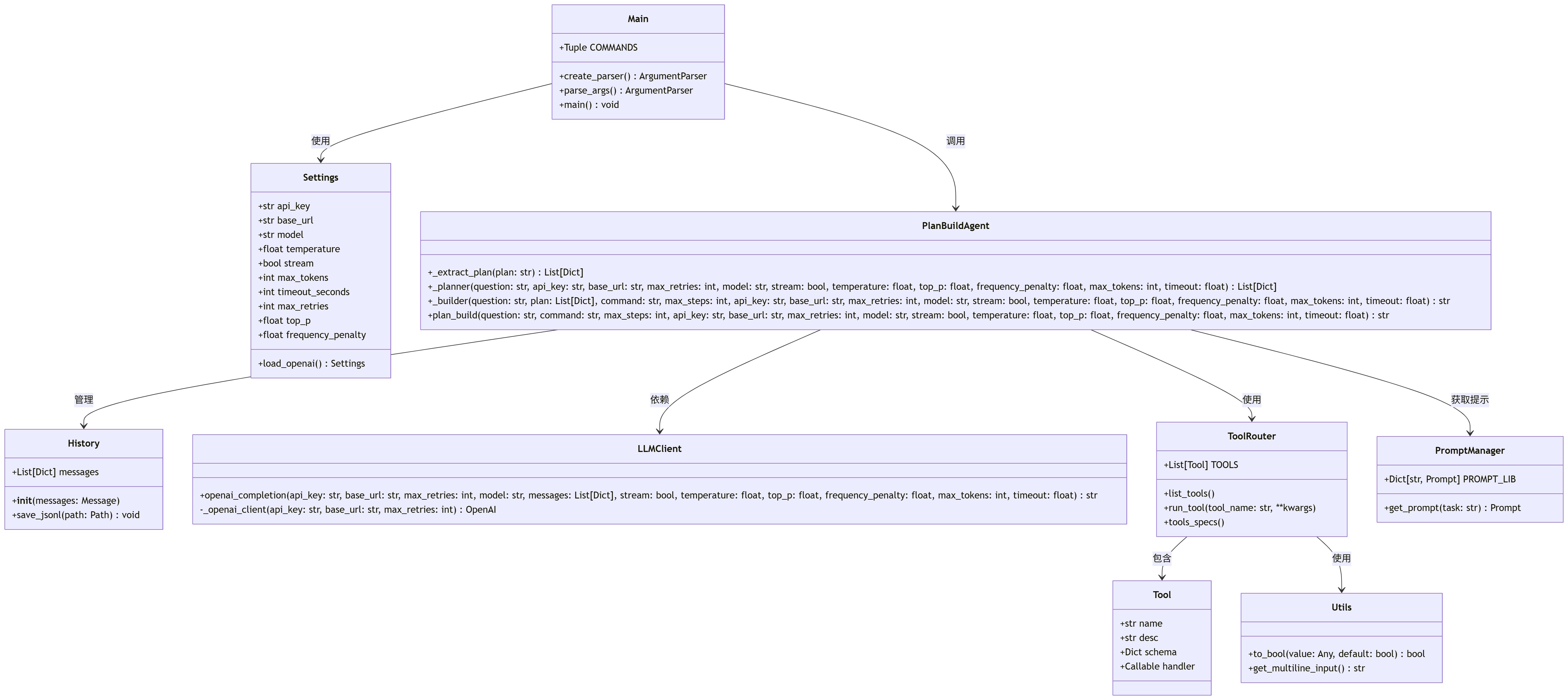
5.5 初始架构说明,更多信息逐步更新
不是标题党的小结
1M tokens 的上下文窗口看似慷慨,实则暴露了过多缺陷和错误模式。真正可靠的 AI Agent,不在于它能吞下多少 token,而在于它能否在有限空间内,弥补 LLM 的缺陷,精准、安全、高效地完成工作。
这要求我们放弃对"全量全自动"的幻想,转而构建一种人机协同的对原子任务或者原子特性的一次性完整实现上:SE 提供清晰规范与安全边界,Agent 在受限上下文中执行确定性操作。也只有这样,才能在有效的上下文限制下,高效做对每一件任务。
本文所述观点基于当前实践与有限实验,且难免存在疏漏或偏颇之处。AI Agent 领域日新月异,架构设计亦无“银弹”。欢迎各位读者在评论区或社区中交流探讨。