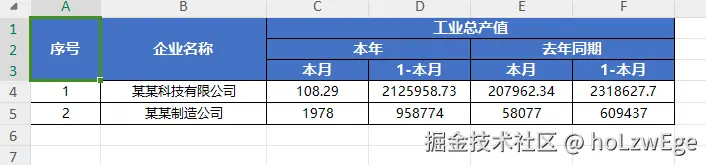
import * as XLSX from 'xlsx'
import * as XLSXStyle from 'xlsx-style-vite'
import {saveAs} from 'file-saver'
/**
* 默认样式配置
*/
const DEFAULT_STYLES = {
// 表头样式
header: {
fill: {
fgColor: { rgb: '4472C4' },
patternType: 'solid'
},
font: {
name: '微软雅黑',
sz: 11,
bold: true,
color: { rgb: 'FFFFFF' }
},
alignment: {
horizontal: 'center',
vertical: 'center',
wrapText: true
},
border: {
top: { style: 'thin', color: { rgb: '000000' } },
bottom: { style: 'thin', color: { rgb: '000000' } },
left: { style: 'thin', color: { rgb: '000000' } },
right: { style: 'thin', color: { rgb: '000000' } }
}
},
// 数据单元格样式
cell: {
font: {
name: '微软雅黑',
sz: 10
},
alignment: {
horizontal: 'center',
vertical: 'center'
},
border: {
top: { style: 'thin', color: { rgb: '000000' } },
bottom: { style: 'thin', color: { rgb: '000000' } },
left: { style: 'thin', color: { rgb: '000000' } },
right: { style: 'thin', color: { rgb: '000000' } }
}
},
// 数字右对齐
// number: {
// font: {
// name: '微软雅黑',
// sz: 10
// },
// alignment: {
// horizontal: 'right',
// vertical: 'center'
// },
// border: {
// top: { style: 'thin', color: { rgb: '000000' } },
// bottom: { style: 'thin', color: { rgb: '000000' } },
// left: { style: 'thin', color: { rgb: '000000' } },
// right: { style: 'thin', color: { rgb: '000000' } }
// },
// numFmt: '
// }
}
/**
* 简单导出 - 将JSON数据导出为Excel(带样式)
* @param {Array} jsonData - 数据数组
* @param {String} fileName - 文件名
* @param {Object} options - 配置选项
* @param {Object} styles - 样式配置
*/
export function exportJson2Excel(jsonData, fileName = "导出", options = {}, styles = {}) {
const ws = XLSX.utils.json_to_sheet(jsonData, options)
// 应用样式
applyStyles(ws, jsonData.length, Object.keys(jsonData[0] || {}).length, styles)
const wb = XLSX.utils.book_new()
XLSX.utils.book_append_sheet(wb, ws, 'Sheet1')
// 导出文件(使用二进制模式以支持样式)
const wopts = { bookType: 'xlsx', bookSST: false, type: 'binary' }
const wbout = XLSX.write(wb, wopts)
// 将二进制字符串转换为 Blob
function s2ab(s) {
const buf = new ArrayBuffer(s.length)
const view = new Uint8Array(buf)
for (let i = 0
view[i] = s.charCodeAt(i) & 0xFF
}
return buf
}
const blob = new Blob([s2ab(wbout)], { type: 'application/octet-stream' })
saveAs(blob, `${fileName}.xlsx`)
}
/**
* 应用样式到工作表(简单表头)
* @param {Object} ws - 工作表对象
* @param {Number} dataRowCount - 数据行数
* @param {Number} colCount - 列数
* @param {Object} customStyles - 自定义样式
*/
function applyStyles(ws, dataRowCount, colCount, customStyles = {}) {
const styles = { ...DEFAULT_STYLES, ...customStyles }
const range = XLSX.utils.decode_range(ws['!ref'] || 'A1')
// 遍历所有单元格应用样式
for (let R = range.s.r
for (let C = range.s.c
const cellAddress = XLSX.utils.encode_cell({ r: R, c: C })
const cell = ws[cellAddress]
if (!cell) continue
// 第一行是表头
if (R === 0) {
cell.s = styles.header
} else {
// 根据数据类型应用不同样式
if (cell.t === 'n') { // 数字类型
cell.s = styles.number
} else {
cell.s = styles.cell
}
}
}
}
// 设置行高
if (!ws['!rows']) ws['!rows'] = []
for (let i = 0
ws['!rows'][i] = { hpt: i === 0 ? 25 : 20 }
}
}
/**
* 应用样式到复杂表头工作表
* @param {Object} ws - 工作表对象
* @param {Number} headerRowCount - 表头行数
* @param {Array} leafColumns - 叶子列配置
* @param {Object} customStyles - 自定义样式
*/
function applyComplexStyles(ws, headerRowCount, leafColumns, customStyles = {}) {
const styles = { ...DEFAULT_STYLES, ...customStyles }
const range = XLSX.utils.decode_range(ws['!ref'] || 'A1')
// 遍历所有单元格应用样式
for (let R = range.s.r
for (let C = range.s.c
const cellAddress = XLSX.utils.encode_cell({ r: R, c: C })
const cell = ws[cellAddress]
if (!cell) continue
// 表头行
if (R < headerRowCount) {
cell.s = styles.header
} else {
// 数据行 - 根据列类型应用样式
const colIndex = C
const colConfig = leafColumns[colIndex]
if (colConfig && colConfig.align) {
// 根据配置的align设置对齐方式
const alignStyle = {
...styles.cell,
alignment: {
...styles.cell.alignment,
horizontal: colConfig.align
}
}
cell.s = alignStyle
} else if (cell.t === 'n') {
// 数字类型默认右对齐
cell.s = styles.number
} else {
cell.s = styles.cell
}
}
}
}
// 设置行高
if (!ws['!rows']) ws['!rows'] = []
for (let i = 0
ws['!rows'][i] = { hpt: i < headerRowCount ? 25 : 20 }
}
}
/**
* 导出复杂表头Excel
* @param {Object} config - 配置对象
* @param {Array} config.headers - 表头配置数组,支持多级表头
* @param {Array} config.data - 数据数组
* @param {String} config.fileName - 文件名
* @param {Array} config.merges - 合并单元格配置(可选,自动计算)
* @param {Object} config.styles - 样式配置(可选)
*
* 表头配置格式示例:
* [
* { label: '序号', prop: 'index', width: 8 },
* { label: '企业名称', prop: 'name', width: 20 },
* {
* label: '工业总产值',
* children: [
* {
* label: '本年',
* children: [
* { label: '本月', prop: 'currentMonth', width: 12 },
* { label: '1-本月', prop: 'currentYear', width: 12 }
* ]
* },
* {
* label: '去年同期',
* children: [
* { label: '本月', prop: 'lastMonth', width: 12 },
* { label: '1-本月', prop: 'lastYear', width: 12 }
* ]
* }
* ]
* }
* ]
*/
export function exportComplexExcel(config) {
const { headers, data, fileName = '导出', merges = [], styles = {} } = config
// 1. 解析表头结构,计算层级深度和叶子节点
const { maxLevel, leafColumns, headerRows } = parseHeaders(headers)
// 2. 构建表头数据(二维数组)
const headerData = buildHeaderData(headers, maxLevel, leafColumns)
// 3. 构建数据行
const dataRows = buildDataRows(data, leafColumns)
// 4. 合并表头和数据
const allRows = [...headerData, ...dataRows]
// 5. 创建工作表
const ws = XLSX.utils.aoa_to_sheet(allRows)
// 6. 自动计算合并单元格(如果未提供)
const autoMerges = merges.length > 0 ? merges : calculateMerges(headers, maxLevel)
ws['!merges'] = autoMerges
// 7. 设置列宽
ws['!cols'] = leafColumns.map(col => ({ wch: col.width || 15 }))
// 8. 应用样式到复杂表头
applyComplexStyles(ws, headerData.length, leafColumns, styles)
// 9. 创建工作簿并导出
const wb = XLSX.utils.book_new()
XLSX.utils.book_append_sheet(wb, ws, 'Sheet1')
// 10. 导出文件(使用xlsx-style-vite写入以支持样式)
const wopts = { bookType: 'xlsx', bookSST: false, type: 'binary' }
const wbout = XLSXStyle.write(wb, wopts)
// 将二进制字符串转换为 Blob
function s2ab(s) {
const buf = new ArrayBuffer(s.length)
const view = new Uint8Array(buf)
for (let i = 0
view[i] = s.charCodeAt(i) & 0xFF
}
return buf
}
const blob = new Blob([s2ab(wbout)], { type: 'application/octet-stream' })
saveAs(blob, `${fileName}.xlsx`)
}
/**
* 解析表头结构
* @param {Array} headers - 表头配置
* @returns {Object} - { maxLevel, leafColumns, headerRows }
*/
function parseHeaders(headers) {
const leafColumns = []
// 计算每个节点的层级
function calcLevel(columns, level = 0) {
let maxLevel = level
columns.forEach(col => {
col._level = level
if (col.children && col.children.length > 0) {
const childMaxLevel = calcLevel(col.children, level + 1)
maxLevel = Math.max(maxLevel, childMaxLevel)
} else {
leafColumns.push(col)
}
})
return maxLevel
}
const maxLevel = calcLevel(headers)
return { maxLevel, leafColumns }
}
/**
* 构建表头数据(二维数组)
* @param {Array} headers - 表头配置
* @param {Number} maxLevel - 最大层级
* @param {Array} leafColumns - 叶子节点列
* @returns {Array} - 表头二维数组
*/
function buildHeaderData(headers, maxLevel, leafColumns) {
const rows = []
// 初始化行数组
for (let i = 0
rows[i] = []
}
// 填充表头数据
function fillHeaders(columns, startCol = 0) {
let currentCol = startCol
columns.forEach(col => {
const level = col._level
const hasChildren = col.children && col.children.length > 0
// 计算该列占用的列数(叶子节点数)
const colSpan = hasChildren ? getLeafCount(col) : 1
// 计算该行占用的行数
const rowSpan = hasChildren ? 1 : (maxLevel - level + 1)
// 在当前位置填充数据
rows[level][currentCol] = col.label
// 填充空白占位
for (let i = 1
rows[level][currentCol + i] = ''
}
// 如果是叶子节点,填充下方空白
if (!hasChildren) {
for (let r = level + 1
for (let c = 0
rows[r][currentCol + c] = ''
}
}
}
if (hasChildren) {
fillHeaders(col.children, currentCol)
}
currentCol += colSpan
})
return currentCol
}
fillHeaders(headers)
// 确保每一行长度一致
const maxCols = leafColumns.length
return rows.map(row => {
const newRow = new Array(maxCols).fill('')
row.forEach((val, idx) => {
if (idx < maxCols) {
newRow[idx] = val
}
})
return newRow
})
}
/**
* 获取叶子节点数量
* @param {Object} column - 列配置
* @returns {Number} - 叶子节点数
*/
function getLeafCount(column) {
if (!column.children || column.children.length === 0) {
return 1
}
return column.children.reduce((sum, child) => sum + getLeafCount(child), 0)
}
/**
* 构建数据行
* @param {Array} data - 数据数组
* @param {Array} leafColumns - 叶子列配置
* @returns {Array} - 数据二维数组
*/
function buildDataRows(data, leafColumns) {
return data.map((row, index) => {
return leafColumns.map(col => {
const value = col.prop ? row[col.prop] : ''
// 处理序号
if (col.prop === 'index' || col.prop === 'seq') {
return index + 1
}
return value !== undefined && value !== null ? value : ''
})
})
}
/**
* 计算合并单元格
* @param {Array} headers - 表头配置
* @param {Number} maxLevel - 最大层级
* @returns {Array} - 合并配置数组
*/
function calculateMerges(headers, maxLevel) {
const merges = []
function calcMerges(columns, startRow = 0, startCol = 0) {
let currentCol = startCol
columns.forEach(col => {
const level = col._level
const hasChildren = col.children && col.children.length > 0
const colSpan = hasChildren ? getLeafCount(col) : 1
const rowSpan = hasChildren ? 1 : (maxLevel - level + 1)
// 添加合并配置
if (colSpan > 1 || rowSpan > 1) {
merges.push({
s: { r: level, c: currentCol },
e: { r: level + rowSpan - 1, c: currentCol + colSpan - 1 }
})
}
if (hasChildren) {
calcMerges(col.children, startRow, currentCol)
}
currentCol += colSpan
})
}
calcMerges(headers)
return merges
}
/**
* 将扁平表头转换为多级表头(适用于简单场景)
* @param {Array} flatHeaders - 扁平表头 [{label, prop}, ...]
* @param {Array} groups - 分组配置 [{label, start, end}, ...]
* @returns {Array} - 多级表头配置
*/
export function convertToComplexHeaders(flatHeaders, groups = []) {
if (groups.length === 0) {
return flatHeaders
}
const result = []
let currentIndex = 0
groups.forEach(group => {
// 添加分组前的独立列
while (currentIndex < group.start && currentIndex < flatHeaders.length) {
result.push(flatHeaders[currentIndex])
currentIndex++
}
// 添加分组
if (currentIndex < flatHeaders.length) {
const groupColumns = []
while (currentIndex <= group.end && currentIndex < flatHeaders.length) {
groupColumns.push(flatHeaders[currentIndex])
currentIndex++
}
result.push({
label: group.label,
children: groupColumns
})
}
})
// 添加剩余的列
while (currentIndex < flatHeaders.length) {
result.push(flatHeaders[currentIndex])
currentIndex++
}
return result
}
示例