本地安装数据库
- 1、下载mysql压缩包,解压到相应的目录
- 2、配置环境变量
- 3、初始化:以管理员身份运行命令窗口 mysqld --initialize-insecure --console
- 4、注册mysql服务 mysqld -install
- 5、启动 net start mysql 停止net stop mysql
- 6、以无密码的方式登录mysql -u root -p回车
- 7、执行sql语句修改密码ALTER USER 'root'@'localhost' IDENTIFIED BY '1234';
企业开发中使用方式
- 1、连接远程的数据库
- mysql -h地址 -P端口号 -u用户名 -p
sql语句
DDL数据库
- 查询所有数据库 show databases
- 查询当前数据库 select database();
- 使用/切换数据库 use 数据库名;
- 创建数据库 create database [if not exists] 数据库名 [default charset utf8mb4]
- 删除数据库 drop database [if exists] 数据库名
创建表
CREATE TABLE 表名 (
    字段名 数据类型 [约束条件] [comment '备注信息']
) [COMMENT '表备注'];
CREATE TABLE user (
    id int auto_increment primary key comment '主键',
    name varchar(10) not null comment '姓名',
    username varchar(20) not null comment '用户名',
    age int comment '年龄',
    createtime datetime comment '创建时间'
) COMMENT '用户表';
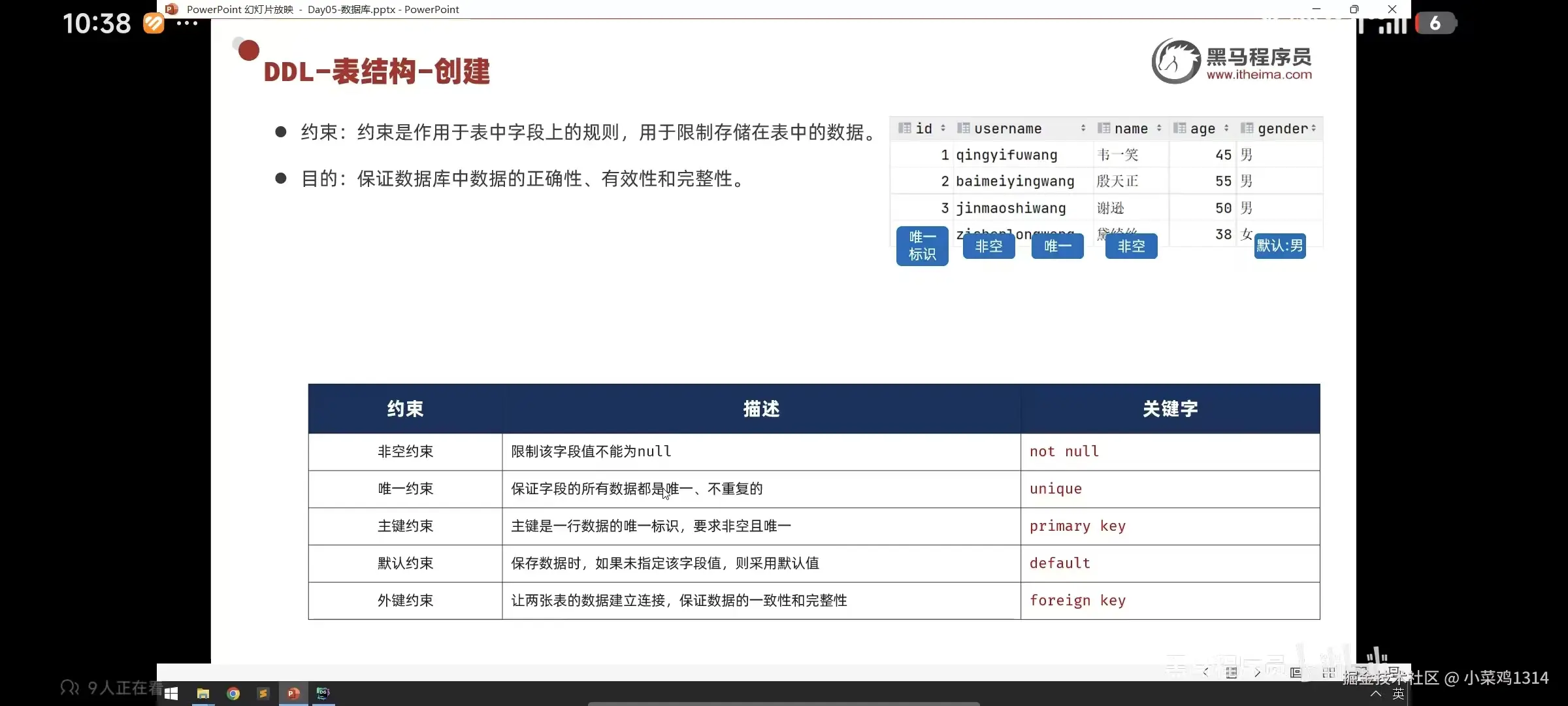
约束条件
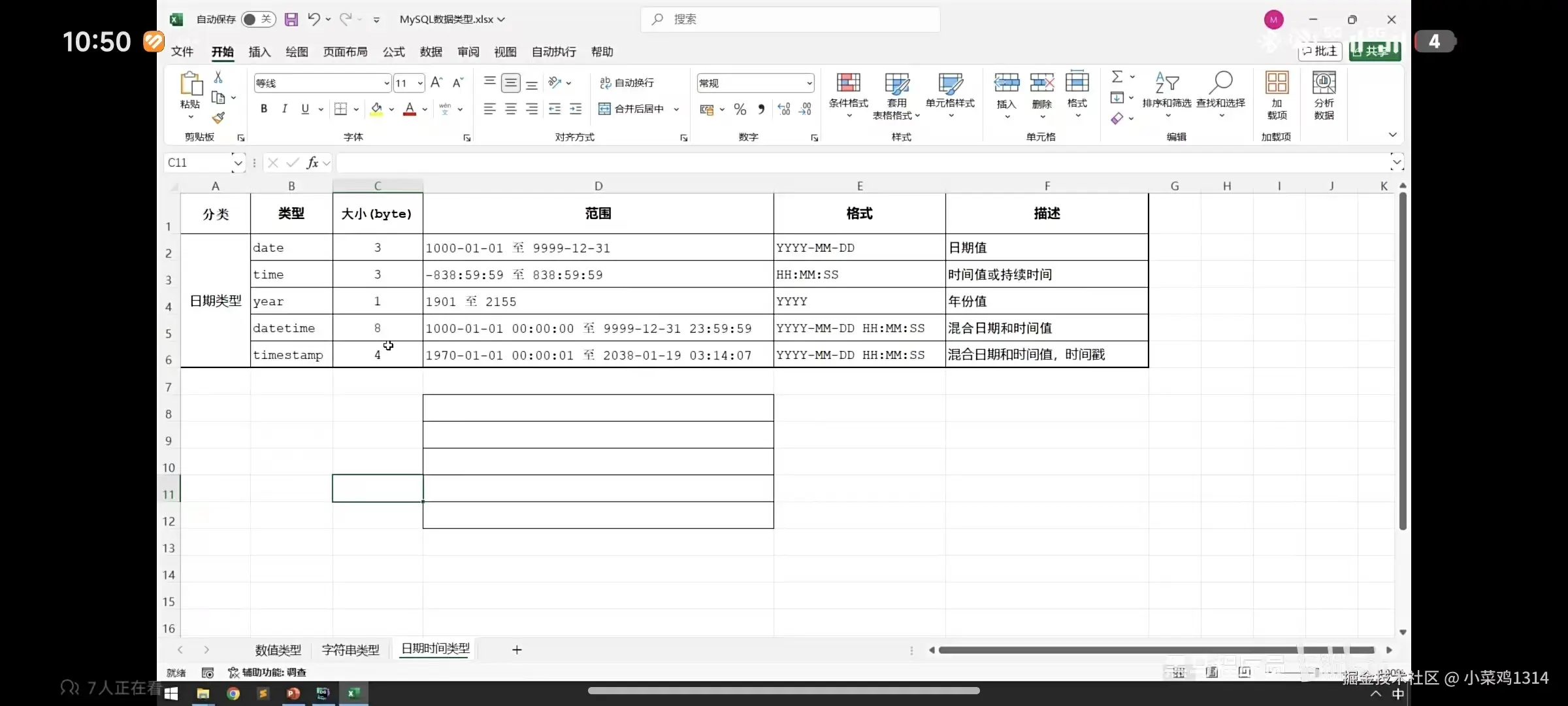
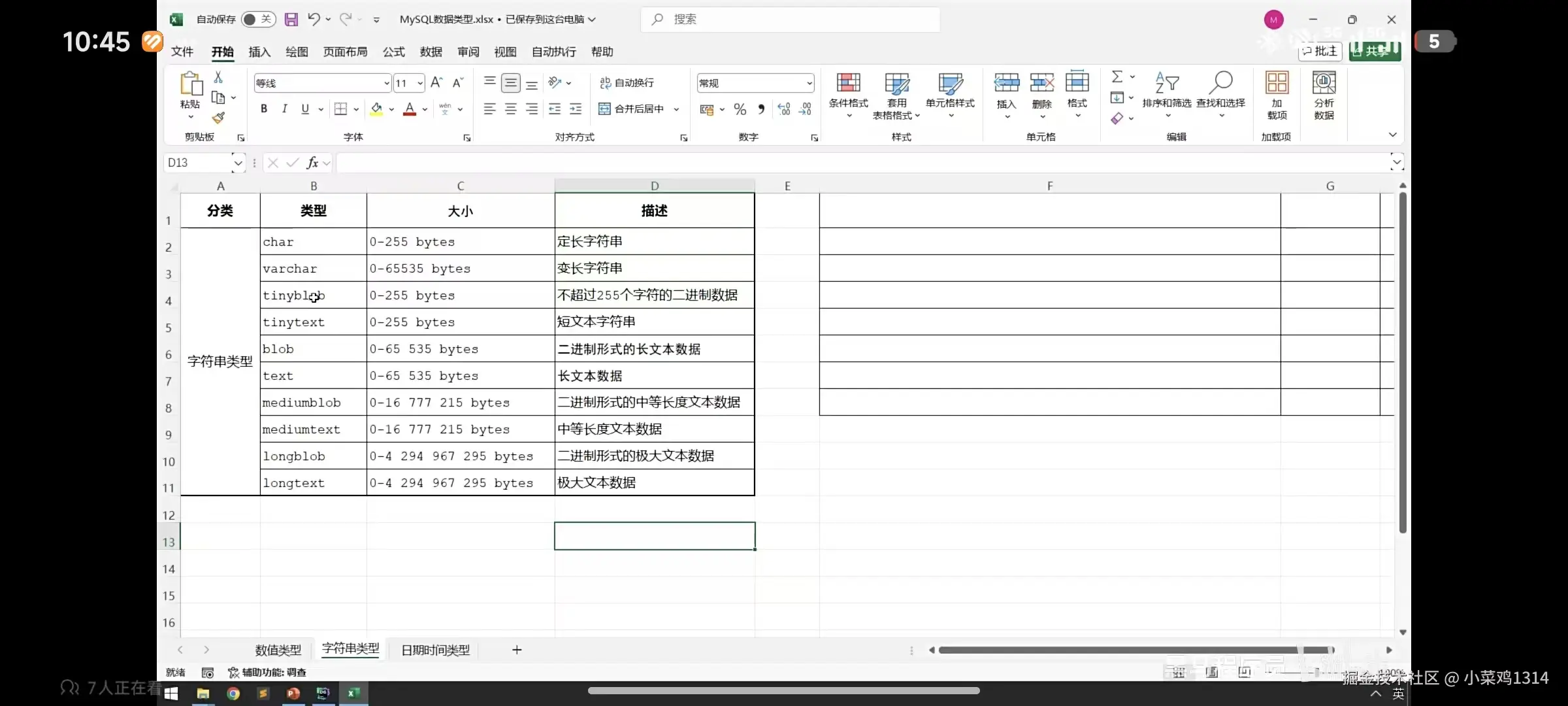
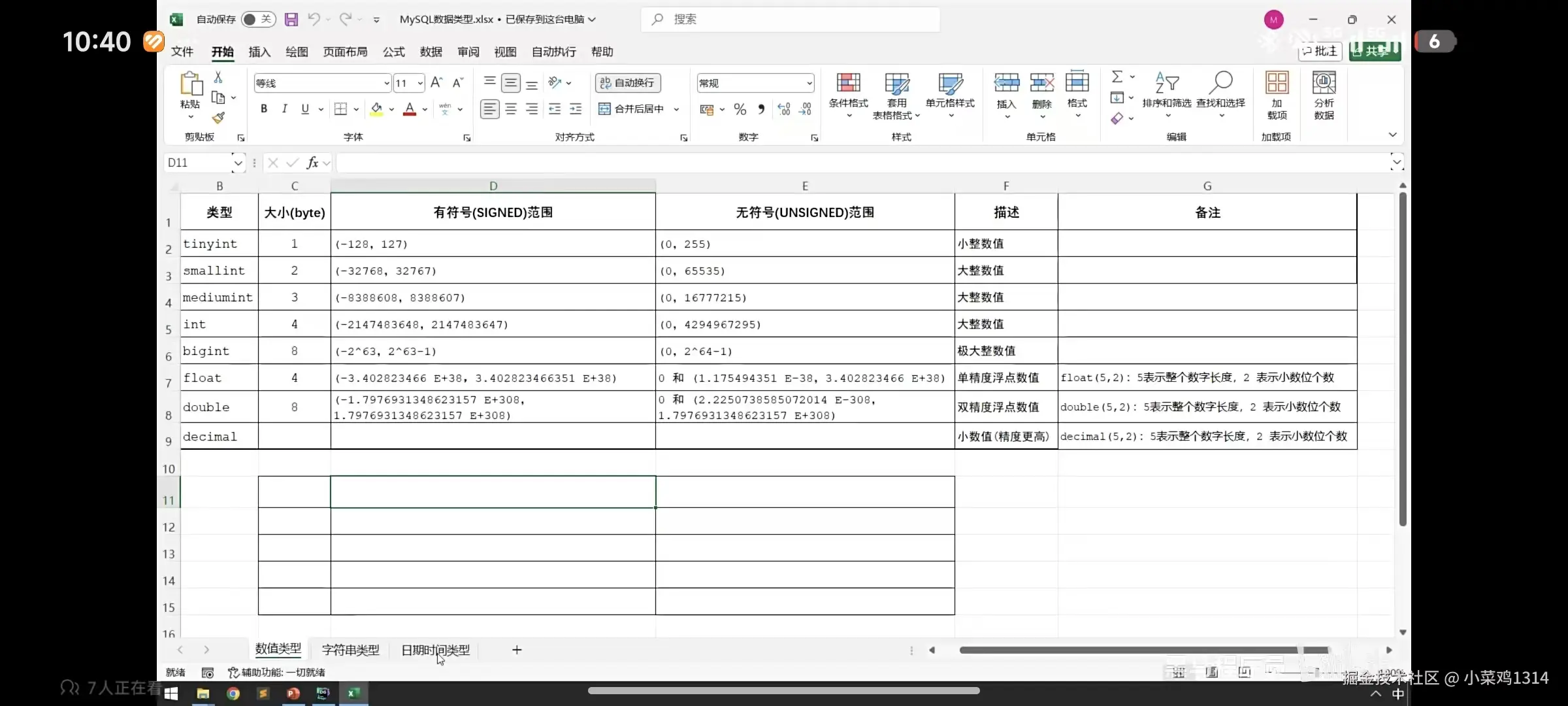
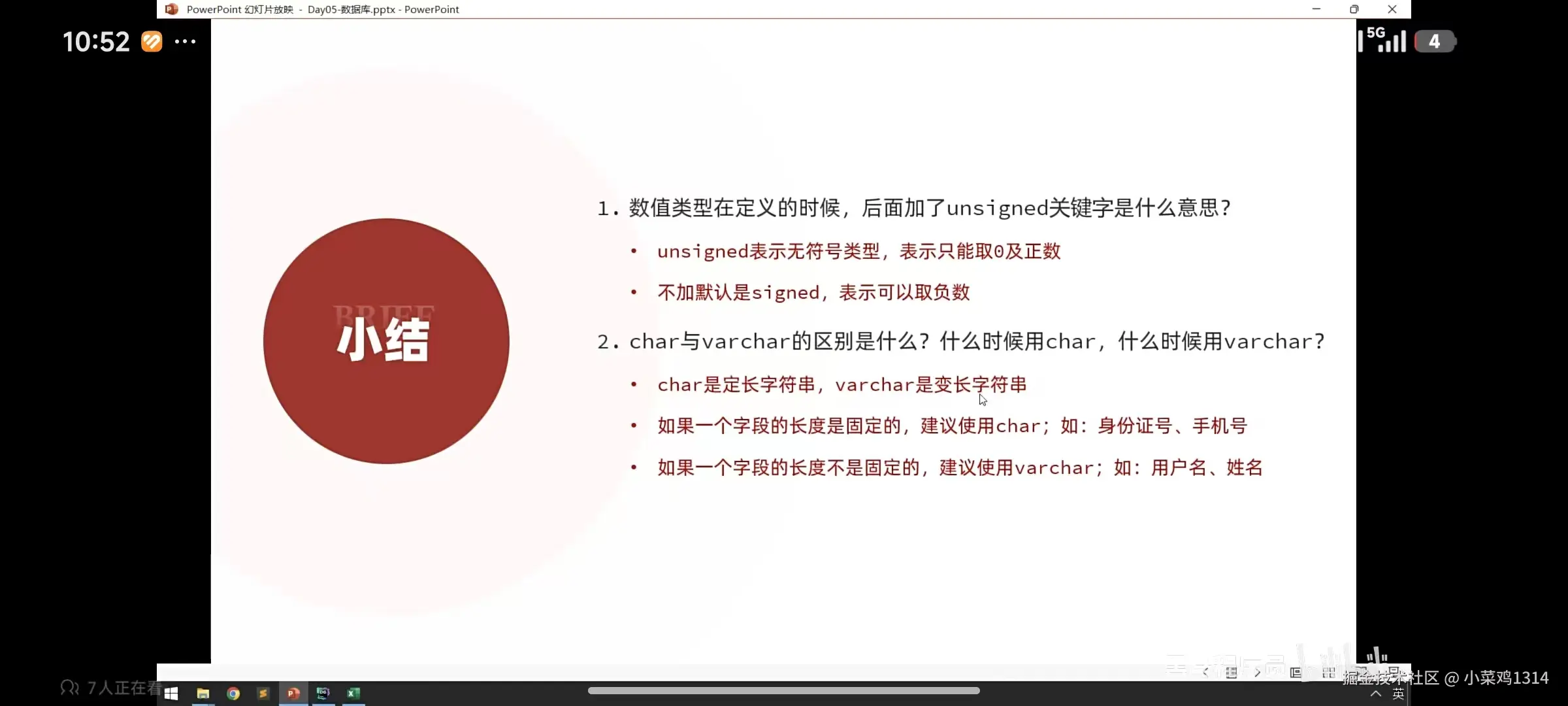
数据类型
show tables ;
desc user;
show create table user;
create table user01(
id int auto_increment primary key comment '主键'
)comment '员工01表';
alter table user01 add username varchar(10) comment '用户名';
alter table 表名 add 字段名 类型(长度) [comment '注释'] [约束];
alter table user01 modify username varchar(20);
alter table 表名 modify 字段名 新数据类型(长度)
alter table user01 change username username01 varchar(30);
alter table 表名 change 旧字段名 新字段名 类型(长度) [comment '注释'] [约束]
alter table user01 drop column id;
alter table 表名 drop colum 字段名
alter table user01 rename to user02;
alter table 旧表名 rename to 新表名
drop table user02;
drop table 表名
向表中添加数据
insert into user(name,username) values ('张三','zhangsan');
insert into 表名(字段1,字段2......) values (值1,值2......)
insert into user values (10,'李四','lisi',18,20260201,'备注');
insert into 表名 values (值1,值2..............)
insert into user(name,username) values ('王五','wangwu'),('赵六','zhaoliu');
insert into 表名(字段1,字段2) values (值1,值2),(值1,值2);
insert into user values (20,'姓名1','xingming1',19,20260201,'备注1'),(21,'姓名2','xingming2',20,20200101,'备注2');
insert into 表名 values (值1,值2,......),(值1,值2,........);
修改数据
update user set name='张三修改1',age=100 where id=1;
update 表名 set 字段1=值,字段2=值,.... [where 条件]
删除数据
delete from user where name='姓名1';
delete form 表名 [where 条件]
基本查询
select * from user;
select * from 表名;
select name,username from user;
select 字段名1,字段名2,.... from 表名;
select name 姓名,username 用户名 from user;
select 字段名1 [别名],字段名2 [别名] from 表名;
select distinct name from user;
select distinct 字段名 from 表名;
条件查询
| 比较运算符 | 功能 |
|---|
| '>' | 大于 |
| '>=' | 大于等于 |
| '<' | 小于 |
| '<=' | 小于等于 |
| '=' | 等于 |
| '<>或者!=' | 不等于 |
| 'between ... and ...' | 在某个范围之内(含最小、最大值) |
| 'in(...)' | 在in之后的列表中的值,多选一 |
| 'like 占位符' | 模糊匹配(_匹配单个字符,%匹配任意个字符) |
| 'is null' | 是null |
| 'and或&&' | 并且(多个条件同时成立) |
| 'or或||' | 或者(多个条件任意一个成立) |
| 'not或!' | 非,不是 |
select * from user where name='王五'
select 字段名 from 表名 where 条件列表
分组查询
| 函数 | 功能 |
|---|
| count | 统计数量 |
| max | 最大值 |
| min | 最小值 |
| avg | 平均值 |
| sum | 求和 |
select count(*) from user;
select count(1) from user;
select count(id) from user;
select max(age) from user;
select min(age) from user;
select avg(age) from user;
select sum(age) from user;
- select 字段列表 from 表名 [where 条件列表] group by 分组字段名 [having 分组后过滤条件]
- where和having的区别
- 执行的时机不同:where是分组之前进行过滤,不满足where不参与分组;而having是分组之后对结果进行过滤
- 判断条件不同:where不能对聚合函数进行判断,而having可以
- 注意:分组之后,select后的字段列表不能随意书写,能写的一般是分组字段+聚合函数
select name,count(*) from user group by name;
select name,count(*) from user where age<90 group by name having count(*)>1
排序查询
- select 字段列表 form 表名 [where 条件列表] [group by 分组字段名 having 分组后的过滤条件] order by 排序字段 排序方式
- 排序方式:升序acr 降序desc 默认升序asc,可以不写
- 可以有多个排序字段用逗号隔开,当第一个字段相同时,才会根据第二个字段进行排序
select * from user order by age;
select * from user order by age desc;
分页查询
- select 字段 from 表名 [where 条件] [group by 分组字段 having 过滤条件] [order by 排序字段 排序条件] limit 起始索引,查询记录数
- 起始索引=(页面-1)*查询记录数
select * from user limit 0,5;



