<!-- src/views/monitor/rules/components/DimensionFilterItem.vue -->
<script setup lang="ts">
import { ref, computed } from "vue";
import { useRenderIcon } from "@/components/ReIcon/src/hooks";
import FilterIcon from "@iconify-icons/ep/filter";
import CloseIcon from "@iconify-icons/ep/close";
import ArrowDown from "@iconify-icons/ep/arrow-down";
import type { DimensionNode } from "../types";
defineOptions({ name: "DimensionFilterItem" });
const props = defineProps<{
dimension: DimensionNode;
modelValue: string[];
}>();
const emit = defineEmits<{
(e: "update:modelValue", values: string[]): void;
(e: "remove"): void;
(e: "change", selectedNodes: DimensionNode[]): void;
}>();
const popoverVisible = ref(false);
const treeRef = ref();
const treeData = computed(() => {
return [
{
name: `全${props.dimension.name}`,
value: "ALL",
children: props.dimension.children || []
}
];
});
const defaultProps = {
children: "children",
label: "name",
value: "value"
};
const handleCheckChange = () => {
if (!treeRef.value) return;
const checkedNodes = treeRef.value.getCheckedNodes(false, false);
const validNodes = checkedNodes.filter((node: any) => node.value !== "ALL");
const validValues = validNodes.map((node: any) => node.value);
emit("update:modelValue", validValues);
emit("change", validNodes);
};
const isActive = computed(
() => props.modelValue && props.modelValue.length > 0
);
</script>
<template>
<el-popover
v-model:visible="popoverVisible"
placement="bottom-start"
:width="220"
trigger="click"
popper-class="!p-0"
>
<template #reference>
<div
class="group relative flex items-center justify-between px-3 py-1.5 border rounded cursor-pointer transition-all select-none mr-3 mb-2 bg-white min-w-[120px]"
:class="[
isActive || popoverVisible
? 'border-primary text-primary bg-blue-50/10'
: 'border-gray-300 text-gray-600 hover:border-primary/50'
]"
>
<span class="text-sm font-medium truncate mr-2">
{{ dimension.name }}
<span v-if="isActive" class="text-xs ml-1"
>({{ modelValue.length }})</span
>
</span>
<div class="flex items-center">
<component
:is="useRenderIcon(FilterIcon)"
class="text-sm mr-1"
:class="isActive ? 'text-primary' : 'text-gray-400'"
/>
<component
:is="useRenderIcon(CloseIcon)"
class="text-sm hover:text-red-500 hover:bg-gray-100 rounded-full p-0.5 transition-colors"
@click.stop="emit('remove')"
/>
</div>
</div>
</template>
<div class="p-2 max-h-[300px] overflow-y-auto">
<el-tree
ref="treeRef"
:data="treeData"
:props="defaultProps"
show-checkbox
node-key="value"
:default-checked-keys="modelValue"
:default-expand-all="true"
@check="handleCheckChange"
/>
</div>
</el-popover>
</template>
<style scoped>
:deep(.el-tree-node__content) {
height: 32px;
}
</style>
<!-- src/views/monitor/rules/components/DimensionModal.vue -->
<script setup lang="ts">
import { ref, computed, watch } from "vue";
import { cloneDeep, get } from "lodash-es";
import { ElMessage } from "element-plus";
import { useRenderIcon } from "@/components/ReIcon/src/hooks";
import Plus from "@iconify-icons/ep/plus";
import Download from "@iconify-icons/ep/download";
import Upload from "@iconify-icons/ep/upload";
import Filter from "@iconify-icons/ep/filter";
import Close from "@iconify-icons/ep/close";

import DimensionFilterItem from "./DimensionFilterItem.vue";
import type { DimensionNode, RuleItem, TableRow, ColumnMeta } from "../types";

defineOptions({ name: "DimensionModal" });

const props = defineProps<{
  modelValue: boolean;
  dimensionsList: DimensionNode[];
  baseRuleList: RuleItem[];
}>();

const emit = defineEmits<{
  (e: "update:modelValue", val: boolean): void;
  (e: "confirm", data: any[]): void;
}>();

// --- 状态管理 ---
const activeFilters = ref<any[]>([]);
const tableData = ref<TableRow[]>([]);
// 【变更1】改为数组,存储多行选中数据
const selectedRows = ref<TableRow[]>([]);

// --- 核心逻辑1: 过滤器逻辑 (不变) ---
const handleAddFilter = (type: string) => {
  const dimSource = props.dimensionsList.find(d => d.type === type);
  if (!dimSource || activeFilters.value.find(f => f.type === type)) return;
  activeFilters.value.push({
    type: dimSource.type,
    dimension: dimSource,
    selectedValues: [],
    selectedNodes: []
  });
};

const handleRemoveFilter = (index: number) => {
  activeFilters.value.splice(index, 1);
  generateTableData();
};

const handleFilterChange = (index: number, selectedNodes: DimensionNode[]) => {
  activeFilters.value[index].selectedNodes = selectedNodes;
  generateTableData();
};

// --- 核心逻辑2: 生成表格 (不变) ---
const cartesianProduct = (arrays: any[][]) => {
  return arrays.reduce(
    (acc, curr) => {
      return acc.flatMap(a => curr.map(c => [a, c].flat()));
    },
    [[]] as any[][]
  );
};

const generateRowKey = (dims: DimensionNode[]) =>
  dims.map(d => d.value).join("_");

const generateTableData = () => {
  const validFilters = activeFilters.value.filter(
    f => f.selectedNodes && f.selectedNodes.length > 0
  );

  if (validFilters.length === 0) {
    tableData.value = [];
    selectedRows.value = []; // 清空选中
    return;
  }

  const arraysToCombine = validFilters.map(f => f.selectedNodes);
  const combinations = cartesianProduct(arraysToCombine);

  tableData.value = combinations.map((combo, idx) => {
    const cleanCombo = combo.filter(item => item && item.name);
    const rowKey = generateRowKey(cleanCombo);

    // 尝试保留旧值
    const oldRow = tableData.value.find(r => r.id === rowKey);

    return {
      id: rowKey,
      dimensions: cleanCombo,
      values: oldRow ? oldRow.values : {}
    };
  });
};

// --- 【变更2】监听表格选中变化 ---
const handleSelectionChange = (rows: TableRow[]) => {
  selectedRows.value = rows;
};

// --- 核心逻辑3: 规则列生成 (不变) ---
const flattenRulesToColumns = (rules: RuleItem[]): ColumnMeta[] => {
  const columns: ColumnMeta[] = [];
  const traverse = (node: RuleItem, path: string) => {
    if (node.ruleItemType === "formula" && node.children) {
      node.children.forEach((child, index) =>
        traverse(child, `${path}.children[${index}]`)
      );
    } else if (node.ruleItemType === "metric" && node.ruleDetailList) {
      const leftMetric = node.ruleDetailList.find(
        item => item.compareType === "parameter"
      );
      const rightVal = node.ruleDetailList.find(
        item => item.compareType !== "parameter"
      );
      const colId = `col_${columns.length}`;
      const opMap: Record<string, string> = {
        gt: ">",
        lt: "<",
        eq: "=",
        gte: ">=",
        lte: "<="
      };
      const opText = opMap[node.operation || ""] || node.operation;
      const fieldName =
        { yearData: "年累计", monthInc: "月环比", monthLink: "年同比" }[
          leftMetric?.objectField
        ] ||
        leftMetric?.objectField ||
        "";
      const metricName = leftMetric?.indicatorCode || "指标";

      columns.push({
        key: colId,
        title: `${metricName} ${fieldName} ${opText}`,
        placeholder: String(rightVal?.fixedValue || 0),
        _meta: {
          path,
          leftIdx: node.ruleDetailList.indexOf(leftMetric),
          rightIdx: node.ruleDetailList.indexOf(rightVal)
        }
      });
    }
  };
  rules.forEach((rule, index) => {
    if (rule.ruleItemList)
      rule.ruleItemList.forEach((item, idx) =>
        traverse(item, `[${index}].ruleItemList[${idx}]`)
      );
  });
  return columns;
};

const dynamicColumns = computed(() =>
  flattenRulesToColumns(props.baseRuleList)
);

// --- 【变更3】确认逻辑:遍历选中行生成多份数据 ---
const handleConfirm = () => {
  if (selectedRows.value.length === 0) {
    ElMessage.warning("请至少勾选一行维度组合数据");
    return;
  }

  const finalResult: any[] = [];

  // 遍历每一行被勾选的数据
  selectedRows.value.forEach(row => {
    // 1. 克隆基础规则
    const rowRules = cloneDeep(props.baseRuleList);

    // 2. 遍历动态列,回填当前行的数据
    dynamicColumns.value.forEach(col => {
      const { _meta, key } = col;
      const inputValue = row.values[key];

      const targetNode = get(rowRules, _meta.path);
      if (targetNode && targetNode.ruleDetailList) {
        // 回填左侧维度 (当前行的维度组合)
        const leftItem = targetNode.ruleDetailList[_meta.leftIdx];
        if (leftItem) {
          leftItem.dimensionsList = row.dimensions.map(d => ({
            name: d.name,
            type: d.type,
            value: d.value || "",
            level: d.level || 2
          }));
        }
        // 回填右侧阈值 (当前行的输入值)
        const rightItem = targetNode.ruleDetailList[_meta.rightIdx];
        if (rightItem && inputValue !== undefined && inputValue !== "") {
          rightItem.fixedValue = inputValue;
        }
      }
    });

    // 3. 将处理好的一组规则加入结果集
    finalResult.push(...rowRules);
  });

  emit("confirm", finalResult);
  handleClose();
};

const handleClose = () => emit("update:modelValue", false);

watch(
  () => props.modelValue,
  val => {
    if (val) {
      activeFilters.value = [];
      tableData.value = [];
      selectedRows.value = [];
    }
  }
);
</script>

<template>
  <el-dialog
    :model-value="modelValue"
    title="维度设置"
    width="1000px"
    destroy-on-close
    :before-close="handleClose"
    class="dimension-modal"
  >
    <!-- 顶部操作区 (无变化) -->
    <div class="flex justify-between items-start mb-4">
      <div class="flex flex-wrap flex-1 gap-y-2 items-center min-h-[32px]">
        <div
          v-if="activeFilters.length === 0"
          class="flex items-center text-gray-400 border border-dashed border-gray-300 rounded px-3 py-1.5 mr-3 select-none"
        >
          <span class="text-sm mr-2">待选择</span>
          <component :is="useRenderIcon(Filter)" class="text-sm" />
          <component :is="useRenderIcon(Close)" class="text-sm ml-2" />
        </div>
        <DimensionFilterItem
          v-for="(filter, index) in activeFilters"
          :key="filter.type"
          :dimension="filter.dimension"
          v-model="filter.selectedValues"
          @remove="handleRemoveFilter(index)"
          @change="nodes => handleFilterChange(index, nodes)"
        />
      </div>
      <div class="flex items-center gap-2 ml-4 shrink-0">
        <el-dropdown trigger="click" @command="handleAddFilter">
          <el-button type="primary" link :icon="useRenderIcon(Plus)"
            >追加维度</el-button
          >
          <template #dropdown>
            <el-dropdown-menu>
              <el-dropdown-item
                v-for="dim in dimensionsList"
                :key="dim.type"
                :command="dim.type"
                :disabled="activeFilters.some(f => f.type === dim.type)"
              >
                {{ dim.name }}
              </el-dropdown-item>
            </el-dropdown-menu>
          </template>
        </el-dropdown>
        <el-divider direction="vertical" />
        <el-button link type="primary" :icon="useRenderIcon(Download)"
          >下载模板</el-button
        >
        <el-button link type="primary" :icon="useRenderIcon(Upload)"
          >上传模板</el-button
        >
      </div>
    </div>

    <!-- 表格区域 -->
    <el-table
      :data="tableData"
      border
      style="width: 100%"
      height="450"
      row-key="id"
      empty-text="请在上方添加维度并选择具体值以生成数据"
      @selection-change="handleSelectionChange"
    >
      <!-- 【变更4】使用 Element Plus 原生多选列 -->
      <el-table-column
        type="selection"
        width="55"
        align="center"
        fixed="left"
      />

      <el-table-column label="维度组合" min-width="200" fixed="left">
        <template #default="{ row }">
          <div class="flex flex-wrap gap-1">
            <el-tag
              v-for="dim in row.dimensions"
              :key="dim.type"
              type="info"
              effect="plain"
              class="!bg-gray-50 !border-gray-200"
            >
              {{ dim.name }}
            </el-tag>
          </div>
        </template>
      </el-table-column>

      <el-table-column
        v-for="col in dynamicColumns"
        :key="col.key"
        :label="col.title"
        width="180"
        align="center"
      >
        <template #default="{ row }">
          <el-input
            v-model="row.values[col.key]"
            :placeholder="col.placeholder"
          />
        </template>
      </el-table-column>
    </el-table>

    <template #footer>
      <div class="flex justify-end pt-4">
        <el-button @click="handleClose">取消</el-button>
        <el-button type="primary" @click="handleConfirm">确认</el-button>
      </div>
    </template>
  </el-dialog>
</template>
<!-- src/views/monitor/rules/components/DimensionSelector.vue -->
<script setup lang="ts">
import { ref } from "vue";
import { useRenderIcon } from "@/components/ReIcon/src/hooks";
import Plus from "@iconify-icons/ep/plus";
import type { DimensionNode } from "../types";
defineOptions({
name: "DimensionSelector"
});
const props = defineProps<{
dimensionSource: DimensionNode[];
}>();
const emit = defineEmits<{
(e: "select", nodes: DimensionNode[]): void;
}>();
const visible = ref(false);
const getLeafNodes = (nodes: DimensionNode[]): DimensionNode[] => {
let res: DimensionNode[] = [];
nodes.forEach(node => {
if (node.children && node.children.length > 0) {
res = res.concat(getLeafNodes(node.children));
} else {
res.push(node);
}
});
return res;
};
const handleSelect = (node: DimensionNode) => {
emit("select", [node]);
visible.value = false;
};
</script>
<template>
<el-popover
v-model:visible="visible"
placement="bottom-start"
:width="200"
trigger="click"
>
<template #reference>
<el-button type="primary" link :icon="useRenderIcon(Plus)">
追加维度
</el-button>
</template>
<div class="h-[300px] overflow-y-auto">
<div
v-for="(group, idx) in props.dimensionSource"
:key="idx"
class="mb-3"
>
<div class="font-bold mb-2 text-text_color_regular">
{{ group.name }}
</div>
<div class="flex flex-col gap-1">
<el-checkbox
v-for="leaf in getLeafNodes(group.children || [])"
:key="leaf.value"
:label="leaf.name"
@change="val => val && handleSelect(leaf)"
>
{{ leaf.name }}
</el-checkbox>
</div>
</div>
</div>
</el-popover>
</template>
export interface DimensionNode {
type: string;
name: string;
value?: string;
level?: number;
children?: DimensionNode[];
}
export interface RuleItem {
ruleItemType: "formula" | "metric";
ruleFormula?: "or" | "and";
children?: RuleItem[];
operation?: string;
ruleDetailList?: any[];
[key: string]: any;
}
export interface TableRow {
id: string;
dimensions: DimensionNode[];
values: Record<string, string>;
}
export interface ColumnMeta {
key: string;
title: string;
placeholder?: string;
_meta: {
path: string;
leftIdx: number;
rightIdx: number;
};
}
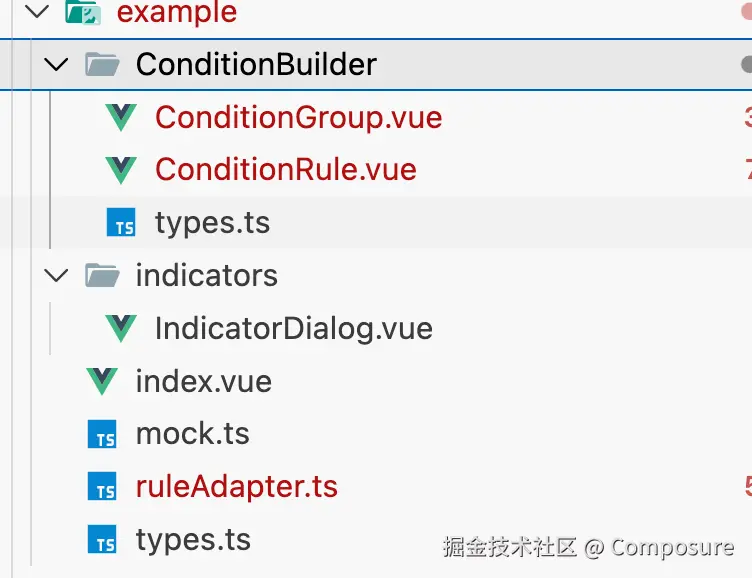
import { v4 as uuidv4 } from "uuid";
import type {
ConditionGroup,
ConditionRule,
ConditionNode
} from "./ConditionBuilder/types";
import type {
BackendRuleItem,
BackendRuleDetail,
BackendRulePayload
} from "./types";
const OP_MAP_TO_API: Record<string, string> = {
">": "gt",
"<": "lt",
"=": "eq",
">=": "ge",
"<=": "le"
};
const OP_MAP_TO_UI: Record<string, string> = {
gt: ">",
lt: "<",
eq: "=",
ge: ">=",
le: "<="
};
export function transformToUI(data: BackendRulePayload): ConditionGroup {
const rootGroup: ConditionGroup = {
id: uuidv4(),
type: "group",
logic: "AND",
children: []
};
if (!data.ruleItemList || data.ruleItemList.length === 0) {
return rootGroup;
}
if (
data.ruleItemList.length === 1 &&
data.ruleItemList[0].ruleItemType === "formula"
) {
const rootFormula = data.ruleItemList[0];
rootGroup.logic =
(rootFormula.ruleFormula?.toUpperCase() as "AND" | "OR") || "AND";
rootGroup.children = (rootFormula.children || []).map(processApiToNode);
}
else {
rootGroup.logic = "AND";
rootGroup.children = data.ruleItemList.map(processApiToNode);
}
return rootGroup;
}
function processApiToNode(item: BackendRuleItem): ConditionNode {
if (item.ruleItemType === "formula") {
return {
id: uuidv4(),
type: "group",
logic: (item.ruleFormula?.toUpperCase() as "AND" | "OR") || "AND",
children: (item.children || []).map(processApiToNode)
} as ConditionGroup;
}
else {
const left = item.ruleDetailList?.[0] || {};
const right = item.ruleDetailList?.[1] || {};
return {
id: uuidv4(),
type: "rule",
metric: left.indicatorCode || "",
dimension: left.objectField || "",
operator: OP_MAP_TO_UI[item.operation || ""] || item.operation || "",
valueType: right.valType === "fixed" ? "value" : "field",
value: String(right.fixedValue !== undefined ? right.fixedValue : "")
} as ConditionRule;
}
}
export function transformToApi(
node: ConditionGroup,
originalData?: Partial<BackendRulePayload>
): BackendRulePayload {
let ruleItemList: BackendRuleItem[] = [];
if (node.logic === "OR") {
ruleItemList = [processNodeToApi(node)];
} else {
ruleItemList = node.children.map(processNodeToApi);
}
return {
id: originalData?.id,
name: originalData?.name,
ruleType: "metric",
ruleItemList: ruleItemList
};
}
function processNodeToApi(node: ConditionNode): BackendRuleItem {
if (node.type === "group") {
return {
ruleItemType: "formula",
ruleFormula: node.logic.toLowerCase() as "and" | "or",
children: node.children.map(processNodeToApi)
};
}
else {
const rule = node as ConditionRule;
const leftSide: BackendRuleDetail = {
name: "指标名称占位",
valType: "metric",
compareType: "parameter",
indicatorCode: rule.metric,
objectField: rule.dimension
};
const rightSide: BackendRuleDetail = {
compareType:
rule.valueType === "value" ? "parameter" : "compareParameter",
valType: rule.valueType === "value" ? "fixed" : "metric",
fixedValue: rule.valueType === "value" ? Number(rule.value) : undefined
};
return {
ruleItemType: "metric",
operation: (OP_MAP_TO_API[rule.operator] as any) || "eq",
ruleDetailList: [leftSide, rightSide]
};
}
}
export interface BackendRuleDetail {
name?: string;
valType: "metric" | "fixed" | "parameter";
compareType?: "parameter" | "compareParameter";
indicatorCode?: string;
objectField?: string;
fixedValue?: string | number;
}
export interface BackendRuleItem {
ruleItemType: "metric" | "formula";
operation?: "gt" | "lt" | "eq" | "ge" | "le";
ruleDetailList?: BackendRuleDetail[];
ruleFormula?: "and" | "or";
children?: BackendRuleItem[];
}
export interface BackendRulePayload {
id?: number | string;
name?: string;
ruleType: string;
ruleItemList: BackendRuleItem[];
}
<script setup lang="ts">
import { ref } from "vue";
import { Refresh, Plus, Delete } from "@element-plus/icons-vue";
import ConditionGroupComp from "../ConditionBuilder/ConditionGroup.vue";
import type { ConditionGroup } from "../ConditionBuilder/types";
import { v4 as uuidv4 } from "uuid";
import type { BackendRulePayload } from "../types";
import { transformToApi, transformToUI } from "../ruleAdapter";
import { ElMessage } from "element-plus";
const visible = ref(false);
const initialData: ConditionGroup = {
id: "root",
type: "group",
logic: "AND",
children: [
{
id: uuidv4(),
type: "rule",
metric: "loss_ratio",
dimension: "yearly",
operator: ">",
valueType: "field",
value: "parent_org"
},
{
id: uuidv4(),
type: "group",
logic: "OR",
children: [
{
id: uuidv4(),
type: "rule",
metric: "loss_ratio",
dimension: "monthly_ratio",
operator: ">",
valueType: "field",
value: "parent_org"
},
{
id: uuidv4(),
type: "rule",
metric: "loss_ratio",
dimension: "monthly_yoy",
operator: "value",
valueType: "value",
value: "0"
}
]
},
{
id: uuidv4(),
type: "rule",
metric: "loss_ratio",
dimension: "yearly",
operator: ">",
valueType: "field",
value: "parent_org"
}
]
};
interface RuleItem {
id: number | string;
name: string;
ruleType: string;
rawData?: BackendRulePayload;
uiData: ConditionGroup;
}
const rulesList = ref<RuleItem[]>([]);
const open = (data?: BackendRulePayload | BackendRulePayload[]) => {
visible.value = true;
if (Array.isArray(data)) {
console.log("正在编辑多个规则:", data);
rulesList.value = data.map((rule, index) => ({
id: rule.id || uuidv4(),
name: rule.name || `规则 ${index + 1}`,
ruleType: rule.ruleType || "metric",
rawData: rule,
uiData: transformToUI(rule)
}));
} else if (data) {
console.log("正在编辑单个规则:", data);
rulesList.value = [
{
id: data.id || uuidv4(),
name: data.name || "规则 1",
ruleType: data.ruleType || "metric",
rawData: data,
uiData: transformToUI(data)
}
];
} else {
rulesList.value = [
{
id: uuidv4(),
name: "规则 1",
ruleType: "metric",
uiData: JSON.parse(JSON.stringify(initialData))
}
];
}
};
const addRule = () => {
const newRule: RuleItem = {
id: uuidv4(),
name: `规则 ${rulesList.value.length + 1}`,
ruleType: "metric",
uiData: JSON.parse(JSON.stringify(initialData))
};
rulesList.value.push(newRule);
};
const deleteRule = (index: number) => {
if (rulesList.value.length <= 1) {
ElMessage.warning("至少需要保留一个规则");
return;
}
rulesList.value.splice(index, 1);
rulesList.value.forEach((rule, i) => {
if (!rule.rawData?.name) {
rule.name = `规则 ${i + 1}`;
}
});
};
const handleReset = (index: number) => {
rulesList.value[index].uiData = JSON.parse(JSON.stringify(initialData));
};
const handleConfirm = () => {
const payload = rulesList.value.map(rule => {
const apiData = transformToApi(rule.uiData, rule.rawData);
return {
...apiData,
name: rule.name
};
});
console.log("最终提交的规则列表:", JSON.stringify(payload, null, 2));
visible.value = false;
};
defineExpose({ open });
</script>
<template>
<el-dialog
v-model="visible"
title="指标预警"
width="900px"
destroy-on-close
class="indicator-dialog"
>
<div class="p-4 min-h-[300px]">
<div
v-for="(rule, index) in rulesList"
:key="rule.id"
class="mb-6 last:mb-0"
>
<div class="flex items-center justify-between mb-3">
<span class="font-medium text-gray-700">{{ rule.name }}</span>
<div class="flex gap-2">
<el-button
link
type="primary"
:icon="Refresh"
size="small"
@click="handleReset(index)"
>
恢复默认设置
</el-button>
<el-button
link
type="danger"
:icon="Delete"
size="small"
@click="deleteRule(index)"
>
删除
</el-button>
</div>
</div>
<ConditionGroupComp :node="rule.uiData" :depth="0" />
<div
v-if="index < rulesList.length - 1"
class="my-6 border-t border-gray-200"
/>
</div>
<div class="flex justify-center mt-6">
<el-button type="primary" :icon="Plus" plain @click="addRule">
新增规则
</el-button>
</div>
</div>
<template #footer>
<div class="flex justify-between items-center w-full">
<div />
<div>
<el-button @click="visible = false">取消</el-button>
<el-button type="primary" @click="handleConfirm">确认</el-button>
</div>
</div>
</template>
</el-dialog>
</template>
<style lang="scss">
// 全局样式覆盖,如果是 scoped 可能会无法覆盖 el-dialog body
.indicator-dialog {
.el-dialog__body {
padding-top: 10px;
padding-bottom: 10px;
}
}
</style>
export type LogicType = "AND" | "OR";
export type NodeType = "group" | "rule";
export interface ConditionRule {
id: string;
type: "rule";
metric: string;
dimension: string;
operator: string;
valueType: string;
value: string;
}
export interface ConditionGroup {
id: string;
type: "group";
logic: LogicType;
children: (ConditionGroup | ConditionRule)[];
}
export type ConditionNode = ConditionGroup | ConditionRule;
<script setup lang="ts">
import { Delete, Plus } from "@element-plus/icons-vue";
import type { ConditionRule } from "./types";
import { computed } from "vue";
const props = defineProps<{
item: ConditionRule;
index: number;
depth: number;
}>();
const emit = defineEmits(["delete", "add"]);
const metricOptions = [{ label: "车险已报告赔付率", value: "loss_ratio" }];
const dimOptions = [
{ label: "年累计", value: "yearly" },
{ label: "月环比", value: "monthly_ratio" },
{ label: "月同比", value: "monthly_yoy" }
];
const opOptions = [
{ label: ">", value: ">" },
{ label: "<", value: "<" },
{ label: "=", value: "=" },
{ label: "数值", value: "value" }
];
</script>
<template>
<div class="flex items-center gap-2 w-full">
<el-select
v-model="props.item.metric"
placeholder="请选择指标"
class="!w-[200px]"
>
<el-option
v-for="opt in metricOptions"
:key="opt.value"
:label="opt.label"
:value="opt.value"
/>
</el-select>
<el-select v-model="item.dimension" placeholder="维度" class="!w-[120px]">
<el-option
v-for="opt in dimOptions"
:key="opt.value"
:label="opt.label"
:value="opt.value"
/>
</el-select>
<el-select v-model="item.operator" placeholder="操作符" class="!w-[120px]">
<el-option
v-for="opt in opOptions"
:key="opt.value"
:label="opt.label"
:value="opt.value"
/>
</el-select>
<template v-if="item.operator === 'value'">
<el-input
v-model="item.value"
placeholder="输入数值"
class="!w-[150px]"
/>
</template>
<template v-else>
<el-select v-model="item.value" placeholder="选择对象" class="!w-[150px]">
<el-option label="上级机构" value="parent_org" />
<el-option label="0" value="0" />
</el-select>
</template>
<el-button type="danger" link :icon="Delete" @click="emit('delete')" />
<el-button
v-if="index === 0"
type="primary"
link
:icon="Plus"
class="ml-2"
@click="emit('add')"
>
{{ depth === 0 ? "筛选" : "并且满足" }}
</el-button>
</div>
</template>
<style scoped>
:deep(.el-input__wrapper) {
box-shadow: 0 0 0 1px #dcdfe6 inset;
}
</style>
<script setup lang="ts">
import ConditionRuleComp from "./ConditionRule.vue";
import type { ConditionGroup, ConditionRule } from "./types";
import { v4 as uuidv4 } from "uuid";
const props = defineProps<{
node: ConditionGroup;
depth: number;
}>();
const emit = defineEmits(["delete-node"]);
const toggleLogic = (val: "AND" | "OR") => {
props.node.logic = val;
};
const addRule = () => {
const newRule: ConditionRule = {
id: uuidv4(),
type: "rule",
metric: "",
dimension: "",
operator: "",
valueType: "value",
value: ""
};
props.node.children.push(newRule);
};
const removeChild = (index: number) => {
props.node.children.splice(index, 1);
if (props.node.children.length === 0 && props.depth > 0) {
emit("delete-node");
}
};
</script>
<template>
<div class="flex w-full">
<div class="relative w-14 flex-shrink-0 mr-2 select-none">
<template v-if="node.children.length > 1">
<div
class="absolute left-1/2 top-4 bottom-4 -translate-x-1/2 w-full pointer-events-none"
>
<div
class="absolute left-1/2 top-0 bottom-0 w-[1px] bg-gray-300 -translate-x-1/2"
/>
<div
class="absolute left-1/2 top-0 w-3 h-[1px] bg-gray-300 -translate-x-1/2"
/>
<div
class="absolute left-1/2 bottom-0 w-3 h-[1px] bg-gray-300 -translate-x-1/2"
/>
</div>
<div
class="absolute top-1/2 left-1/2 -translate-x-1/2 -translate-y-1/2 z-10"
>
<div
class="flex flex-col items-center bg-gray-100 p-1 rounded-lg shadow-sm border border-gray-200"
>
<div
class="w-6 h-6 flex items-center justify-center text-xs rounded cursor-pointer transition-all mb-1"
:class="
node.logic === 'AND'
? 'bg-blue-500 text-white shadow-sm'
: 'text-gray-500 hover:text-gray-700'
"
@click="toggleLogic('AND')"
>
且
</div>
<div
class="w-6 h-6 flex items-center justify-center text-xs rounded cursor-pointer transition-all"
:class="
node.logic === 'OR'
? 'bg-blue-500 text-white shadow-sm'
: 'text-gray-500 hover:text-gray-700'
"
@click="toggleLogic('OR')"
>
或
</div>
</div>
</div>
</template>
</div>
<div class="flex-1 flex flex-col gap-4">
<div
v-for="(child, index) in node.children"
:key="child.id"
class="relative"
>
<template v-if="child.type === 'group'">
<ConditionGroup
:node="(child as ConditionGroup)"
:depth="depth + 1"
@delete-node="removeChild(index)"
/>
</template>
<template v-else>
<ConditionRuleComp
:item="(child as ConditionRule)"
:index="index"
:depth="depth"
@delete="removeChild(index)"
@add="addRule"
/>
</template>
</div>
</div>
</div>
</template>


