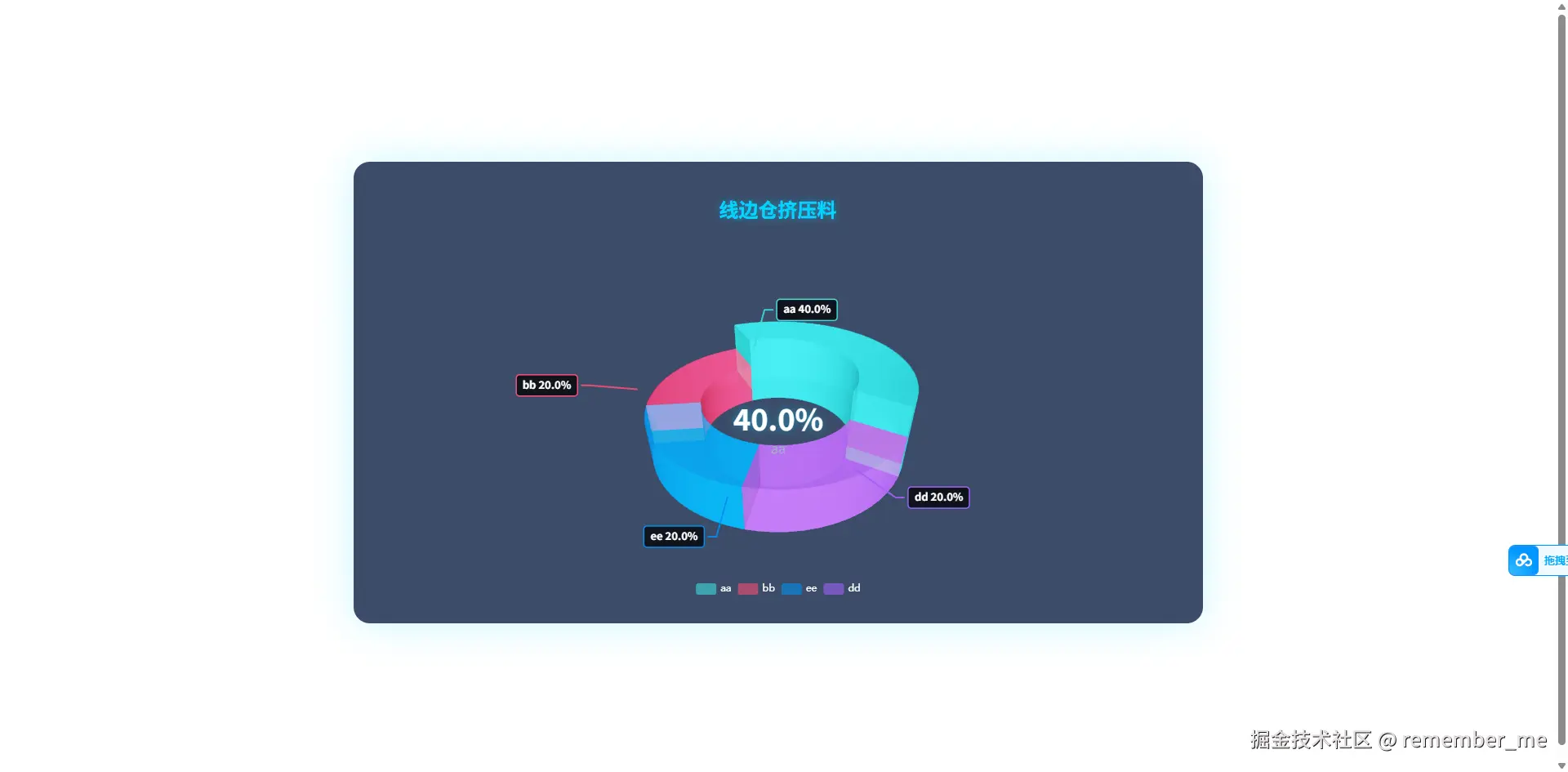
import React, { useRef, useEffect, useState, useCallback } from 'react';
import ReactECharts from 'echarts-for-react';
import * as echarts from 'echarts';
import 'echarts-gl';
function getParametricEquation(startRatio, endRatio, isSelected, isHovered, k, h) {
let midRatio = (startRatio + endRatio) / 2;
let startRadian = startRatio * Math.PI * 2;
let endRadian = endRatio * Math.PI * 2;
let midRadian = midRatio * Math.PI * 2;
if (startRatio === 0 && endRatio === 1) {
isSelected = false;
}
k = typeof k !== 'undefined' ? k : 1 / 3;
let offsetX = isSelected ? Math.cos(midRadian) * 0.1 : 0;
let offsetY = isSelected ? Math.sin(midRadian) * 0.1 : 0;
let hoverRate = isHovered ? 1.05 : 1;
return {
u: {
min: -Math.PI,
max: Math.PI * 3,
step: Math.PI / 32
},
v: {
min: 0,
max: Math.PI * 2,
step: Math.PI / 20
},
x: function (u, v) {
if (u < startRadian) {
return offsetX + Math.cos(startRadian) * (1 + Math.cos(v) * k) * hoverRate;
}
if (u > endRadian) {
return offsetX + Math.cos(endRadian) * (1 + Math.cos(v) * k) * hoverRate;
}
return offsetX + Math.cos(u) * (1 + Math.cos(v) * k) * hoverRate;
},
y: function (u, v) {
if (u < startRadian) {
return offsetY + Math.sin(startRadian) * (1 + Math.cos(v) * k) * hoverRate;
}
if (u > endRadian) {
return offsetY + Math.sin(endRadian) * (1 + Math.cos(v) * k) * hoverRate;
}
return offsetY + Math.sin(u) * (1 + Math.cos(v) * k) * hoverRate;
},
z: function (u, v) {
if (u < -Math.PI * 0.5) {
return Math.sin(u);
}
if (u > Math.PI * 2.5) {
return Math.sin(u) * h * 0.1;
}
return Math.sin(v) > 0 ? 1 * h * 0.1 : -1;
}
};
}
function hexToRgba(hex, alpha) {
let r, g, b;
if (hex.startsWith('#')) {
hex = hex.slice(1);
}
if (hex.length === 3) {
r = parseInt(hex[0] + hex[0], 16);
g = parseInt(hex[1] + hex[1], 16);
b = parseInt(hex[2] + hex[2], 16);
} else if (hex.length === 6) {
r = parseInt(hex.slice(0, 2), 16);
g = parseInt(hex.slice(2, 4), 16);
b = parseInt(hex.slice(4, 6), 16);
} else {
const canvas = document.createElement('canvas');
const ctx = canvas.getContext('2d');
ctx.fillStyle = hex;
const computed = ctx.fillStyle;
if (computed.startsWith('rgb')) {
return computed.replace('rgb', 'rgba').replace(')', `, ${alpha})`);
}
return hex;
}
return `rgba(${r}, ${g}, ${b}, ${alpha})`;
}
function getPie3D(pieData, internalDiameterRatio) {
let series = [];
let sumValue = 0;
let startValue = 0;
let endValue = 0;
let legendData = [];
let k = typeof internalDiameterRatio !== 'undefined'
? (1 - internalDiameterRatio) / (1 + internalDiameterRatio)
: 1 / 3;
const maxItem = pieData.reduce((max, item) => item.value > max.value ? item : max, pieData[0]);
const total = pieData.reduce((sum, item) => sum + item.value, 0);
const maxPercent = ((maxItem.value / total) * 100).toFixed(1);
for (let i = 0; i < pieData.length; i++) {
sumValue += pieData[i].value;
let seriesItem = {
name: typeof pieData[i].name === 'undefined' ? `series${i}` : pieData[i].name,
type: 'surface',
parametric: true,
wireframe: { show: false },
pieData: pieData[i],
pieStatus: { selected: false, hovered: false, k: k }
};
let itemStyle = {};
if (typeof pieData[i].itemStyle !== 'undefined') {
const color = pieData[i].itemStyle.color;
itemStyle.color = hexToRgba(color, 0.85);
if (typeof pieData[i].itemStyle.opacity !== 'undefined') {
itemStyle.opacity = pieData[i].itemStyle.opacity;
}
}
seriesItem.itemStyle = itemStyle;
series.push(seriesItem);
}
for (let i = 0; i < series.length; i++) {
endValue = startValue + series[i].pieData.value;
series[i].pieData.startRatio = startValue / sumValue;
series[i].pieData.endRatio = endValue / sumValue;
series[i].parametricEquation = getParametricEquation(
series[i].pieData.startRatio,
series[i].pieData.endRatio,
false,
false,
k,
series[i].pieData.value
);
startValue = endValue;
legendData.push(series[i].name);
}
series.push({
name: 'mouseoutSeries',
type: 'surface',
parametric: true,
wireframe: { show: false },
itemStyle: { opacity: 0 },
parametricEquation: {
u: { min: 0, max: Math.PI * 2, step: Math.PI / 20 },
v: { min: 0, max: Math.PI, step: Math.PI / 20 },
x: function (u, v) { return Math.sin(v) * Math.sin(u) + Math.sin(u); },
y: function (u, v) { return Math.sin(v) * Math.cos(u) + Math.cos(u); },
z: function (u, v) { return Math.cos(v) > 0 ? 0.1 : -0.1; }
}
});
return {
legend: {
data: legendData,
textStyle: { color: '#fff' },
bottom: 10
},
tooltip: {
formatter: params => {
if (params.seriesName !== 'mouseoutSeries' && params.seriesIndex < series.length - 1) {
return `${params.seriesName}<br/>
<span style="display:inline-block;margin-right:5px;border-radius:10px;width:10px;height:10px;background-color:${params.color};"></span>
${series[params.seriesIndex].pieData.value}`;
}
return '';
}
},
graphic: [
{
type: 'text',
left: 'center',
top: '45%',
style: {
text: maxPercent + '%',
textAlign: 'center',
fill: '#fff',
fontSize: 36,
fontWeight: 'bold',
textShadowBlur: 10,
textShadowColor: 'rgba(0, 212, 255, 0.5)'
}
},
{
type: 'text',
left: 'center',
top: '55%',
style: {
text: maxItem.name,
textAlign: 'center',
fill: '#a0b3c6',
fontSize: 16
}
}
],
xAxis3D: { min: -1, max: 1 },
yAxis3D: { min: -1, max: 1 },
zAxis3D: { min: -1, max: 1 },
grid3D: {
show: false,
boxHeight: 15,
viewControl: {
alpha: 35,
beta: 30,
rotateSensitivity: 0,
zoomSensitivity: 0,
panSensitivity: 0,
autoRotate: false,
distance: 200
},
light: {
main: {
intensity: 1.2,
shadow: true,
alpha: 30,
beta: 30
},
ambient: {
intensity: 0.3
}
},
postEffect: {
enable: true,
bloom: {
enable: true,
bloomIntensity: 0.15
},
SSAO: {
enable: true,
quality: 'medium',
radius: 2
}
}
},
series: series
};
}
const Pie3DChart = ({
data = [
{ name: 'cc', value: 80, itemStyle: { color: 'red' } },
{ name: 'aa', value: 44, itemStyle: { color: '#3edce0' } },
{ name: 'bb', value: 44, itemStyle: { color: '#f94e76' } },
{ name: 'ee', value: 44, itemStyle: { color: '#018ef1' } },
{ name: 'dd', value: 44, itemStyle: { color: '#9e60f9' } }
],
internalDiameterRatio = 0.59,
style = { width: '100%', height: '600px' },
showLabels = true,
labelDistance = 1.4
}) => {
const chartRef = useRef(null);
const [option, setOption] = useState(null);
const selectedIndexRef = useRef('');
const hoveredIndexRef = useRef('');
const labelsRef = useRef([]);
const calculateLabelPosition = useCallback((pieData, index, k, isSelected, isHovered) => {
const item = pieData[index];
const startRatio = item.startRatio;
const endRatio = item.endRatio;
const midRatio = (startRatio + endRatio) / 2;
const midRadian = midRatio * Math.PI * 2;
const hoverRate = isHovered ? 1.05 : 1;
const radius = (1 + k) * hoverRate * labelDistance;
let offsetX = 0, offsetY = 0;
if (isSelected) {
offsetX = Math.cos(midRadian) * 0.1;
offsetY = Math.sin(midRadian) * 0.1;
}
const x = offsetX + Math.cos(midRadian) * radius;
const y = offsetY + Math.sin(midRadian) * radius;
const z = item.value * 0.05;
return { x, y, z, midRadian, color: item.itemStyle?.color || '#fff' };
}, [labelDistance]);
const project3DToScreen = useCallback((chart, x3d, y3d, z3d) => {
if (!chart) return { x: 0, y: 0 };
const option = chart.getOption();
const viewControl = option.grid3D[0].viewControl;
const alpha = (viewControl.alpha || 35) * Math.PI / 180;
const beta = (viewControl.beta || 30) * Math.PI / 180;
const cosA = Math.cos(alpha), sinA = Math.sin(alpha);
const cosB = Math.cos(beta), sinB = Math.sin(beta);
const x1 = x3d * cosB - y3d * sinB;
const y1 = x3d * sinB + y3d * cosB;
const z1 = z3d;
const y2 = y1 * cosA - z1 * sinA;
const z2 = y1 * sinA + z1 * cosA;
const scale = 120;
const x2d = x1 * scale;
const y2d = -y2 * scale;
const rect = chart.getDom().getBoundingClientRect();
const centerX = rect.width / 2 - 40;
const centerY = rect.height / 2 - 80;
return {
x: centerX + x2d,
y: centerY + y2d,
z2: z2
};
}, []);
const updateLabels = useCallback(() => {
const chart = chartRef.current;
if (!chart || !showLabels) return;
const currentOption = chart.getOption();
const series = currentOption.series;
labelsRef.current.forEach(el => el.remove());
labelsRef.current = [];
const chartDom = chart.getDom();
series.forEach((s, index) => {
if (s.name === 'mouseoutSeries' || !s.pieData) return;
const pos = calculateLabelPosition(
data,
index,
s.pieStatus.k,
s.pieStatus.selected,
s.pieStatus.hovered
);
const screenPos = project3DToScreen(chart, pos.x, pos.y, pos.z);
const edgeRate = s.pieStatus.hovered ? 1.05 : 1.0;
const edgeX = pos.x / labelDistance * edgeRate;
const edgeY = pos.y / labelDistance * edgeRate;
const edgeScreenPos = project3DToScreen(chart, edgeX, edgeY, pos.z);
const isRight = pos.x > 0;
const rect = chartDom.getBoundingClientRect();
const centerX = rect.width / 2;
const centerY = rect.height / 2;
const rotatePoint = (x, y, angleDeg) => {
const angle = angleDeg * Math.PI / 180;
const dx = x - centerX;
const dy = y - centerY;
const rx = dx * Math.cos(angle) - dy * Math.sin(angle);
const ry = dx * Math.sin(angle) + dy * Math.cos(angle);
return {
x: centerX + rx,
y: centerY + ry
};
};
const rotationAngle = 30;
const rotatedEdge = rotatePoint(edgeScreenPos.x, edgeScreenPos.y, rotationAngle);
const rotatedScreen = rotatePoint(screenPos.x, screenPos.y, rotationAngle);
const elbowX = isRight ? rotatedScreen.x + 10 : rotatedScreen.x - 10;
const group = document.createElementNS('http://www.w3.org/2000/svg', 'svg');
group.style.cssText = `
position: absolute;
left: 0;
top: 0;
width: 100%;
height: 100%;
pointer-events: none;
z-index: 100;
overflow: visible;
`;
const line = document.createElementNS('http://www.w3.org/2000/svg', 'polyline');
const points = `${rotatedEdge.x},${rotatedEdge.y} ${rotatedScreen.x},${rotatedScreen.y} ${elbowX},${rotatedScreen.y}`;
line.setAttribute('points', points);
line.setAttribute('fill', 'none');
line.setAttribute('stroke', pos.color);
line.setAttribute('stroke-width', '2');
line.setAttribute('stroke-linecap', 'round');
line.setAttribute('stroke-linejoin', 'round');
line.setAttribute('opacity', '0.9');
group.appendChild(line);
const percent = ((s.pieData.value / data.reduce((sum, item) => sum + item.value, 0)) * 100).toFixed(1);
const textContent = `${s.name} ${percent}%`;
const tempText = document.createElement('span');
tempText.style.cssText = 'position:absolute;visibility:hidden;font-size:13px;font-weight:bold;';
tempText.innerText = textContent;
document.body.appendChild(tempText);
const textWidth = tempText.offsetWidth + 16;
const textHeight = 26;
document.body.removeChild(tempText);
const labelPadding = 8;
const labelX = isRight ? elbowX + 5 : elbowX - textWidth - 5;
const labelY = rotatedScreen.y - textHeight / 2;
const bg = document.createElementNS('http://www.w3.org/2000/svg', 'rect');
bg.setAttribute('x', labelX);
bg.setAttribute('y', labelY);
bg.setAttribute('width', textWidth);
bg.setAttribute('height', textHeight);
bg.setAttribute('rx', '4');
bg.setAttribute('fill', 'rgba(0,0,0,0.75)');
bg.setAttribute('stroke', pos.color);
bg.setAttribute('stroke-width', '1.5');
group.appendChild(bg);
const text = document.createElementNS('http://www.w3.org/2000/svg', 'text');
text.setAttribute('x', isRight ? labelX + labelPadding : labelX + textWidth - labelPadding);
text.setAttribute('y', labelY + textHeight / 2 + 4);
text.setAttribute('fill', '#fff');
text.setAttribute('font-size', '13');
text.setAttribute('font-weight', 'bold');
text.setAttribute('text-anchor', isRight ? 'start' : 'end');
text.textContent = textContent;
group.appendChild(text);
chartDom.appendChild(group);
labelsRef.current.push(group);
});
}, [data, showLabels, labelDistance, calculateLabelPosition, project3DToScreen]);
useEffect(() => {
const initialOption = getPie3D(data, internalDiameterRatio);
setOption(initialOption);
}, [data, internalDiameterRatio]);
useEffect(() => {
if (!option || !showLabels) return;
const timer = setTimeout(updateLabels, 500);
const handleResize = () => {
updateLabels();
};
window.addEventListener('resize', handleResize);
return () => {
clearTimeout(timer);
window.removeEventListener('resize', handleResize);
labelsRef.current.forEach(el => el.remove());
};
}, [option, showLabels, updateLabels]);
const onChartReady = (chart) => {
chartRef.current = chart;
chart.on('click', function (params) {
if (params.seriesIndex >= option.series.length - 1) return;
let currentOption = chart.getOption();
let series = currentOption.series;
let isSelected = !series[params.seriesIndex].pieStatus.selected;
let isHovered = series[params.seriesIndex].pieStatus.hovered;
let k = series[params.seriesIndex].pieStatus.k;
let startRatio = series[params.seriesIndex].pieData.startRatio;
let endRatio = series[params.seriesIndex].pieData.endRatio;
if (selectedIndexRef.current !== '' && selectedIndexRef.current !== params.seriesIndex) {
series[selectedIndexRef.current].parametricEquation = getParametricEquation(
series[selectedIndexRef.current].pieData.startRatio,
series[selectedIndexRef.current].pieData.endRatio,
false,
false,
k,
series[selectedIndexRef.current].pieData.value
);
series[selectedIndexRef.current].pieStatus.selected = false;
}
series[params.seriesIndex].parametricEquation = getParametricEquation(
startRatio, endRatio, isSelected, isHovered, k, series[params.seriesIndex].pieData.value
);
series[params.seriesIndex].pieStatus.selected = isSelected;
if (isSelected) {
selectedIndexRef.current = params.seriesIndex;
} else {
selectedIndexRef.current = '';
}
chart.setOption(currentOption);
setTimeout(updateLabels, 100);
});
chart.on('mouseover', function (params) {
if (params.seriesName === 'mouseoutSeries') return;
if (hoveredIndexRef.current === params.seriesIndex) return;
let currentOption = chart.getOption();
let series = currentOption.series;
if (hoveredIndexRef.current !== '') {
let idx = hoveredIndexRef.current;
let isSelected = series[idx].pieStatus.selected;
let k = series[idx].pieStatus.k;
series[idx].parametricEquation = getParametricEquation(
series[idx].pieData.startRatio,
series[idx].pieData.endRatio,
isSelected,
false,
k,
series[idx].pieData.value
);
series[idx].pieStatus.hovered = false;
}
let isSelected = series[params.seriesIndex].pieStatus.selected;
let k = series[params.seriesIndex].pieStatus.k;
series[params.seriesIndex].parametricEquation = getParametricEquation(
series[params.seriesIndex].pieData.startRatio,
series[params.seriesIndex].pieData.endRatio,
isSelected,
true,
k,
series[params.seriesIndex].pieData.value + 5
);
series[params.seriesIndex].pieStatus.hovered = true;
hoveredIndexRef.current = params.seriesIndex;
chart.setOption(currentOption);
setTimeout(updateLabels, 50);
});
chart.on('globalout', function () {
if (hoveredIndexRef.current === '') return;
let currentOption = chart.getOption();
let series = currentOption.series;
let idx = hoveredIndexRef.current;
let isSelected = series[idx].pieStatus.selected;
let k = series[idx].pieStatus.k;
series[idx].parametricEquation = getParametricEquation(
series[idx].pieData.startRatio,
series[idx].pieData.endRatio,
isSelected,
false,
k,
series[idx].pieData.value
);
series[idx].pieStatus.hovered = false;
hoveredIndexRef.current = '';
chart.setOption(currentOption);
setTimeout(updateLabels, 50);
});
setTimeout(updateLabels, 300);
};
if (!option) return null;
return (
<div style={{ position: 'relative', ...style }}>
<ReactECharts
option={option}
style={{ width: '100%', height: '100%' }}
onChartReady={onChartReady}
opts={{ renderer: 'canvas' }}
/>
</div>
);
};
export default Pie3DChart;