golang之air热重载与dlv调试
- 首先安装air
go install github.com/air-verse/air@latest
- vscode 及类似IDE 安装go扩展后,打开调试的时候会自动安装dlv工具
- air init 生成热重载配置文件
...
# 其他的都默认配置,下面命令是构建go程序,加入调试信息构建 -gcflags all='-N -l'
cmd = "go build -o ./tmp/main.exe -gcflags all='-N -l' ."
...
# 之后使用air -c .air.toml 进行热重载启动
- 在vscode中配置本地调试,request为attach,mode为local
{
    // Use IntelliSense to learn about possible attributes.
    // Hover to view descriptions of existing attributes.
    // For more information, visit: https://go.microsoft.com/fwlink/?linkid=830387
    "version": "0.2.0",
    "configurations": [
        {
            "name": "Attach to Process",
            "type": "go",
            "request": "attach",
            "mode": "local",
            "processId": 0
        }
    ]
}
-
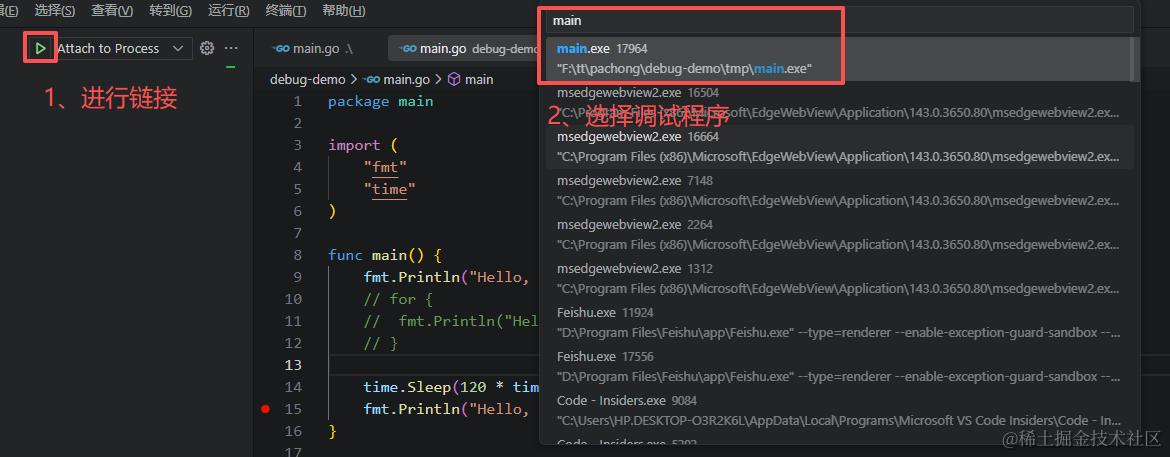
当程序在热重载模式下启动的时候,要调试则进行exe程序的选择就可以了。
-
-