分享网页快照截图代码
const puppeteer = require('puppeteer');
const path = require('path');
const fs = require('fs');
async function takeFullScreenshot(targetUrl, savePath, fileName) {
if (!fs.existsSync(savePath)) {
fs.mkdirSync(savePath, { recursive: true });
console.log(`已创建目录: ${savePath}`);
}
const finalFilePath = path.join(savePath, fileName);
console.log('🚀 正在启动浏览器...');
const browser = await puppeteer.launch({
headless: "new",
executablePath: 'C:\\Program Files\\Google\\Chrome\\Application\\chrome.exe',
args: [
'--no-sandbox',
'--disable-setuid-sandbox',
'--disable-dev-shm-usage',
'--disable-gpu',
'--no-zygote',
'--disable-software-rasterizer'
],
ignoreHTTPSErrors: true,
timeout: 60000
});
try {
const page = await browser.newPage();
console.log(`🌐 正在打开页面: ${targetUrl}`);
await page.goto(targetUrl, {
waitUntil: 'networkidle2',
timeout: 120000
});
console.log('🖥️ 设置视口...');
await page.setViewport({ width: 1200, height: 800 });
console.log('⏳ 等待页面渲染稳定...');
await new Promise(resolve => setTimeout(resolve, 2000));
console.log('📸 正在生成完整网页快照...');
await page.screenshot({
path: finalFilePath,
fullPage: true,
type: 'png'
});
console.log(`\n✅ 成功!快照已保存至: ${finalFilePath}`);
} catch (error) {
console.error('❌ 截图过程中出现错误:', error);
} finally {
await browser.close();
console.log('浏览器已关闭。');
}
}
const config = {
url: 'https://baike.baidu.com/item/%E9%95%BF%E6%B2%99%E5%B8%82/12020819?fromtitle=%E9%95%BF%E6%B2%99&fromid=204237',
saveDir: 'E:\\py_project\\temp\\res',
fileName: '1.png'
};
takeFullScreenshot(config.url, config.saveDir, config.fileName).catch(console.error);
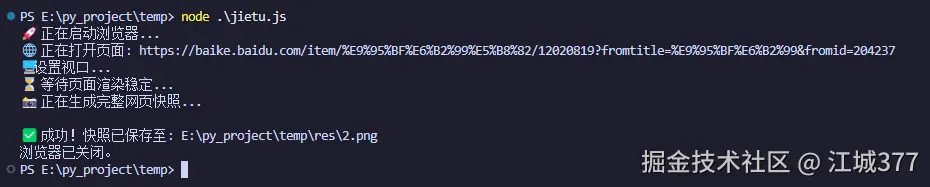
结果示例: