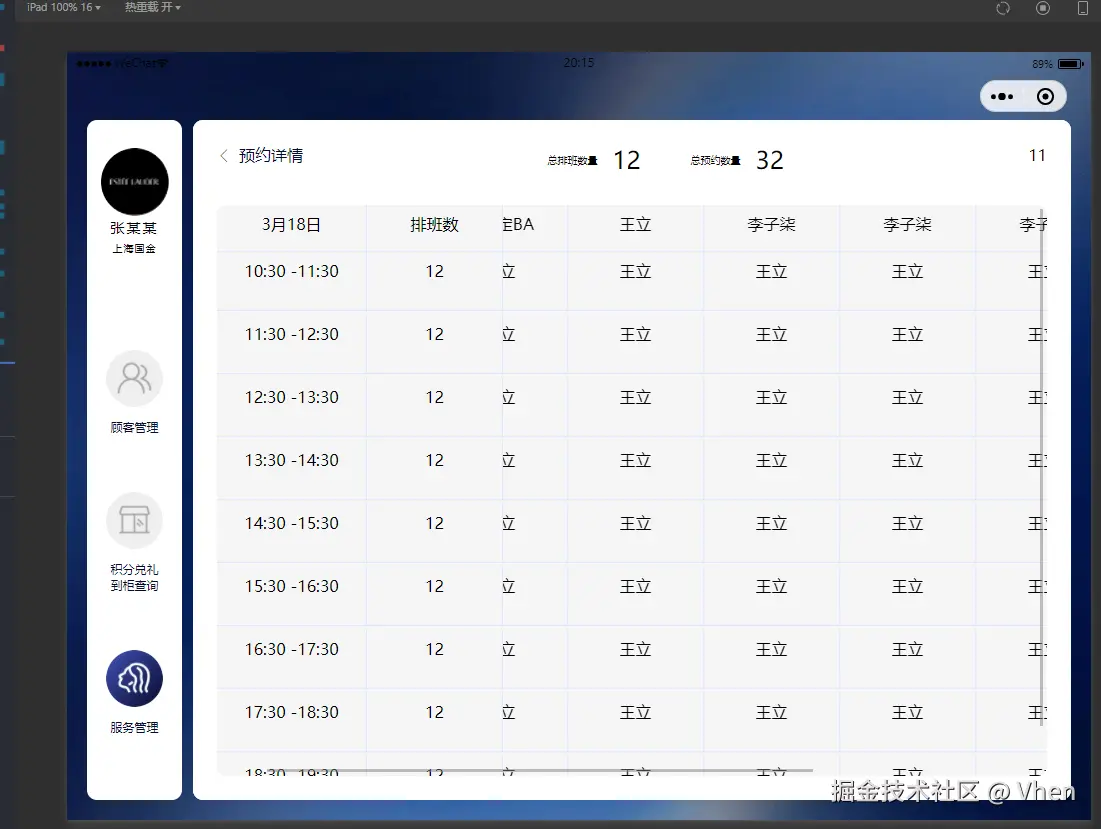
export const selectorQuery = (selector: string) => {
  return new Promise((resolve, reject) => {
    Taro.createSelectorQuery()
      .select(selector)
      .boundingClientRect()
      .exec((res) => {
        resolve(res)
      })
  })
}
import { selectorQuery } from "@/utils"
import { ScrollView, ScrollViewProps, View } from "@tarojs/components"
import { useLoad } from "@tarojs/taro"
import { useState } from "react"
import "./index.scss"
interface TableProps extends ScrollViewProps {
  columns: Array<{
    name: string
    dataIndex: string | number
    width?: number
    align?: 'left' | 'center' | 'right'
    fixed?: true
  }>
  width: number | string
  colMinWidth?: number
  height?: string
  border?: boolean
  stripe?: boolean
  headerBgColor?: string
  bgColor?: string
  dataSource: Array<any>
}
const Table: React.FC<TableProps> = ({ columns, dataSource, headerBgColor = '#f6f6f6', bgColor = '#f6f6f6', colMinWidth = 136, width, height = '100%', border = false, stripe = false, ...rest }) => {
  const [tableWidth, setTableWidth] = useState(0)

  useLoad(async () => {
    const res: any = await selectorQuery('.c-table')
    console.log('@res', res)
    setTableWidth(res[0].width)
  })
  const getColumnStyle = (item: any, index: number) => {
    let totalWidth = columns.reduce((prev, cur) => prev + (cur.width || 0), 0)
    let colWidth = 0;
    let noWidthCol = columns.filter((item) => !item.width).length
    if (noWidthCol > 0) {
      colWidth = (tableWidth as number - totalWidth) / noWidthCol
    }
    let style: React.CSSProperties = {
      width: item.width ? `${item.width}Px` : `${colWidth < colMinWidth ? colMinWidth : colWidth}Px`,
      textAlign: item.align || 'center',
    }
    if (item.fixed) {
      style.position = 'sticky'
      style.zIndex = 99
      style.left = index === 0 ? '0' : `${columns.slice(0, index).reduce((prev, cur) => prev + (cur.width || colMinWidth), 0)}Px`
    }
    return style
  }
  const getTableClassName = () => {
    if (border) {
      return 'c-table-border'
    }
    if (stripe) {
      return 'c-table-stripe'
    }
    return ''
  }
  return (
    <View className={`c-table ${getTableClassName()}`} style={{ width: `${width}`, height: `${height}` }}>
      {
        tableWidth > 0 ? (
          <ScrollView className="c-table-scroll" style={{ height: `${height}` }} {...rest} scrollX scrollY>
            <View>
              {/* 头部 */}
              <View className="c-table-thead" style={{ backgroundColor: headerBgColor }}>
                <View className="c-table-tr">
                  {columns.map((item, index) => (
                    <View className="c-table-th" key={item.dataIndex} style={{ ...getColumnStyle(item, index), backgroundColor: headerBgColor }}>
                      {item.name}
                    </View>
                  ))}
                </View>
              </View>
              {/* 内容 */}
              <View className="c-table-tbody">
                {dataSource.map((item) => (
                  <View className="c-table-tr" key={item[columns[0].dataIndex]} style={{ backgroundColor: bgColor }}>
                    {columns.map((col, index) => (
                      <View className="c-table-td" key={col.dataIndex} style={{ ...getColumnStyle(col, index), backgroundColor: bgColor }}>
                        {item[col.dataIndex]}
                      </View>
                    ))}
                  </View>
                ))}
              </View>
            </View>
          </ScrollView>
        ) : ''
      }

    </View>
  )
}
export default Table
$border-color: #E0E7FE;
.c-table {
position: relative;
background-color: transparent;
&-scroll {
width: 100%;
white-space: nowrap;
overflow: hidden;
}
&-thead {
position: sticky;
top: 0;
z-index: 100;
.c-table-tr {
display: inline-flex;
}
.c-table-th {
padding: 8Px 12Px;
height: 47Px;
background-color: transparent;
}
}
&-tbody {
.c-table-td {
display: inline-block;
white-space: nowrap;
overflow: hidden;
text-overflow: ellipsis;
padding: 8Px 12Px;
height: 59Px;
}
}
}
.c-table-border {
.c-table-thead {
.c-table-th {
border-bottom: 1Px solid $border-color;
&:not(:last-child) {
border-right: 1Px solid $border-color;
}
}
}
.c-table-tbody {
.c-table-tr {
&:not(:last-child) {
.c-table-td {
border-bottom: 1Px solid $border-color;
}
}
.c-table-td {
&:not(:last-child) {
border-right: 1Px solid $border-color;
}
}
}
}
}
.c-table-stripe {
.c-table-thead {
.c-table-th {
border-bottom: 1Px solid $border-color;
}
}
.c-table-tbody {
.c-table-tr {
.c-table-td {
border-bottom: 1Px solid $border-color;
}
}
}
}