一,海康接口获取
- 获取区域列表
- 获取监控点列表
- 组成树形列表
- 获取视频流url
二,海康官网demo下载 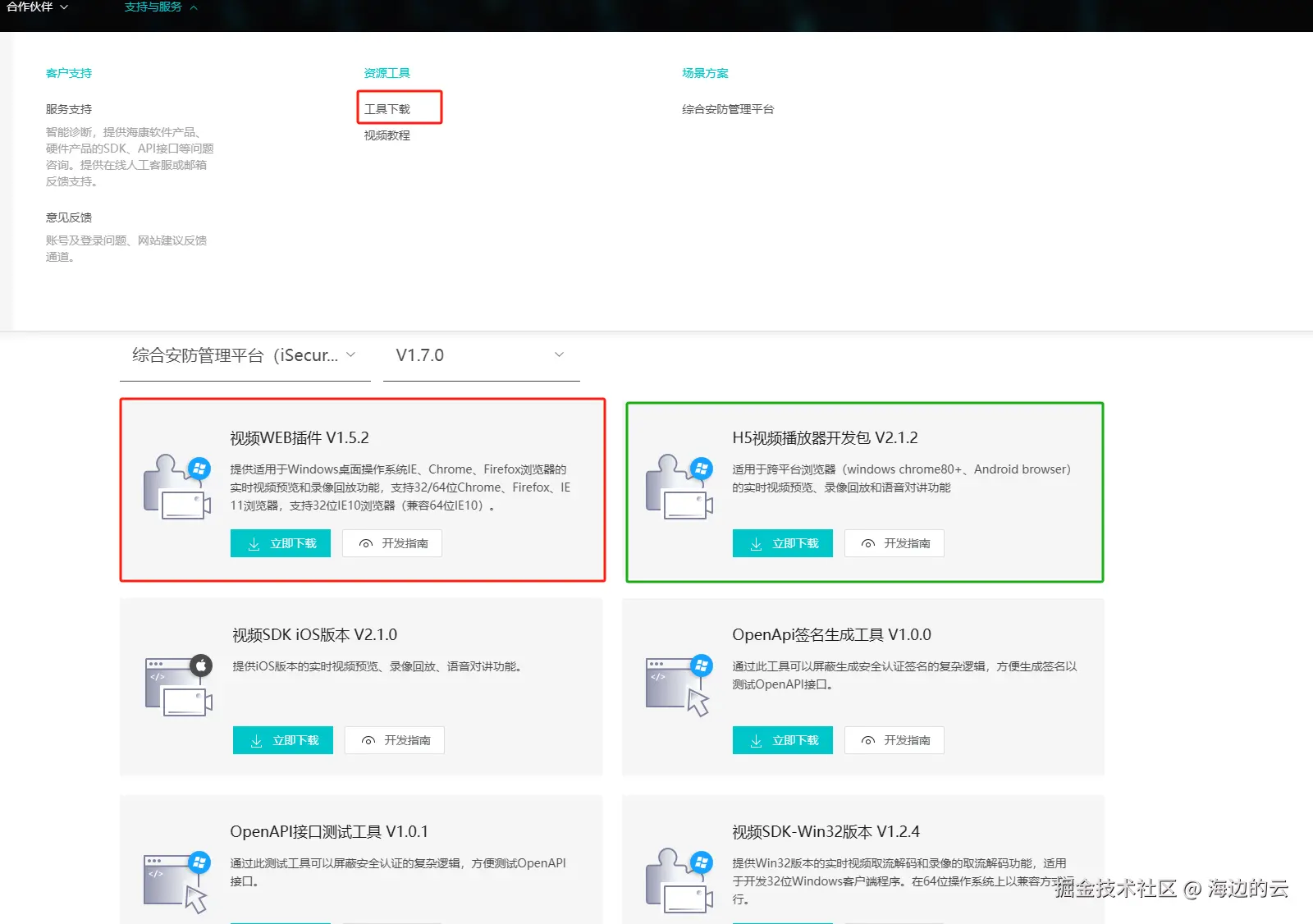
在项目public文件中创建hik文件夹把js文件放里
在index.html中引入文件
完整代码
<template>
<div class="content">
<el-container>
<el-aside width="360px">
<el-card class="custom-card" :style="customTreeStyle" shadow="always">
<div>
<div style="color: #f7f6f8">监控点列表</div>
</div>
<el-tree
node-key="id"
:data="treeData"
:props="defaultProps"
class="custom-tree tree-line"
:highlight-current="true"
:default-expand-all="true"
:render-content="renderContent"
@node-click="handleNodeClick"
/>
<div style="display: flex">
<!-- <el-button @click="uploadExe">插件下载</el-button> -->
</div>
</el-card>
<div></div>
</el-aside>
<el-main>
<div ref="playWndBox" style="overflow: auto">
<!-- 视频数据站位 -->
<div
id="playWnd"
:style="{
height: '93vh',
width: '75vw',
}"
/>
</div>
</el-main>
</el-container>
<el-dialog
title="系统提示"
:visible.sync="dialogVisible"
width="30%"
:before-close="handleClose"
>
<span style="font-size: 16px; color: rgba(247, 246, 248, 0.7)"
>当前插件未安装,请安装插件<el-button
type="text"
@click="uploadExe"
class="btn-color"
>点击安装</el-button
></span
>
<div class="hint">
<div>
如果您的浏览器版本过高,可能存在兼容性问题,请在插件下载成功后尝试下面方法解决
</div>
<div style="margin: 5px 0">
1: 在谷歌浏览器中地址栏输入 <span>chrome://flags/</span> ,
</div>
<div>
2: 搜索secure,找到
<span
>Allow invalid certificates for resources loaded from
localhost(启用它)</span
>
</div>
<div style="margin-top: 5px">
3: 找到 <span>Block insecure private network requests.(禁用它)</span>
</div>
</div>
</el-dialog>
</div>
</template>
<script>
import { getHik } from "@/api/biz/hik.js";
import { getToken } from "@/utils/auth";
export default {
data() {
return {
count: 0, // 点击计数器
dialogVisible: false,
forwardParams: {
requestMethod: undefined,
paramType: undefined,
url: undefined,
params: {},
},
streamType: "0",
customTreeStyle: {
minHeight: "95%",
},
treeData: [],
defaultProps: {
children: "children",
label: "name",
},
// 视频盒子的高度
playWndHeight: "1050",
// 视频盒子的宽度
playWndWidth: "440",
oWebControl: null,
initCount: 0,
pubKey: "",
cameraIndexCode: "", // 监控点编号
objData: {
appkey: "25188049",
ip: "123.184.68.2",
port: 4433,
playMode: 0, // 0 预览 1回放
layout: "3x3", //页面展示的模块数【16】
secret: "CTqgklbpEDu092pPWRAo",
},
wsUrl: undefined,
onlineList:[]
};
},
created() {
// this.wsUrl = "ws://" + window.location.hostname + ":41005";
this.wsUrl = "ws://123.184.68.2:41005";
this.getNodesByParams();
this.connectWebSocket();
this.getOnline()
},
mounted() {
// this.getTreeList();
// 首次加载时的到父容器的高度
this.playWndHeight = this.$refs.playWndBox.clientHeight;
// 首次加载时的到父容器的宽度
this.playWndWidth = this.$refs.playWndBox.clientWidth;
// 初始化摄像头
this.$nextTick(() => {
this.initPlugin();
});
// 监听resize事件,使插件窗口尺寸跟随DIV窗口变化
window.addEventListener("resize", () => {
console.log(
this.$refs.playWndBox.clientHeight,
this.$refs.playWndBox.clientWidth
);
if (this.oWebControl != null) {
this.oWebControl.JS_Resize(
this.$refs.playWndBox.clientWidth,
this.$refs.playWndBox.clientHeight
);
}
this.playWndHeight = this.$refs.playWndBox.clientHeight;
// 首次加载时的到父容器的宽度
this.playWndWidth = this.$refs.playWndBox.clientWidth;
});
// 监听滚动条
window.addEventListener("scroll", () => {
if (this.oWebControl != null) {
this.oWebControl.JS_Resize(800, 300);
this.setWndCover();
}
});
},
methods: {
previewVideoAll() {
console.log(this.oWebControl);
this.oWebControl.JS_RequestInterface({
funcName: "startMultiPreviewByCameraIndexCode",
argument: JSON.stringify({
list: [
{
cameraIndexCode: "c64f0637faea4b54b04280a2cc26ad3e", // 鹰眼
streamMode: 0, // 主子码流标识
transMode: 0, // 传输协议
gpuMode: 0, // 是否开启GPU硬解
wndId: 1, // 可指定播放窗口
},
{
cameraIndexCode: "498ebfaf4cba4592b1bac8e5fd59a142", // 钢筋加工区
streamMode: 0, // 主子码流标识
transMode: 0, // 传输协议
gpuMode: 0, // 是否开启GPU硬解
wndId: 2, // 可指定播放窗口
},
{
cameraIndexCode: "17b36f69c9e644688a47d57c0071c6be", // 正门入口
streamMode: 0, // 主子码流标识
transMode: 0, // 传输协议
gpuMode: 0, // 是否开启GPU硬解
wndId: 3, // 可指定播放窗口
},
{
cameraIndexCode: "e624a8c8b34545599efbc6bad28e3d57", // 北门球机
streamMode: 0, // 主子码流标识
transMode: 0, // 传输协议
gpuMode: 0, // 是否开启GPU硬解
wndId: 4, // 可指定播放窗口
},
{
cameraIndexCode: "87555f46b84c4c60b53a29273d940f0e", // 东门球机
streamMode: 0, // 主子码流标识
transMode: 0, // 传输协议
gpuMode: 0, // 是否开启GPU硬解
wndId: 5, // 可指定播放窗口
},
{
cameraIndexCode: "6f0118492bed4b3f943e0806395fc381", // 西南角围墙枪机24
streamMode: 0, // 主子码流标识
transMode: 0, // 传输协议
gpuMode: 0, // 是否开启GPU硬解
wndId: 6, // 可指定播放窗口
},
{
cameraIndexCode: "52ce46300928467d918ee3e998cddadc", // 西北角围墙枪机14
streamMode: 0, // 主子码流标识
transMode: 0, // 传输协议
gpuMode: 0, // 是否开启GPU硬解
wndId: 7, // 可指定播放窗口
},
{
cameraIndexCode: "44ecf021783c4903a678f77fa0612e2a", // 南侧中围墙枪机28
streamMode: 0, // 主子码流标识
transMode: 0, // 传输协议
gpuMode: 0, // 是否开启GPU硬解
wndId: 8, // 可指定播放窗口
},
{
cameraIndexCode: "c78b7fb592914d02a8ea147ffd2223df", // 东侧中通道枪机31
streamMode: 0, // 主子码流标识
transMode: 0, // 传输协议
gpuMode: 0, // 是否开启GPU硬解
wndId: 9, // 可指定播放窗口
},
// 其他监控点信息...
],
}),
});
},
handleClose() {
this.dialogVisible = false;
},
uploadExe() {
window.location.href =
"http://49.232.234.185:20003/check/2023/09/25/29c2a7f0f1094cc29b15208cd329c750.exe";
},
handleNodeClick(data) {
console.log(data.indexCode);
this.count++;
if (this.count % 2 === 0) {
this.previewVideo(data.indexCode);
}
},
// 查询区域列表v2
getNodesByParams() {
this.forwardParams.requestMethod = "post";
this.forwardParams.url =
process.env.VUE_APP_BASE_URL + "/api/irds/v2/region/nodesByParams";
this.forwardParams.paramType = "body";
this.forwardParams.params = {
resourceType: "camera",
pageNo: "1",
pageSize: "100",
};
getHik(this.forwardParams).then((res) => {
const jsonStr = res.data;
const data = JSON.parse(jsonStr);
console.log("区域列表", data.data.list);
const nodeList = data.data.list;
this.getCameraOnline(nodeList);
});
},
// 获取监控点列表
getCameraOnline(nodeList) {
this.forwardParams.requestMethod = "post";
this.forwardParams.url =
process.env.VUE_APP_BASE_URL + "/api/resource/v2/camera/search";
this.forwardParams.paramType = "body";
this.forwardParams.params = {
pageNo: "1",
pageSize: "100",
};
getHik(this.forwardParams).then((res) => {
const jsonStr = res.data;
const data = JSON.parse(jsonStr);
if (data.data) {
const cameraList = data.data.list;
const onlineList = this.onlineList;
const mergedList = cameraList.map((cameraItem) => {
const onlineItem = onlineList.find(
(item) => item.indexCode === cameraItem.indexCode
);
return { ...cameraItem, ...onlineItem };
});
// /console.log('打印合并后的数组',mergedList); // 打印合并后的数组
const newCodeArray = mergedList.map((camera) => ({
name: camera.name + (camera.online === 1 ? "-在线" : "-离线"),
parentIndexCode: camera.regionIndexCode,
indexCode: camera.indexCode,
cameraType: camera.cameraType,
online: camera.online,
color: camera.online === 1 ? "#12B796" : "#FF5733",
}));
const tree = [...newCodeArray, ...nodeList];
this.treeData = this.handleTree(tree, "indexCode", "parentIndexCode");
// console.log("treeData", this.treeData);
}
});
},
renderContent(h, { node, data, store }) {
return h(
"span",
{
style: {
fontSize: "14px",
},
},
[
data.name.slice(0, -2),
h(
"span",
{
style: {
color: data.color,
// 设置绿色
},
},
data.name.slice(-2)
),
]
);
},
// 监控点在线状态
getOnline() {
this.forwardParams.requestMethod = "post";
this.forwardParams.url =
process.env.VUE_APP_BASE_URL + "/api/nms/v1/online/camera/get";
this.forwardParams.paramType = "body";
this.forwardParams.params = {
pageNo: 1,
pageSize: 1000,
// includeSubNode: 1
};
getHik(this.forwardParams).then((res) => {
const jsonStr = res.data;
const data = JSON.parse(jsonStr);
console.log("监控点在线", data.data.list);
if (data.data) {
this.onlineList = data.data.list;
}
});
},
// 创建WebSocket连接
connectWebSocket() {
const token = getToken();
const socketUrl =
this.wsUrl + `/websocket/warning?Authorization=Bearer ${token}`;
const socket = new WebSocket(socketUrl);
// 监听WebSocket连接事件
socket.onopen = () => {
console.log("WebSocket连接已建立");
};
// 监听WebSocket错误事件
socket.onerror = (event) => {
console.error("WebSocket 连接发生错误:", event);
// 发生错误时重新连接WebSocket
this.reconnectWebSocket();
};
// 监听WebSocket关闭事件
socket.onclose = () => {
console.log("WebSocket连接已关闭");
// 连接关闭时重新连接WebSocket
this.reconnectWebSocket();
};
// 监听WebSocket消息事件
socket.onmessage = (event) => {
console.log(event.data);
const message = JSON.parse(event.data);
if (message.type === "预警") {
const imageUrl = message.data.annex; //预警图片
const eventType = message.data.eventType; // 预警名字
const warningTime = message.data.warningTime; // 预警时间
const warningInfo = message.data.info;
const srcList = [imageUrl];
this.$notify({
title: "预警消息",
dangerouslyUseHTMLString: true,
message: `<div class="warning-item"><div class="warning-info">预警类型: ${eventType}</div><div class="warning-info">预警时间:${warningTime}</div><div class="warning-info">预警地点:${warningInfo}</div><div class="imageBase"><div> <div>预警图片:</div> <div><img style="width: 100%; height: 120px;box-shadow: 0 2px 10px 0 #F7A124;" src="${imageUrl}"></img></div> </div></div></div>`,
type: "warning",
position: "bottom-left",
duration: 3500,
});
}
};
this.socket = socket;
},
// 重新连接WebSocket
reconnectWebSocket() {
// 延迟一定时间后重新连接WebSocket,
setTimeout(() => {
if (this.socket) {
console.log("正在重新连接WebSocket...");
this.connectWebSocket();
}
}, 3000); // 3秒后重新连接
},
// 创建播放实例
initPlugin() {
let that = this;
this.oWebControl = null;
that.oWebControl = new WebControl({
szPluginContainer: "playWnd", // 指定容器id
iServicePortStart: 15900, // 指定起止端口号,建议使用该值
iServicePortEnd: 15909,
szClassId: "23BF3B0A-2C56-4D97-9C03-0CB103AA8F11", // 用于IE10使用ActiveX的clsid
cbConnectSuccess: () => {
// 创建WebControl实例成功
that.oWebControl
.JS_StartService("window", {
// WebControl实例创建成功后需要启动服务
// 值"./VideoPluginConnect.dll"写死
dllPath: "./VideoPluginConnect.dll",
})
.then(
function () {
// 设置消息回调
that.oWebControl.JS_SetWindowControlCallback({
cbIntegrationCallBack: that.cbIntegrationCallBack,
});
//JS_CreateWnd创建视频播放窗口,宽高可设定
that.oWebControl
.JS_CreateWnd("playWnd", 900, 600)
.then(function () {
// 创建播放实例成功后初始化
that.init();
});
},
function () {
// 启动插件服务失败
console.log("插件启动失败");
that.$message.warning("插件启动失败,请检查插件是否安装!");
}
);
},
// 创建WebControl实例失败
cbConnectError: function () {
that.oWebControl = null;
that.$message.warning("插件未启动,正在尝试启动,请稍候...");
// 程序未启动时执行error函数,采用wakeup来启动程序
window.WebControl.JS_WakeUp("VideoWebPlugin://");
that.initCount++;
if (that.initCount < 2) {
setTimeout(function () {
that.initPlugin();
}, 3000);
} else {
that.dialogVisible = true;
// that.$message.warning("插件启动失败,请检查插件是否安装!");
}
},
cbConnectClose: () => {
// 异常断开:bNormalClose = false
// JS_Disconnect正常断开:bNormalClose = true
console.log("cbConnectClose");
that.oWebControl = null;
},
});
},
// 初始化
init(callback) {
let that = this;
that.getPubKey(() => {
let appkey = that.objData.appkey; //综合安防管理平台提供的appkey,必填
let secret = that.setEncrypt(that.objData.secret); //综合安防管理平台提供的secret,必填
let ip = that.objData.ip; //综合安防管理平台IP地址,必填
let playMode = that.objData.playMode; //初始播放模式:0-预览,1-回放
let port = that.objData.port; //综合安防管理平台端口,若启用HTTPS协议,默认443
let snapDir = "D:\SnapDir"; //抓图存储路径
let videoDir = "D:\VideoDir"; //紧急录像或录像剪辑存储路径
let layout = that.objData.layout; //playMode指定模式的布局
let enableHTTPS = 1; //是否启用HTTPS协议与综合安防管理平台交互,这里总是填1
let encryptedFields = "secret"; //加密字段,默认加密领域为secret
let showToolbar = 1; //是否显示工具栏,0-不显示,非0-显示
let showSmart = 1; //是否显示智能信息(如配置移动侦测后画面上的线框),0-不显示,非0-显示
let buttonIDs =
"0,16,256,257,258,259,260,512,513,514,515,516,517,768,769"; //自定义工具条按钮
// var toolBarButtonIDs = "2049,2304" // 工具栏上自定义按钮
that.oWebControl
.JS_RequestInterface({
funcName: "init",
argument: JSON.stringify({
appkey: appkey, //API网关提供的appkey
secret: secret, //API网关提供的secret
ip: ip, //API网关IP地址
playMode: playMode, //播放模式(决定显示预览还是回放界面)
port: port, //端口
snapDir: snapDir, //抓图存储路径
videoDir: videoDir, //紧急录像或录像剪辑存储路径
layout: layout, //布局
enableHTTPS: enableHTTPS, //是否启用HTTPS协议
encryptedFields: encryptedFields, //加密字段
showToolbar: showToolbar, //是否显示工具栏
showSmart: showSmart, //是否显示智能信息
buttonIDs, //自定义工具条按钮
}),
})
.then(function (oData) {
that.previewVideoAll();
that.oWebControl.JS_Resize(that.playWndWidth, that.playWndHeight); // 初始化后resize一次,规避firefox下首次显示窗口后插件窗口未与DIV窗口重合问题
if (callback) {
callback();
}
// 隐藏
// that.oWebControl.JS_HideWnd()
});
});
},
// 设置窗口裁剪,当因滚动条滚动导致窗口需要被遮住的情况下需要JS_CuttingPartWindow部分窗口
setWndCover() {
//获取web页面的尺寸
var iWidth = $(window).width();
var iHeight = $(window).height();
console.log(iWidth, iHeight);
//获取播放窗口div元素的左边界、右边界距离web页面左边界的长度、上边界、下边界距离web页面上边界的长度
var oDivRect = $("#playWnd").get(0).getBoundingClientRect();
//Math.round 为四舍五入 Math.abs 为取绝对值
var iCoverLeft = oDivRect.left < 0 ? Math.abs(oDivRect.left) : 0;
var iCoverTop = oDivRect.top < 0 ? Math.abs(oDivRect.top) : 0;
var iCoverRight =
oDivRect.right - iWidth > 0 ? Math.round(oDivRect.right - iWidth) : 0;
var iCoverBottom =
oDivRect.bottom - iHeight > 0
? Math.round(oDivRect.bottom - iHeight)
: 0;
iCoverLeft = iCoverLeft > 800 ? 800 : iCoverLeft;
iCoverTop = iCoverTop > 400 ? 400 : iCoverTop;
iCoverRight = iCoverRight > 800 ? 800 : iCoverRight;
iCoverBottom = iCoverBottom > 400 ? 400 : iCoverBottom;
oWebControl.JS_RepairPartWindow(0, 0, 801, 400); // 多1个像素点防止还原后边界缺失一个像素条
//抠除左边界
if (iCoverLeft != 0) {
oWebControl.JS_CuttingPartWindow(0, 0, iCoverLeft, 401);
}
//抠除上边界
if (iCoverTop != 0) {
oWebControl.JS_CuttingPartWindow(0, 0, 801, iCoverTop); // 多剪掉一个像素条,防止出现剪掉一部分窗口后出现一个像素条
}
//抠除右边界
if (iCoverRight != 0) {
oWebControl.JS_CuttingPartWindow(
801 - iCoverRight,
0,
iCoverRight,
401
);
}
//抠除下边界
if (iCoverBottom != 0) {
oWebControl.JS_CuttingPartWindow(
0,
401 - iCoverBottom,
801,
iCoverBottom
);
}
//弹框示例位置扣除
if (showDivInstruction) {
// 获取弹框的位置、尺寸信息
var oDivLightRect = document
.getElementById("light")
.getBoundingClientRect();
iCoverLeft =
oDivLightRect.left - oDivRect.left < 0
? 0
: oDivLightRect.left - oDivRect.left;
iCoverTop =
oDivLightRect.top - oDivRect.top < 0
? 0
: oDivLightRect.top - oDivRect.top;
iCoverRight =
oDivLightRect.right - oDivRect.left < 0
? 0
: oDivLightRect.right - oDivRect.left;
iCoverBottom =
oDivLightRect.bottom - oDivRect.top < 0
? 0
: oDivLightRect.bottom - oDivRect.top;
iCoverLeft = iCoverLeft > 800 ? 800 : Math.round(iCoverLeft);
iCoverTop = iCoverTop > 400 ? 400 : Math.round(iCoverTop);
iCoverRight = iCoverRight > 800 ? 800 : Math.round(iCoverRight);
iCoverBottom = iCoverBottom > 400 ? 400 : Math.round(iCoverBottom);
//JS_CuttingPartWindow接口参照开发指南,参数为:抠图左上角点在插件窗口上的left长度、top长度、所扣除矩形区域的宽度、所扣除矩形区域的长度
oWebControl.JS_CuttingPartWindow(
iCoverLeft - 1,
iCoverTop - 1,
iCoverRight - iCoverLeft + 2,
iCoverBottom - iCoverTop + 2
);
}
},
// 获取公钥
getPubKey(callback) {
let that = this;
this.oWebControl
.JS_RequestInterface({
funcName: "getRSAPubKey",
argument: JSON.stringify({
keyLength: 1024,
}),
})
.then(function (oData) {
if (oData.responseMsg.data) {
that.pubKey = oData.responseMsg.data;
callback();
}
});
},
// RSA 加密
setEncrypt(value) {
let that = this;
let encrypt = new window.JSEncrypt();
encrypt.setPublicKey(that.pubKey);
return encrypt.encrypt(value);
},
// 回调的消息
cbIntegrationCallBack(oData) {
let { responseMsg: type } = oData;
if (type === "error") {
console.log(
type,
type,
this.dateFormat(new Date(), "yyyy-MM-dd hh:mm:ss")
);
} else {
console.log(
type,
type,
this.dateFormat(new Date(), "yyyy-MM-dd hh:mm:ss")
);
}
},
// 视频预览功能
previewVideo(data) {
console.log("视频预览功能", data);
let that = this;
let cameraIndexCode = data; // 获取输入的监控点编号值,必填
let streamMode = 0; // 主子码流标识:0-主码流,1-子码流
let transMode = 0; // 传输协议:0-UDP,1-TCP
let gpuMode = 0; // 是否启用GPU硬解,0-不启用,1-启用
let wndId = -1; // 播放窗口序号(在2x2以上布局下可指定播放窗口)
console.log(cameraIndexCode, "-------cameraIndexCode-");
that.oWebControl.JS_RequestInterface({
funcName: "startPreview",
argument: JSON.stringify({
cameraIndexCode: cameraIndexCode.trim(), // 监控点编号
streamMode: streamMode, // 主子码流标识
transMode: transMode, // 传输协议
gpuMode: gpuMode, // 是否开启GPU硬解
wndId: wndId, // 可指定播放窗口
}),
});
},
// 停止全部预览
stopAllPreview() {
this.oWebControl.JS_RequestInterface({
funcName: "stopAllPreview",
});
},
// 格式化时间
dateFormat(oDate, fmt) {
let o = {
"M+": oDate.getMonth() + 1, //月份
"d+": oDate.getDate(), //日
"h+": oDate.getHours(), //小时
"m+": oDate.getMinutes(), //分
"s+": oDate.getSeconds(), //秒
"q+": Math.floor((oDate.getMonth() + 3) / 3), //季度
S: oDate.getMilliseconds(), //毫秒
};
if (/(y+)/.test(fmt)) {
fmt = fmt.replace(
RegExp.$1,
(oDate.getFullYear() + "").substr(4 - RegExp.$1.length)
);
}
for (let k in o) {
if (new RegExp("(" + k + ")").test(fmt)) {
fmt = fmt.replace(
RegExp.$1,
RegExp.$1.length == 1
? o[k]
: ("00" + o[k]).substr(("" + o[k]).length)
);
}
}
return fmt;
},
},
// 组件销毁后
beforeDestroy() {
if (this.oWebControl != null) {
// 先让窗口隐藏,规避可能的插件窗口滞后于浏览器消失问题
this.oWebControl.JS_HideWnd();
// 销毁当前播放的视频
this.oWebControl.JS_RequestInterface({ funcName: "destroyWnd" });
// 断开与插件服务连接
this.oWebControl.JS_Disconnect();
}
},
};
</script>
<style lang="scss" scoped>
.playWnd {
margin: 30px 0 0 50px;
width: 900px;
height: 600px;
border: 1px solid red;
}
.custom-aside {
width: 15vw;
}
.custom-card {
width: 100%;
margin-top: 10px;
min-height: 95%;
::v-deep .el-card__body {
background-color: unset;
}
}
.custom-tree {
margin-top: 10px;
min-height: 95%;
border-radius: 3px;
// box-shadow: 0 2px 4px rgba(0.2, 0.2, 0.2, 0.2);
}
.el-aside {
margin: 0px;
height: 93.5vh;
color: #333;
background-color: transparent;
}
.el-main {
width: 100%;
height: 95vh;
background-color: transparent;
color: #333;
position: relative;
// text-align: center;
}
.hint {
font-size: 14px;
color: rgba(247, 246, 248, 0.7);
}
::v-deep .btn-color.el-button--text {
color: #6eebe5;
}
::v-deep .btn-color.el-button--text:hover {
color: #97a8be;
}
</style>