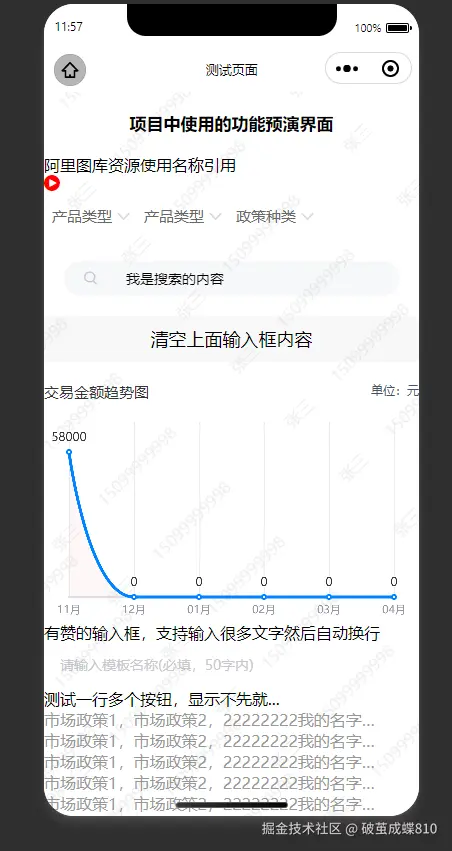
import {
    isEmpty,
    hexToRgba,
} from "../../utils/util";
Component({
    options: {
        // multipleSlots: true,
        styleIsolation: 'apply-shared'
    },
    /**
     * 组件的属性列表
     */
    properties: {
        // 水印文本内容
        watermarkText: {
            type: String,
            value: '水印文本内容'
        },
        // 水印字体大小
        fontSize: {
            type: Number,
            value: 14
        },
        // 水印颜色和透明度
        color: {
            type: String,
            value: 'rgba(0, 0, 0, 0.1)'
        },
        // 旋转角度
        rotate: {
            type: Number,
            value: -40
        },
        // 水印之间的水平间距
        gapX: {
            type: Number,
            value: 100
        },
        // 水印之间的垂直间距
        gapY: {
            type: Number,
            value: 80
        }
    },

    /**
     * 组件的初始数据
     */
    data: {
        themeStyleStr: '',
        // 屏幕宽高
        screenWidth: 375,
        screenHeight: 667

    },
    lifetimes: {
        attached() {
            let themeColorValue = '#F41E12'//支持后续动态下发主题色;(v3代理商目前是写死的)
            /* 主题色 */
            let themeColor = '--themeColor:' + themeColorValue + ';'
            console.log("自定义下发的主题色事件:" + themeColor)
            /* 主题色 RGB 0.05%透明度 */
            let themeRgb05Color = '--themeRgb05Color:' + hexToRgba(themeColorValue, 0.05) + ';'
            /* 主题色 RGB 10%透明度 */
            let themeRgb10Color = '--themeRgb10Color:' + hexToRgba(themeColorValue, 0.1) + ';'
            /* 主题色 RGB 20%透明度 */
            let themeRgb20Color = '--themeRgb20Color:' + hexToRgba(themeColorValue, 0.2) + ';'
            /* 主题色 RGB 30%透明度 */
            let themeRgb30Color = '--themeRgb30Color:' + hexToRgba(themeColorValue, 0.3) + ';'
            /* 主题色 RGB 40%透明度 */
            let themeRgb40Color = '--themeRgb40Color:' + hexToRgba(themeColorValue, 0.4) + ';'
            /* 主题色 RGB 50%透明度 */
            let themeRgb50Color = '--themeRgb50Color:' + hexToRgba(themeColorValue, 0.5) + ';'
            /* 主题色 RGB 60%透明度 */
            let themeRgb60Color = '--themeRgb60Color:' + hexToRgba(themeColorValue, 0.6) + ';'
            /* 主题色 RGB 80%透明度 */
            let themeRgb08Color = '--themeRgb08Color:' + hexToRgba(themeColorValue, 0.8) + ';'
            /* tabbar主题色 */
            let tabBarThemeColor = '--tabBarThemeColor:' + themeColorValue + ';'
            /* h5主题色 */
            let h5ThemeColor = '--h5ThemeColor:' + themeColorValue + ';'
            /* h5主题色 渐变色色 */
            let h5gradientThemeColor = '--h5gradientThemeColor:' + '#E64151' + ';'
            //属性集合
            let themeArray = [
                themeColor,
                themeRgb05Color,
                themeRgb10Color,
                themeRgb20Color,
                themeRgb30Color,
                themeRgb40Color,
                themeRgb50Color,
                themeRgb60Color,
                themeRgb08Color,
                tabBarThemeColor,
                h5ThemeColor,
                h5gradientThemeColor
            ];
            let themeStyleStr = themeArray.join('')//转换为string
            console.log("自定义下发的主题色属性:" + themeStyleStr)
            this.setData({
                themeStyleStr//转换为string
            })
            // 组件挂载时获取屏幕信息并绘制水印
            this.getSystemInfoAndDraw();
        },
        ready() {
            // 确保组件渲染完成后绘制
            setTimeout(() => {
                this.drawWatermark();
            }, 100);
        }
    },
    pageLifetimes: {
        // 组件所在页面的生命周期函数
        show: function () {

        },

    },

    /**
     * 组件的方法列表
     */
    methods: {
        // 获取系统信息
        getSystemInfoAndDraw() {
            const that = this;
            wx.getSystemInfo({
                success(res) {
                    that.setData({
                        screenWidth: res.screenWidth,
                        screenHeight: res.screenHeight
                    }, () => {
                        that.drawWatermark();
                    });
                },
                fail(err) {
                    console.error('获取系统信息失败:', err);
                    // 使用默认尺寸绘制
                    that.drawWatermark();
                }
            });
        },

        // 绘制水印的核心方法
        drawWatermark() {
            const {
                watermarkText,
                fontSize,
                color,
                rotate,
                gapX,
                gapY,
                screenWidth,
                screenHeight
            } = this.data;

            const ctx = wx.createCanvasContext('watermarkCanvas', this);

            // 设置水印样式
            ctx.setFontSize(fontSize);
            ctx.setFillStyle(color);

            // 转换旋转角度为弧度
            const rotateRadians = rotate * Math.PI / 180;
            ctx.rotate(rotateRadians);

            // 计算需要绘制的水印数量(为了确保覆盖整个屏幕,需要绘制超出屏幕范围)
            const horizontalCount = Math.ceil(screenWidth * 2 / gapX) + 2;
            const verticalCount = Math.ceil(screenHeight * 2 / gapY) + 2;

            // 平铺绘制水印
            for (let i = -horizontalCount; i < horizontalCount; i++) {
                for (let j = -verticalCount; j < verticalCount; j++) {
                    const x = i * gapX;
                    const y = j * gapY;
                    ctx.fillText(watermarkText, x, y);
                }
            }

            // 执行绘制
            ctx.draw(false, () => {
                console.log('水印绘制完成');
            });
        },

        // 重新绘制水印的方法(可在外部调用)
        refreshWatermark(newText = '') {
            if (newText) {
                this.setData({
                    watermarkText: newText
                }, () => {
                    this.drawWatermark();
                });
            } else {
                this.drawWatermark();
            }
        },

        // 清除水印
        clearWatermark() {
            const ctx = wx.createCanvasContext('watermarkCanvas', this);
            ctx.clearRect(0, 0, this.data.screenWidth, this.data.screenHeight);
            ctx.draw();
        }
    },
    // 监听属性变化,重新绘制
    observers: {
        'watermarkText, fontSize, color, rotate, gapX, gapY': function () {
            // 防抖处理,避免频繁重绘
            clearTimeout(this.redrawTimer);
            this.redrawTimer = setTimeout(() => {
                this.drawWatermark();
            }, 300);
        }
    }
})
<view style="{{themeStyleStr}}">
<canvas canvas-id="watermarkCanvas" class="watermark-content"></canvas>
<slot></slot>
</view>
.watermark-content {
position: fixed;
top: 0;
left: 0;
width: 100%;
height: 100%;
pointer-events: none;
z-index: 9999;
}
util.js 文件的方法
module.exports = {
isEmpty: isEmpty,
hexToRgba: hexToRgba,
}
function isEmpty (value) {
if (value === null || value === undefined || value === '') {
return true
}
if (typeof value === 'object') {
// 注意:空数组和空对象在这里也被视作"空"
return Object.keys(value).length === 0
}
return false
}
/**
* HEX到RGBA的转换
* @param {*} hex
* @param {*} alpha
* // 使用示例
const rgbaColor = hexToRgba("#ff0000", 0.5)
console.log(rgbaColor)
*/
function hexToRgba(hex, alpha = 1.0) {
const normalizeHex = hex.replace(/[^0-9A-Fa-f]/g, '')
let bigint = parseInt(normalizeHex, 16)
if (normalizeHex.length === 3) {
bigint = (bigint & 0x00FFFF) << 8 | (bigint & 0x00FFFF) >> 4 | (bigint & 0x00FFFF) & 0xF0
}
var r = (bigint >> 16) & 0xFF
var g = (bigint >> 8) & 0xFF
var b = bigint & 0xFF
return `rgba(${r}, ${g}, ${b}, ${alpha})`
}