用于点击外部区域关闭键盘:
FocusManager.instance.primaryFocus?.unfocus();
一次性token的控制器单例模式:
class TokenController extends GetxController {
static TokenController get to => Get.find<TokenController>();
String token = "";
void set() {
token = mock.sentence();
update();
}
void delete() {
token = "";
update();
}
}
Get.put(TokenController());
if (TokenController.to.token.isEmpty) {
Get.toNamed('/login/verify-code');
}
密码登录弹出安全键盘:
TextField(
keyboardType: TextInputType.visiblePassword,
obscureText: true,
enableSuggestions: false,
autocorrect: false,
decoration: InputDecoration(
hintText: "请输入密码",
contentPadding: const EdgeInsets.symmetric(
vertical: 0,
horizontal: 16,
),
enabledBorder: OutlineInputBorder(
borderRadius: BorderRadius.circular(8),
borderSide: BorderSide(color: WcaoTheme.outline, width: 2),
),
focusedBorder: OutlineInputBorder(
borderRadius: BorderRadius.circular(8),
borderSide: BorderSide(color: WcaoTheme.primaryFocus, width: 2),
),
),
),
底部缺口与浮动按钮联动:
Scaffold(
body: PageView(
controller: _pageController,
physics: const NeverScrollableScrollPhysics(),
children: const [
PageViewIndex(),
PageViewCommunity(),
PageViewMessage(),
PageViewMine(),
],
),
floatingActionButton: FloatingActionButton(
backgroundColor: WcaoTheme.primary,
onPressed: () {
Get.toNamed('/publish');
},
child: const Icon(Icons.add),
),
resizeToAvoidBottomInset: true,
floatingActionButtonLocation: FloatingActionButtonLocation.centerDocked,
bottomNavigationBar: BottomAppBar(
shape: const CircularNotchedRectangle(),
child: Padding(
padding: const EdgeInsets.only(top: 8),
child: Row(
mainAxisAlignment: MainAxisAlignment.spaceBetween,
children: [
barItem(curPage == 0, 0, icon: Icons.home_filled, text: "首页"),
barItem(curPage == 1, 1, icon: Icons.access_alarm, text: "社区"),
const SizedBox(width: 48),
barItem(curPage == 2, 2, icon: Icons.message_sharp, text: "消息"),
barItem(curPage == 3, 3, icon: Icons.person, text: "我的"),
],
),
),
),
);
弹出底部弹窗:
showModalBottomSheet(
          builder: (context) => const SearchDialog(),
          context: context,
          isScrollControlled: true,
        );
根据父容器组件尺寸来控制大小:
FractionallySizedBox(
      heightFactor: .9,
      child: Column(
        crossAxisAlignment: CrossAxisAlignment.start,
        children: [
          appbarTitle(context),
          Expanded(
            child: SingleChildScrollView(child: SafeArea(child: body())),
          ),
        ],
      ),
    );
旋转组件:
import 'dart:math';
Transform.rotate(
angle: 45 * pi / 180,
child: Container(
width: 100,
height: 50,
color: Colors.blue,
child: Text('旋转45°'),
),
)
Transform.rotate(
angle: pi / 4,
origin: Offset(0, 0),
child: Container(
width: 100,
height: 100,
color: Colors.red,
),
)
Transform.rotate(
angle: -30 * pi / 180,
alignment: Alignment.topRight,
child: Icon(Icons.star, size: 50),
)
Transform.rotate(
angle: _rotationAngle,
child: CircularProgressIndicator(),
)
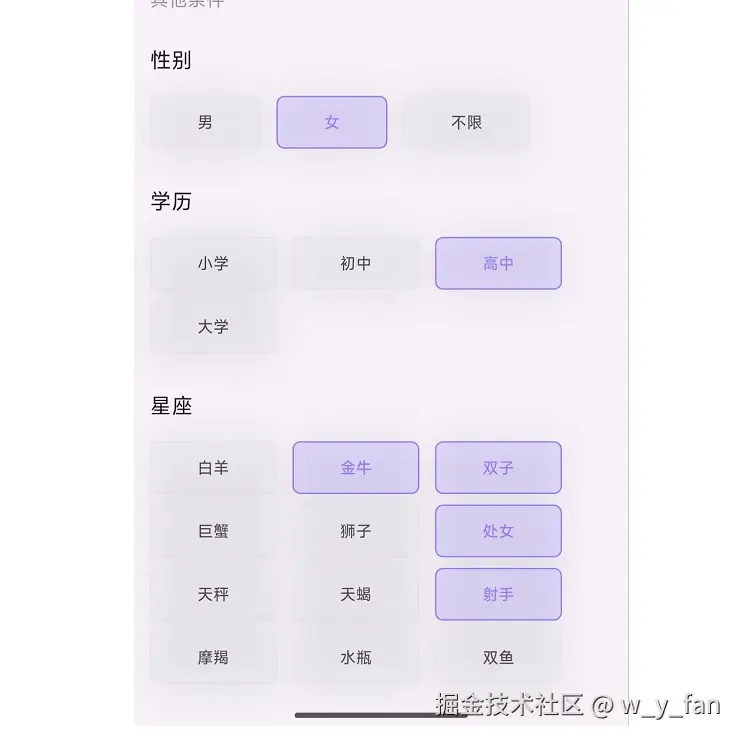
一组选择按钮:
group_button: ^5.3.4
GroupButton(buttons: sex, options: groupButtonOptions()),
GroupButtonOptions groupButtonOptions() {
return GroupButtonOptions(
elevation: 0,
mainGroupAlignment: MainGroupAlignment.start,
textPadding: const EdgeInsets.symmetric(vertical: 2, horizontal: 12),
runSpacing: 0,
spacing: 12,
borderRadius: BorderRadius.circular(6),
unselectedColor: WcaoTheme.outline.withOpacity(.25),
selectedColor: WcaoTheme.primary.withOpacity(.2),
unselectedBorderColor: WcaoTheme.outline,
selectedBorderColor: WcaoTheme.primary,
unselectedTextStyle: TextStyle(
color: WcaoTheme.base.withOpacity(.85),
fontSize: WcaoTheme.fsSm,
),
selectedTextStyle: TextStyle(
color: WcaoTheme.primary,
fontSize: WcaoTheme.fsSm,
),
);
}