

官网:http://securitytech.cc/
macOS 微内核 | 用于注入的 IPC 消息
在本文中,我们聚焦于 Mach 微内核的基础,特别是内核如何通过 IPC(进程间通信)实现进程之间的通信。
这对 macOS 的安全研究(利用链/实时测试)非常重要,尤其是在你开始考虑像进程/代码注入这样的技术时。
我会把这篇文章保持在核心 IPC 消息概念上。关于实际注入技术我会另写几篇文章并在准备好后把链接放在这里。
Mach 进程间通信(核心)
在 Mach 中,任务(tasks) 是用于管理和共享资源的基本单位。每个任务可以包含一个或多个 线程(threads),线程是 CPU 调度的执行单元。
任务通过 Mach IPC 相互通信,Mach IPC 依赖单向通信通道。
这些消息通过 端口(ports) 传递,端口类似内核管理的消息队列,可以保存结构化的 Mach 消息。
一个 Mach 消息通常有固定的头(header)和承载数据的自定义体(body)。
任务使用端口权限(port rights)来发送或接收消息,端口权限定义了任务对端口可执行的操作。
任务使用端口权限名(port right names)来标识端口权限,这些名字只是普通整数。
RECEIVE 权限让任务能从端口读取(出队)消息。整个系统中对于某个给定端口,只有一个任务能持有该端口的 RECEIVE 权限。持有此权限的任务也可以为该端口创建 SEND 或 SEND_ONCE 权限,这允许它向该端口发送多个消息或仅发送一次消息。
当任务创建一个端口时,它会自动得到 RECEIVE 和 SEND 两种权限。起初,SEND 权限只允许任务发送消息给自己,这并不有用。为了允许与其他任务进行双向通信,需要第三方(例如 bootstrap server)来把 SEND 权限分发给它们。
在 macOS 上,bootstrap server 是 launchd,它是最先启动的进程,始终拥有进程 ID(PID)为 1:
按回车或点击可查看大图

好的,那么……
让我们看看两个任务如何使用我做的这个示意 ASCII 来建立通信通道:
1. Task A creates a new port and gets the RECEIVE right.+---------+
| Task A  |
|---------|
| RECEIVE |
|  right  |
+---------+Port A created...2. Task A now creates a SEND right for the port.+---------+
| Task A  |
|---------|
| RECEIVE |
|  right  |
| SEND    |
|  right  |
+---------+Port A:
[Messages can be sent to Task A]3. Task A registers the port and its SEND right with the bootstrap server using a service name.+---------+          +-----------------+
| Task A  |--------->|  Bootstrap      |
|---------| Register |   Server        |
| RECEIVE |          |  (launchd)      |
| SEND    |          +-----------------+
+---------+4. Task B asks the bootstrap server for the service. The server sends a copy of the SEND right to Task B.+---------+          +-----------------+          +---------+
| Task B  |<---------|  Bootstrap      |<---------| Task A  |
|         |  Lookup  |   Server        |  SEND   | SEND    |
|         |          |  (launchd)      | right   | right   |
+---------+          +-----------------+          +---------+5. Now that Task B has a SEND right, it can send messages directly to Task A.+---------+             +---------+
| Task B  |---Message-->| Task A  |
| SEND    |             | RECEIVE |
| right   |             | right   |
+---------+             +---------+Communication established!
(译注:上面是示意流程 —— A 创建端口并持有 RECEIVE 和 SEND,向 bootstrap 注册;B 通过 bootstrap 获取 A 的 SEND 权限后就能向 A 发送消息。)
好的,现在让我们探索一个重要的安全问题。
bootstrap server 实际上无法真正检查某个任务声明的服务名是否真的属于该任务。
这意味着某个任务可能会冒充为系统服务并接管本不该属于它的任务。(可能导致服务劫持 / hijacking)
为防止这种情况,Apple 在 配置文件 中保留了一份所有真实系统服务的清单,并且指明哪个二进制属于哪个服务。这些文件可以在 /System/Library/LaunchDaemons & LaunchAgents 中找到,而且别忘了 SIP(系统完整性保护):
按回车或点击可查看大图

bootstrap server 还会为每个服务名保留一个 RECEIVE 权限以确保只有真实、受信任的任务能使用它们。
对于这些内建服务,lookup 的流程会有所不同。Launchd(bootstrap server)会在被请求时自动启动对应服务。再来看一次示意 ASCII:
1. Task B asks the bootstrap server (launchd) for a service by name.+---------+          +-----------------+
| Task B  |--------->|  Bootstrap      |
|         |  Lookup  |   Server        |
+---------+          |  (launchd)      |
+-----------------+2. If Task A (the service) isn’t running, launchd starts it.+---------+          +-----------------+          +---------+
| Task B  |          |  Bootstrap      |          | Task A  |
|         |          |   Server        |          | Service |
| Lookup  |          |  (launchd)      |--Start-->+---------+
+---------+          +-----------------+          | RECEIVE |
| right   |
+---------+3. Task A performs a bootstrap check-in.
-launchd keeps a SEND right and gives Task A the RECEIVE right.+---------+          +-----------------+          +---------+
| Task B  |          |  Bootstrap      |          | Task A  |
|         |          |   Server        |          | Service |
| Lookup  |          |  (launchd)      |          | RECEIVE |
+---------+          | Keeps SEND      |          | right   |
| right for A     |          +---------+
+-----------------+
4. Now Task B can send messages to Task A.+---------+             +-----------------+          +---------+
| Task B  |<---SEND---- |  Bootstrap      |          | Task A  |
|         |   right     |   Server        |          | Service |
+---------+             |   (launchd)     |          | RECEIVE |
+-----------------+          | right   |
+---------+Communication established!
如我所说,这个新流程只对内建的系统任务有效。其他普通任务仍然按之前的方式工作,因此你仍然可以(针对非系统任务)做服务劫持。
编码 / API
好,我们来看看这两个文件(一个 sender、一个 receiver)的示例,它们展示了如何设置一个基本的 IPC 通道(示例参考资料见链接)。
receiver.c
#include <stdio.h>
#include <mach/mach.h>
#include <servers/bootstrap.h>

int main() {
// Create a new port.
mach_port_t port;
kern_return_t kr = mach_port_allocate(mach_task_self(), MACH_PORT_RIGHT_RECEIVE, &port);
if (kr != KERN_SUCCESS) {
printf("mach_port_allocate() failed with code 0x%x\n", kr);
return 1;
}
printf("mach_port_allocate() created port right name %d\n", port);

// Give us a send right to this port, in addition to the receive right.
kr = mach_port_insert_right(mach_task_self(), port, port, MACH_MSG_TYPE_MAKE_SEND);
if (kr != KERN_SUCCESS) {
printf("mach_port_insert_right() failed with code 0x%x\n", kr);
return 1;
}
printf("mach_port_insert_right() inserted a send right\n");

// Send the send right to the bootstrap server, so that it can be looked up by other processes.
kr = bootstrap_register(bootstrap_port, "org.darlinghq.example", port);
if (kr != KERN_SUCCESS) {
printf("bootstrap_register() failed with code 0x%x\n", kr);
return 1;
}
printf("bootstrap_register()'ed our port\n");

// Wait for a message.
struct {
mach_msg_header_t header;
char some_text[10];
int some_number;
mach_msg_trailer_t trailer;
} message;

kr = mach_msg(
&message.header,  // Same as (mach_msg_header_t *) &message.
MACH_RCV_MSG,     // Options. We're receiving a message.
0,                // Size of the message being sent, if sending.
sizeof(message),  // Size of the buffer for receiving.
port,             // The port to receive a message on.
MACH_MSG_TIMEOUT_NONE,
MACH_PORT_NULL    // Port for the kernel to send notifications about this message to.
);
if (kr != KERN_SUCCESS) {
printf("mach_msg() failed with code 0x%x\n", kr);
return 1;
}
printf("Got a message\n");

message.some_text[9] = 0;
printf("Text: %s, number: %d\n", message.some_text, message.some_number);
}
在第 10 行,任务调用 mach_port_allocate 来创建一个新端口。port 变量保存表示任务权限的端口权利(port right)。
然后在第 19 行,它用 mach_port_insert_right 为同一端口创建了一个 SEND 权限。接着在第 28 行,代码调用(已弃用的)bootstrap_register API,用服务名 "org.darlinghq.example" 把端口注册到 bootstrap server。bootstrap_port 变量保存了对 bootstrap server 的 SEND 权利。最后,在第 44 行,它调用 mach_msg 来等待并接收一条消息。
sender.c
#include <stdio.h>
#include <mach/mach.h>
#include <servers/bootstrap.h>

int main() {
// Lookup the receiver port using the bootstrap server.
mach_port_t port;
kern_return_t kr = bootstrap_look_up(bootstrap_port, "org.darlinghq.example", &port);
if (kr != KERN_SUCCESS) {
printf("bootstrap_look_up() failed with code 0x%x\n", kr);
return 1;
}
printf("bootstrap_look_up() returned port right name %d\n", port);

// Construct our message.
struct {
mach_msg_header_t header;
char some_text[10];
int some_number;
} message;

message.header.msgh_bits = MACH_MSGH_BITS(MACH_MSG_TYPE_COPY_SEND, 0);
message.header.msgh_remote_port = port;
message.header.msgh_local_port = MACH_PORT_NULL;

strncpy(message.some_text, "Hello", sizeof(message.some_text));
message.some_number = 35;

// Send the message.
kr = mach_msg(
&message.header,  // Same as (mach_msg_header_t *) &message.
MACH_SEND_MSG,    // Options. We're sending a message.
sizeof(message),  // Size of the message being sent.
0,                // Size of the buffer for receiving.
MACH_PORT_NULL,   // A port to receive a message on, if receiving.
MACH_MSG_TIMEOUT_NONE,
MACH_PORT_NULL    // Port for the kernel to send notifications about this message to.
);
if (kr != KERN_SUCCESS) {
printf("mach_msg() failed with code 0x%x\n", kr);
return 1;
}
printf("Sent a message\n");
}
如果简单说,第 10 行任务使用 bootstrap_look_up (服务名 "org.darlinghq.example")从 bootstrap server 查找接收端端口。它得到的 port 变量是 bootstrap server 给出的一个 SEND 权利。之后,代码构建一个 Mach 消息并使用 mach_msg 发送它。
消息本身由两部分组成:一个头(header)和一个体(body)。头始终是相同类型的 mach_msg_header_t,包括 msgh_bits(消息属性)、msgh_remote_port(发送目标端口)和 msgh_local_port(本地端口,在这里是 NULL)等字段。体是自定义的,这个示例中包含一个名为 some_text 的文本数组和一个名为 some_number 的整型。
按回车或点击可查看大图
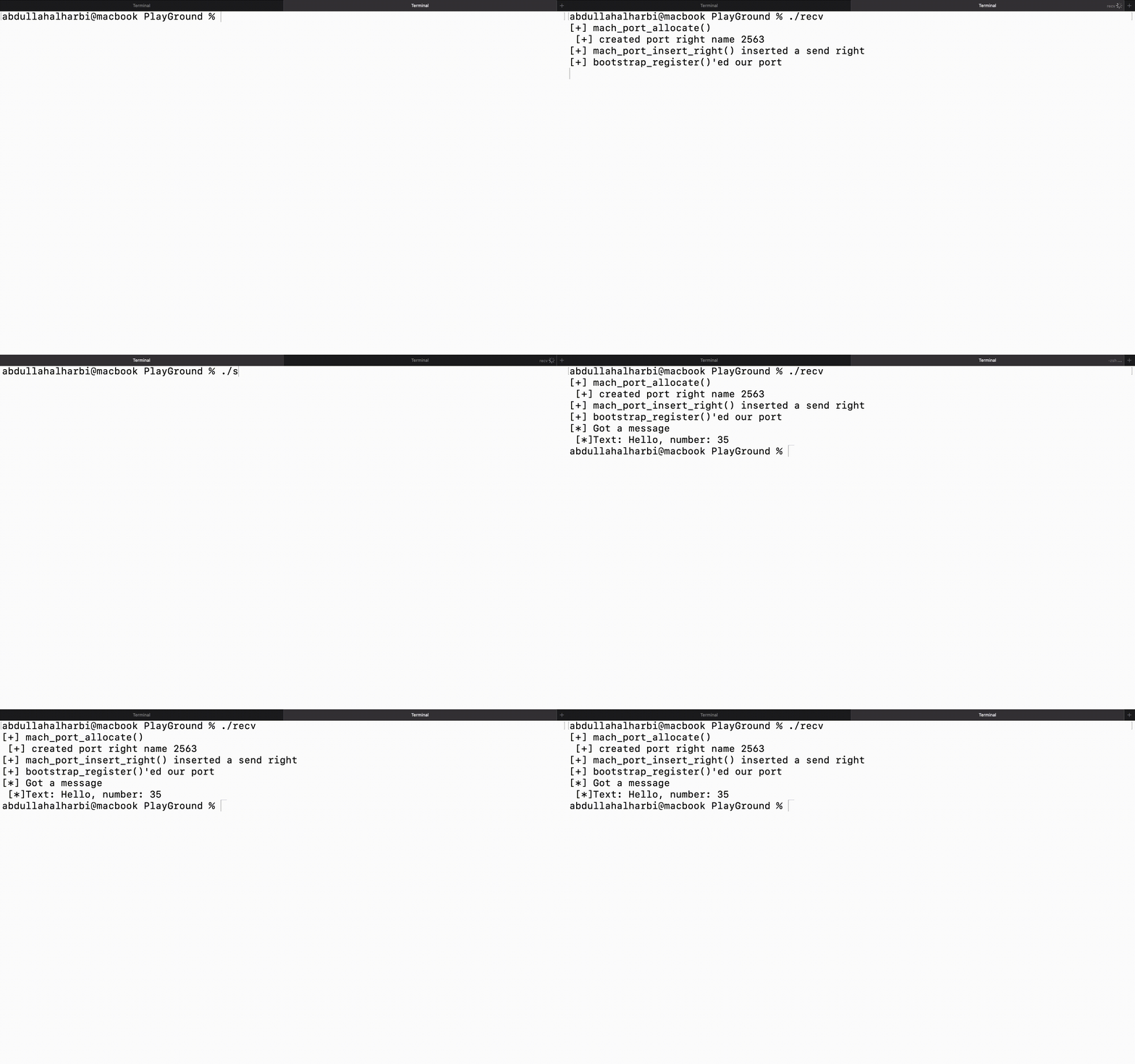
我稍微改进了输出。
你会看到端口权利名在每个任务中都是不同的。它们代表不同的权限,而且这些整数只在各自任务内部有意义,放到别的任务中没有意义。
谢谢!
参考
查看 mach 特殊端口 & 在这种情况下的注入攻击向量。

