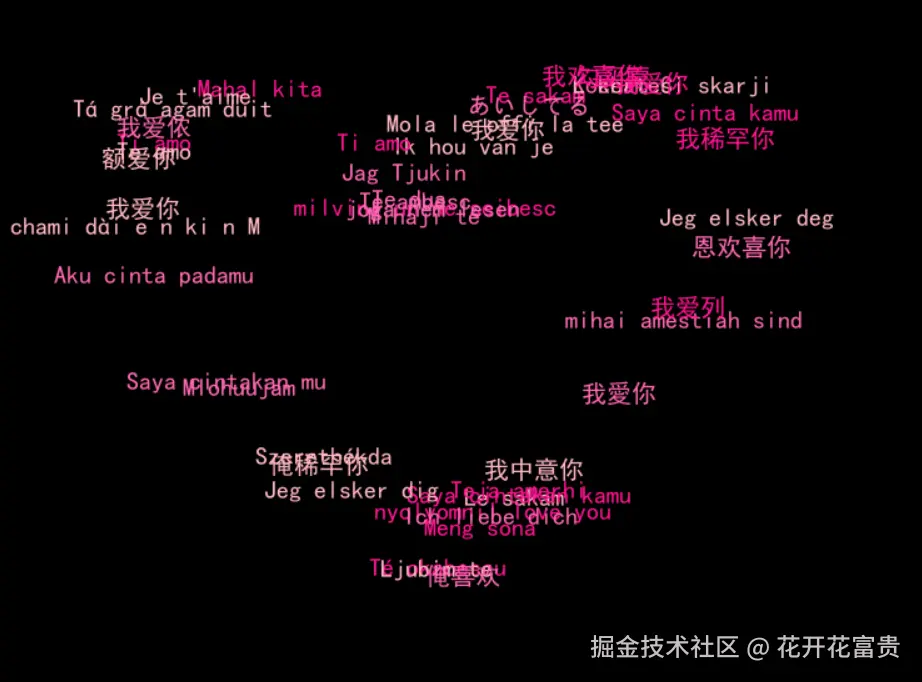
import pygame
import random
import sys
import math
import os
pygame.init()
width, height = 1000, 800
screen = pygame.display.set_mode((width, height))
def get_font(size):
font_paths = [
"C:/Windows/Fonts/simhei.ttf",
"C:/Windows/Fonts/msyh.ttc",
"C:/Windows/Fonts/simsun.ttc",
"/System/Library/Fonts/PingFang.ttc",
"/System/Library/Fonts/Arial.ttf",
"/usr/share/fonts/truetype/droid/DroidSansFallbackFull.ttf",
"/usr/share/fonts/truetype/wqy/wqy-microhei.ttc",
]
for font_path in font_paths:
if os.path.exists(font_path):
try:
return pygame.font.Font(font_path, size)
except:
continue
try:
return pygame.font.SysFont("Arial", size)
except:
return pygame.font.Font(None, size)
font = get_font(20)
title_font = get_font(36)
love_texts = [
"Mola le offi la tee",
"mihai amestiah sind",
"milvini un ne seibesc",
"Le sakam",
"Mlohuujam",
"Te sakam",
"chami dài e n ki n M",
"Te dua",
"Té okabescu",
"Tá grá agam duit",
"Kocham Ci",
"Saya cintakan kamu",
"我爱你",
"Te ambesc",
"Mahal kita",
"Jeg elsker deg",
"Mihaji té",
"Meng sona",
"Szerethékda",
"Jag Tjukin",
"Teja amerhi",
"L kertesi skarji",
"joga nem lesen",
"nyolyomni"
"I love you",
"Je t'aime",
"Ich liebe dich",
"Ti amo",
"Te amo",
"あいしてる",
"我爱你",
"我中意你",
"我爱侬",
"我欢喜你",
"我爱你",
"我愛你",
"勾买蒙",
"额爱你",
"恩欢喜你",
"我爱列",
"Ik hou van je",
"Saya cintakan mu",
"Ti amo",
"Jeg elsker dig",
"Aku cinta padamu",
"Saya cinta kamu",
"Ljubim te",
"俺喜欢",
"我稀罕你",
"俺稀罕你"
]
love_points = []
for t in range(1000):
theta = t / 1000 * 2 * math.pi
x = 15 * (pow(math.sin(theta), 3))
y = 10 * math.cos(theta) - 5 * math.cos(2 * theta) - 2 * math.cos(3 * theta) - math.cos(4 * theta)
x = x * 18 + width // 2
y = -y * 18 + height // 2
love_points.append((int(x), int(y)))
text_objects = []
colors = [
(255, 182, 193),
(255, 105, 180),
(255, 20, 147),
]
print("测试字体渲染...")
for text in love_texts:
try:
test_surface = font.render(text, True, (255, 255, 255))
print(f"成功渲染: {text}")
except Exception as e:
print(f"渲染失败: {text} - 错误: {e}")
for i, text in enumerate(love_texts):
color = colors[i % len(colors)]
try:
if not isinstance(text, str):
text = str(text)
text_surface = font.render(text, True, color)
except Exception as e:
print(f"渲染失败 '{text}': {e}")
text_surface = font.render("Love", True, color)
idx = random.randint(0, len(love_points) - 1)
x, y = love_points[idx]
speed_x = random.uniform(-0.15, 0.15)
speed_y = random.uniform(-0.15, 0.15)
text_objects.append({
"surface": text_surface,
"text": text,
"x": x,
"y": y,
"speed_x": speed_x,
"speed_y": speed_y,
"target_idx": idx,
"color": color
})
try:
title_text = title_font.render("", True, (255, 255, 255))
except:
title_text = title_font.render("I Love You in Multiple Languages", True, (255, 255, 255))
instruction_font = get_font(16)
instruction_text = instruction_font.render("按ESC键退出", True, (150, 150, 150))
clock = pygame.time.Clock()
running = True
while running:
for event in pygame.event.get():
if event.type == pygame.QUIT:
running = False
elif event.type == pygame.KEYDOWN:
if event.key == pygame.K_ESCAPE:
running = False
screen.fill((0, 0, 0))
screen.blit(title_text, (width // 2 - title_text.get_width() // 2, 20))
screen.blit(instruction_text, (width - instruction_text.get_width() - 10, height - 30))
for obj in text_objects:
text_rect = obj["surface"].get_rect(center=(obj["x"], obj["y"]))
screen.blit(obj["surface"], text_rect)
target_x, target_y = love_points[obj["target_idx"]]
obj["x"] += (target_x - obj["x"]) * 0.02 + obj["speed_x"]
obj["y"] += (target_y - obj["y"]) * 0.02 + obj["speed_y"]
obj["target_idx"] = (obj["target_idx"] + 1) % len(love_points)
if obj["x"] < 0 or obj["x"] > width:
obj["speed_x"] *= -1
if obj["y"] < 50 or obj["y"] > height - 50:
obj["speed_y"] *= -1
fps_text = font.render(f"FPS: {int(clock.get_fps())}", True, (100, 100, 100))
screen.blit(fps_text, (10, height - 30))
pygame.display.flip()
clock.tick(60)
pygame.quit()
sys.exit()