npm i --save chatarea
<template>
<div class="demo-wrap">
<div class="editor-container" ref="rich">
<div class="textarea">
<div ref="elmRef" class="chat-elm"></div>
</div>
<div class="expand_btn_wrapper" v-show="show">
<span class="icon"><svg xmlns="http://www.w3.org/2000/svg" width="1em" height="1em" fill="none" viewBox="0 0 24 24"><path fill="currentColor" d="M22 3v7a1 1 0 1 1-2 0V4h-6a1 1 0 1 1 0-2h7a1 1 0 0 1 1 1M11.005 21a1 1 0 0 1-1 1H3a1 1 0 0 1-1-1v-7a1 1 0 0 1 2.002 0v6h6.003a1 1 0 0 1 1 1"></path></svg></span>
<span style="font-size:14px;">模板</span></div>
</div>
<div class="rich-text-bottom">
<div class="left-area">
<span :class="['deepthink', {active: deepthink}]" @click="handleDeepThink">深度搜索</span>
<span :class="['knowledge', {active: show}]" @click="handleShow">知识库</span>
</div>
<div class="right-area">
<div :class="['send', {active: query.trim().length != 0} ]" @click="sendMsg">发送</div>
</div>
</div>
</div>
</template>
<script>
import ChatArea from 'chatarea'
import 'chatarea/lib/ChatArea.css'
export default {
name: 'demo',
data () {
return {
chat: null,
query: '',
deepthink: false,
show: false
}
},
mounted () {
this.initChat()
},
methods: {
initChat () {
this.chat = new ChatArea({
elm: this.$refs.elmRef,
placeholder: '请输入问题,Shift+Enter换行',
needCallEvery: false,
device: 'pc',
wrapKeyFun: (event) => event.shiftKey && event.key === 'Enter',
selectList: [
{
dialogTitle: '工作类型',
key: 'job',
options: [
{ id: '1', name: '前端工程师', },
{ id: '2', name: '后端工程师', },
{ id: '3', name: '运维工程师', },
{ id: '4', name: 'Python人工智能' },
]
}, {
dialogTitle: '风格',
key: 'style',
options: [
{ id: '1', name: '人像摄影', },
{ id: '2', name: '电影写真', },
{ id: '3', name: '中国风', },
{ id: '4', name: '动漫', },
{ id: '5', name: '3D渲染',},
{ id: '6', name: '赛博朋克', }
]
}
],
})
document.addEventListener('keydown',(e)=>{
if (e.keyCode === 27 && this.chat != null) {
console.log('ESC');
this.chat.closeTipTag()
}
})
console.log(this.chat);
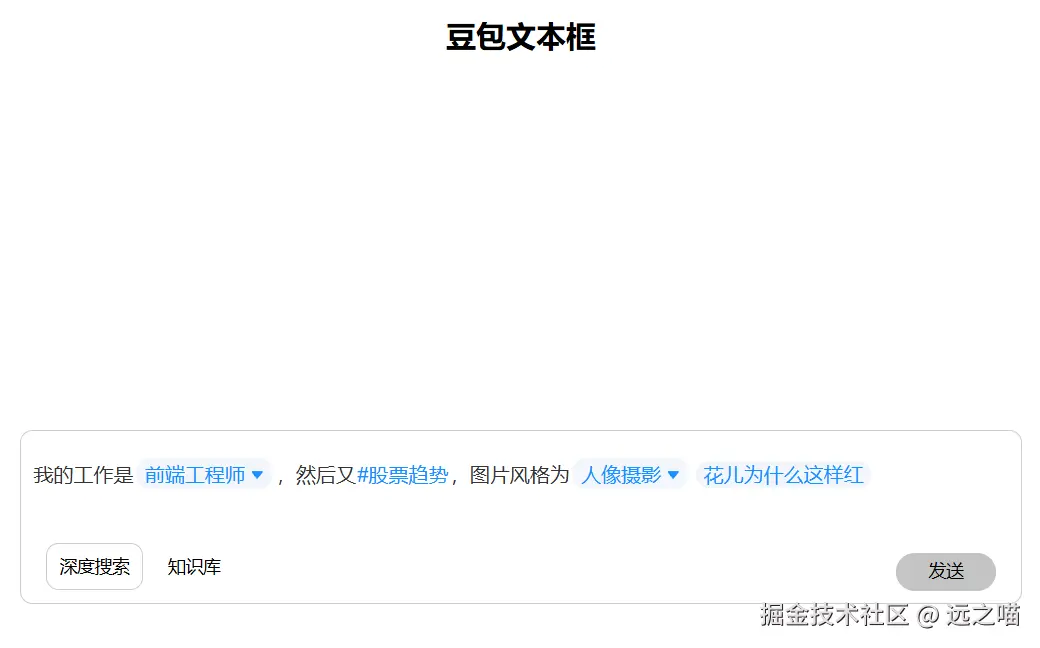
const opNode = this.chat.createOperateNode()
opNode.insertNode({
type: 'gridBox',
rank: '0001',
children: [
{
type: 'gridInput',
rank: '00010001',
text: '我的工作是'
},
{
type: 'selectTag',
rank: '00010002',
dataset: {
id: '1',
name: '前端工程师',
key: 'job'
}
},
{
type: 'gridInput',
rank: '00010003',
text: ',然后又'
},
{
type: 'customTag',
rank: '00010004',
dataset: { id: '1', name: '股票趋势', prefix: '#' }
},
{
type: 'gridInput',
rank: '00010005',
text: ',图片风格为'
},
{
type: 'selectTag',
rank: '00010006',
dataset:{
id: '1',
name: '人像摄影',
key: 'style'
},
},
{
type: 'gridInput',
rank: '00010007',
text: ''
},
{
type: 'inputTag',
rank: '00010008',
dataset: {
key: 'title',
placeholder: '[请输入文章题目]',
value: '花儿为什么这样红'
}
},
{
type: 'gridInput',
rank: '00010009',
text: ''
}
]
})
this.chat.addEventListener('enterSend', this.sendMsg)
this.chat.richText.addEventListener('input',(e)=>{
try {
this.query = this.chat.getText()
} catch (e) {
this.query = ''
}
if (e.code=== 'Enter'&&!e.shiftKey) {
e.preventDefault();
}
})
},
template(){
},
handleDeepThink(){
this.deepthink = !this.deepthink
},
handleShow(){
this.show = !this.show
if (this.show) {
this.chat.openTipTag({
tagLabel: '写作',
popoverLabel: '点击退出技能',
codeLabel: 'ESC'
})
}
},
sendMsg () {
if (!this.chat || !this.query) return
console.log('send',this.query);
const htmlMsg = this.chat.getHtml({
identifyLink: true
})
const textMsg = this.chat.getText({
imgToText: true
})
const callUserList = this.chat.getCallUserList()
}
},
beforeDestroy () {
if (this.chat) {
this.chat.dispose()
this.chat = null
}
}
} </script>
<style scoped lang="less">
.demo-wrap {
width: 800px;
margin: 0 auto;
margin-top: 300px;
border: 1px solid #ccc;
border-radius: 10px;
& .editor-container{
& .textarea{
padding: 10px 0;
width: 100%;
}
display: flex;
.expand_btn_wrapper{
user-select: none;
cursor: pointer;
width: 68px;
height: 32px;
display: flex;
justify-content: space-around;
align-items: center;
.icon{
line-height: 32px;
display: flex;
align-items: center;
}
}
}
.chat-elm {
// flex: 1;
max-height: 100px;
overflow-y: auto;
overflow-x: hidden;
text-align: left;
// border: 1px solid #c6c6c6;
background: #fff;
:deep(.at-user) {
color: #269aff;
}
/deep/ .chat-tip-tag {
transform: translateY(5px) !important;
}
:deep(.chat-select-dialog-main::-webkit-scrollbar){
display: none;
}
.chat-select-dialog-main::-webkit-scrollbar{
display: none !important;
}
:deep(.chat-placeholder-wrap) {
color: #ccc;
}
}
.chat-elm::-webkit-scrollbar{
width: none;
background-color: transparent;
}
.rich-text-bottom{
display: flex;
font-size: 14px;
justify-content: space-between;
padding: 10px;
& .left-area{
margin-left: 10px;
.deepthink{
cursor: pointer;
border: 1px solid #ccc;
border-radius: 10px;
padding: 10px;
background-color: #fff;
}
.deepthink.active{
background-color: #e5eeff;
color: #0057ff;
}
.knowledge{
cursor: pointer;
margin-left: 10px;
border-radius: 10px;
padding: 10px;
background-color: #fff;
}
.knowledge.active {
background-color: #e5eeff;
color: #0057ff;
}
}
& .right-area{
margin-right: 10px;
& .send{
cursor: not-allowed;
user-select: none;
border-radius: 15px;
width: 80px;
line-height: 30px;
background-color: #c3c3c3;
}
& .send.active{
cursor: pointer;
color: #fff;
background-color: #0057ff;
}
}
}
}
</style>
```
```



