1 标题
1、层次结构:
Latex的文档层次结构大约有5层,分别是:
section — subsection — subsubsection — paragraph — subparagraph
2、实例:
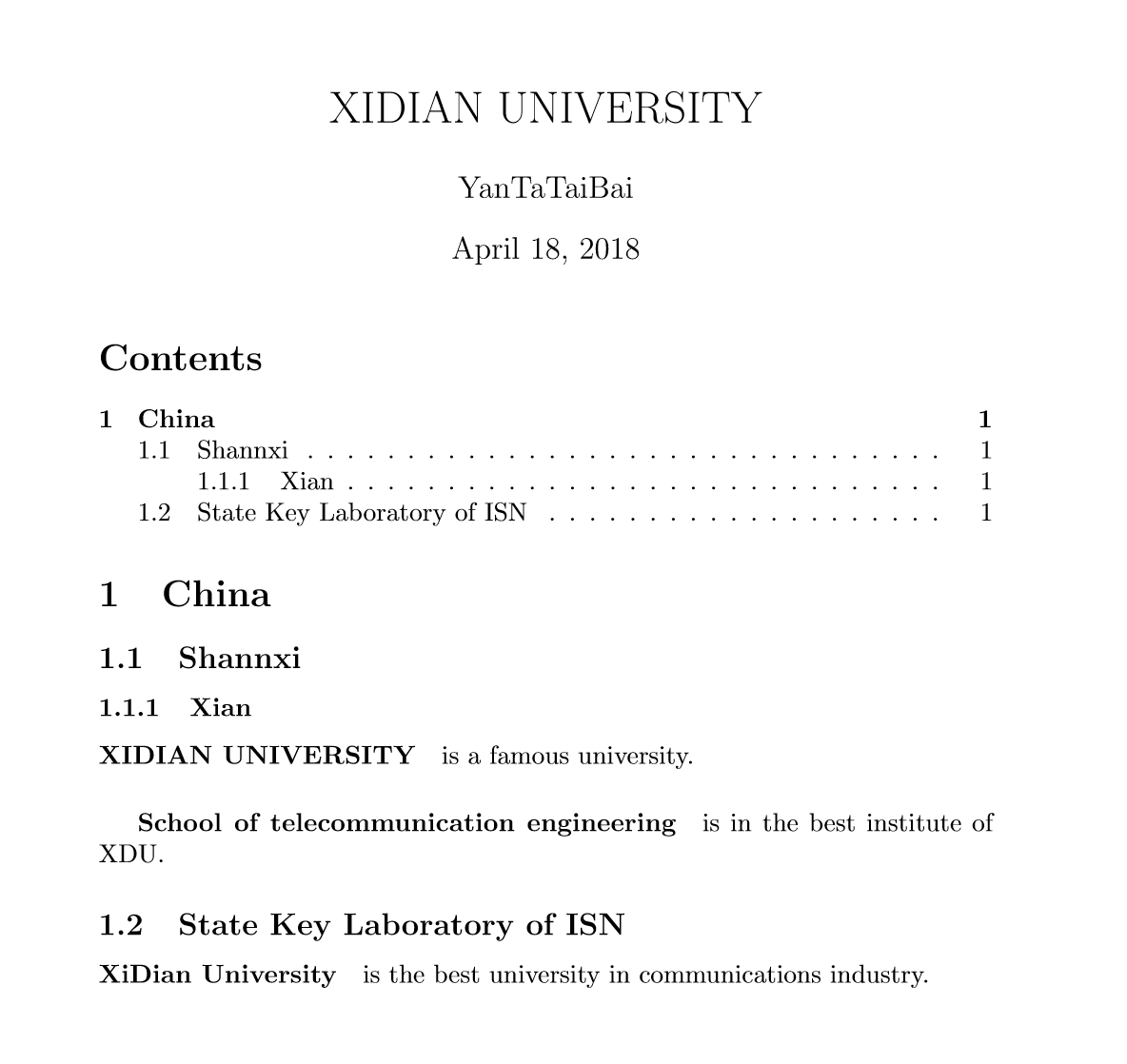
*3、代码:*
\documentclass{article}
   \title{XIDIAN UNIVERSITY}                     %———总标题
   \author{YanTaTaiBai}
\begin{document}
   \maketitle                               % —— 显示标题
\tableofcontents                              %—— 制作目录(目录是根据标题自动生成的)
   \section{China}                           %——一号子标题  China is in East Asia.
     \subsection{Shannxi}                      %——二号子标题  Beijing is the capital of China.
       \subsubsection{Xian}                    %——三号子标题
         \paragraph{XIDIAN UNIVERSITY}is a famous university.  %{}中的内容加粗显示
           \subparagraph{School of telecommunication engineering} is in the best institute of XDU.
       \subsection{State Key Laboratory of ISN }
         \paragraph{XiDian University} is the best university in communications industry.
\end{document}
2 注释
Latex注释是我们常用的命名,总体可分为单行,多行和批量。
场景:单行注释用%: 方法:
增加注释:每行添加一个%
取消注释:逐个删掉%
2.场景:多行注释可以用if false和fi命令
if false
需要多行注释的文本
fi
- 基于注释包的批量多行注释:
方法(1)顶部导入包:
\usepackage{verbatim}
(2)注释文字处:
\begin{comment} 需批量注释的文本
\end{comment}
- 工具的简便注释方法
WinEdt中,选中要注释的内容,右键选择Insert Comment,WinEdt自动为每行添加%,完成多行注释。
取消多行注释时,选中待取消注释的区域文字,右键选择Remove Comment,WinEdt会自动为每行去掉%,即可实现取消注释。
3 表格使用情况
现有一个表格,若要把表格标题放在表格下面,则把\caption{***}这一行代码放在下面,如下所示:
\begin{table}\[H]
\renewcommand{\arraystretch}{1.3}
\centering
\begin{tabular}{c|cc|cc}
\hline
\hline
\end{tabular}
\caption{***}
\label{tab1}
\end{table}
若要把表格标题放在表格上面,则把\caption{***}这一行代码放在上面,如下所示:
\begin{table}\[H]
\renewcommand{\arraystretch}{1.3}
\caption{***}
\label{tab1}
\centering
\begin{tabular}{c|cc|cc}
\hline
\hline
\end{tabular}
\end{table}
注意: \label{tab1}一定要放在\caption{***}后面
3.1 表格列宽
\begin{tabular}{ | c | c | c | p{2cm} |}
	\hline
	Day & Min Temp & Max Temp & This is a loooooonger title \\ \hline
	Monday & 11C & 22C & A  \\ \hline
	Tuesday & 9C & 19C & B  \\ \hline
\end{tabular}

————————————————
版权声明:上面内容为CSDN博主「yhl_leo」的原创文章部分内容,遵循CC 4.0 BY-SA版权协议,转载请附上原文出处链接及本声明。
原文链接:blog.csdn.net/YhL_Leo/art…
3.2 表格内换行
\makecell[居中情况]{第1行内容 \ 第2行内容 \ 第3行内容 ...}
也就是说,只需要在换行的地方键入 \ 即可实现。[居中情况] 包括 r,c,l,分别表示靠右、居中、靠左。
4 算法
4.1 algorithmic
\usepackage{algorithm}
\usepackage{algorithmic}
% \usepackage{algpseudocode}  % 这个和algorithmic不兼容,用了就要报错,好多莫名其妙的错误!!!!!
\renewcommand{\algorithmicrequire}{ \textbf{Input:}}     %Use Input in the format of Algorithm
\renewcommand{\algorithmicensure}{ \textbf{Output:}}    %UseOutput in the format of Algorithm


\title{test}
\author{XXX}
\date{June 2022}

\begin{document}

\maketitle

%哈哈哈
\section{Introduction}
你好啊\par
你好啊\\ %这个是注释
你好啊

\begin{center}
    来个居中吧
\end{center}

\begin{algorithm}
	\caption{Calculate $y = x^n$}
	\label{alg3}
    \begin{algorithmic}
		\REQUIRE $n \geq 0 \vee x \neq 0$
		\ENSURE $y = x^n$

		\STATE $y \gets 1$
		\IF{$n < 0$}
		\STATE $X \gets 1 / x$
		\STATE $N \gets -n$
		\ELSE
		\STATE $X \gets x$
		\STATE $N \gets n$
		\ENDIF
		\WHILE{$N \neq 0$}
		\IF{$N$ is even}
		\STATE $X \gets X \times X$
		\STATE $N \gets N / 2$
		\ELSE[$N$ is odd] \STATE $y \gets y \times X$
		\STATE $N \gets N - 1$
		\ENDIF
		\ENDWHILE

	\end{algorithmic}
\end{algorithm}
4.2 Algorithmicx
\usepackage{algorithm}
\usepackage{algorithmicx}
\usepackage{algpseudocode}  % 这个和algorithmic不兼容,用了就要报错,好多莫名其妙的错误!!!!!
\renewcommand{\algorithmicrequire}{ \textbf{Input:}}     %Use Input in the format of Algorithm
\renewcommand{\algorithmicensure}{ \textbf{Output:}}    %UseOutput in the format of Algorithm

\State initialize a tree $T_{i}$ with only a leaf (the root);

\begin{algorithm}
	\caption{HHS \cite{Branch1998}}
	\label{hhsa}
	\begin{algorithmic}[1]  %1表示每隔一行编号
		\Require The original signal $x$.
		\Ensure  The energy-time-frequency distribution of $x$.
		\Function{EMD}{$x, seg\_len$}
		\State $ N \gets length(x) / seg\_len$;
		\For {$i=1 \to i=N$}
		\State $seg(i) \gets x(1+(i-1)*seg\_len : i*seg\_len)$;
		\EndFor
		\EndFunction
	\end{algorithmic}
\end{algorithm}
5 公式
$ 1+2= 3 $:
$$
\begin{align*}
\dot{x} & = \sigma(y-x) \\
\dot{y} & = \rho x - y - xz  \\
\end{align*}
$$
显示为
6 代码缩进
TODO
7 列表
下面这个语法只能在overleaf中使用
\begin{itemize}
\item One entry in the list
\item Another entry in the list
\end{itemize}

\begin{enumerate}
\item The labels consists of sequential numbers.
\item The numbers starts at 1 with every call to the enumerate environment.
\end{enumerate}
8 overleaf的引用
参考
[1]latex注释,zhuanlan.zhihu.com/p/91119874
[2]overleaf插图,blog.csdn.net/xovee/artic…
[3]overleaf插图2,zhuanlan.zhihu.com/p/143529262
[4]overleaf30分钟教程,imztj.cn/?p=3073#i-5
[5]latex公式,latex.91maths.com/
[6]overleaf公式,zhuanlan.zhihu.com/p/266241159
[7]overleaf公式2,blog.csdn.net/golden13145…
[8]表格生成,tablesgenerator.com/#
[9]表格居中,www.cnblogs.com/qq952693358…
[10]8分钟高能使用overleaf,www.bilibili.com/video/BV1cg…
[11]latex算法,blog.csdn.net/qq_36607894…
[12]latex算法2,www.wandouip.com/t5i367618/
[13]插入真实的代码,www.overleaf.com/learn/latex…
[14]引用,blog.csdn.net/weixin_4498…
[15]latex公式输入,zhuanlan.zhihu.com/p/110756681
[16]latex公式输入,zhuanlan.zhihu.com/p/99406531
[17]缩进,tex.stackexchange.com/questions/4…
[18]overleaf Else, tex.stackexchange.com/questions/1…
[19]latex代码的位置blog.csdn.net/xovee/artic…
[20]显示所有的引用,blog.csdn.net/OOFFrankDur…
[21]列表,blog.csdn.net/xovee/artic…
[22]表格换行,blog.csdn.net/u014546828/…
[23] LaTeX的表格标题位置blog.csdn.net/weixin_3831…