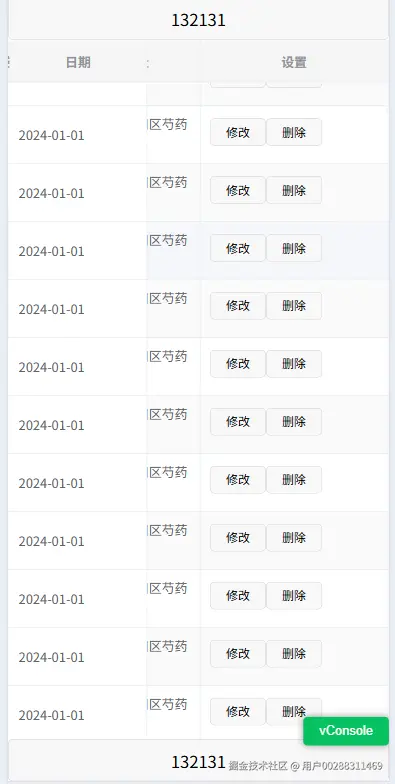
<template>
  <view class="demo">
    <view class="demo-header"><button>132131</button></view>
    <view class="demo-content">
      <z-paging ref="zPagingRef" :refresher-only="true" :lower-threshold="'300rpx'" :fixed="false">
        <view class="uni-container">
          <uni-table ref="table" border stripe emptyText="暂无更多数据">
            <uni-tr class="table-header">
              <uni-th width="150" class="fixed" align="center">日期</uni-th>
              <uni-th width="150" align="center">姓名</uni-th>
              <uni-th align="center">地址</uni-th>
              <uni-th width="204" align="center">设置</uni-th>
            </uni-tr>

            <uni-tr v-for="(item, index) in tableData" :key="index">
              <uni-td class="fixed">{{ item.date }}</uni-td>
              <uni-td>
                <view class="name">{{ item.name }}</view>
              </uni-td>
              <uni-td align="center">{{ item.address }}</uni-td>
              <uni-td>
                <view class="uni-group">
                  <button class="uni-button" size="mini">修改</button>
                  <button class="uni-button" size="mini">删除</button>
                </view>
              </uni-td>
            </uni-tr>
          </uni-table>
        </view>
      </z-paging>
    </view>
    <view class="demo-header"><button>132131</button></view>
  </view>
</template>

<script lang="ts" setup>
const tableData = Array.from({ length: 20 }).map((_, index) => ({
  date: '2024-01-01',
  name: '张三',
  address: '北京市朝阳区芍药居',
}));
</script>

<style lang="scss">
.demo {
  display: flex;
  flex-direction: column;
  width: 100%;
  height: 100%;
  overflow: hidden;
  .demo-content {
    flex: auto;
    width: 100%;
    overflow: hidden;
    :deep(.z-paging-content) {
      .zp-paging-container {
        overflow: hidden;
      }
      .zp-paging-container-content {
        height: 100%;
      }
    }
    .uni-container {
      width: 100%;
      height: 100%;

      :deep(.uni-table-scroll) {
        height: 100%;
        .uni-table {
          // 固定表头样式
          .table-header {
            position: sticky;
            top: 0;
            z-index: 999;
            background-color: #f5f5f5;
          }

          // 冻结表头第一列
          .uni-table-tr .uni-table-th.fixed {
            position: sticky;
            left: 0;
            top: 0;
            z-index: 100;
            background-color: #f5f5f5;
          }

          .uni-table-tr .uni-table-td.fixed {
            position: sticky;
            left: 0;
            z-index: 99;
            background-color: #fff;
          }

          // 确保表格可滚动
          .uni-table-body {
            overflow-y: auto;
            max-height: calc(100vh - 150px);
          }
        }
      }
    }
  }
}
</style>



