先看第一个类字符串 在开发中字符串操作是开发的核心任务之一
第一种 普通字符串
vue中 {{放数据}} 直接使用
<template>
<div>
    <h3>学习Vue</h3>
    <div>{{ txt }}</div>
</div>
</template>
<script lang="ts" setup>
import  {ref} from  "vue"
const  txt  = ref("你好")
</script>
Harmony中 用this点数据
@Entry
@Component
struct MyString {
  @State  txt:string = "你好"
  build() {
    Column() {
        Text(this.txt)
    }
    .height('100%')
    .width('100%')
  }
}
效果
第二种 富文本字符串 (带有页面结构标签)
vue中v-html解析绑定
<template>

<div>
    <h3>学习Vue</h3>
    <div v-html="txt"></div>
</div>
</template>

<script lang="ts" setup>
import  {ref} from  "vue"
const  txt  = ref("<div>我们正在学Vue,<button>你好呀</button></div>")

</script>
效果 你好呀会被识别成按钮
Harmony中 需要专门的组件来做,没有指令这套 使用RichText
直接用效果如下
使用RichText组件以后 不能预览器 只能用模拟器或者真机,直接使用预览会提示
完整代码如下 注意样式也可以写在字符串中 高级 高级
@Entry
@Component
struct MyString {
  // 背景颜色,通过内容中添加style样式,内容添加背景颜色或者其他样式信息
  @State richBgContent: string = '<style> div{ font-size:50px}  button{ font-size:50px}</style>'

  @State  txt:string = "<div>我们正在学Vue,<button>你好呀</button></div>"
  build() {
    Column() {
        Text(this.txt)
         RichText(this.richBgContent+this.txt).height(50)
    }
    .height('100%')
    .width('100%')
  }
}
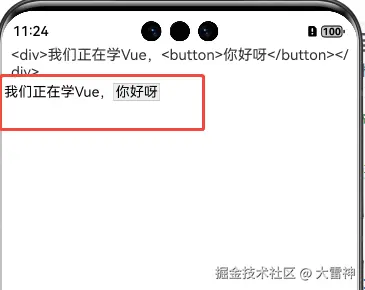
模拟器中的效果如下 也能解析html中的字符串 和样式 能把 你好呀修改按钮

第三种 字符串与表单元素交互
vue 双向绑定 v-model
<template>
<div>
    <h3>学习Vue</h3>
    <div>
        姓名  <input v-model="username"/>
    </div>
</div>

</template>

<script lang="ts" setup>
import  {ref} from  "vue"
const  username = ref("大雷神")
</script>
Harmony 中使用 $$表示双向绑定
@Entry
@Component
struct MyString {

  @State  username:string  ="大雷神"

  build() {
    Column() {

      Row(){
        Text("用户名")
        TextInput({text:$$this.username})
      }
      Button("取值").onClick(()=>{
        console.log(this.username)
      })

    }
    .height('100%')
    .width('100%')
  }
}
效果如下
第四种 字符串转成二维码
Vue中没直接解决方案,需要使用第三方提供的插件
安装依赖:
npm install @chenfengyuan/vue-qrcode
页面使用就可以了
<template>
<div>
    <h3>学习Vue</h3>
    <div>
         <vue-qrcode :value="username" :options="{ width: 200 }"></vue-qrcode>
    </div>
</div>

</template>

<script lang="ts" setup>
import VueQrcode from '@chenfengyuan/vue-qrcode'

import  {ref} from  "vue"
const  username = ref("大雷神")
</script>
效果 别问为什么打码,因为不打码审核通不过
Harmony中自带的组件QRCode能解决二维码问题
@Entry
@Component
struct MyString {
  @State  username:string  ="大雷神"
  build() {
    Column() {
      Row(){
        QRCode(this.username).color(0xF7CE00).width(140).height(140)
      }
    }
    .height('100%')
    .width('100%')
  }
}
效果
总结
本文对比了Vue和Harmony在字符串操作上的实现方式,主要涵盖四种场景:1)普通字符串的静态展示;2)富文本字符串的解析渲染(Vue使用v-html指令,Harmony使用RichText组件);3)表单字符串的双向绑定(Vue用v-model,Harmony用$$语法);4)字符串转二维码(Vue需第三方插件,Harmony内置QRCode组件)。文章通过具体代码示例展示了两种框架在字符串处理上的差异,特别指出Harmony的RichText组件需要真机调试,而Vue的富文本解析更便捷。