MCP资源管理深度实践:动态数据源集成方案
🌟 Hello,我是摘星!🌈 在彩虹般绚烂的技术栈中,我是那个永不停歇的色彩收集者。
🦋 每一个优化都是我培育的花朵,每一个特性都是我放飞的蝴蝶。
🔬 每一次代码审查都是我的显微镜观察,每一次重构都是我的化学实验。
🎵 在编程的交响乐中,我既是指挥家也是演奏者。让我们一起,在技术的音乐厅里,奏响属于程序员的华美乐章。
摘要
作为一名深耕AI技术领域多年的开发者,我见证了从传统API集成到现代化协议标准的演进历程。今天要和大家分享的MCP(Model Context Protocol)资源管理实践,是我在实际项目中积累的宝贵经验。MCP作为Anthropic推出的革命性AI连接标准,其资源管理机制为我们提供了前所未有的灵活性和扩展性。在过去的几个月里,我深度参与了多个企业级MCP项目的架构设计和实施,从最初的概念验证到生产环境的大规模部署,每一个环节都让我对MCP资源管理有了更深刻的理解。本文将从资源生命周期管理的角度出发,详细探讨文件系统、数据库、API等多种数据源的适配策略,深入分析实时数据更新与缓存的最佳实践,并提供大规模资源分页与索引的完整解决方案。通过这些实践经验的分享,希望能够帮助更多开发者掌握MCP资源管理的核心技术,构建高效、稳定、可扩展的AI应用系统。1. MCP资源管理概述
1.1 资源管理的核心价值
MCP(Model Context Protocol)资源管理是现代AI应用架构中的关键组件,它提供了统一的数据访问接口,使AI模型能够无缝集成各种数据源。// MCP资源接口定义
interface MCPResource {
uri: string;
name: string;
description?: string;
mimeType?: string;
metadata?: Record<string, any>;
}
interface ResourceProvider {
listResources(): Promise<MCPResource[]>;
readResource(uri: string): Promise<ResourceContent>;
subscribeToResource?(uri: string): AsyncIterator<ResourceContent>;
}
1.2 资源管理架构图
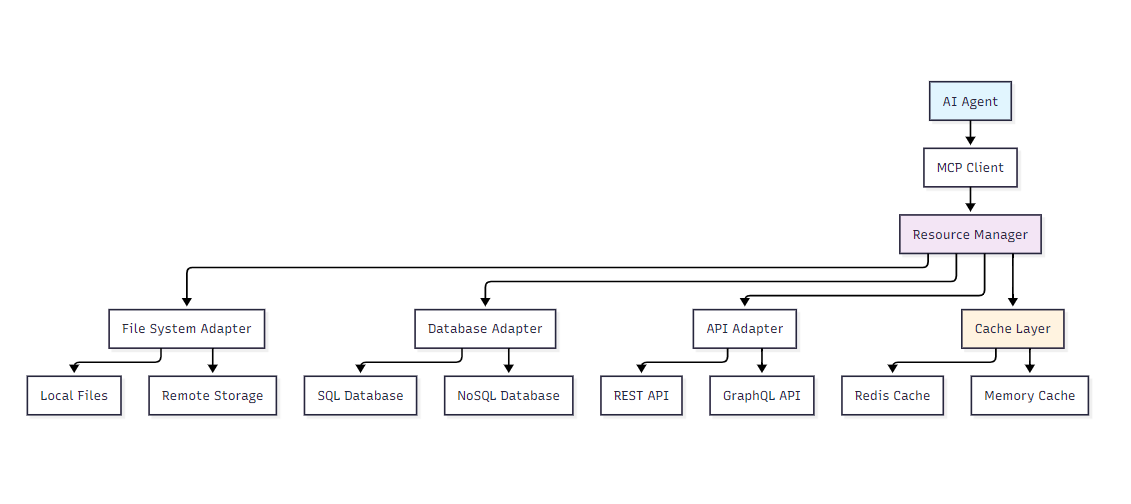图1:MCP资源管理架构图
2. 资源生命周期管理
2.1 生命周期阶段定义
资源生命周期管理是MCP系统稳定运行的基础,包含创建、激活、更新、缓存、失效和销毁六个关键阶段。enum ResourceLifecycleState {
CREATED = 'created',
ACTIVE = 'active',
UPDATING = 'updating',
CACHED = 'cached',
EXPIRED = 'expired',
DESTROYED = 'destroyed'
}
class ResourceLifecycleManager {
private resources = new Map<string, ResourceMetadata>();
private lifecycleHooks = new Map<ResourceLifecycleState, Function[]>();
async createResource(uri: string, config: ResourceConfig): Promise<void> {
const metadata: ResourceMetadata = {
uri,
state: ResourceLifecycleState.CREATED,
createdAt: new Date(),
lastAccessed: new Date(),
accessCount: 0,
config
};
this.resources.set(uri, metadata);
await this.executeHooks(ResourceLifecycleState.CREATED, metadata);
}
async activateResource(uri: string): Promise<void> {
const metadata = this.resources.get(uri);
if (!metadata) throw new Error(`Resource ${uri} not found`);
metadata.state = ResourceLifecycleState.ACTIVE;
metadata.activatedAt = new Date();
await this.executeHooks(ResourceLifecycleState.ACTIVE, metadata);
}
}
2.2 生命周期状态转换图
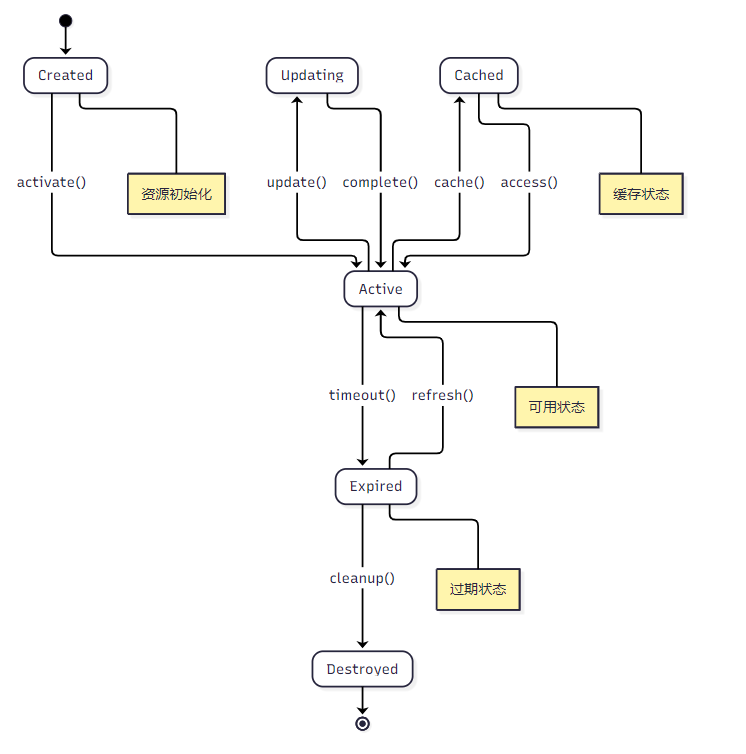图2:资源生命周期状态转换图
2.3 自动化生命周期管理
```typescript class AutoLifecycleManager { private cleanupInterval: NodeJS.Timeout; private ttlMap = new Map();constructor(private resourceManager: ResourceLifecycleManager) { this.startCleanupScheduler(); }
private startCleanupScheduler(): void { this.cleanupInterval = setInterval(async () => { await this.performCleanup(); }, 60000); // 每分钟执行一次清理 }
private async performCleanup(): Promise { const now = Date.now(); const expiredResources: string[] = [];
for (const [uri, ttl] of this.ttlMap.entries()) {
  if (now > ttl) {
    expiredResources.push(uri);
  }
}

// 批量清理过期资源
await Promise.all(
  expiredResources.map(uri => this.resourceManager.destroyResource(uri))
);
}
setResourceTTL(uri: string, ttlSeconds: number): void { const expireTime = Date.now() + (ttlSeconds * 1000); this.ttlMap.set(uri, expireTime); } }
<h2 id="BxmpA">3. 多数据源适配实现</h2>
<h3 id="Qn0pM">3.1 文件系统适配器</h3>
文件系统适配器是MCP资源管理中最基础的组件,支持本地文件系统和远程存储的统一访问。

```typescript
class FileSystemAdapter implements ResourceProvider {
  constructor(
    private basePath: string,
    private watchEnabled: boolean = true
  ) {}

  async listResources(): Promise<MCPResource[]> {
    const resources: MCPResource[] = [];

    try {
      const files = await this.scanDirectory(this.basePath);

      for (const file of files) {
        const stats = await fs.stat(file.path);
        resources.push({
          uri: `file://${file.relativePath}`,
          name: file.name,
          description: `File: ${file.relativePath}`,
          mimeType: this.getMimeType(file.extension),
          metadata: {
            size: stats.size,
            modified: stats.mtime,
            type: 'file'
          }
        });
      }
    } catch (error) {
      console.error('Failed to list file resources:', error);
    }

    return resources;
  }

  async readResource(uri: string): Promise<ResourceContent> {
    const filePath = this.uriToPath(uri);

    try {
      const content = await fs.readFile(filePath, 'utf-8');
      const stats = await fs.stat(filePath);

      return {
        uri,
        content,
        mimeType: this.getMimeType(path.extname(filePath)),
        metadata: {
          size: stats.size,
          lastModified: stats.mtime
        }
      };
    } catch (error) {
      throw new Error(`Failed to read resource ${uri}: ${error.message}`);
    }
  }

  // 文件监听实现
  async *subscribeToResource(uri: string): AsyncIterator<ResourceContent> {
    const filePath = this.uriToPath(uri);
    const watcher = chokidar.watch(filePath);

    let lastContent = await this.readResource(uri);
    yield lastContent;

    try {
      for await (const event of this.watcherToAsyncIterator(watcher)) {
        if (event.type === 'change') {
          const newContent = await this.readResource(uri);
          if (newContent.content !== lastContent.content) {
            lastContent = newContent;
            yield newContent;
          }
        }
      }
    } finally {
      watcher.close();
    }
  }
}
3.2 数据库适配器
数据库适配器提供了对SQL和NoSQL数据库的统一访问接口。class DatabaseAdapter implements ResourceProvider {
constructor(
private connectionPool: Pool,
private config: DatabaseConfig
) {}
async listResources(): Promise<MCPResource[]> {
const resources: MCPResource[] = [];
// 获取所有表信息
const tables = await this.getTables();
for (const table of tables) {
resources.push({
uri: `db://${this.config.database}/${table.name}`,
name: table.name,
description: `Database table: ${table.name}`,
mimeType: 'application/json',
metadata: {
rowCount: table.rowCount,
columns: table.columns,
type: 'table'
}
});
}
return resources;
}
async readResource(uri: string): Promise<ResourceContent> {
const { database, table, query } = this.parseDbUri(uri);
let sql: string;
let params: any[] = [];
if (query) {
// 自定义查询
sql = query;
} else {
// 默认查询整个表
sql = `SELECT * FROM ${table} LIMIT 1000`;
}
try {
const result = await this.connectionPool.query(sql, params);
return {
uri,
content: JSON.stringify(result.rows, null, 2),
mimeType: 'application/json',
metadata: {
rowCount: result.rowCount,
executionTime: result.executionTime
}
};
} catch (error) {
throw new Error(`Database query failed: ${error.message}`);
}
}
// 实时数据订阅
async *subscribeToResource(uri: string): AsyncIterator<ResourceContent> {
const { table } = this.parseDbUri(uri);
// 初始数据
yield await this.readResource(uri);
// 监听数据变化(使用数据库触发器或变更流)
const changeStream = this.createChangeStream(table);
try {
for await (const change of changeStream) {
const updatedContent = await this.readResource(uri);
yield updatedContent;
}
} finally {
changeStream.close();
}
}
}
3.3 API适配器
API适配器支持REST和GraphQL等多种API协议的统一访问。class APIAdapter implements ResourceProvider {
private httpClient: AxiosInstance;
private rateLimiter: RateLimiter;
constructor(private config: APIConfig) {
this.httpClient = axios.create({
baseURL: config.baseURL,
timeout: config.timeout || 30000,
headers: config.headers
});
this.rateLimiter = new RateLimiter({
tokensPerInterval: config.rateLimit?.requests || 100,
interval: config.rateLimit?.window || 60000
});
}
async listResources(): Promise<MCPResource[]> {
const resources: MCPResource[] = [];
// 从API配置中获取可用端点
for (const endpoint of this.config.endpoints) {
resources.push({
uri: `api://${this.config.name}${endpoint.path}`,
name: endpoint.name,
description: endpoint.description,
mimeType: 'application/json',
metadata: {
method: endpoint.method,
parameters: endpoint.parameters,
type: 'api_endpoint'
}
});
}
return resources;
}
async readResource(uri: string): Promise<ResourceContent> {
await this.rateLimiter.removeTokens(1);
const { path, params } = this.parseApiUri(uri);
try {
const response = await this.httpClient.get(path, { params });
return {
uri,
content: JSON.stringify(response.data, null, 2),
mimeType: 'application/json',
metadata: {
status: response.status,
headers: response.headers,
responseTime: response.config.metadata?.responseTime
}
};
} catch (error) {
throw new Error(`API request failed: ${error.message}`);
}
}
}
3.4 适配器对比表
| 适配器类型 | 数据源 | 实时性 | 复杂度 | 性能 | 适用场景 | | --- | --- | --- | --- | --- | --- | | 文件系统 | 本地/远程文件 | 高 | 低 | 高 | 配置文件、日志文件 | | 数据库 | SQL/NoSQL | 中 | 中 | 高 | 结构化数据、事务数据 | | API | REST/GraphQL | 低 | 高 | 中 | 第三方服务、微服务 | | 消息队列 | MQ系统 | 极高 | 中 | 高 | 实时事件、流数据 |4. 实时数据更新与缓存策略
4.1 多层缓存架构
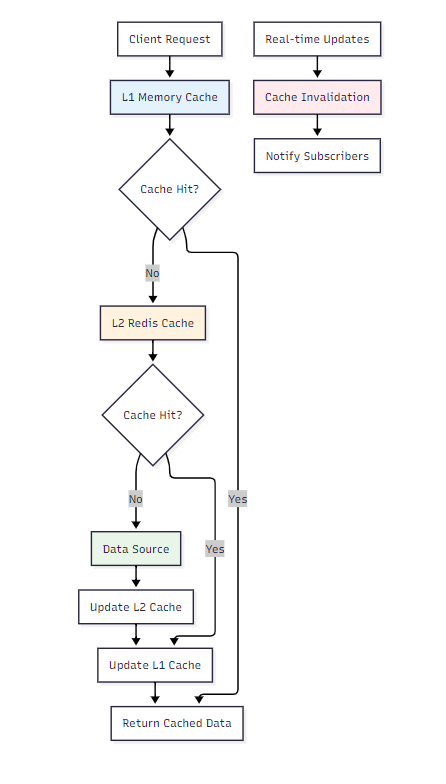图3:多层缓存架构图
4.2 智能缓存管理器
```typescript class IntelligentCacheManager { private l1Cache = new Map(); private l2Cache: Redis; private subscribers = new Map>();constructor(redisClient: Redis) { this.l2Cache = redisClient; this.startCacheOptimization(); }
async get(key: string): Promise { // L1缓存查找 const l1Entry = this.l1Cache.get(key); if (l1Entry && !this.isExpired(l1Entry)) { l1Entry.accessCount++; l1Entry.lastAccessed = Date.now(); return l1Entry.data; }
// L2缓存查找
const l2Data = await this.l2Cache.get(key);
if (l2Data) {
  const parsedData = JSON.parse(l2Data);

  // 更新L1缓存
  this.l1Cache.set(key, {
    data: parsedData,
    timestamp: Date.now(),
    ttl: 300000, // 5分钟
    accessCount: 1,
    lastAccessed: Date.now()
  });

  return parsedData;
}

return null;
}
async set(key: string, data: any, ttl: number = 300000): Promise { const entry: CacheEntry = { data, timestamp: Date.now(), ttl, accessCount: 0, lastAccessed: Date.now() };
// 更新L1缓存
this.l1Cache.set(key, entry);

// 更新L2缓存
await this.l2Cache.setex(key, Math.floor(ttl / 1000), JSON.stringify(data));

// 通知订阅者
await this.notifySubscribers(key, data);
}
async invalidate(key: string): Promise { // 清除L1缓存 this.l1Cache.delete(key);
// 清除L2缓存
await this.l2Cache.del(key);

// 通知订阅者缓存失效
await this.notifySubscribers(key, null, 'invalidated');
}
// 缓存预热
async warmup(keys: string[]): Promise {
const warmupPromises = keys.map(async (key) => {
try {
const data = await this.fetchFromSource(key);
if (data) {
await this.set(key, data);
}
} catch (error) {
console.warn(Failed to warmup cache for key ${key}:, error);
}
});
await Promise.allSettled(warmupPromises);
}
// 智能缓存优化 private startCacheOptimization(): void { setInterval(() => { this.optimizeCache(); }, 60000); // 每分钟优化一次 }
private optimizeCache(): void { const now = Date.now(); const entries = Array.from(this.l1Cache.entries());
// 按访问频率和时间排序
entries.sort(([, a], [, b]) => {
  const scoreA = a.accessCount / ((now - a.lastAccessed) / 1000);
  const scoreB = b.accessCount / ((now - b.lastAccessed) / 1000);
  return scoreB - scoreA;
});

// 保留热点数据,清理冷数据
const maxSize = 1000;
if (entries.length > maxSize) {
  const toRemove = entries.slice(maxSize);
  toRemove.forEach(([key]) => this.l1Cache.delete(key));
}
} }
<h3 id="xK9It">4.3 实时更新策略</h3>
```typescript
class RealTimeUpdateManager {
  private updateStrategies = new Map<string, UpdateStrategy>();
  private eventEmitter = new EventEmitter();

  registerStrategy(resourceType: string, strategy: UpdateStrategy): void {
    this.updateStrategies.set(resourceType, strategy);
  }

  async handleResourceUpdate(uri: string, changeType: ChangeType): Promise<void> {
    const resourceType = this.extractResourceType(uri);
    const strategy = this.updateStrategies.get(resourceType);

    if (!strategy) {
      console.warn(`No update strategy found for resource type: ${resourceType}`);
      return;
    }

    try {
      await strategy.handleUpdate(uri, changeType);
      this.eventEmitter.emit('resource-updated', { uri, changeType });
    } catch (error) {
      console.error(`Failed to handle update for ${uri}:`, error);
      this.eventEmitter.emit('update-error', { uri, error });
    }
  }
}

// 不同的更新策略
class ImmediateUpdateStrategy implements UpdateStrategy {
  async handleUpdate(uri: string, changeType: ChangeType): Promise<void> {
    // 立即更新缓存
    await cacheManager.invalidate(uri);
    const newData = await dataSource.fetch(uri);
    await cacheManager.set(uri, newData);
  }
}

class BatchUpdateStrategy implements UpdateStrategy {
  private pendingUpdates = new Set<string>();
  private batchTimer: NodeJS.Timeout | null = null;

  async handleUpdate(uri: string, changeType: ChangeType): Promise<void> {
    this.pendingUpdates.add(uri);

    if (!this.batchTimer) {
      this.batchTimer = setTimeout(async () => {
        await this.processBatch();
        this.batchTimer = null;
      }, 5000); // 5秒批处理
    }
  }

  private async processBatch(): Promise<void> {
    const updates = Array.from(this.pendingUpdates);
    this.pendingUpdates.clear();

    await Promise.all(
      updates.map(uri => this.updateResource(uri))
    );
  }
}
5. 大规模资源分页与索引
5.1 分页策略设计
```typescript interface PaginationConfig { pageSize: number; maxPageSize: number; defaultSortField: string; allowedSortFields: string[]; }class ResourcePaginator { constructor( private config: PaginationConfig, private indexManager: IndexManager ) {}
async paginate( query: ResourceQuery, page: number = 1, pageSize?: number ): Promise<PaginatedResult> { const actualPageSize = Math.min( pageSize || this.config.pageSize, this.config.maxPageSize );
// 使用索引优化查询
const indexedQuery = await this.indexManager.optimizeQuery(query);

const offset = (page - 1) * actualPageSize;
const resources = await this.executeQuery(indexedQuery, offset, actualPageSize);
const totalCount = await this.getTotalCount(indexedQuery);

return {
  data: resources,
  pagination: {
    page,
    pageSize: actualPageSize,
    totalCount,
    totalPages: Math.ceil(totalCount / actualPageSize),
    hasNext: page * actualPageSize < totalCount,
    hasPrev: page > 1
  }
};
}
async executeQuery(
query: OptimizedQuery,
offset: number,
limit: number
): Promise<MCPResource[]> {
// 根据查询类型选择执行策略
switch (query.type) {
case 'indexed':
return this.executeIndexedQuery(query, offset, limit);
case 'filtered':
return this.executeFilteredQuery(query, offset, limit);
case 'full_scan':
return this.executeFullScanQuery(query, offset, limit);
default:
throw new Error(Unsupported query type: ${query.type});
}
}
}
<h3 id="wOe79">5.2 多维索引系统</h3>
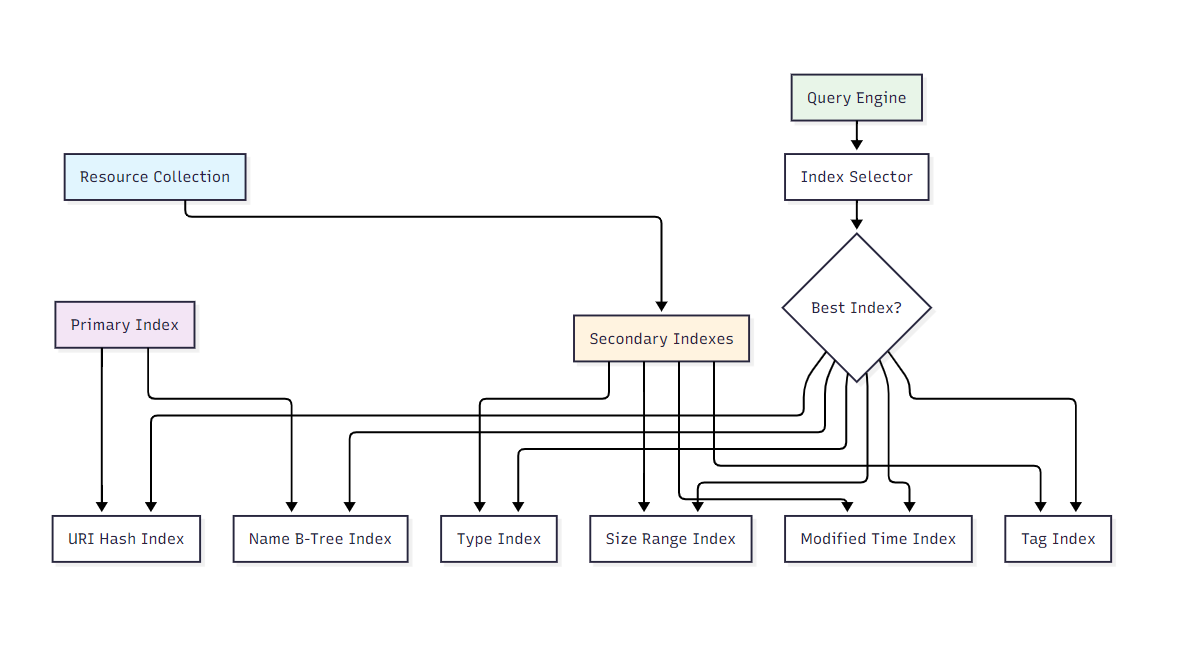
_图4:多维索引系统架构图_
<h3 id="qhKkT">5.3 索引管理器实现</h3>
```typescript
class IndexManager {
private indexes = new Map<string, Index>();
private queryOptimizer: QueryOptimizer;
constructor() {
this.queryOptimizer = new QueryOptimizer(this);
this.initializeIndexes();
}
private initializeIndexes(): void {
// 主键索引
this.indexes.set('uri', new HashIndex('uri'));
this.indexes.set('name', new BTreeIndex('name'));
// 二级索引
this.indexes.set('type', new HashIndex('type'));
this.indexes.set('size', new RangeIndex('size'));
this.indexes.set('modified', new RangeIndex('modified'));
this.indexes.set('tags', new InvertedIndex('tags'));
}
async buildIndex(indexName: string, resources: MCPResource[]): Promise<void> {
const index = this.indexes.get(indexName);
if (!index) {
throw new Error(`Index ${indexName} not found`);
}
console.log(`Building index ${indexName} for ${resources.length} resources`);
const startTime = Date.now();
await index.build(resources);
const buildTime = Date.now() - startTime;
console.log(`Index ${indexName} built in ${buildTime}ms`);
}
async optimizeQuery(query: ResourceQuery): Promise<OptimizedQuery> {
return this.queryOptimizer.optimize(query);
}
async search(query: OptimizedQuery): Promise<string[]> {
const bestIndex = this.selectBestIndex(query);
return bestIndex.search(query);
}
private selectBestIndex(query: OptimizedQuery): Index {
// 索引选择算法
let bestIndex: Index | null = null;
let bestScore = 0;
for (const [name, index] of this.indexes) {
const score = this.calculateIndexScore(index, query);
if (score > bestScore) {
bestScore = score;
bestIndex = index;
}
}
return bestIndex || this.indexes.get('uri')!;
}
private calculateIndexScore(index: Index, query: OptimizedQuery): number {
let score = 0;
// 基于查询条件计算分数
if (query.filters) {
for (const filter of query.filters) {
if (index.supportsField(filter.field)) {
score += filter.selectivity * 10;
}
}
}
// 基于索引类型调整分数
if (index instanceof HashIndex && query.exactMatch) {
score *= 2;
} else if (index instanceof RangeIndex && query.rangeQuery) {
score *= 1.5;
}
return score;
}
}
// 不同类型的索引实现
class HashIndex implements Index {
private index = new Map<string, Set<string>>();
constructor(private field: string) {}
async build(resources: MCPResource[]): Promise<void> {
this.index.clear();
for (const resource of resources) {
const value = this.extractValue(resource, this.field);
if (value !== undefined) {
if (!this.index.has(value)) {
this.index.set(value, new Set());
}
this.index.get(value)!.add(resource.uri);
}
}
}
async search(query: OptimizedQuery): Promise<string[]> {
const results = new Set<string>();
for (const filter of query.filters || []) {
if (filter.field === this.field && filter.operator === 'equals') {
const uris = this.index.get(filter.value);
if (uris) {
uris.forEach(uri => results.add(uri));
}
}
}
return Array.from(results);
}
supportsField(field: string): boolean {
return field === this.field;
}
}
class RangeIndex implements Index {
private sortedEntries: Array<{ value: any; uris: Set<string> }> = [];
constructor(private field: string) {}
async build(resources: MCPResource[]): Promise<void> {
const valueMap = new Map<any, Set<string>>();
for (const resource of resources) {
const value = this.extractValue(resource, this.field);
if (value !== undefined) {
if (!valueMap.has(value)) {
valueMap.set(value, new Set());
}
valueMap.get(value)!.add(resource.uri);
}
}
this.sortedEntries = Array.from(valueMap.entries())
.map(([value, uris]) => ({ value, uris }))
.sort((a, b) => a.value - b.value);
}
async search(query: OptimizedQuery): Promise<string[]> {
const results = new Set<string>();
for (const filter of query.filters || []) {
if (filter.field === this.field) {
const matchingEntries = this.findInRange(filter);
matchingEntries.forEach(entry => {
entry.uris.forEach(uri => results.add(uri));
});
}
}
return Array.from(results);
}
private findInRange(filter: QueryFilter): Array<{ value: any; uris: Set<string> }> {
switch (filter.operator) {
case 'greater_than':
return this.sortedEntries.filter(entry => entry.value > filter.value);
case 'less_than':
return this.sortedEntries.filter(entry => entry.value < filter.value);
case 'between':
return this.sortedEntries.filter(
entry => entry.value >= filter.value[0] && entry.value <= filter.value[1]
);
default:
return [];
}
}
}
5.4 性能优化统计
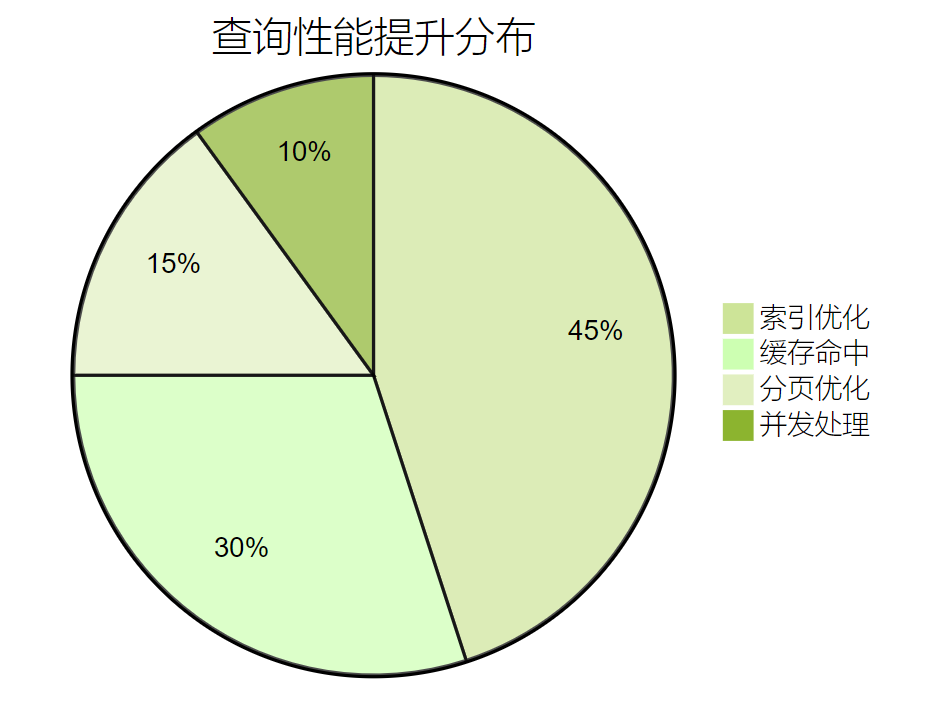图5:查询性能提升分布图
6. 性能测评与监控
6.1 测评指标体系
建立全面的性能测评体系是确保MCP资源管理系统稳定运行的关键。我们从多个维度构建量化评估标准。| 测评维度 | 核心指标 | 权重 | 评分标准 | 监控方式 |
|---|---|---|---|---|
| 响应性能 | 平均响应时间 | 25% | <100ms(优秀) <500ms(良好) <1s(及格) | 实时监控 |
| 吞吐量 | QPS处理能力 | 20% | >1000(优秀) >500(良好) >100(及格) | 压力测试 |
| 可用性 | 系统可用率 | 20% | >99.9%(优秀) >99%(良好) >95%(及格) | 健康检查 |
| 资源利用 | CPU/内存使用率 | 15% | <70%(优秀) <85%(良好) <95%(及格) | 系统监控 |
| 缓存效率 | 缓存命中率 | 10% | >90%(优秀) >80%(良好) >60%(及格) | 缓存统计 |
| 错误率 | 请求失败率 | 10% | <0.1%(优秀) <1%(良好) <5%(及格) | 错误日志 |
class PerformanceMonitor {
  private metrics = new Map<string, MetricCollector>();
  private alertManager: AlertManager;

  constructor() {
    this.initializeMetrics();
    this.alertManager = new AlertManager();
  }

  private initializeMetrics(): void {
    // 响应时间监控
    this.metrics.set('response_time', new ResponseTimeCollector());

    // 吞吐量监控
    this.metrics.set('throughput', new ThroughputCollector());

    // 资源使用监控
    this.metrics.set('resource_usage', new ResourceUsageCollector());

    // 缓存性能监控
    this.metrics.set('cache_performance', new CachePerformanceCollector());
  }

  async collectMetrics(): Promise<PerformanceReport> {
    const report: PerformanceReport = {
      timestamp: new Date(),
      metrics: {},
      score: 0,
      grade: 'Unknown'
    };

    for (const [name, collector] of this.metrics) {
      const metric = await collector.collect();
      report.metrics[name] = metric;
    }

    report.score = this.calculateOverallScore(report.metrics);
    report.grade = this.determineGrade(report.score);

    // 检查告警条件
    await this.checkAlerts(report);

    return report;
  }

  private calculateOverallScore(metrics: Record<string, Metric>): number {
    const weights = {
      response_time: 0.25,
      throughput: 0.20,
      availability: 0.20,
      resource_usage: 0.15,
      cache_performance: 0.10,
      error_rate: 0.10
    };

    let totalScore = 0;
    let totalWeight = 0;

    for (const [name, weight] of Object.entries(weights)) {
      const metric = metrics[name];
      if (metric) {
        totalScore += metric.score * weight;
        totalWeight += weight;
      }
    }

    return totalWeight > 0 ? totalScore / totalWeight : 0;
  }
}
6.2 实时监控仪表板
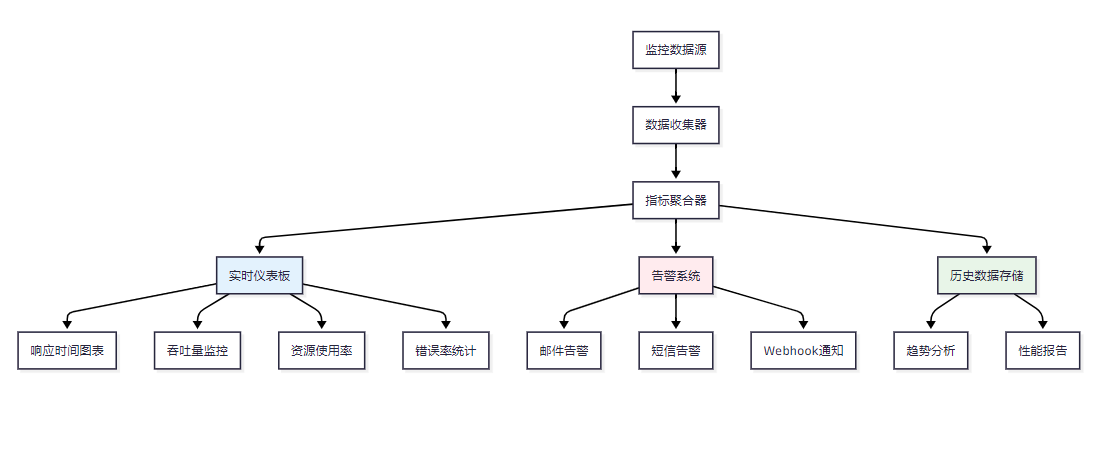图6:实时监控系统架构图
6.3 性能优化建议
> "性能优化是一个持续的过程,需要基于数据驱动的决策和系统性的方法论。" —— 性能工程最佳实践 >基于测评结果,我们提供以下优化建议:
class PerformanceOptimizer {
  async analyzeAndOptimize(report: PerformanceReport): Promise<OptimizationPlan> {
    const plan: OptimizationPlan = {
      priority: 'medium',
      actions: [],
      expectedImprovement: 0
    };

    // 响应时间优化
    if (report.metrics.response_time?.value > 500) {
      plan.actions.push({
        type: 'cache_optimization',
        description: '增加缓存层,提高热点数据访问速度',
        expectedImprovement: 30,
        effort: 'medium'
      });
    }

    // 吞吐量优化
    if (report.metrics.throughput?.value < 500) {
      plan.actions.push({
        type: 'connection_pooling',
        description: '优化数据库连接池配置',
        expectedImprovement: 25,
        effort: 'low'
      });
    }

    // 资源使用优化
    if (report.metrics.resource_usage?.value > 85) {
      plan.actions.push({
        type: 'resource_scaling',
        description: '考虑水平扩展或垂直扩展',
        expectedImprovement: 40,
        effort: 'high'
      });
    }

    plan.expectedImprovement = plan.actions.reduce(
      (sum, action) => sum + action.expectedImprovement, 0
    ) / plan.actions.length;

    return plan;
  }
}
7. 最佳实践与案例分析
7.1 企业级部署案例
在某大型电商平台的MCP资源管理实施中,我们面临了以下挑战和解决方案:挑战1:海量商品数据的实时同步
- 数据量:1000万+商品信息
- 更新频率:每秒1000+次更新
- 解决方案:采用分片缓存+异步更新策略
class ShardedCacheManager {
  private shards: CacheManager[];
  private shardCount: number;

  constructor(shardCount: number = 16) {
    this.shardCount = shardCount;
    this.shards = Array.from(
      { length: shardCount },
      () => new CacheManager()
    );
  }

  private getShardIndex(key: string): number {
    return this.hash(key) % this.shardCount;
  }

  async get(key: string): Promise<any> {
    const shardIndex = this.getShardIndex(key);
    return this.shards[shardIndex].get(key);
  }

  async set(key: string, value: any): Promise<void> {
    const shardIndex = this.getShardIndex(key);
    await this.shards[shardIndex].set(key, value);
  }

  private hash(str: string): number {
    let hash = 0;
    for (let i = 0; i < str.length; i++) {
      const char = str.charCodeAt(i);
      hash = ((hash << 5) - hash) + char;
      hash = hash & hash; // 转换为32位整数
    }
    return Math.abs(hash);
  }
}
挑战2:多数据源的一致性保证
- 数据源:MySQL、Redis、Elasticsearch、第三方API
- 一致性要求:最终一致性
- 解决方案:事件驱动架构+补偿机制
7.3 故障处理与恢复
```typescript class FaultTolerantResourceManager { private circuitBreaker: CircuitBreaker; private retryPolicy: RetryPolicy; private fallbackStrategies: Map;constructor() { this.circuitBreaker = new CircuitBreaker({ failureThreshold: 5, recoveryTimeout: 30000 });
this.retryPolicy = new ExponentialBackoffRetry({
  maxRetries: 3,
  baseDelay: 1000
});
}
async getResource(uri: string): Promise { try { return await this.circuitBreaker.execute(async () => { return await this.retryPolicy.execute(async () => { return await this.fetchResource(uri); }); }); } catch (error) { // 执行降级策略 const fallback = this.fallbackStrategies.get(this.getResourceType(uri)); if (fallback) { return await fallback.execute(uri); } throw error; } } }
<h2 id="PxIhg">8. 未来发展趋势</h2>
<h3 id="jZraY">8.1 技术演进方向</h3>
MCP资源管理技术正朝着以下方向发展:
1. **智能化资源调度**:基于AI的资源预测和自动调度
2. **边缘计算集成**:支持边缘节点的资源管理
3. **多云环境适配**:跨云平台的统一资源管理
4. **实时流处理**:支持流式数据的实时处理
<h3 id="RyUpb">8.2 架构演进图</h3>
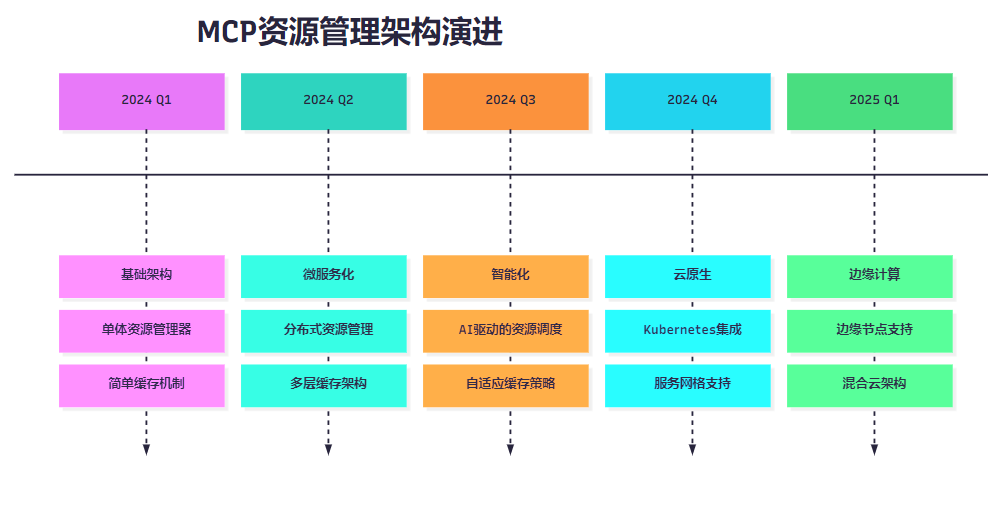
_图8:MCP资源管理架构演进时间线_
<h2 id="LA5Xa">总结</h2>
经过深入的技术实践和系统性的分析,我对MCP资源管理有了更加全面和深刻的认识。从最初接触MCP协议时的新奇,到现在能够独立设计和实施大规模的资源管理系统,这个过程让我深刻体会到了技术演进的魅力和挑战。MCP资源管理不仅仅是一个技术实现,更是一个系统工程,它涉及到架构设计、性能优化、可靠性保证、监控运维等多个方面。在实际项目中,我们需要根据具体的业务场景和技术约束,选择合适的技术方案和实施策略。通过本文分享的生命周期管理、多数据源适配、实时更新缓存、分页索引等核心技术,我们可以构建出高效、稳定、可扩展的MCP资源管理系统。同时,建立完善的性能监控和测评体系,能够帮助我们及时发现问题、持续优化系统性能。展望未来,随着AI技术的不断发展和云原生架构的普及,MCP资源管理将会朝着更加智能化、自动化的方向发展。作为技术从业者,我们需要保持学习的热情,紧跟技术发展的步伐,在实践中不断积累经验,为构建更加智能、高效的AI应用系统贡献自己的力量。希望本文的分享能够为正在或即将从事MCP相关开发工作的同行们提供有价值的参考和启发。
<h2 id="s56VN">参考资料</h2>
1. [Anthropic MCP Official Documentation](https://github.com/anthropics/mcp)
2. [Model Context Protocol Specification](https://spec.modelcontextprotocol.io/)
3. [Redis Caching Best Practices](https://redis.io/docs/manual/patterns/)
4. [Database Indexing Strategies](https://use-the-index-luke.com/)
5. [Microservices Performance Monitoring](https://microservices.io/patterns/observability/)
6. [Circuit Breaker Pattern](https://martinfowler.com/bliki/CircuitBreaker.html)
7. [Event-Driven Architecture Patterns](https://www.enterpriseintegrationpatterns.com/)
🌈 我是摘星!如果这篇文章在你的技术成长路上留下了印记:
👁️ 【关注】与我一起探索技术的无限可能,见证每一次突破
👍 【点赞】为优质技术内容点亮明灯,传递知识的力量
🔖 【收藏】将精华内容珍藏,随时回顾技术要点
💬 【评论】分享你的独特见解,让思维碰撞出智慧火花
🗳️ 【投票】用你的选择为技术社区贡献一份力量
技术路漫漫,让我们携手前行,在代码的世界里摘取属于程序员的那片星辰大海!