计算机基础
计算机组成
硬盘
- 存储长期稳定的数据
- 读取速率很慢
- 断电数据也不会受到影响
内存
- 存储运行执行程序的数据
- 读取速率极快
- 断电后数据会丢失
CPU
- 从内存取出指令并执行
- 进行算术逻辑运算和控制操作
主板
- 连接不同元器件,使它们能够协同工作
显卡
- 专门并行处理图形图像数据,减轻 CPU 负担,并把最终画面输出到显示器
应用执行
- 硬盘本身只负责存,不会主动执行任何程序;真正运行程序时,数据要先载入内存
- CPU 只能直接访问内存(或缓存),不能跳过内存直接运行硬盘上的程序
进程、线程、程序、端口、IP
进程
进程是执行中的程序
一个程序可以包含多个进程,比如:浏览器每打开一个新标签页/窗口,通常会启动一个新的渲染进程
线程
线程是一个执行进程中的一个执行线路
程序
保存在硬盘里的一堆代码和数据,还没运行,只是待命的文件
端口
端口号是传输层用来区分同一台主机上不同进程的门牌号,与IP地址一起构成网络通信的唯一终点
# netstat -ano | findstr 进程号
netstat -ano | findstr 6676
- 一个进程可以占用 0 个、1 个或多个端口
- 一个端口同一时间只能被一个进程占用
IP
标识网络通信的设备,每个设备接入互联网都需要IP
Buffer
一段位于内存中长度固定的连续二进制数据块(字节数组)
- 固定长度:创建后不可动态调整大小
- 二进制存储:数组每项是一个 0-255 的二进制字节数据(对应 8 位无符号整数)
创建
Buffer.alloc
import { Buffer } from "node:buffer";

// 创建长度为10的Buffer数据,初始值全为0
const buf1 = Buffer.alloc(10);

console.log(buf1); // <Buffer 00 00 00 00 00 00 00 00 00 00>
- 自动将内存初始化为 0
Buffer.allocUnsafe
import { Buffer } from "node:buffer";

// 创建长度为99999的Buffer数据,初始值取决于内存中原数据的值
const buf2 = Buffer.allocUnsafe(99999);

console.log(buf2) // <Buffer 10 d0 46 0e bb 01 00 00 20 5b  ... 99989 more bytes>
- 初始值取决于内存中原数据
- 创建速度优于
Buffer.alloc
Buffer.from
数字数组
import { Buffer } from "node:buffer";

// [1, 2, 3]数组每一项就转至Buffer数据中对应索引的每一项
const buf3 = Buffer.from([1, 2, 3]);

console.log(buf3); // <Buffer 01 02 03>
字符串
import { Buffer } from "node:buffer";

// 每一个字符按照utf-8编码转码
const buf5 = Buffer.from("w爱n");

console.log(buf5); // <Buffer 77 e7 88 b1 6e>
修改
import { Buffer } from "node:buffer";

const buf = Buffer.alloc(5)
// 按照索引修改
buf[0] = 128

console.log(buf);  // <Buffer 80 00 00 00 00>
转换
转为字符串
import { Buffer } from "node:buffer";

// 默认采用utf-8编码对每个字符转码
const buf5 = Buffer.from("w爱n");

console.log(buf5); // <Buffer 77 e7 88 b1 6e>

// 默认采用utf-8编码对Buffer数据进行解码
console.log(buf5.toString()); // w爱n
特性
溢出
数组每项是一个 **0-255 ** 的二进制字节数据。但是如果赋值超过取值范围,就会进行高位截取,也就是只保留 低8位
import { Buffer } from "node:buffer";

const buf = Buffer.alloc(5)
buf[0] = 258

console.log(buf); // <Buffer 02 00 00 00 00>
fs
可以实现与硬盘进行交互,例如文件的创建、删除、重命名、移动,还可以实现文件内容的写入、读取,以及文件夹的操作
文件创建及写入
fs.writeFile
fs.writeFile
import fs from 'node:fs'

fs.writeFile('./hello.txt', 'hello nodejs', (error) => {
    if (error) {
        console.log(error);
        return
    }
    console.log('写入成功');
})
fs.writeFileSync
import fs from 'node:fs'

try {
    fs.writeFileSync('./hello.txt', 'hello nodejs')
} catch (error) {
    console.log(error);
}

console.log("写入成功");
fs.promises.writeFile
import fs from 'node:fs'

fs.promises.writeFile('./hello.txt', 'hello nodejs').then(() => {
    console.log('写入成功');
}).catch((error) => {
    console.log(error);
})
fs.createWriteStream
import fs from 'node:fs'

const ws = fs.createWriteStream('./hello.txt')

ws.on('finish', () => {
    console.log('写入成功');
})

ws.on('error', (error) => {
    console.log(error);
})

ws.write("hello nodejs\r\n")
ws.write("study nodejs\r\n")

ws.close()
程序打开关闭一个文件是需要消耗资源的,fs.createWriteStream 可以减少打开关闭文件的次数
fs.createWriteStream 适合于 频繁写入或大文件写入的场景,fs.writeFileSync 适合 写入频率较低的场景
文件内容追加
fs.appendFile
fs.appendFile
import fs from 'node:fs'

fs.appendFile('./hello.txt', 'hello world', (error) => {
    if (error) {
        console.log(error);
    }
    console.log('追加成功');
})
fs.appendFileSync
import fs from 'node:fs'

try {
    fs.appendFileSync('./hello.txt', 'hello world')
    console.log('追加成功');
} catch (error) {
    console.log(error);
}
fs.promises.appendFile
import fs from 'node:fs'

fs.promises.appendFile('./hello.txt', 'hello world')
    .then(() => {
        console.log('追加成功');
    })
    .catch((error) => {
        console.log(error);
    })
fs.writeFile
fs.writeFile
import fs from 'node:fs'

fs.writeFile('./hello.txt', 'hello nodejs', {
    flag: 'a'
}, (error) => {
    if (error) {
        console.log(error);
        return;
    }
    console.log('追加成功');
})
fs.writeFileSync
import fs from 'node:fs'

try {
    fs.writeFileSync('./hello.txt', 'hello nodejs', {
        flag: 'a'
    })
    console.log('追加成功');
} catch (error) {
    console.log(error);
}
fs.promises.writeFile
import fs from 'node:fs'

fs.promises.writeFile('./hello.txt', 'hello nodejs', {
    flag: 'a'
})
    .then(() => {
        console.log('追加成功');
    })
    .catch((error) => {
        console.log(error);
    })
fs.createWriteStream
import fs from 'node:fs'

const ws = fs.createWriteStream('./hello.txt')

ws.on('finish', () => {
    console.log('写入成功');
})

ws.on('error', (error) => {
    console.log(error);
})

ws.write("hello nodejs\r\n")
ws.write("study nodejs\r\n")

ws.close()
文件读取
fs.readFile
fs.readFile
import fs from "node:fs"

fs.readFile("./hello.txt", (error, data) => {
    if (error) {
        console.log(error);
        return;
    }
    console.log(data);
})
fs.readFileSync
import fs from "node:fs"

try {
    const data = fs.readFileSync("./hello.txt")
    console.log(data);
} catch (error) {
    console.log(error);
}
fs.promises.readFile
import fs from "node:fs"

fs.promises.readFile("./hello.txt")
    .then((data) => {
        console.log(data);
    })
    .catch((error) => {
        console.log(error);
    })
fs.createReadStream
import fs from "node:fs"

const rs = fs.createReadStream("./hello.txt")
rs.on("data", (chunk) => {
    console.log(chunk);
})
rs.on("end", () => {
    console.log("读取完成");
})
文件复制(实践)
文件API
import fs from "node:fs"

try {
    const data = fs.readFileSync("./hello.txt")
    fs.writeFileSync("./hello1.txt", data)
    console.log("复制完成");
} catch (error) {
    console.log(error);
}
流式API
import fs from "node:fs"

const rs = fs.createReadStream("./hello.txt")
const ws = fs.createWriteStream("./hello1.txt")
rs.on("data", (chunk) => {
    ws.write(chunk)
})
rs.on("end", () => {
    ws.end()
})
ws.on("finish", () => {
    console.log("复制完成");
})
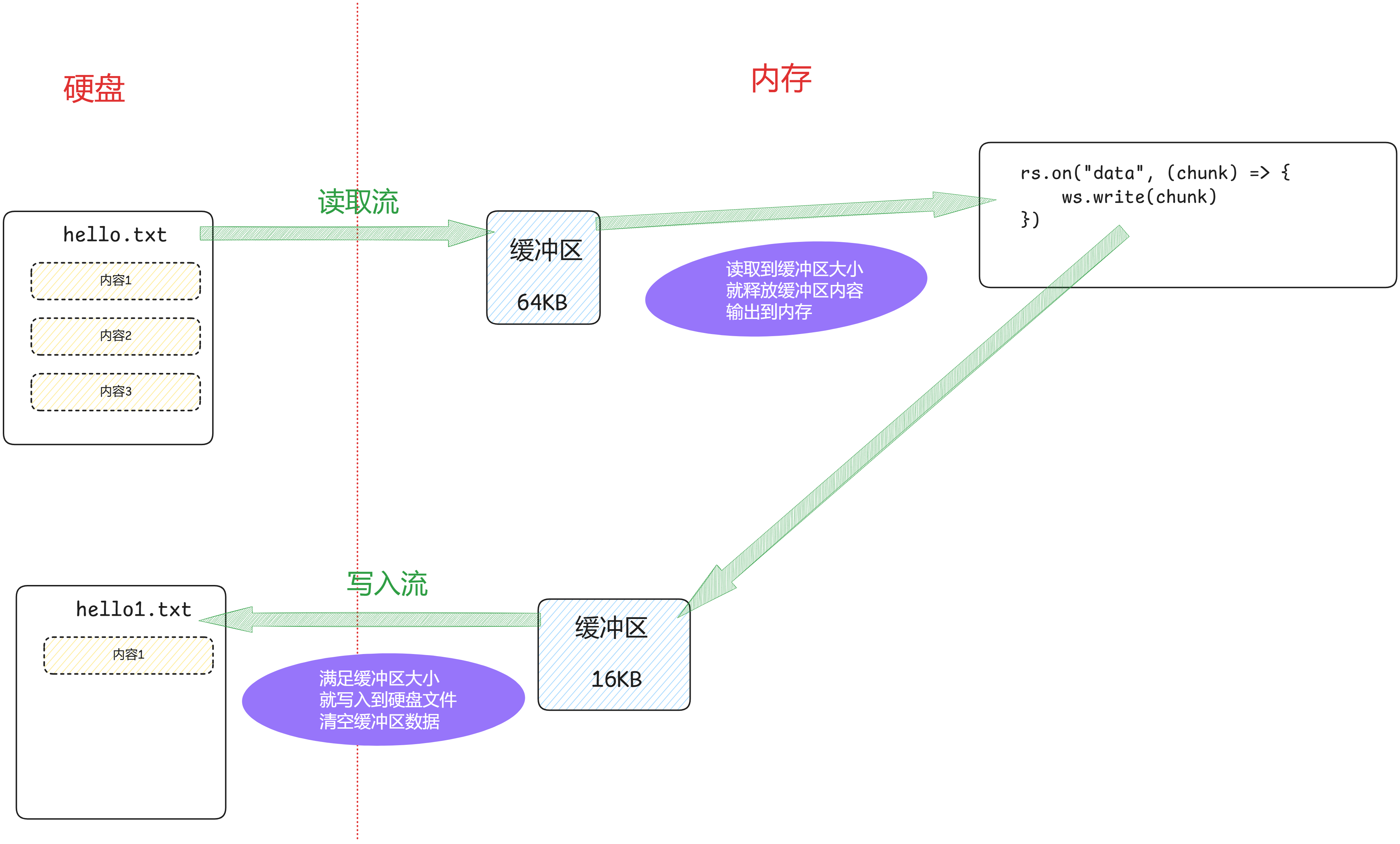
文件API需要一次读取所有数据到缓存中,再把缓存中数据一次写入新文件
而流式API是 读写同时存在,并且会 及时清空内存数据 ,所有流式API的 读写速度和内存消耗 都优于 文件API
流式API适合大文件读写或者多次读写的场景
文件的移动或重命名
fs.rename
fs.rename
import fs from "fs"

fs.rename("./hello.txt", "./copy/hello.txt", (error) => {
    if (error) {
        console.log(error);
        return
    }
    console.log("移动文件成功");
})
renameSync
import fs from "fs"

try {
    fs.renameSync("./hello.txt", "./copy/hello1.txt")
    console.log("移动文件成功");
} catch (error) {
    console.log(error);
}
fs.promises.rename
import fs from "fs"

fs.promises.rename("./hello.txt", "./hello1.txt").then(() => {
    console.log("重命名成功");
}).catch(error => {
    console.log(error);
})
删除文件
fs.unlink
fs.unlink
import fs from "fs"

fs.unlink("./hello.txt", (error) => {
    if (error) {
        console.log(error);
        return
    }
    console.log("删除文件成功");
})
fs.unlinkSync
import fs from "fs"

try {
    fs.unlinkSync("./hello1.txt")
    console.log("删除文件成功");
} catch (error) {
    console.log(error);
}
fs.promises.unlink
import fs from "fs"

fs.promises.unlink("./hello2.txt").then(() => {
    console.log("删除文件成功");
}).catch(error => {
    console.log(error);
})
fs.rm
fs.rm
import fs from "fs"

fs.rm("./hello5.txt", (error) => {
    if (error) {
        console.log(error);
        return
    }
    console.log("删除文件成功");
})
fs.rmSync
import fs from "fs"

try {
    fs.rmSync("./hello6.txt")
    console.log("删除文件成功");
} catch (error) {
    console.log(error);
}
fs.promises.rm
import fs from "fs"

fs.promises.rm("./hello6.txt").then(() => {
    console.log("删除文件成功");
}).catch((error) => {
    console.log(error);
})
创建文件夹
fs.mkdir
fs.mkdir
import fs from "node:fs"

fs.mkdir("./hello", (error) => {
    if (error) {
        console.log(error);
        return
    }
    console.log("hello文件夹创建成功");
})
fs.mkdirSync
import fs from "node:fs"

try {
    fs.mkdirSync("./hello2")
    console.log("hello2文件夹创建成功");
} catch (error) {
    console.log(error);
}
fs.promises.mkdir
import fs from "node:fs"

fs.promises.mkdir("./hello2").then(() => {
    console.log("hello2文件夹创建成功");
}).catch((error) => {
    console.log(error);
})
多层文件夹可以递归创建 recursive: true
import fs from "node:fs"

fs.promises.mkdir("./a/b/c", {
    recursive: true
}).then(() => {
    console.log("./a/b/c文件夹创建成功");
}).catch((error) => {
    console.log(error);
})
删除文件夹
fs.rmDir
fs.rmDir
import fs from "node:fs"

fs.rmdir("./a", {
    recursive: true
}, (error) => {
    if (error) {
        console.log(error);
        return
    }
    console.log("./a文件夹递归删除成功");
})
fs.rmdir 将要被弃用,推荐使用 fs.rm
fs.rm
fs.rm
import fs from "node:fs"

fs.rm("./a/b/c",(error)=>{
    if (error) {
        console.log(error);
        return
    }
    console.log("./a/b/c文件夹删除成功");
})
fs.rm 只能删除文件,fs.rm 方法在删除目录时需要额外的选项 recursive: true
recursive: true 会递归删除目录及其所有内容,请谨慎使用
import fs from "node:fs"

fs.rm("./a/b/c", {
    recursive: true
}, (error) => {
    if (error) {
        console.log(error);
        return
    }
    console.log("./a/b/c文件夹删除成功");
})
fs.rmSync
import fs from "node:fs"

try {
    fs.rmSync("./a", {
        recursive: true
    })
    console.log("./a文件夹删除成功");
} catch (error) {
    console.log(error);
}
fs.promise.rm
import fs from "node:fs"

fs.promises.mkdir("./a/b/c", {
    recursive: true
}).then(() => {
    console.log("./a/b/c文件夹创建成功");
    return fs.promises.rm("./a", {
        recursive: true
    })
}).then(() => {
    console.log("./a文件夹删除成功");
}).catch((error) => {
    console.log(error);
})
文件夹重命名
fs.rename
fs.rename
import fs from "node:fs"

fs.rename("./hello7", "./hello8", (error) => {
    if (error) {
        console.log(error);
        return
    }
    console.log("./hello7文件夹改名成功");
})
fs.renameSync
import fs from "node:fs"

try {
    fs.renameSync("./hello7", "./hello9")
    console.log("./hello7文件夹重命名成功");
} catch (error) {
    console.log(error);
}
fs.promises.rename
import fs from "node:fs"

fs.promises.rename("./hello7", "./hello3").then(() => {
    console.log("./hello7文件夹重命名成功");
}).catch((error) => {
    console.log(error);
})
查询文件夹内容
fs.readdir
fs.readdir
import fs from "node:fs"

fs.readdir("../demo_1", (error, files) => {
    if (error) {
        console.log(error);
        return
    }
    console.log(files);
})
fs.readdirSync
import fs from "node:fs"

try {
    const files = fs.readdirSync("../demo_1")
    console.log(files);
} catch (error) {
    console.log(error);
}
fs.promises.readdir
import fs from "node:fs"

fs.promises.readdir("../demo_1").then((files) => {
    console.log(files);
}).catch((error) => {
    console.log(error);
})
获取当前路径状态
fs.stat
fs.stat
import fs from 'node:fs'

fs.stat('./hello.txt', (error, stats) => {
    if (error) {
        console.log(error)
        return
    }
    console.log(stats.isFile())  // true
    console.log(stats.isDirectory()) // false
})
fs.statSync
import fs from 'node:fs'

try {
    const stats = fs.statSync('./hello.txt')
    console.log(stats.isFile())  // true
    console.log(stats.isDirectory()) // false
} catch (error) {
    console.log(error)
}
fs.promises.stat
import fs from 'node:fs'

fs.promises.stat('./hello.txt').then((stats) => {
    console.log(stats.isFile())  // true
    console.log(stats.isDirectory()) // false
}).catch((error) => {
    console.log(error)
})
批量更改文件名称(实践)
批量创建文件
import fs from "node:fs"
import path from "node:path"
import url from "node:url"

const __filename = url.fileURLToPath(import.meta.url)
const __dirname = path.dirname(__filename)

fs.rmSync(path.resolve(__dirname, "src"), {
    recursive: true,
    force: true
})
fs.mkdirSync(path.resolve(__dirname, "src"))
Array.from({ length: 12 }).forEach((_, index) => {
    fs.writeFileSync(path.resolve(__dirname, "src", `file_${index + 1}.txt`), `file_${index + 1}`)
})
批量修改文件名称
import fs from "node:fs"
import path from "node:path"
import url from "node:url"

const __filename = url.fileURLToPath(import.meta.url)
const __dirname = path.dirname(__filename)


fs.readdirSync(path.resolve(__dirname, "src")).forEach((name) => {
    const filePath = path.resolve(__dirname, "src", name)
    const stats = fs.statSync(filePath)
    if (stats.isFile()) {
        const matchInfo = name.match(/(_)(\d+)(\.)/)
        if (matchInfo) {
            const num = matchInfo[2].padStart(2, "0")
            const newName = name.replace(/(_)(\d+)(\.)/, (...$) => {
                return `${$[1]}${num}${$[3]}`
            })
            fs.renameSync(filePath, path.resolve(__dirname, "src", newName))
        }
    }
})
path
相对路径
相对路径以运行
node命令时所在的工作目录为基准,而非当前脚本文件所在的目录
// index.js
import fs from "node:fs"
const data = fs.readFileSync("./src/App.vue")
console.log(data.toString());

// src/App.vue
import { createApp } from 'vue'
createApp(App).mount('#app')
E:\demo 作为工作目录,./src/App.vue 就是 E:\demo\src\App.vue
E:\demo\src 作为工作目录,./src/App.vue 就是 E:\demo\src\src\App.vue,就会找不到文件
__filename、__dirname
CommonJS
CommonJS 模块的本质,就是 Node.js 把你的全部源码封装成一个立即执行的函数,并在调用时将 global、require、module、__filename、__dirname 作为实参注入,从而让这些变量在模块内部 天然可用
(function (global, require, module, __filename, __dirname) {
    /* 你的源码被塞到这里 */
});
__filename 和 __dirname 变量也就可以内置使用
console.log(__filename);	// E:\demo\index.js
console.log(__dirname);		// E:\demo
ESModule
在 ESModule 中,Node.js 不再提供 CommonJS 的 __filename 和 __dirname 变量。如需使用,可手动创建
import fs from "node:fs"
import url from "node:url"
import path from "node:path"

const __filename = url.fileURLToPath(import.meta.url)  // E:\demo\index.js
const __dirname = path.dirname(__filename)

console.log(__filename);	// E:\demo\index.js
console.log(__dirname);		// E:\demo
路径拼接
path.join
把任意多个参数按顺序用系统分隔符简单拼接成一条路径
它仅负责合并,不验证路径完整性,也允许结果仍为片段(如 src\App.vue 或 demo\src\App.vue)
import path from "node:path"

const __filename = url.fileURLToPath(import.meta.url)
const __dirname = path.dirname(__filename)

console.log(path.join("src", "App.vue")); // src\App.vue
console.log(path.join("demo", "/src", "App.vue"));  // demo\src\App.vue
console.log(path.join(__dirname, "/src", "/App.vue")) // E:\demo\src\App.vue
path.resolve
以当前工作目录为起点,每个参数依次执行 cd 参数 操作,最终返回绝对路径
import fs from "node:fs"
import url from "node:url"
import path from "node:path"

const __filename = url.fileURLToPath(import.meta.url)
const __dirname = path.dirname(__filename)

console.log(path.resolve("src", "App.vue"));			 // E:\demo\src\App.vue
console.log(path.resolve("demo", "/src", "App.vue"));	  // E:\demo\src\App.vue
console.log(path.resolve(__dirname, "/src", "/App.vue")); // E:\App.vue
路径基本信息
根路径名称
import url from "node:url"
import path from "node:path"

const __filename = url.fileURLToPath(import.meta.url)
const __dirname = path.dirname(__filename)

console.log(path.basename(__filename));  // index.js
console.log(path.basename(__dirname));	 // demo
路径后缀
import url from "node:url"
import path from "node:path"

const __filename = url.fileURLToPath(import.meta.url)
const __dirname = path.dirname(__filename)

console.log(path.extname(__filename));   // .js
console.log(path.extname(__dirname));	 //
路径目录
import url from "node:url"
import path from "node:path"

const __filename = url.fileURLToPath(import.meta.url)
const __dirname = path.dirname(__filename)

console.log(path.dirname(__filename));   // E:\demo
console.log(path.dirname(__dirname));	 // E:\
不同系统的路径处理
path.sep
import path from "node:path"


console.log(path.sep);   // \
http
开启服务
import http from "node:http"

const server = http.createServer((request, response) => {
    res.setHeader("Content-Type", "text/html;charset=utf-8")
    res.end("http server")
})

server.listen(8080, () => {
    console.log(`server is running at http://127.0.0.1:8080`)
})
请求
请求信息
请求行
import http from "node:http"

const server = http.createServer((request, respones) => {

    // 获取请求行 HTTP 使用版本
    console.log(request.httpVersion);
    // 获取请求行 URL
    console.log(request.url);
    // 获取请求行 方法
     console.log(request.method);

    respones.end("http server")
})

server.listen(8080)
请求头
import http from "node:http"

const server = http.createServer((request, respones) => {

    // 访问的站点地址
    console.log(request.headers['host']);
    // 浏览器信息
    console.log(request.headers['user-agent']);
    // 自定义请求头(token)
    console.log(request.headers["Authorization"])

    respones.end("http server")
})

server.listen(8080)
请求体
import http from "node:http"

const server = http.createServer((request, respones) => {

    let body = ""
    request.on("data", (chunk) => {
       // chunk 是一个buffer 数据

        body += chunk
    })
    request.on("end", () => {
        console.log(body);
        respones.end("http server")
    })

})

server.listen(8080)
请求体获取采用流式读取的方式
请求路径与请求参数
url
import http from "node:http"
import url from "node:url"

const server = http.createServer((request, respones) => {

    const parsedUrl = url.parse(request.url)
    console.log(parsedUrl);

    respones.end("http server")
})

server.listen(8080)
url.parse 默认并不会格式化 query 信息, 如需格式化,设置 url.parse 第二个参数
const parsedUrl = url.parse(request.url,true)
URL
import http from "node:http"

const server = http.createServer((request, respones) => {
    const url = new URL(request.url, `http://${request.headers.host}`)
    console.log(url.pathname);
    console.log(url.searchParams.get("username"));

    respones.end("HTTP Server")
})

server.listen(8080)
URL 在浏览器环境也可以使用
响应
响应状态码
200
服务器成功响应
404
服务器上未找到请求的资源
- 前端请求地址错误
- 前端请求方法错误
- 服务器未实现该请求地址代码
503
服务器宕机,停止服务
- 服务器停止服务
响应信息
响应头
import http from "node:http"

const server = http.createServer((request, respones) => {
    respones.statusCode = 203
    respones.statusMessage = 'i am ok'
    respones.end("http server")
})

server.listen(8080)
响应头
import http from "node:http"

const server = http.createServer((request, respones) => {
    respones.setHeader("Content-Type", "text/html;charset=utf-8")
    respones.setHeader("Set-Cookie", [
        "name=" + Buffer.from("张三", "utf-8").toString("base64"),
        "age=18"
    ])
    respones.setHeader("customize-header", "customize-header-value")
    respones.end("http server")
})

server.listen(8080)
响应体
import http from "node:http"

const server = http.createServer((request, respones) => {
    respones.write("hello ")
    respones.write("world ")
    respones.end("...")
})

server.listen(8080)
respones.write可以调用多次respones.end在单次请求中只能调用一次,并且只能是最后调用
路径
当前网页 http://127.0.0.1:8080/demo.html
绝对路径
| 形式 | 最终URL |
|---|---|
https://www.baidu.com | https://www.baidu.com |
//www.baidu.com | http://www.baidu.com |
/web | http://127.0.0.1:8080/web |
相对路径
| 形式 | 最终URL |
|---|---|
./css/style.css | http://127.0.0.1:8080/css/style.css |
css/style.css | http://127.0.0.1:8080/css/style.css |
../js/scrip.js | http://127.0.0.1:8080/js/scrip.js |
mime 类型
用于标识数据类型,格式[type]/[subtype]
响应头
响应头 content-type 告诉浏览器:拿到数据后该怎么处理
| mime 类型 | 行为 |
|---|---|
text/html | 直接渲染网页 |
text/css | 当作样式表 |
application/octet-stream | 触发下载 |
http.createServer((request, respones) => {
   respones.setHeader("Content-Type", "text/html")
   respones.end("<h1>hello world</h1>")
})
响应头中如没有返回 content-type,浏览器会 mime 嗅探,通过检查文件的前几个字节(通常是前256字节)来猜测文件类型
攻击者构建看似一个无害的文件(如 .jpg、.txt),但是在文件开头插入恶意的 HTML 或 JavaScript代码
<script>alert(document.cookie)</script>
当浏览器进行嗅探的时候,会将其误判 text/html 文件,并执行其中脚本
请求头
请求头 content-type 告诉服务器:接下来这段数据是什么格式,按什么方式去解析
| mime 类型 | 场景 |
|---|---|
application/json | API 交换数据 |
multipart/form-data | 浏览器表单提交 |
application/x-www-form-urlencoded | 含文件或二进制字段的表单 |
axios({
    url: "http://localhost:8080",
    method: "get",
    headers: {
        "Content-Type": "application/json"
    }
})
编码
浏览器和服务器交互的数据本质是 二进制流
http.createServer((request, respones) => {
   respones.setHeader("content-type", "text/html;charset=utf-8;")
   respones.end("<h1>hello world</h1>")
})
编辑器保存的 HTML 文件是通过 utf-8 编码转换成二进制数据,当服务器把文件数据通过二进制流 返回浏览器端时,浏览器解也要通过 utf-8 编码析 HTML文件
默认规则
-
如果后端返回
HTML内容没有设置编码,将会采用meta标签设置的编码,但是通过content-type设置编码的优先于meta标签设置的编码<meta charset="UTF-8"> -
js、css、json网页加载的资源文件没有通过content-type设置编码时,会默认采用当前网页设置的编码
练习
根据不同路由返回不同页面
import http from "node:http"
import fs from "node:fs"


const server = http.createServer((request, respones) => {
    const method = request.method
    const url = new URL(request.url, `http://${request.headers.host}`)
    if (url.pathname === "/login") {
        respones.setHeader("Content-Type", "text/html;charset=utf-8")
        respones.end("登录成功")
    } else if (url.pathname === "/register") {
        respones.setHeader("Content-Type", "text/html;charset=utf-8")
        respones.end("注册成功")
    } else if (url.pathname === "/favicon.ico") {
        const rs = fs.createReadStream("./favicon.ico")
        respones.setHeader("Content-Type", "image/x-icon;charset=utf-8")
        rs.on("data", (data) => {
            respones.write(data)
        })
        rs.on("end", () => {
            respones.end()
        })
    } else {
        respones.setHeader("Content-Type", "text/html;charset=utf-8")
        respones.statusCode = 404
        respones.end("Not Fount")
    }
})

server.listen(8080)
返回 HTML 数据,浏览器渲染
import http from "node:http"

const server = http.createServer((request, respones) => {
    respones.writeHead(200, {
        "Content-Type": "text/html;charset=utf-8"
    })
    respones.end(`
        <!DOCTYPE html>
        <html lang="en">
        <head>
            <meta charset="UTF-8">
            <meta name="viewport" content="width=device-width, initial-scale=1.0">
            <title>Document</title>
            <style>
                table {
                    border-collapse: collapse;
                    border: 1px solid #ccc;
                }
                th, td {
                    border: 1px solid #ccc;
                    padding: 15px;
                    text-align: center;
                    min-width: 100px;
                }
                td {
                    cursor: pointer;
                }
                th {
                    background-color: #f5f5f5;
                }
                tr:nth-child(even) {
                    background-color: #f9f9f9;
                }
            </style>
        </head>
        <body>
           <table>
                <thead>
                    <tr>
                        <th>用户名</th>
                        <th>密码</th>
                    </tr>
                </thead>
                <tbody>
                    <tr>
                        <td>123</td>
                        <td>666</td>
                    </tr>
                    <tr>
                        <td>789</td>
                        <td>999</td>
                    </tr>
                    <tr>
                        <td>111</td>
                        <td>222</td>
                    </tr>
                </tbody>
            </table>
            <script>
                const table = document.querySelector("table")
                table.addEventListener("click", (event) => {
                    if (event.target.tagName === "TD") {
                        event.target.style.backgroundColor = "red"
                    }
                })
            </script>
        </body>
        </html>
    `)
})

server.listen(8080)
静态资源目录或网站根目录
import http from "node:http"
import path from "node:path"
import fs from "node:fs"
import url from "node:url"

const __dirname = path.dirname(url.fileURLToPath(import.meta.url))


const MIME_MAP = new Map([
    ["html", "text/html"],
    ["css", "text/css"],
    ["js", "application/javascript"],
    ["json", "application/json"],
    ["png", "image/png"],
    ["jpg", "image/jpeg"],
    ["ico", "image/x-icon"]
])


const server = http.createServer((request, respones) => {
    const url = new URL(request.url, `http://${request.headers.host}`)

    const staticDir = path.resolve(__dirname, "public")

    const filePath = path.join(staticDir, url.pathname === "/" ? "index.html" : url.pathname)

    fs.promises.readFile(filePath)
        .then(data => {
            let extname = path.extname(filePath)
            extname = extname.slice(1)

            if (MIME_MAP.has(extname)) {
                if (extname === "html") {
                    respones.setHeader("Content-Type", MIME_MAP.get(extname) + ";charset=utf-8")
                } else {
                    respones.setHeader("Content-Type", MIME_MAP.get(extname))
                }
            } else {
                respones.setHeader("Content-Type", "application/octet-stream")
            }

            respones.end(data)
        })
        .catch((error) => {
            console.log(error);
            if (error.code === "ENOENT") {
                respones.statusCode = 404
                respones.setHeader("Content-Type", "text/plain")
                respones.end("Not Found")
            } else {
                respones.statusCode = 500
                respones.setHeader("Content-Type", "text/plain")
                respones.end("Internal Server Error")
            }
        })

})

server.listen(8080)
<!DOCTYPE html>
<html lang="en">

<head>
    <meta charset="UTF-8">
    <meta name="viewport" content="width=device-width, initial-scale=1.0">
    <title>Document</title>
    <link rel="stylesheet" href="index.css">

</head>

<body>
    <table>
        <thead>
            <tr>
                <th>用户名</th>
                <th>密码</th>
            </tr>
        </thead>
        <tbody>
            <tr>
                <td>123</td>
                <td>666</td>
            </tr>
            <tr>
                <td>789</td>
                <td>999</td>
            </tr>
            <tr>
                <td>111</td>
                <td>222</td>
            </tr>
        </tbody>
    </table>

    <script src="index.js"></script>
</body>

</html>
 table {
    border-collapse: collapse;
    border: 1px solid #ccc;
}

th,
td {
    border: 1px solid #ccc;
    padding: 15px;
    text-align: center;
    min-width: 100px;
}

td {
    cursor: pointer;
}

th {
    background-color: #f5f5f5;
}

tr:nth-child(even) {
    background-color: #f9f9f9;
}
const table = document.querySelector("table")
table.addEventListener("click", (event) => {
    if (event.target.tagName === "TD") {
        event.target.style.backgroundColor = "red"
    }
})