MyBatis入门程序
什么是MyBatis?
创建SpringBoot项目
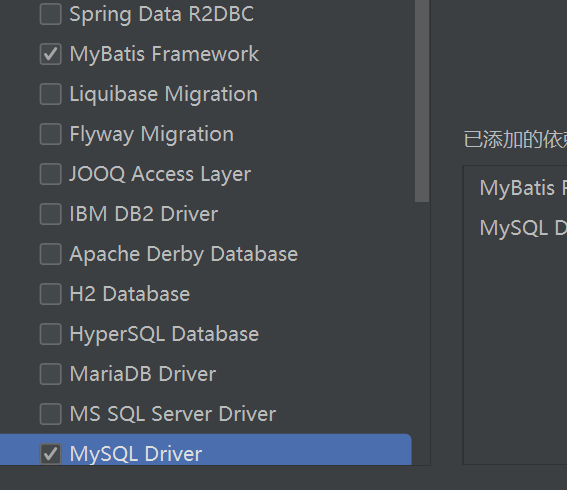
勾选MyBatis和MySQL选项,然后创建
确认语言标准
将语言级别统一规定为JDK版本 , 否则会报错
创建一个如图所示的文件目录结构
//TeacherMapper
@Mapper
public interface TeacherMapper {
    @Select("select * from teachers")
    public List<Teacher> list ();
}
// pojo
public class Teacher {
    private Integer id;
    private String tname;
    private int age;
    private String object;
    private int salary;
    private String email;
}
//添加getter setter 有参无参构造 toString 或者使用 lombok, 详情见下文
//test/spring-mybatis-quickstart
@SpringBootTest
class SpringMybatisApplicationTests {

    @Autowired
    private TeacherMapper teacherMapper;
    @Test
    public void testListTeacher(){
        List<Teacher> teacherList = teacherMapper.list();

        teacherList.stream().forEach(
                teacher -> {
                    System.out.println(teacher);
                }
        );
    }

}
@Mapper 注解是由MyBatis提供的,用于标注一个接口时 MyBatis 的 Mapper接口 , 主要作用是 将接口交给 Spring 容器管理 , 并自动生成该接口的实现类代理对象
传统做法实现Dao层要写接口和实现类 , 使用@Mapper注解 , 可以省去写实现类
配置数据源
点击右侧的数据库 , 点击左上方加号 数据源 , mysql , 按照提示自动下载驱动文件
配置自己的数据库名 , 账户 , 密码
lombok注解
为了简化pojo对象的创建 , 使用 lombok 的注解可以简化 getter setter 有参 ,全参构造
@Data
@Getter @Setter @toString equals() hashcode() @RequiredArgsConstructor 的复合版本
只需要标注@Data Spring就会自动实现 上述的方法
@NoArgsConstructor
自动生成无参构造
@AllArgsConstructor
自动生成全参构造
MyBatis基础操作
mybatis 链接: pan.baidu.com/s/1stOPPZCV… 提取码: 5q1d
参数占位符
#{...}
- 采用 预编译的方式(PreparedStatement) 将
#{...}自动替换为 ? - 有效防止SQL注入
${...}
- 使用拼接字符的方式 直接将
${...}拼接在 Statement中 , 存在SQL注入的问题- 比如 where 语句中
where name = '士大夫萨芬萨芬' and password = ' ' or '1'='1 ' - ' or '1'='1 将前面的 password 查询条件 变成空字符串 , 然后 用 or 把 语句变成 永真式
- 比如 where 语句中
- 对表名和列表进行动态设置时使用
插入
//EmpMapper.java
@Insert("insert into emp(username,name,gender,image,job,entrydate,dept_id,create_time,update_time)\n" +
            "    values(#{username}, #{name}, #{gender}, #{image}, #{job}, #{entrydate}, #{dept_id}, #{create_time}, #{update_time});")
    public void insert(Emp emp);
//test/springmybatisTest.java
@Test
public void testInsert() {
    Emp emp = new Emp();
    emp.setUsername("Tom");
    emp.setName("汤姆");
    emp.setGender((short) 1);
    emp.setImage("1.jpg");
    emp.setJob((short) 1);
    emp.setEntrydate(LocalDate.parse("2005-01-01"));
    emp.setDept_id(1);
    // 注意: create_time 和 update_time 通常由数据库自动设置
     emp.setCreate_time(LocalDateTime.now());
     emp.setUpdate_time(LocalDateTime.now());
    empMapper.insert(emp);
}
MyBatis 主键回填;
Mybatis 是"半自动化" 的ORM框架 , 默认不会把数据库自动生成的主键封装到java对象中,除非明确配置主角主键回填
方法:
使用
@Options注解 @Options(keyProperty = "id"(主键名称) ,useGeneratedKeys = true)
- keyProperty 将数据库生成的主键设置回 emp 对象 的"id" 属性
- useGeneratedKeys 告诉MyBatis JDBC的主键生成策略
- 前提是主键自增
删除
//mapper
@Delete("delete from emp where id = #{id} ")
public  int  delete(Integer id );
//test
   @Test
    public void testDelete() {
        int delete = empMapper.delete(19);
        System.out.println(delete);
    }
由于JDBC插入后删除数据后主键 的 auto_increment 并不会变化 , 所以需要改变它的值
简单写一个JDBC的自动更新 auto_increment的测试 , 每次删除后都要跟着启动
@Test
    public void testAlterAutoIncrement() throws Exception {
        Connection conn6 = DriverManager.getConnection(
                "jdbc:mysql://localhost:3306/mybatis_learning",
                "root",
                "123456"
        );
        PreparedStatement ps6 = conn6.prepareStatement("alter table emp auto_increment = ?");
        PreparedStatement preparedStatement = conn6.prepareStatement("select max(id) from emp");
        ResultSet rs1 = preparedStatement.executeQuery();
        int num = 0;
        if (rs1.next()) {
            num = rs1.getInt(1) + 1;
        }

        ps6.setInt(1, num);
        int count = ps6.executeUpdate();
        ps6.execute("FLUSH TABLES");
        System.out.println("success alter auto increment into " + num);


        rs1.close();
        preparedStatement.close();
        ps6.close();
        conn6.close();
    }
更新
//mapper
@Options(keyProperty = "id", useGeneratedKeys = true)
    @Update("update emp set username = #{emp.username}, name = #{emp.name}, gender = #{emp.gender}, image = #{emp.image}, " +
            "job = #{emp.job}, entrydate = #{emp.entrydate}, dept_id = #{emp.deptId}, create_time = #{emp.createTime}, " +
            "update_time = #{emp.updateTime} where id = #{id}")
    public void update(@Param("emp") Emp emp, @Param("id") Integer id);


//test
@Test
    public void testUpdate() {
        Emp emp = new Emp();
        emp.setUsername("cola");
        emp.setName("可乐");
        emp.setGender((short)1);
        emp.setImage("1.jpg");
        emp.setJob((short)2);
        emp.setEntrydate(LocalDate.parse("2005-03-02"));
        emp.setDeptId(2);
        emp.setCreateTime(LocalDateTime.now());
        emp.setUpdateTime(LocalDateTime.now());
        //method 1 : emp.setId(17);
        //method 2:
        Integer id = 17;
        empMapper.update(emp,id);
    }
为什么需要setId来设置ID呢
当使用@Update注解时,MyBatis期望提供一个包含所有需要更新字段的对象
如果直接传递一个id作为单独的参数 , MyBatis将无法自动识别它 , 因为注解中的SQL语句引用的时对象的属性
手动设置ID的方法
使用@Param 注解 来规定填充的内容
public void update(@Param("emp") Emp emp, @Param("id") Integer id);@Param和@RequestParam
- @RequestParam是Spring 用于Controller层接收HTTP请求参数
- @Param 用于MyBatis 的Mapper 接口 接收传给 SQL 的参数
- 一个是请求处理操作 , 一个是数据库操作
数据封装的问题
可以看到 后三没有从数据库映射到Emp对象中
实体类的属性 和 数据库表的字段 名成可能不一样 , myBatis 无法封装 的问题
同样的问题 在JDBC数据库连接池 的 Dao层 实现类中也有 类似的问题
那时的解决方案是 使用 字段别名
前面为了 方便数据封装 , 把实体类的 属性和字段名统一 设置为字段名
但是实际开发时往往应用的是驼峰命名法 , 为了规范变量的命名 , 我们需要把实体类的属性名称修改
dept_id ----> deptId
create_time --> createTime
update_time --> updateTime
//method 1 : 起别名
    @Select("select id ,username ,password,name,gender,image,job," +
            "entrydate entryDate,dept_id deptId,create_time createTime,update_time updateTime from emp where id = #{id}")
    public  Emp  getById(Integer id );


//method 2: 手动处理映射

    @Results({
            @Result(column = "dept_id", property = "deptId"),
            @Result(column = "create_time" , property = "createTime"),
            @Result(column = "update_time" ,property = "updateTime")

    })
    @Select("select * from emp where id = #{id}")
    public  Emp  getById(Integer id );

//method 2 或者  把emp实体对象传入用参数占位符的方法手动设置映射关系


   @Insert("insert into 		   emp(username,name,gender,image,job,entrydate,dept_id,create_time,update_time)\n" +
            "    values(#{username}, #{name}, #{gender}, #{image}, #{job}, #{entryDate}, #{deptId}, #{createTime}, #{updateTime});")
    public void insert(Emp emp);


//method 3  开启mybatis的自动的驼峰命名的自动映射开关
//application.properties
mybatis.configuration.map-underscore-to-camel-case=true
查询
根据id查询
//mapper  (已经设置过 mybaits驼峰命名映射)
@Select("select * from emp where id = #{id}")
    public Emp getById(Integer id);
//test

    @Test
    public void testGetById() {
        Integer id = 16;
        Emp empSelected = empMapper.getById(id);
        System.out.println(empSelected);
模糊查询
//mapper
    @Select("select * from emp where name like '%${name}%' and gender = #{gender} and " +
            "entrydate between #{begin} and #{end}")
    public List<Emp> scope(String name , short gender, LocalDate begin , LocalDate end);
//test
@Test
    public void testScope() {
        List<Emp> empList = empMapper.scope("张", (short) 1, LocalDate.of(2010, 1, 1), LocalDate.of(2020, 1, 1));
        empList.stream().forEach(
                emp -> {
                    System.out.println(emp);
                }
        );
    }
模糊查询中 "张" 要作为字符串插入'% %'中间 , 使用 拼接型占位符
${...}
XML映射实现动态SQL
命名规范
- xml 映射文件的名称与mapper的接口保持一致
- xml 映射文件的存放位置和mapper的包名保持相同
- xml映射文件的namespace属性为mapper接口全限定名保持一致
- xml映射文件的 sql语句的id 与 Mapper 接口的方法要保持一致 , 并且返回类型要一致
示例
//EmpMapper
public List<Emp> scope(String name, short gender, LocalDate begin, LocalDate end);
}
//xml
<?xml version="1.0" encoding="UTF-8" ?>
<!DOCTYPE mapper
        PUBLIC "-//mybatis.org//DTD Mapper 3.0//EN"
        "https://mybatis.org/dtd/mybatis-3-mapper.dtd">
<mapper namespace="com.zpero.mapper.EmpMapper">

    <select id="scope" resultType="com.zpero.pojo.Emp">
        select * from emp where name like concat('%',#{name},'%') and
                 gender = #{gender} and entrydate between #{begin} and #{end}
                    order by update_time desc
    </select>
</mapper>
去掉 select 注解 后 , mybatis 会根据 包名到resourse 配置文件夹中去寻找 相应的SQL语句
我们 方法名字是 scope , xml文件中的 id 也应该是 scope , resultType是 对应 返回的实体类型的路径 . mybatis 需要根据路径映射 相应的实体
插件
MyBatisX 插件 功能;
-
mapper 接口和 xml文件 之间可以来回跳转
-
mybaits.xml , mapper.xml 智能提示词
-
mapper 和 xml 支持自动提示补全
-
继承Mybatis Generator 的图形界面
使用后 界面会出现 mybatis 的图标 ,点击可以跳转
标签
<if>标签
用于判断条件是否成立 , test属性 是条件表达式 , 返回true 才会渲染标签里的SQL 内容
<select id="scope" resultType="com.zpero.pojo.Emp">
        select * from emp
        where
            <if test="name != null and name != ''">
                name like concat('%',#{name},'%')
            </if>
            <if test="gender != null">
                and gender = #{gender}
            </if>
            <if test="begin != null and end != null">
                and entrydate between #{begin} and #{end}
            </if>
        order by update_time desc
    </select>
原来的 where 条件被 <if> 标签隔开 , 动态拼接SQL语句
如果测试用例是 "张 , null,null,null" 筛选出 名字中带有 张 的员工
可以看到筛选条件只有一个 name
但是 只使用 <if> 标签 是拼接sql语句的 , 所以 如果筛选条件变成 null , (short) 1 ,null,null sql语句被拼接成了 where and gender = 1 , 会出现语法错误 . 所以 <if> 标签要搭配 <where> 使用
<where> 标签
用于动态自动拼接where 子句 避免多余的 and 和 or , 使sql 更加健壮整洁
<where>
    <if test="name != null and name != ''">
        name like concat('%',#{name},'%')
    </if>
    <if test="gender != null">
        and gender = #{gender}
    </if>
    <if test="begin != null and end != null">
        and entrydate between #{begin} and #{end}
    </if>
</where>
<set>标签
和where同理, 存在拼接错误 , 出现 ,在where之前 , 报语法错误, set 后很多个sql 拼接时 要用 <set>标签包裹
添加 update2 方法
public void update2(Emp emp);
 @Test
    public  void testUpdate2(){
        Emp emp = new Emp();
        emp.setId(18);
        emp.setUsername("tom1111");
        emp.setGender((short)2);
        emp.setUpdateTime(LocalDateTime.now());

        empMapper.update2(emp);
        System.out.println(emp);
    }
 <update id="update2">
        update emp
        <set>
        <if test="username != null ">username = #{username},</if>
        <if test="name != null ">name = #{name},</if>
        <if test="gender != null ">gender = #{gender},</if>
        <if test="image != null ">image = #{image},</if>
        <if test="job != null ">job = #{job},</if>
        <if test="entryDate != null ">entrydate = #{entryDate},</if>
        <if test="deptId != null ">dept_id = #{deptId},</if>
        <if test="createTime != null ">create_time = #{createTime},</if>
        <if test="updateTime != null ">update_time = #{updateTime} </if>
		<set>
        where id = #{id}
    </update>
传入的参数 是 Emp 对象 , test属性里 的 变量名称应该和 Emp对象中定义的一致 , 必须手动指定 属性名 , 无法使用驼峰命名映射
<foreach>标签
- collection: 遍历的集合
- item: 遍历的数组
- separator: 分隔符
- open : 遍历开始前拼接的sql片段
- close : 遍历结束后拼接的sql片段
//mapper
public void deleteBatch(List(Integer) ids);
//xml
<delete id="deleteBatch">
        delete  from emp
        where id in
        <foreach collection="ids" item="id" separator="," open="(" close=")">
            #{id}
        </foreach>
    </delete>
//test
@Test
public void testDeleteBatch(){
    List<Integer> ids  = Arrays.asList(18,19,20);
    empMapper.deleteBatch(ids);
}
delete from emp where id in (18,19,20)
<sql> <include>标签
一个可复用sql片段 , 定义一段可以被其他失去了语句 重复使用的 sql代码 来避免重复写相同的字段或条件,提高代码的可维护性
- id 字段 : sql 片段的唯一标识
- refid: include 标签中的 唯一标识
例如
    <sql id="CommonSelect">
        select id,username,password,name,gender,image,job,entrydate,dept_id,create_time,update_time
        from emp
    </sql>
使用<include>导入
<select id="scope" resultType="com.zpero.pojo.Emp">
    <include refid="CommonSelect"></include>
    where
    <if test="name != null ">
        name like concat('%',#{name},'%')
    </if>
    <!-- ... -->